
 Ilan Asseo
AI for Marketing and Sales: 9 Workflows That Drive Pipeline
How to reclaim selling time with nine AI-enabled revenue workflows — from ICP list building and enrichment to autonomous LinkedIn conversations.

Sales reps spend just 28% of their week actually selling, the rest disappears into admin, research, and follow-up work that never touches pipeline (Salesforce State of Sales). Meanwhile, the average B2B deal involves 6 to 10 stakeholders, so every missed follow-up and slow handoff compounds into lost deals (Gartner).
AI for marketing and sales is only worth deploying when it replaces that wasted time with a repeatable set of workflows that reliably produce qualified conversations, booked meetings, and clean handoffs.
Industry evidence: “Our research suggests that a fifth of current sales-team functions could be automated.” — McKinsey & Company.
Source: McKinsey
What is AI for marketing and sales?
AI for marketing and sales is the use of machine learning and generative AI to automate revenue workflows like targeting, personalization, conversation handling, qualification, routing, and follow-up. The goal is not “more activity”, it is more pipeline per hour by making execution faster, more consistent, and easier to measure.
Comparison table: tools that power pipeline-driving AI workflows
| Tool Name | Best For | Key Feature | Starting Price |
|---|---|---|---|
| Kakiyo | Autonomous LinkedIn conversations that qualify and book meetings | AI runs full multi-turn LinkedIn threads with scoring + booking | Free trial / demo |
| Clay | ICP list building + enrichment workflows | No-code enrichment and routing logic across data sources | See pricing |
| 6sense | Account-based intent prioritization | Account intent + predictive insights for ABM | Contact sales |
| Apollo | Prospecting database + outbound execution | Leads + sequences in one platform | See pricing |
| Salesforce | System-of-record pipeline + lifecycle governance | Einstein AI (scoring, insights) inside CRM | See pricing |
| HubSpot | Marketing automation + lifecycle orchestration | CRM-native marketing + workflows | See pricing |
| Gong | Turning calls into coaching + pipeline insight | Conversation intelligence and deal risk signals | Contact sales |
| Zapier | Connecting tools without engineering | Workflow automation across apps | See pricing |
| Calendly | Removing scheduling friction | Fast scheduling links + routing | See pricing |
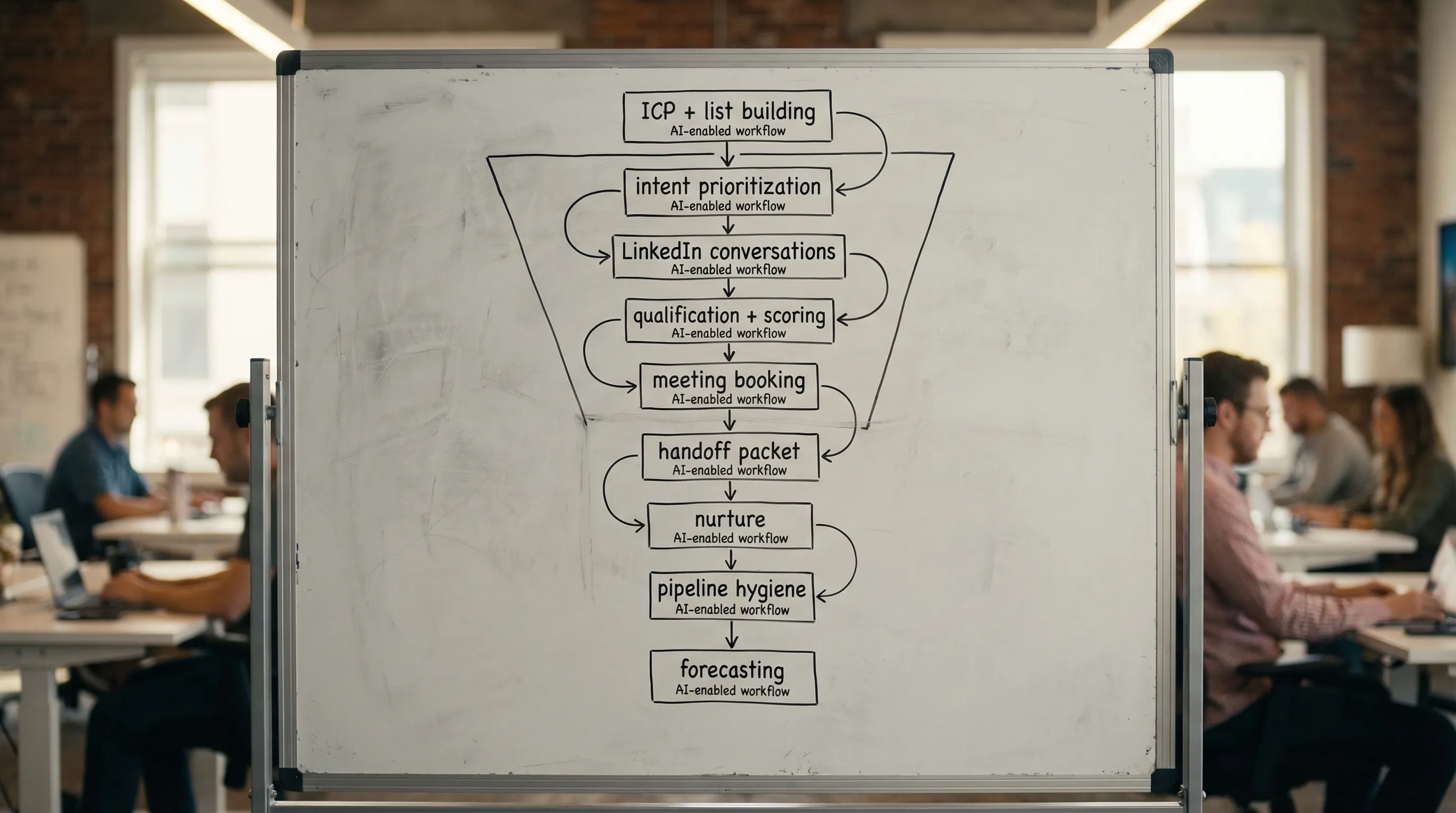
The 9 workflows that actually drive pipeline (not vanity metrics)
Below are nine workflows I’d implement in order. Each one has a clear output that marketing and sales can agree on, and each one is measurable.
| Workflow | Owner (primary) | Output that matters | Metric to watch |
|---|---|---|---|
| 1) ICP slicing + list building | RevOps / SDR Ops | A reachable, narrow target list | Coverage (accounts, personas) |
| 2) Enrichment + data QA | RevOps | “Contactable” prospects, fewer bounces | Data validity rate |
| 3) Intent-based prioritization | Marketing Ops | Ranked account queue by likelihood to engage | % outreach to high-intent accounts |
| 4) Personalized first touch at scale (LinkedIn-first) | SDR | Replies from the right people | Reply rate by persona |
| 5) Autonomous multi-turn conversation handling | SDR Ops | Conversations that progress without human babysitting | Qualified conversation rate |
| 6) In-thread lead qualification + evidence capture | SDR + RevOps | Proof-based qualification packet | AE acceptance rate |
| 7) Frictionless meeting booking | SDR | Meetings booked with the right stakeholders | Show rate + meetings held |
| 8) Lifecycle nurture + reactivation | Marketing | Warm accounts re-engaged with context | Reactivation rate |
| 9) Pipeline hygiene + forecast signals | RevOps | Cleaner stages, earlier risk detection | Stage aging + forecast accuracy |
If you already have “AI tools” but pipeline is flat, it’s usually because you bought point solutions and never stitched them into these workflows.
Kakiyo (Workflow 4 to 7: LinkedIn conversation, qualification, booking)
What it does: Kakiyo autonomously manages personalized LinkedIn conversations at scale, from first touch through qualification to meeting booking. Instead of queueing tasks for SDRs, it runs the thread and escalates only when a human should step in.
Standout feature: Kakiyo’s edge is end-to-end autonomy plus an intelligent scoring system that qualifies leads inside the conversation and routes to the next action.
Who it’s for: Teams running LinkedIn-first outbound who want more qualified meetings without increasing SDR headcount.
Pricing: Free trial / demo (see Kakiyo).
Pros:
- Goes beyond “sending automation”, it manages the full multi-turn conversation, qualification, and booking
- Built for controlled iteration with prompt creation and A/B prompt testing
- Designed for scale with simultaneous conversation management and override control
Cons:
- Best results require a real qualification rubric (if your team can’t define “qualified,” the AI can’t either)
- LinkedIn-first by design, not a generic omni-channel sequencer
Clay (Workflow 1 and 2: ICP list building + enrichment)
What it does: Clay helps you build targeted account and contact lists and enrich them with firmographic, technographic, and trigger data. It’s the fastest way to turn “we should go after X” into a clean, segmented queue.
Standout feature: Flexible enrichment and logic so you can build repeatable “if this, then that” targeting rules without engineering.
Who it’s for: RevOps, growth, and SDR ops leaders who need better lists and cleaner segmentation before scaling outreach.
Pricing: See Clay’s pricing page (Clay).
Pros:
- Strong for stitching multiple data sources into one usable prospecting sheet
- Great for building tight ICP slices and testing new segments quickly
- Reduces SDR time wasted on manual research
Cons:
- Enrichment is only valuable if you define what signals actually matter
- Easy to overbuild workflows that produce “more data” but not better prioritization
6sense (Workflow 3: intent-based prioritization for ABM)
What it does: 6sense is an ABM platform used to prioritize accounts based on intent and predictive insights. In practice, it gives marketing and sales a shared “who is in market” view so outreach timing improves.
Standout feature: Account-level intent signals that can be turned into time-bound outreach plays.
Who it’s for: Mid-market and enterprise teams running ABM who need better prioritization than static account lists.
Pricing: Contact sales (6sense).
Pros:
- Helps align marketing and sales around which accounts to press now
- Useful for segment-level reporting and ABM measurement
- Can reduce wasted outreach to dead accounts
Cons:
- Intent without execution is a dashboard, not pipeline
- Needs disciplined routing and SLAs to avoid “signal theater”
Apollo (Workflow 2 and 4: prospecting data + outbound execution)
What it does: Apollo provides a prospecting database plus outbound sequencing, so teams can find contacts and run email-centric outreach quickly. Many teams use it as a fast way to stand up outbound coverage.
Standout feature: One platform for contact discovery and basic sequencing.
Who it’s for: Lean SDR teams that need data plus a simple execution layer, especially for email-first.
Pricing: See Apollo’s pricing (Apollo).
Pros:
- Quick path to list building plus outbound execution
- Useful filters for carving ICP slices
- Good for early-stage teams that need speed
Cons:
- Sequencing is not the same as conversation management on LinkedIn
- Data quality still needs QA and suppression rules
Salesforce (Workflow 6 and 9: lifecycle governance + AI signals in CRM)
What it does: Salesforce is the system of record where lifecycle stages, routing, and pipeline reporting should live. With Einstein features, teams can add scoring and recommendations when their data and labels are clean.
Standout feature: CRM-native governance, required fields, validation rules, and reporting that enforce “what counts.”
Who it’s for: Teams that care about auditability, reliable forecasting, and consistent stage definitions across marketing and sales.
Pricing: See Salesforce pricing (Salesforce).
Pros:
- Best-in-class for enforcing lifecycle discipline and creating one source of truth
- Strong reporting for stage conversion, aging, and pipeline inspection
- AI is useful when operationalized into actions and SLAs
Cons:
- Will not run LinkedIn conversations for you (execution gap is real)
- AI outputs are only as good as your definitions and data hygiene
HubSpot (Workflow 8: nurture, reactivation, and lifecycle orchestration)
What it does: HubSpot combines CRM, marketing automation, and workflows so marketing can nurture leads while staying connected to sales outcomes. It’s useful when you want lifecycle automation without a heavy ops footprint.
Standout feature: Marketing workflows that can trigger off behavior and feed sales with cleaner context.
Who it’s for: SMB and mid-market teams that want a unified marketing and sales operating layer.
Pricing: See HubSpot pricing (HubSpot).
Pros:
- Strong for nurture, reactivation, and lifecycle emails tied to CRM records
- Easier to stand up workflows than many enterprise MAP stacks
- Good visibility into campaign-to-pipeline attribution (when configured)
Cons:
- Easy to optimize for form fills and MQL volume instead of qualified pipeline
- Needs clear handoff rules to prevent stage drift
Gong (Workflow 6 and 9: evidence capture from calls + deal risk)
What it does: Gong records and analyzes sales calls to surface patterns, objections, and deal risk. The real value is turning qualitative conversations into searchable data that improves messaging and forecasting.
Standout feature: Conversation intelligence that highlights what top reps do differently and where deals stall.
Who it’s for: Teams with enough call volume to benefit from coaching and consistency across reps.
Pricing: Contact sales (Gong).
Pros:
- Speeds up onboarding and coaching with real examples
- Helps standardize discovery and handoff quality
- Useful for spotting risk patterns earlier than CRM stage changes
Cons:
- Doesn’t fix bad top-of-funnel targeting or weak qualification definitions
- Adoption fails if reps don’t trust how insights are used
Zapier (Workflow 6 and 8: routing, handoffs, and glue automation)
What it does: Zapier automates workflows across tools, like pushing enriched data into a CRM, notifying Slack channels, or creating tasks from key events. It’s the “glue” that keeps systems connected without waiting on engineering.
Standout feature: Fast, no-code integrations across thousands of apps.
Who it’s for: RevOps and growth teams who need to move faster than the engineering backlog.
Pricing: See Zapier pricing (Zapier).
Pros:
- Removes manual handoffs that kill speed-to-lead
- Great for simple routing, notifications, and task creation
- Helps keep marketing and sales signals in sync
Cons:
- Can become brittle if you build too many one-off zaps
- Not a substitute for a clean data model and lifecycle rules
Calendly (Workflow 7: scheduling that doesn’t leak meetings)
What it does: Calendly reduces friction in booking by letting prospects choose a time and automatically handling confirmations. It’s not “AI,” but it is a pipeline-critical workflow because scheduling drag destroys conversion.
Standout feature: Fast scheduling plus routing options so meetings land with the right person.
Who it’s for: Any team that books meetings from outbound or inbound and wants fewer back-and-forth emails.
Pricing: See Calendly pricing (Calendly).
Pros:
- Increases booked rate by removing scheduling friction
- Improves buyer experience (especially across time zones)
- Simple to deploy across SDR and AE teams
Cons:
- Doesn’t qualify for you (you still need gates before the link)
- Can create calendar spam if you don’t control routing and criteria
Which tool should you choose?
- If you want autonomous AI conversation management, LinkedIn lead qualification, and meeting booking, use Kakiyo.
- If you want fast ICP list building and enrichment workflows, use Clay.
- If you want account intent to prioritize ABM outreach, use 6sense.
- If you want an all-in-one CRM plus lifecycle governance, use Salesforce (or HubSpot for lighter-weight teams).
- If you want call-based coaching and deal risk signals, use Gong.
FAQs
What is AI for marketing and sales?
AI for marketing and sales is the use of AI to automate and improve revenue workflows like targeting, personalization, qualification, routing, and follow-up. The test is simple: does it increase qualified pipeline per hour, or just increase activity?
What are the top AI SDR tools?
Top AI SDR tools are the ones that reduce SDR busywork while increasing qualified conversations and meetings. Tools that only automate sending are useful, but the biggest lift usually comes from tools that can manage multi-turn conversations and qualification, like Kakiyo for LinkedIn-first motions.
What are the best automated LinkedIn outreach tools?
The best automated LinkedIn outreach tools depend on what you mean by “outreach.” Some tools automate sending, while others manage the full conversation. If you care about qualification and booked meetings, prioritize conversation-capable platforms over basic sequencers.
How does LinkedIn outreach automation work without spamming?
LinkedIn outreach automation works without spamming when you throttle volume, personalize based on real signals, and use stop rules when prospects are not engaging. The safest setups optimize for micro-conversions (acceptance, replies, qualified conversations) rather than message volume.
What is the best LinkedIn lead qualification software?
The best LinkedIn lead qualification software captures evidence in-thread, scores consistently, and routes the next action (nurture, meeting, disqualify) without manual triage. Kakiyo is built specifically for this: it manages the conversation, qualifies with scoring, and books meetings so SDRs only step in to close.
Book a demo of Kakiyo to run autonomous LinkedIn conversations that qualify and book meetings.