
 Ilan Asseo
AI for Sales Emails: Prompts, QA, and Reply-Rate Gains
How to use AI to draft, personalize, QA, and test outbound sales emails while protecting deliverability and improving reply rates.

Google and Yahoo now expect bulk senders to keep spam complaint rates under 0.3%, so one sloppy AI-written sequence can hurt deliverability for your whole domain. Meanwhile, the Radicati Group’s email statistics forecast 361.6 billion emails per day in 2024, which is why “generic but high-volume” has basically stopped working.
Industry evidence: “As customers increasingly learn and buy digitally, sales reps become just one of many possible sales channels.” — Cristina Gomez, Managing Vice President, Gartner.
Source: Gartner
What is AI for sales emails?
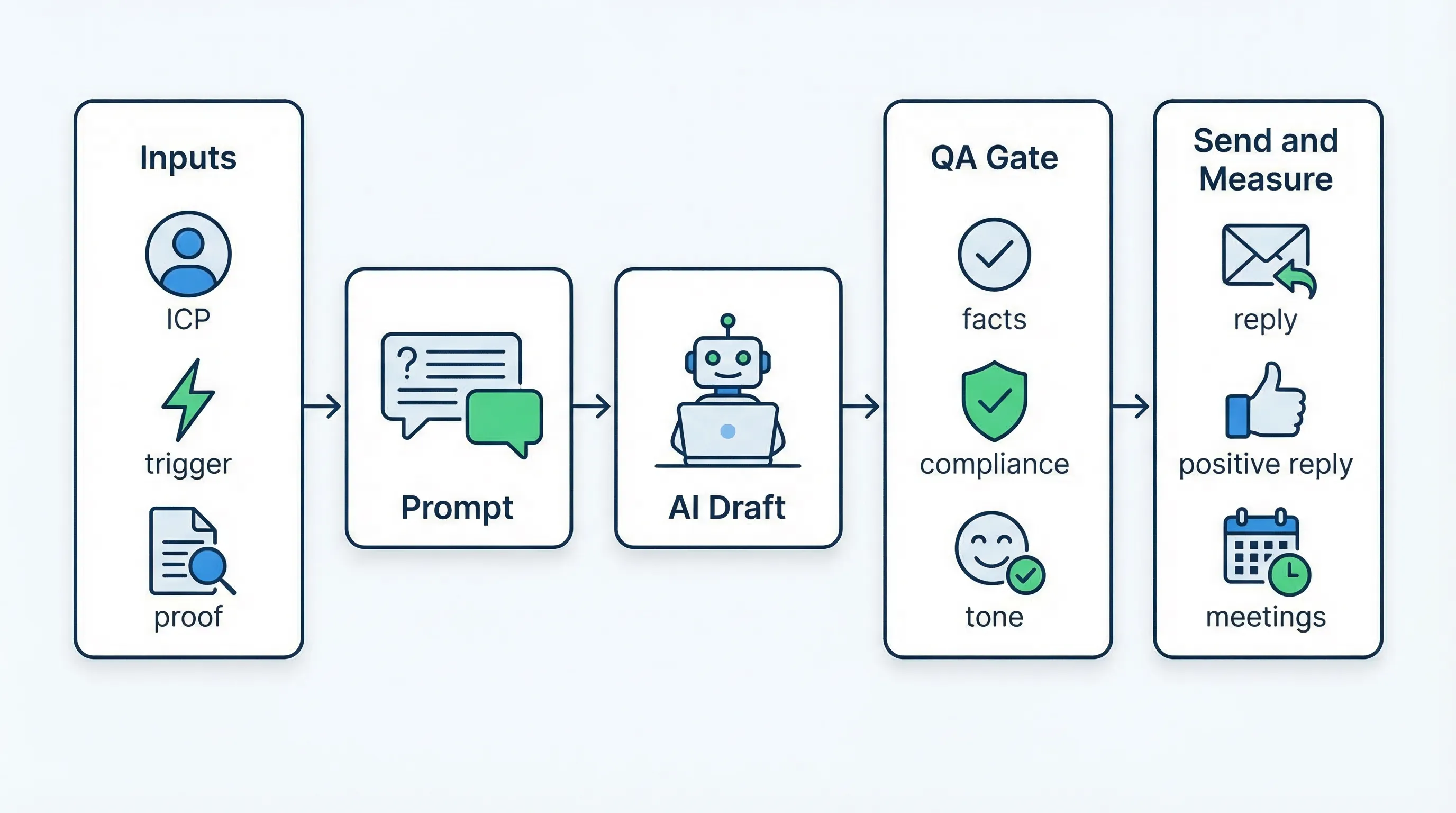
AI for sales emails is using large language models and automation to draft, personalize, QA, and optimize outbound emails based on your ICP, offer, and proof points. Done right, it speeds up writing while improving relevance and consistency. Done wrong, it creates confident-sounding nonsense, compliance risk, and deliverability issues. The best setups pair AI drafting with strict QA, controlled testing, and clear stop rules.
Tool comparison table (email + conversation stack)
| Tool Name | Best For | Key Feature | Starting Price |
|---|---|---|---|
| Kakiyo | Turning outbound into qualified conversations and booked meetings | Autonomous LinkedIn conversations with lead qualification and meeting booking | Custom (contact sales) |
| ChatGPT | Drafting and iterating cold email copy fast | Flexible prompting for variants, tone, and objection handling | Free (Plus available) |
| Apollo | Shipping sequences quickly with AI-assisted copy | Prospecting + sequences + AI draft assist in one workflow | Free plan available |
| Grammarly | QA for clarity and tone before you send | Inline rewrite, tone, and correctness checks | Free plan available |
| Microsoft Copilot for Microsoft 365 | Drafting inside Outlook for teams living in Microsoft | Email drafting and summarization in Microsoft apps | Paid add-on |
| HubSpot Sales Hub | Teams that want CRM-first email workflows | Templates, sequences, and reporting tied to CRM objects | Free tools available |
| Outreach | Enterprise sequencing with governance | Sales engagement platform with controls and analytics | Custom (contact sales) |
Kakiyo
What it does (2 sentences). Kakiyo autonomously manages personalized LinkedIn conversations at scale, from first touch through qualification to meeting booking. It is not an email writer, it is the conversation engine that turns outbound interest into a qualified meeting without an SDR babysitting threads.
Standout feature (1 sentence). Kakiyo’s edge is that competitors automate sending, Kakiyo autonomously manages the full conversation, qualifies the lead with an intelligent scoring system, and books the meeting.
Who it’s for (1 sentence). SDR leaders and RevOps teams running LinkedIn-first outbound who want higher-quality meetings while reducing inbox and thread management.
Pricing. Custom (request pricing in demo).
Pros
- Handles multi-turn qualification so reps do not have to live in LinkedIn DMs.
- Built for controlled scaling with prompt creation, A/B testing, scoring, and override control.
- Optimizes for outcomes (qualified conversations, booked meetings), not just “sent” volume.
Cons
- If you need email deliverability tooling, Kakiyo is not that product.
- Works best when you already have a defined ICP slice and qualification rubric.
ChatGPT
What it does (2 sentences). ChatGPT helps you draft cold emails, subject lines, follow-ups, and personalization snippets quickly. It is also useful for generating variant angles and rewriting for brevity, clarity, and tone.
Standout feature (1 sentence). Fast iteration, you can produce 10 acceptable variants in minutes, then select and QA.
Who it’s for (1 sentence). SDRs, founders, and enablement leads who want a flexible AI drafting assistant for sales emails.
Pricing. Free plan, paid plans available.
Pros
- Strong for rapid copy iteration and “rewrite shorter” loops.
- Useful for building a shared prompt library across a team.
Cons
- Will hallucinate details if you do not constrain inputs and enforce QA.
- Not an engagement platform, sending, tracking, deliverability, and analytics happen elsewhere.
Apollo
What it does (2 sentences). Apollo combines prospect data, list building, and outbound sequences, with AI features that help draft emails faster. It is often chosen by small and mid-market teams that want one place to source contacts and run sequences.
Standout feature (1 sentence). An integrated workflow from target list to sequence execution, which reduces tool sprawl.
Who it’s for (1 sentence). Teams that want a single system to prospect and run email sequences, and are willing to trade “best in class” depth for speed.
Pricing. Free plan available, paid tiers vary.
Pros
- Easy to move from list to outreach without stitching multiple tools.
- Good for testing new ICP slices quickly.
Cons
- AI draft assist does not replace a QA gate for accuracy and compliance.
- Qualification still depends on how you handle replies and route outcomes.
Grammarly
What it does (2 sentences). Grammarly is a QA layer that catches clarity issues, awkward phrasing, and tone mismatches before you send. For outbound, it is most valuable as a final pass to remove “AI-isms” and sharpen the ask.
Standout feature (1 sentence). Consistent tone and readability checks that make emails feel less robotic.
Who it’s for (1 sentence). Any team using AI to draft sales emails that wants a lightweight quality gate.
Pricing. Free plan available, paid tiers vary.
Pros
- Quick way to tighten sentences and reduce fluff.
- Helps standardize voice across SDRs.
Cons
- Does not know your ICP, so it can “correct” into generic language.
- Not a sales workflow tool, it will not manage sequences, routing, or analytics.
Microsoft Copilot for Microsoft 365
What it does (2 sentences). Copilot helps draft and summarize emails inside Microsoft apps, which is convenient if your team lives in Outlook. It can also turn meeting notes into follow-ups, or rewrite a draft for a different tone.
Standout feature (1 sentence). Native placement in the tools your team already uses, which can improve adoption.
Who it’s for (1 sentence). Microsoft-first revenue orgs that want AI drafting in the flow of work.
Pricing. Paid add-on for Microsoft 365 (see official Copilot pricing).
Pros
- High adoption potential because it is embedded in daily workflows.
- Helpful for post-meeting follow-ups and internal summaries.
Cons
- Still needs a strict outbound QA rubric, especially for factual claims and compliance.
- Not built specifically for outbound experimentation (prompt A/B, outcome scoring) as a sales system.
HubSpot Sales Hub
What it does (2 sentences). HubSpot gives teams CRM-first outbound workflows, including templates, sequences, and reporting that ties activity to contacts and deals. It is often used by SMB and mid-market teams standardizing their pipeline process.
Standout feature (1 sentence). CRM-native tracking and reporting, which makes measurement and coaching easier.
Who it’s for (1 sentence). Teams that want email outreach, CRM, and basic automation in one ecosystem.
Pricing. Free tools available, paid tiers vary (see HubSpot pricing).
Pros
- Strong system-of-record benefits, activity and outcomes sit with contacts and deals.
- Easier to enforce definitions and SLAs when the workflow is centralized.
Cons
- AI drafting alone will not fix targeting, proof, or offer clarity.
- Advanced outbound needs may require additional specialized tools.
Outreach
What it does (2 sentences). Outreach is a sales engagement platform used to run multi-step outbound sequences, measure performance, and standardize execution. It is typically chosen by larger teams that need governance, reporting, and repeatable motions.
Standout feature (1 sentence). Enterprise controls and analytics for sequencing, experimentation, and team execution.
Who it’s for (1 sentence). Mid-market and enterprise SDR orgs that want robust sales engagement governance.
Pricing. Custom (contact sales).
Pros
- Mature sequencing and reporting for large teams.
- Better operational control than piecing together multiple lightweight tools.
Cons
- Still requires strong copy inputs, QA, and qualification definitions to produce quality meetings.
- Higher complexity and cost than SMB stacks.
Prompts that actually improve sales email replies (not just “pretty copy”)
If you want AI for sales emails to drive reply-rate gains, your prompts have to do two things: constrain hallucinations, and force the model to make a specific, testable choice (angle, proof, CTA).
The operator-grade prompt blueprint
Use this structure so you can reuse it, QA it, and A/B it:
Prompt: Cold email draft (high-control)
- Role: You are an outbound SDR writing a plain-text cold email.
- Target: [ICP], [persona], [seniority], [industry], [geo]
- Trigger: [recent event, job change, funding, tool change, hiring]
- Problem hypothesis: [1 sentence]
- Proof: [one short proof point you are allowed to claim, no inventions]
- Offer: [one clear outcome]
- CTA: [one low-friction question]
- Constraints:
- 80 to 120 words
- 2 short paragraphs max
- No buzzwords, no exclamation points
- If a detail is missing, ask me a question instead of guessing
- Output:
- Subject line (max 5 words)
- Email body
- 3 alternate CTAs
Why this works: it forces specificity (trigger, proof, CTA) and explicitly blocks guessing, which reduces the most common AI failure mode in outbound.
Prompt: Personalization that is not creepy
Prompt: Personalization snippet
- Prospect: [name], [title], [company]
- Allowed sources: only the notes I paste below
- Notes: [paste 2 to 5 lines from LinkedIn profile, company site, news]
- Task: write one personalization sentence that connects the notes to my problem hypothesis.
- Constraints: 18 words max, no compliments, no “saw your profile,” no guessing.
Prompt: Follow-up that adds value without a content dump
Prompt: Follow-up value drop
- Context: prospect did not reply to the first email.
- Task: write a follow-up that adds one new, concrete insight relevant to [ICP] about [problem].
- Constraints: 60 to 90 words, end with a yes/no question, do not mention “bumping this.”
Prompt: Objection handling for common replies
Prompt: Reply handling
- Reply from prospect: [paste reply]
- Objective: move the conversation to one of three outcomes: (a) disqualify politely, (b) ask 1 qualification question, (c) book a meeting.
- Constraints: 3 sentences max, one question max, no pressure language.
QA for AI-written sales emails (the checklist that protects deliverability and trust)
If you do not add a QA gate, AI increases throughput while quietly lowering truthfulness, specificity, and buyer respect.
Here is a simple QA rubric you can operationalize.
| QA check | What you are preventing | How to test fast |
|---|---|---|
| Fact check every claim | Hallucinated customers, metrics, integrations, or “we saw X” | Highlight all facts, confirm source, delete anything unverified |
| “Permission and relevance” opener | Spam complaints, low intent replies | Ask, would I reply if I received this with no context? |
| One clear CTA | Multi-ask confusion | Ensure the email ends with one question, not three |
| Remove AI patterns | Robotic tone, generic fluff | Delete adjectives, cut 30% of words, keep nouns and verbs |
| Compliance basics | Deliverability penalties | Confirm unsubscribe language where required, avoid misleading subject lines |
Deliverability note that matters in 2026: Google’s bulk sender guidelines explicitly call out a 0.3% spam complaint rate expectation and require authentication (SPF, DKIM, DMARC) for bulk senders. Start with the official guidance at Google’s email sender guidelines.
How to get measurable reply-rate gains (without lying to yourself)
Most teams “feel” like AI is working because output volume goes up. The only measurement that matters is downstream: replies, positive replies, qualified conversations, and meetings that hold.
Use one primary metric per experiment
Pick one depending on motion maturity:
- Early: reply rate (replies / delivered)
- Mid: positive reply rate (positive replies / delivered)
- Advanced: meeting booked rate (meetings booked / delivered), then meeting held rate
Keep the rest as diagnostics, not goals.
A/B test prompts, not just subject lines
If you only test subject lines, you will optimize opens while leaving the body generic. Better variables to test:
- Angle: trigger-based vs problem-first
- Proof: quantified proof snippet vs “credibility by category”
- CTA: yes/no question vs “right person?”
- Personalization: none vs 1 sentence tied to trigger
Operational rule: run one variable at a time, hold list quality constant, and do not declare winners on tiny samples.
The channel reality: email drafts are not the whole system
Even perfect copy cannot recover:
- A weak ICP slice
- Unverifiable proof
- Slow reply handling
- No qualification standard
This is where conversation-led workflows shine. Email can start interest, but multi-turn qualification usually happens in a back-and-forth channel. Kakiyo exists specifically for that gap: it runs the LinkedIn thread, qualifies with an intelligent scoring system, and books the meeting so SDRs only step in to close.
Which tool should you choose?
- If you want autonomous AI conversation management and LinkedIn lead qualification, use Kakiyo.
- If you want the fastest way to draft and iterate sales email copy, use ChatGPT.
- If you want list building plus sequences in one place (and can accept tradeoffs), use Apollo.
- If you want a lightweight QA layer to remove robotic phrasing, use Grammarly.
- If you want CRM-first email workflows and reporting, use HubSpot Sales Hub.
FAQs
What are the best prompts for AI for sales emails?
The best prompts constrain inputs (ICP, trigger, proof, CTA) and block guessing. Use a template that forces word count, limits paragraphs, and requires the model to ask questions when data is missing. Your prompt should also output multiple CTA options so you can test.
How do I QA AI-generated cold emails before sending?
Use a short rubric: fact-check every claim, enforce one CTA, cut fluff, and remove “AI voice” patterns. Then run a compliance and deliverability pass, especially if you send at volume. If anything is unverified, delete it rather than “sounding confident.”
Can AI improve sales email reply rate?
Yes, but only when you use AI to produce better relevance and faster iteration, not just more volume. Reply-rate gains come from tighter ICP slices, sharper proof, and controlled testing, with a QA gate that prevents generic or misleading copy.
Is Kakiyo an AI for sales emails tool?
Kakiyo is not an email writing tool. It is an AI platform that autonomously manages LinkedIn conversations end-to-end, qualifies prospects using an intelligent scoring system, and books meetings so SDRs focus on high-value opportunities.
What’s the safest way to scale AI-written outbound without hurting deliverability?
Treat AI as drafting, not sending. Keep a human QA gate, follow bulk sender requirements (authentication and low spam complaint rates), and scale gradually while watching complaints, bounces, and reply quality. Optimize for qualified conversations and meetings held, not just activity.
Request a demo of Kakiyo to see autonomous LinkedIn conversations that qualify prospects and book meetings.