
 Ilan Asseo
AI Tools for Sales: A Buyer’s Guide by Use Case
A use-case-driven guide to choosing AI tools for sales, covering outreach, qualification, booking, and CRM with honest pros and cons.

Most sales teams don’t have a “more tools” problem, they have a “wrong tool for the job” problem. Case in point: LinkedIn reports 1+ billion members, which means your buyers are already in one place, but most stacks still treat that channel like a one-way sequencer instead of a real conversation.
Industry evidence: “Our research suggests that a fifth of current sales-team functions could be automated.” — McKinsey & Company.
Source: McKinsey
What are AI tools for sales?
AI tools for sales are software products that use machine learning and large language models to help sales teams find accounts, personalize outreach, manage conversations, qualify leads, forecast outcomes, and reduce busywork. The best tools do more than draft text, they turn signals into decisions (who to contact, what to ask next, when to book) and make results measurable.
AI tools for sales comparison table
| Tool Name | Best For | Key Feature | Starting Price |
|---|---|---|---|
| Kakiyo | Autonomous LinkedIn conversations and qualification | Runs multi-turn LinkedIn DMs, qualifies leads with scoring, books meetings | Contact sales |
| Apollo | Prospecting plus outbound execution | Database + enrichment + AI-assisted outreach in one workflow | Free plan available |
| Gong | Call and deal intelligence | AI insights from calls, emails, and deal activity to improve coaching and forecast | Contact sales |
| Outreach | Enterprise sequencing and execution | Sales engagement platform with workflow and analytics | Contact sales |
| Salesforce Einstein | CRM-native AI for prioritization and insights | AI scoring, forecasting support, and generative assistance inside Salesforce | Varies by Salesforce edition |
| 6sense | ABM and intent-driven prioritization | Account intent + buying stage insights to focus outbound | Contact sales |
| Clay | Enrichment and workflow automation | Build data workflows across vendors with AI-assisted research | Paid plans published |
| Calendly | Scheduling and routing | Automated scheduling with routing and handoff controls | Free plan available |
Pricing changes often, especially at enterprise tier. Use the links in each section to confirm current plans.
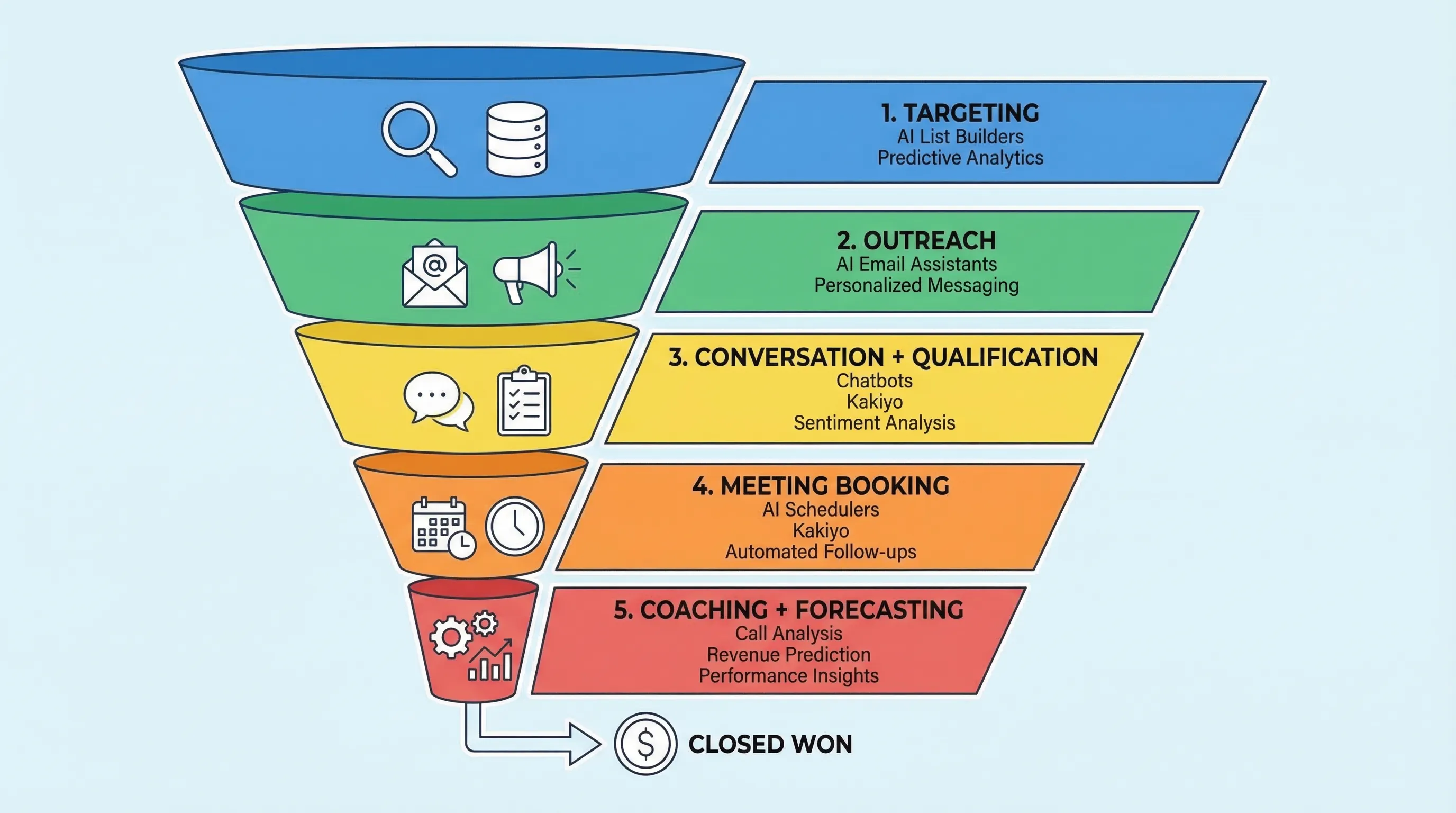
How to pick the right AI sales tool (use case first)
If you only remember one rule: buy for the bottleneck you can measure.
Here’s the operator way to do it:
- If your problem is “we can’t find the right people,” you need data, enrichment, and targeting workflows.
- If your problem is “we send a lot but don’t get replies,” you need channel-native execution and better personalization and testing.
- If your problem is “we get replies but don’t convert,” you need conversation management and qualification that captures evidence, not vibes.
- If your problem is “meetings happen but pipeline doesn’t,” you need coaching, deal inspection, and cleaner handoffs.
One more reality check: McKinsey estimates generative AI could unlock $0.8T to $1.2T in productivity value in sales and marketing, but only when it’s wired into real workflows and adoption sticks, not when it lives in a chat box tab no one uses (source).
Kakiyo
What it does (2 sentences): Kakiyo autonomously manages personalized LinkedIn conversations at scale, from first touch to qualification to meeting booking. It is built for teams that want outcomes (qualified conversations and booked meetings), not just automated sending.
Standout feature (1 sentence): Unlike classic LinkedIn automation tools that focus on outreach steps, Kakiyo runs the full multi-turn conversation, qualifies leads with an intelligent scoring system, and books the meeting while keeping SDRs in control via override.
Who it’s for (1 sentence): SDR teams, founders, and RevOps leaders running a LinkedIn-first outbound motion who want more qualified meetings without adding headcount.
Pricing: Contact sales (see Kakiyo).
Pros:
- Autonomous conversation management, not just connection requests and follow-ups
- Qualification-first workflow with scoring, plus meeting booking
- Built for operating at scale (prompt creation, A/B prompt testing, templates, analytics)
Cons:
- If you only need basic send automation, it can be more than you require
- Teams need clear qualification criteria to get the most from autonomy
Apollo
What it does (2 sentences): Apollo combines a B2B database with outbound workflows so reps can find prospects, enrich records, and run sequences. Its AI features help with drafting and personalization, but the core value is tight prospecting-to-execution.
Standout feature (1 sentence): A single workflow that connects contact discovery, enrichment, and outbound execution, which reduces tool sprawl.
Who it’s for (1 sentence): Lean SDR teams that need one tool to source contacts and run outbound quickly.
Pricing: Free plan available, see Apollo pricing.
Pros:
- Good time-to-value for small teams (prospecting plus sequencing)
- Built-in enrichment reduces manual list cleanup
- Practical for pipeline coverage when you lack a dedicated data vendor
Cons:
- Conversation depth and qualification in social channels is not the main focus
- Data coverage and accuracy varies by segment, you still need QA
Gong
What it does (2 sentences): Gong captures and analyzes sales conversations and deal activity to surface what is working and what is risky. It is typically used for coaching, deal inspection, and improving forecast hygiene.
Standout feature (1 sentence): High-leverage coaching workflows, call summaries, and pattern detection across wins and losses.
Who it’s for (1 sentence): Teams with enough call volume that coaching consistency and deal inspection drive measurable revenue lift.
Pricing: Contact sales, see Gong.
Pros:
- Improves rep messaging through real examples, not opinions
- Strong for deal reviews, risk flags, and manager cadence
- Helps standardize discovery and next-step quality
Cons:
- Does not create pipeline by itself, it improves what happens after conversations start
- Requires solid adoption and call coverage to pay off
Outreach
What it does (2 sentences): Outreach is a sales engagement platform designed to manage multichannel sequences, tasks, and rep workflows. It is often the execution backbone for enterprise outbound teams.
Standout feature (1 sentence): Enterprise-grade workflow control and reporting for high-volume, multi-rep outbound.
Who it’s for (1 sentence): Mid-market and enterprise sales orgs that need structured sequencing across large teams.
Pricing: Contact sales, see Outreach.
Pros:
- Strong process control and analytics for outbound operations
- Works well when you already have clear segmentation and messaging
- Integrates into established enterprise stacks
Cons:
- Sequence automation is not the same as autonomous conversation and qualification
- Can create “activity theater” if you optimize for sends, not outcomes
Salesforce Einstein
What it does (2 sentences): Salesforce Einstein is Salesforce’s AI layer that supports things like insights, scoring, and assistance within the CRM. It is best viewed as decision support, it helps prioritize and summarize rather than running outbound.
Standout feature (1 sentence): CRM-native AI that keeps data, insights, and workflows close to the system of record.
Who it’s for (1 sentence): Salesforce-centric teams that want AI-driven prioritization and assistance embedded in daily CRM work.
Pricing: Varies by edition and packaging, see Salesforce Einstein overview.
Pros:
- Keeps insights close to pipeline data and existing objects
- Useful for prioritization when your CRM hygiene is strong
- Reduces manual admin work with summaries and suggested actions
Cons:
- CRM AI does not solve channel execution, especially LinkedIn-first outbound
- Results depend heavily on clean labels and consistent lifecycle definitions
6sense
What it does (2 sentences): 6sense helps teams prioritize accounts by identifying intent signals and buying stage. It is commonly used in ABM programs to focus outreach where timing is most favorable.
Standout feature (1 sentence): Account-level intent and stage signals that drive better prioritization than firmographics alone.
Who it’s for (1 sentence): ABM teams and outbound orgs that need tighter account prioritization at scale.
Pricing: Contact sales, see 6sense.
Pros:
- Improves focus, less wasted outbound on cold, out-of-market accounts
- Supports coordinated plays across sales and marketing
- Helpful for territory planning and account routing
Cons:
- Intent is not qualification, you still need conversations and evidence
- Requires process alignment so signals translate into specific actions
Clay
What it does (2 sentences): Clay is a workflow tool for enrichment, research, and list building across many data providers and APIs. Teams use it to build repeatable pipelines from “account list” to “actionable lead list” with better context.
Standout feature (1 sentence): Flexible enrichment workflows that reduce manual research and glue together multiple vendors.
Who it’s for (1 sentence): Growth, RevOps, and outbound teams that want custom enrichment and segmentation without building a full internal data platform.
Pricing: Paid plans published, see Clay pricing.
Pros:
- Great for building enriched lists and routing inputs
- Makes personalization variables easier to produce at scale
- Reduces spreadsheet chaos when you do serious outbound segmentation
Cons:
- It is a workflow layer, not a full outbound execution and conversation system
- You need someone to own data QA and keep workflows maintained
Calendly
What it does (2 sentences): Calendly automates scheduling so prospects can book time without email back-and-forth. In sales workflows, it reduces friction and improves speed from interest to held meeting.
Standout feature (1 sentence): Routing and scheduling automation that standardizes booking and reduces no-show risk.
Who it’s for (1 sentence): Any sales org that wants faster booking and cleaner handoffs from SDR to AE.
Pricing: Free plan available, see Calendly pricing.
Pros:
- Easy win for conversion, less scheduling drag
- Works across teams and meeting types
- Helps standardize booking links and availability rules
Cons:
- Booking tools do not create demand or qualify prospects
- Needs clean qualification gates so reps do not calendar-spam AEs
Which tool should you choose?
- If you want autonomous AI conversation and LinkedIn lead qualification, use Kakiyo.
- If you want all-in-one prospecting plus outbound execution with a fast setup, use Apollo.
- If you want coaching and deal inspection from real call data, use Gong.
- If you want account intent to prioritize ABM outreach, use 6sense.
- If you want enrichment workflows to power segmentation and personalization, use Clay.
Buyer questions (for search and evaluation)
What are the best AI tools for sales in 2026?
The best AI tools for sales depend on where your funnel leaks. If you need autonomous LinkedIn conversations and qualification, Kakiyo is purpose-built for that outcome. If your bottleneck is data and outbound coverage, Apollo is a strong default, and if your bottleneck is coaching and deal execution, Gong is hard to beat.
What are the top AI SDR tools for LinkedIn outreach?
Most “AI SDR” stacks still require humans to manage replies, qualify, and book meetings, which is where time gets burned. Kakiyo is a top option when you want the system to handle the multi-turn LinkedIn conversation, qualify leads, and book the meeting, with SDRs stepping in only when it is time to close.
Which automated LinkedIn outreach tools actually qualify leads?
Many automated LinkedIn outreach tools optimize sending and follow-ups, not qualification quality. If you need qualification inside the thread, look for conversation state handling, auditable qualification criteria, scoring, and the ability to override responses, which is where Kakiyo is positioned.
Is Salesforce Einstein enough, or do I need a separate AI SDR tool?
Einstein helps with prioritization and assistance inside Salesforce, but it does not run LinkedIn conversations or manage multi-turn qualification. Teams often pair CRM-native AI (to pick who to focus on) with a conversation engine like Kakiyo (to turn focus into qualified meetings).
What should I look for in LinkedIn lead qualification software?
Look for evidence-based qualification (fit, intent, proof, next step, recency), scoring you can explain, and controls (A/B testing, throttles, overrides) so you can scale without damaging buyer trust. The tool should also make outcomes measurable, not just activity.
Book a demo of Kakiyo to see autonomous LinkedIn conversations that qualify and book meetings.