
 Ilan Asseo
Automated LinkedIn Outreach: Do It Safely and Effectively
If you get automated LinkedIn outreach right, it becomes a dependable source of qualified conversations and meetings.

If you get automated LinkedIn outreach right, it becomes a dependable source of qualified conversations and meetings. If you get it wrong, it can trigger account warnings, annoy buyers, and pollute your CRM. This guide shows how to do it safely and effectively in 2025, with practical guardrails, message strategy, and measurement. It also explains how to use AI to personalize at scale without crossing platform or ethical lines.
Industry evidence: “As customers increasingly learn and buy digitally, sales reps become just one of many possible sales channels.” — Cristina Gomez, Managing Vice President, Gartner.
Source: Gartner
What automated LinkedIn outreach really means in 2025
Automation used to mean blasting generic messages. That is not only ineffective, it is risky. Modern, effective automation looks like this:
- Target a narrow ICP, based on reliable signals.
- Start a 1-to-1 LinkedIn conversation with short, relevant messages.
- Qualify in the thread with one or two specific questions.
- If there is interest, propose a meeting and handle simple scheduling.
- If there is no fit, gracefully close the loop and log the reason.
Done well, this mirrors what your best SDRs already do. The difference is scale and consistency. Tools like Kakiyo help you run many conversations at once while keeping humans in the loop for nuance and judgment.
For message anatomy and cadence specifics, see our companion playbooks: LinkedIn Outreach That Converts: Proven Templates and Tips and the LinkedIn Prospecting Playbook: From First Touch to Demo.
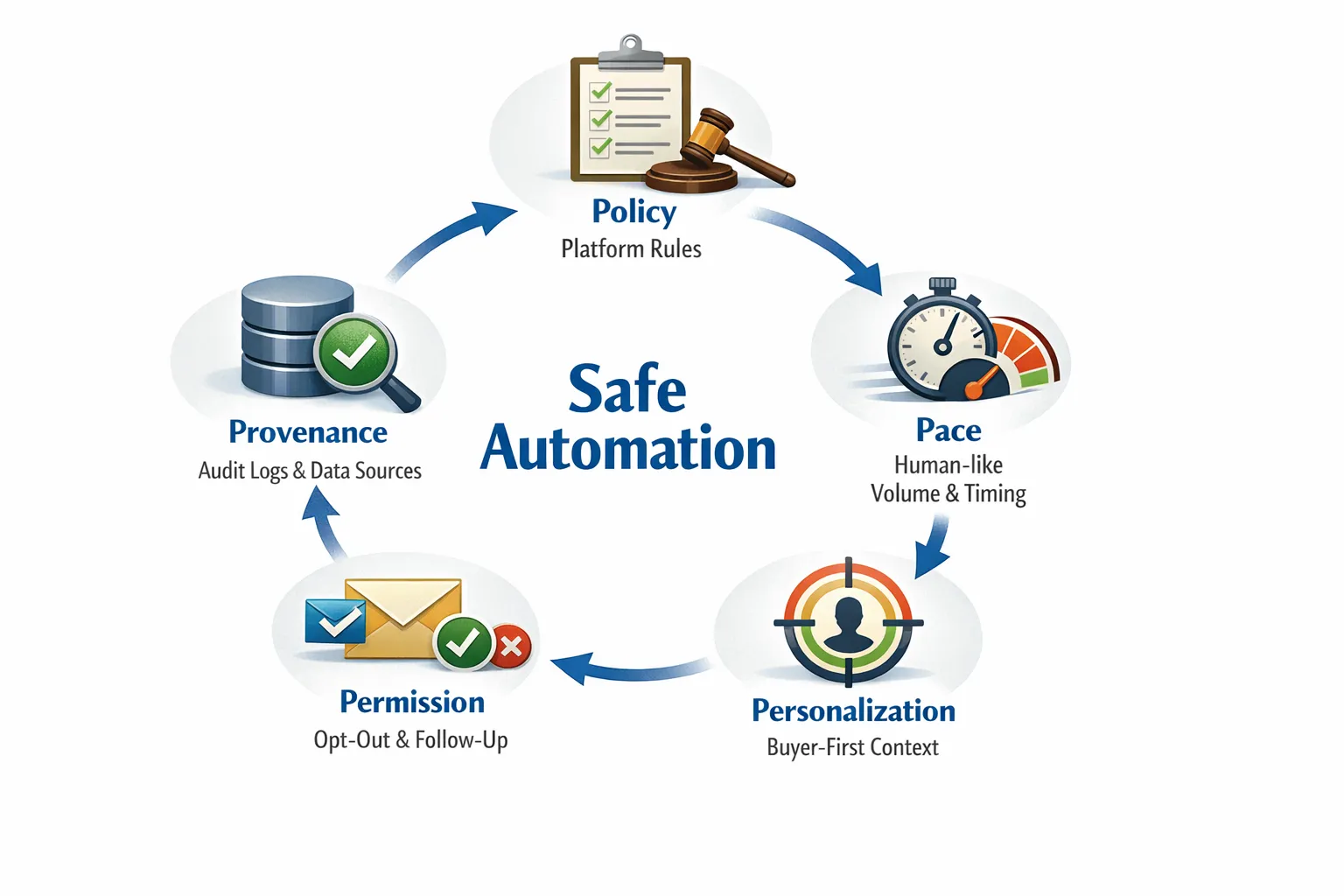
The five pillars of safe automation
1) Policy: respect platform rules and local law
- Review LinkedIn’s User Agreement and Professional Community Policies. Avoid behavior that looks like spam or unauthorized access.
- If you process personal data, ensure compliance with privacy laws such as GDPR when applicable. Store only necessary data, honor opt-out requests, and define retention periods. For an overview of GDPR concepts, see the EU’s guidance at gdpr.eu.
- Do not promise features that violate platform policies and do not attempt to evade detection. Sustainable programs align with the rules.
This article is informational, not legal advice. Consult counsel for your specific situation.
2) Pace: keep a human rhythm
LinkedIn does not publish hard daily or weekly limits. Spikes, repetitive timing, or large bursts of identical actions are common triggers for friction. Safer patterns include gradual ramp-up, natural timing windows, and variety in actions. Rotate outreach with normal engagement, like reacting to posts or commenting where appropriate, and leave ample time between steps.
3) Personalization: lead with buyer context, not trivia
Vanity personalization (college, weather, emojis) is noise. High-signal context is what earns replies, for example a recent product launch, a hiring trend, a technology stack change, or an initiative mentioned by the prospect. Keep messages short and helpful, and avoid links early in the conversation.
4) Permission: make no a good outcome
Offer a polite out in early exchanges. If someone says not interested, stop. Honor do-not-contact flags across systems. This protects your brand and improves deliverability of future messages.
5) Provenance: keep an audit trail
Log what was sent, when it was sent, why it was sent, and what data was used. This improves coaching, makes A/B tests trustworthy, and supports compliance reviews.
Building a safe, effective outreach workflow
Targeting and list quality
Start narrow. One ICP, one use case, one offer. Use clean lists with verifiable titles and companies. Remove student accounts, consultancies outside scope, and obvious mismatches. A smaller, well-defined list reduces risk and increases reply rates.
Message architecture that earns replies
Each message should do one job, not five. A reliable structure is context, credibility, value, soft CTA, and brevity. Examples and templates are in LinkedIn Outreach That Converts: Proven Templates and Tips.
A practical cadence without tripping risks
- Connection invite, keep it concise and relevant.
- First message, offer a specific observation or benefit, ask a single low-friction question.
- Light follow-ups, space them naturally, reference value, not pressure.
- Breakup, thank them and close the loop respectfully.
Avoid long sequences, dense pitches, or rapid-fire bumps. If the thread goes cold, shift to helpful content interactions for a while instead of more asks.
Qualify in-thread, not in a form
Use one or two direct questions tied to your ICP. For example, are you evaluating X this quarter or are you handling Y internally. Short, factual answers let AI triage with confidence, then a human can step in to handle nuance.
More on in-thread qualification and scoring here: AI Sales Automation: From Prospecting to Qualification and Business Development Rep: AI Tactics for LinkedIn Outreach.
Handoffs and meeting booking
Once interest is confirmed, propose two or three time windows, or ask for a preferred slot. Keep the booking step as simple as possible. If the prospect requests email or a different channel, follow their lead.
Guardrails that prevent mistakes at scale
A safe automated program relies on explicit guardrails. The following controls reduce risk while preserving speed:
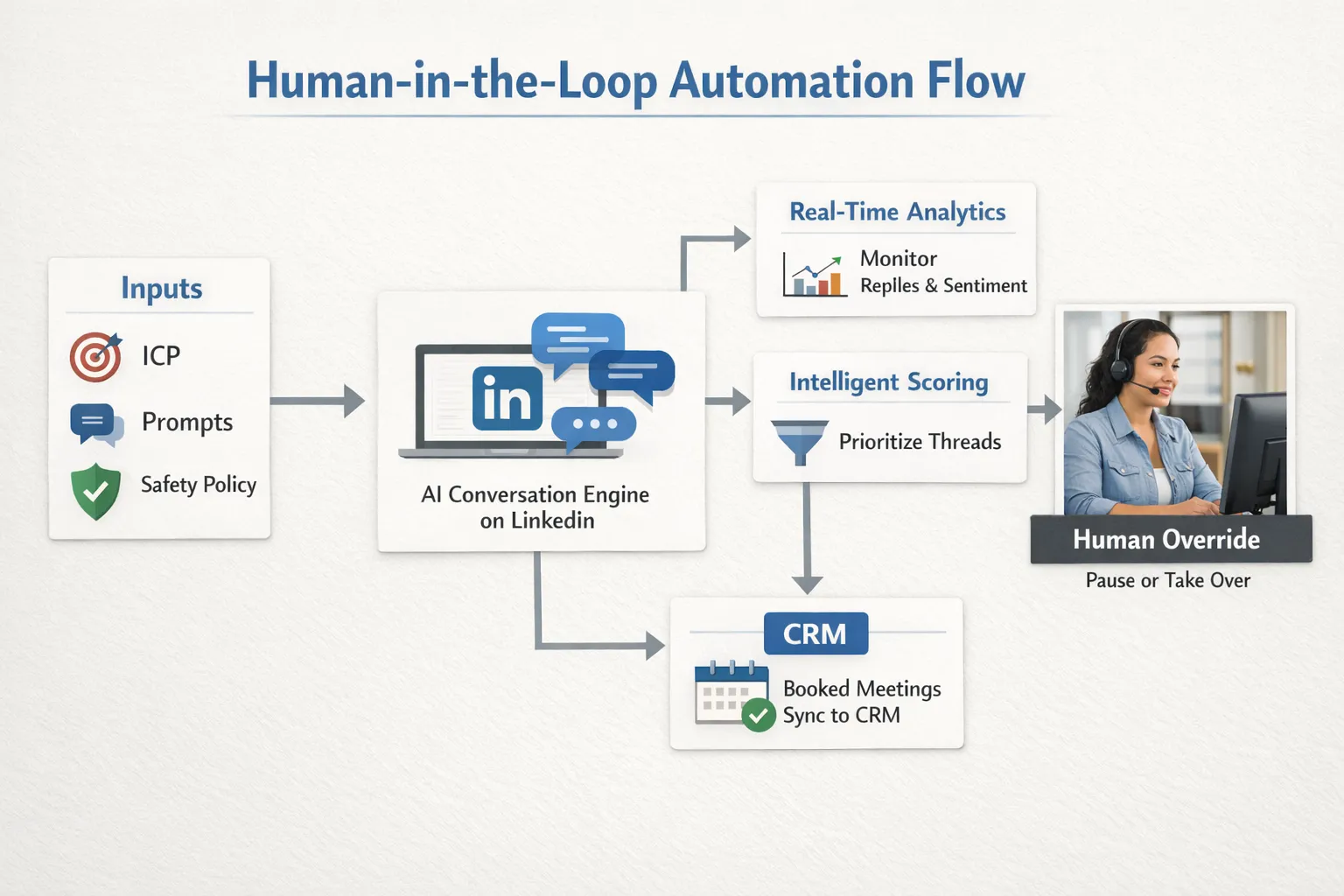
- Human override control, any conversation can be paused or taken over immediately.
- Prompt libraries and A/B testing, experiment in a controlled way, and retire losing variants quickly.
- Tone and compliance checks, block messages that include sensitive topics or disallowed claims.
- Real-time dashboards, watch reply mix, sentiment, and safety indicators.
- Intelligent scoring, focus human attention on the right threads.
Kakiyo includes these controls in one place, including customizable prompt creation, A/B prompt testing, industry-specific templates, an intelligent scoring system, conversation override, a centralized real-time dashboard, and advanced analytics and reporting. See how an AI SDR handles first touch, qualification, and booking while keeping humans in the loop.
Signals to monitor every day
| Signal to watch | What it tells you | Recommended action |
|---|---|---|
| Connection acceptance rate | List quality and invite relevance | Review targeting and invite copy, pause if acceptance dips materially |
| First-message reply rate | Context strength and clarity of ask | Tighten message focus, remove links, test a stronger hook |
| Positive vs neutral vs negative replies | Fit and tone | Amplify winning prompts, disable variants that draw negative reactions |
| Not interested or opt-out mentions | Permission health | Honor immediately, suppress from future sends |
| Sudden send failures or friction | Potential account risk | Pause sends, decrease pace, review recent changes |
| Meetings booked per 100 conversations | Business outcome | Double down on segments with higher conversion |
Common risks and how to mitigate them
| Risk scenario | What it looks like | How to mitigate |
|---|---|---|
| Over-automation fatigue | Generic invites, fast follow-ups, and low acceptance | Narrow ICP, reduce volume, improve context, extend spacing between steps |
| Off-brand tone | Messages feel pushy or informal for your market | Create brand voice cards, test tone variants, enforce approval on new prompts |
| Personalization mistakes | Wrong company, role, or initiative referenced | Use structured fields, add validation checks, and prefer recent, verifiable signals |
| Compliance gaps | No audit trail or unclear opt-out handling | Centralize logs, capture consent and do-not-contact states, document retention |
| Data drift | Lists shift away from ICP over time | Rebuild lists on a schedule, review by segment, archive stale data |
A safety-first rollout checklist
- Define a single ICP and offer, write three short message variants and a breakup.
- Configure guardrails, opt-out language, and escalation rules to a named owner.
- Start small, a limited daily cohort with human review of every response for the first few days.
- Instrument dashboards, watch acceptance, replies, sentiment, opt-outs, and meeting conversion.
- Run A/B prompt tests with clear stop rules, retire losers, and keep only what improves outcomes.
- Expand gradually, add one new segment or use case at a time, never increase volume and complexity simultaneously.
- Conduct a weekly retro, review safety incidents, top objections, and message learnings, then update prompts and targeting.
If you want a deeper implementation framework with metrics and governance, see Conversational AI for Sales: Real-World Use Cases and our AI Sales Automation guide.
What to measure beyond vanity metrics
Connection counts and send volume are not business outcomes. Measure:
- Acceptance rate, reply rate, positive reply rate.
- Qualified conversation rate, based on explicit answers to your criteria.
- Meetings booked and meeting show rate.
- Safety indicators, send friction, opt-outs, negative feedback.
- Cycle time from first touch to meeting booked.
Use these metrics to decide what to scale and what to stop. Then feed learnings back into your prompts and segmentation.
How Kakiyo operationalizes safe automation
Kakiyo is built for SDR teams that want scale without losing control. From first touch to qualification to booking, Kakiyo’s AI manages personalized LinkedIn conversations and surfaces the right moments for humans to jump in. Key capabilities that support safe, effective execution include:
- Autonomous LinkedIn conversations with AI-driven lead qualification.
- Customizable prompt creation with A/B prompt testing to learn fast.
- Industry-specific templates to start strong, then refine.
- An intelligent scoring system to prioritize high-value threads.
- Simultaneous conversation management with conversation override control.
- A centralized real-time dashboard plus advanced analytics and reporting.
If you are building or upgrading your automated LinkedIn outreach motion, Kakiyo helps you move quickly while staying within policy, tone, and brand guardrails.
Frequently asked questions
Is automated LinkedIn outreach allowed? LinkedIn’s policies prohibit abusive behavior, spam, and unauthorized access. The safest approach is to align with platform rules, keep a human pace, personalize for relevance, and maintain opt-out handling and audit logs.
What is a safe sending pace? LinkedIn does not publish official limits. Start small, space actions naturally, and scale gradually while you monitor acceptance, replies, and any friction. Avoid spikes and repetitive timing patterns.
How personalized should my messages be? Focus on business-relevant signals, recent initiatives, hiring, tech stack, or outcomes tied to your offer. Avoid trivial facts and long pitches. One specific observation plus a single question is usually enough to earn a reply.
How do I prevent brand or compliance issues? Use approval workflows for new prompts, enforce tone guidelines, log every message and decision, and honor opt-outs across systems. When in doubt, pause and have a human review.
Can AI qualify prospects reliably inside LinkedIn threads? Yes, if you ask clear, specific questions and define what counts as qualified. AI can triage and score responses, then route promising threads to humans for scheduling or deeper discovery.
Turn safe automation into booked meetings
Ready to scale outreach without sacrificing reputation or control, see how Kakiyo runs AI-driven LinkedIn conversations from first touch to qualification to meeting booking, with guardrails built in. Explore Kakiyo and request a live walkthrough at kakiyo.com.