
 Ilan Asseo
B2B Lead to MQL Conversion Rate: How to Improve Fast
Rapid tactics to boost B2B lead-to-MQL conversion: make MQLs binary, speed up first touch, qualify in-thread, tighten ICP, and use tools like Kakiyo.

Gartner found B2B buyers spend just 17% of their buying journey meeting with potential suppliers. If your “lead to MQL” process requires a bunch of back-and-forth just to confirm basic fit and intent, your conversion rate will stay low because buyers will move on before you even classify them.
The fastest way to lift your B2B lead to MQL conversion rate is to stop treating MQLs like a volume metric and start treating them like an enforceable contract: clear entry criteria, fast response, and proof captured in the first conversation.
Industry evidence: Gartner’s research on the B2B buying journey shows that consensus creation is now a core buying job, which is why qualification needs buying-group evidence rather than single-contact activity.
Source: Gartner
What is a B2B lead to MQL conversion rate?
The B2B lead to MQL conversion rate is the percentage of leads that become Marketing Qualified Leads (MQLs) in a given period. It is calculated as MQLs divided by total leads, multiplied by 100. A lead becomes an MQL only when it meets your defined criteria, typically a combination of fit (ICP match), intent (behavior or conversation signal), and recency (it happened recently enough to act on).
Tools that improve lead to MQL conversion rate fast
You can improve process without new software, but tools help when the bottleneck is speed, inconsistent qualification, or conversation throughput.
| Tool Name | Best For | Key Feature | Starting Price |
|---|---|---|---|
| Kakiyo | Autonomous LinkedIn qualification and meeting booking | AI manages multi-turn LinkedIn conversations, scores leads, and books meetings | Contact sales |
| HubSpot | Simple MQL scoring and lifecycle automation | Properties, workflows, and lead scoring tied to lifecycle stages | Free plan available (paid tiers vary) |
| 6sense | Account-based intent prioritization | Identifies in-market accounts using intent and predictive signals | Contact sales |
| Apollo | Outbound lists plus basic sequencing | Prospecting database with outreach workflows | Free plan available |
| Chili Piper | Converting hot leads to scheduled meetings | Instant routing and scheduling from forms and handoffs | Contact sales |
| Salesforce (Sales Cloud) | Enterprise funnel governance | Custom objects, reporting, and routing with strict controls | Contact sales |
The fastest way to improve your lead to MQL conversion rate (7 levers)
“Improve fast” means you change the rules of the system, not just ask people to work harder. These levers are ordered by speed-to-impact.
1) Make MQL entry binary (and auditable)
Most teams leak conversion because MQL criteria are fuzzy, and everyone applies them differently.
A fast fix is to define MQL as:
- Fit: ICP match is true or false (company size, region, industry, tech, persona).
- Intent: a specific trigger happened (reply, demo request, pricing page visit, event request, referral, product usage threshold).
- Recency: the trigger happened within a defined window (for example, last 7 or 14 days).
If you cannot explain why a lead is an MQL in one sentence, your conversion rate will be noisy and unfixable.
2) Separate “contactable” from “qualified”
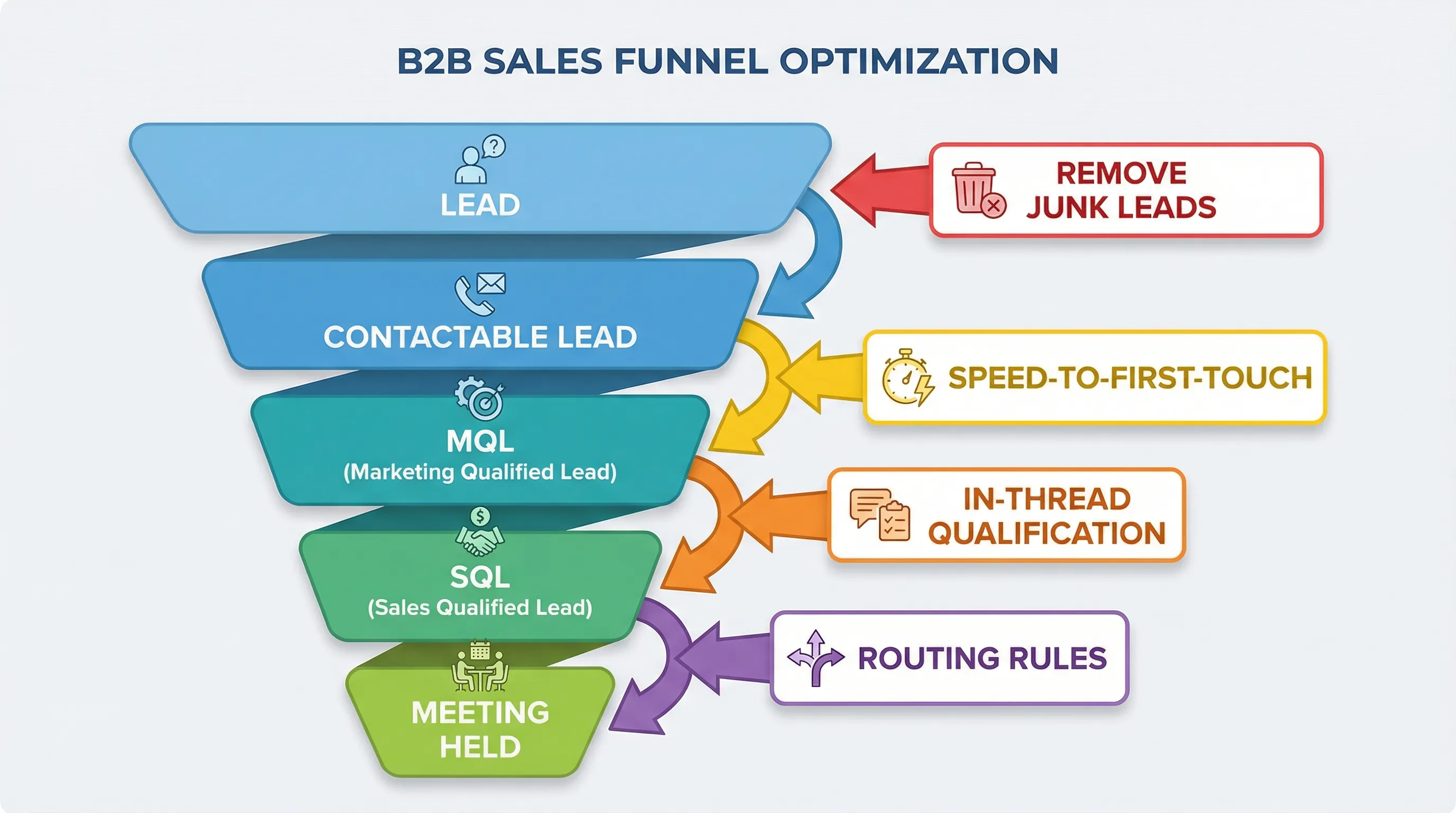
Many funnels inflate the denominator by counting junk as leads (bad data, no persona match, students, vendors, bots). That makes your B2B lead to MQL conversion rate look worse than it is.
Do this immediately:
- Create a Contactable Lead gate (valid company, valid persona, reachable channel).
- Only measure lead to MQL off contactable leads.
You did not “cheat the metric,” you removed trash from the denominator so your team can see the real leak.
3) Force speed-to-first-meaningful-touch
Slow response kills conversion because intent decays fast. This is especially brutal for inbound.
Operational rule that works:
- Define first meaningful touch as “a real question or next step,” not an auto-email.
- Set an SLA by lead tier (hot, warm, nurture).
If your speed is inconsistent, your best leads turn into someone else’s pipeline.
4) Qualify inside the first conversation, not after
The fastest lift comes when you capture proof early.
Instead of:
- “Thanks for reaching out. Can you tell me more about your role?”
Do:
- “Quick check so I route you correctly: are you evaluating solutions this quarter, or just gathering options?”
A single, well-placed question moves a lead from “maybe” to “actionable” or “disqualify” fast.
5) Use a two-lane qualification flow (hot vs warm)
Treating every lead the same destroys conversion because hot leads get slowed down and warm leads get over-pressured.
Use two lanes:
- Hot lane: confirm fit and book.
- Warm lane: confirm fit, capture context, offer an asset or a short async next step.
This increases conversion and reduces no-show meetings.
6) Tighten your ICP slice before you touch messaging
When conversion is low, teams usually rewrite copy. The real fix is targeting.
Fast ICP slicing approach:
- Pick one vertical or use case.
- Pick one persona.
- Pick one trigger.
Your lead to MQL conversion rate improves because the message finally matches a specific problem.
7) Close the loop with rejection codes
If sales rejects MQLs but marketing never learns why, conversion will never improve.
Require a rejection code when an MQL is rejected (examples: wrong persona, no active project, competitor lock-in, too small, timing).
Then fix the top rejection reason first.
How to calculate lead to MQL conversion rate (without misleading yourself)
Use this as your standard formula:
Lead to MQL conversion rate = (MQLs / Leads) x 100
But do not stop there. For it to be actionable, you need segmentation:
- By source (paid, organic, outbound, partner, event)
- By persona
- By ICP tier
- By time-to-touch bucket
A practical reporting setup (the minimum)
Track these four numbers weekly:
| Metric | Definition | Why it matters |
|---|---|---|
| Contactable lead rate | Contactable leads / total leads | Data and targeting health |
| Lead to MQL conversion rate | MQLs / contactable leads | Qualification effectiveness |
| Time to first meaningful touch | Median minutes or hours | Speed and SLA adherence |
| Sales acceptance rate | Sales accepted MQLs / MQLs | Quality control, prevents gaming |
If your lead to MQL conversion rises but sales acceptance drops, you are just relabeling.
Common reasons B2B lead to MQL conversion rate is low (and the fastest fix)
| Symptom | Likely cause | Fastest fix | Metric to watch |
|---|---|---|---|
| Lots of leads, few MQLs | ICP too broad, low intent | Slice ICP, add one intent gate | Lead to MQL by segment |
| MQLs are high, pipeline is low | Weak MQL definition, no proof | Require evidence packet, add rejection codes | Sales acceptance rate |
| Inbound underperforms | Slow response | Tight SLA, automate routing | Time to first meaningful touch |
| Outbound replies are fine, MQLs are low | Reps avoid qualification questions | Add thread-safe questions, score evidence | Qualified conversation rate |
| Teams argue about MQLs | Definition drift | One-page definition and audit | Override or dispute rate |
Kakiyo
What it does: Kakiyo autonomously manages personalized LinkedIn conversations from first touch through qualification to meeting booking. Instead of automating sending, it runs the multi-turn thread and only brings an SDR in when it is time to close.
Standout feature: Intelligent scoring plus autonomous conversation management, so qualification happens inside the chat, consistently, at scale.
Who it’s for: Teams that want higher lead to MQL conversion from LinkedIn without turning SDRs into full-time inbox operators.
Pricing: Contact sales.
Pros:
- Handles simultaneous LinkedIn conversations without losing context
- Qualifies with a consistent rubric and captures proof for handoff
- Supports prompt customization and A/B prompt testing to improve conversion fast
Cons:
- Not a generic sequencer, it is purpose-built for conversation-led qualification
- Requires you to define qualification rules clearly (this is a feature, but it is work)
HubSpot
What it does: HubSpot helps teams define lifecycle stages, score leads, and automate handoffs between marketing and sales. It is strong for inbound workflows where form fills and content engagement drive initial intent signals.
Standout feature: Lifecycle automation with workflows and lead scoring tied to CRM properties.
Who it’s for: SMB to mid-market teams that need a clean, enforceable MQL definition and routing without heavy admin overhead.
Pricing: Free plan available (paid tiers vary).
Pros:
- Fast to implement and easy to operationalize
- Good reporting for lifecycle conversion and attribution
- Works well for inbound qualification and routing
Cons:
- Lead scoring can become noisy if properties are not governed
- Not designed to run autonomous LinkedIn conversations end-to-end
6sense
What it does: 6sense surfaces account-level intent and predictive signals so you can prioritize accounts that are more likely to convert. It is a “who to focus on” layer, not a “run the conversation” layer.
Standout feature: Account-based intent modeling for prioritization.
Who it’s for: ABM teams who need better targeting to lift conversion by focusing outreach on in-market accounts.
Pricing: Contact sales.
Pros:
- Improves lead quality upstream by narrowing focus
- Strong fit for ABM and buying-group motions
- Helps align marketing and sales around the same target accounts
Cons:
- Does not qualify leads for you, execution still matters
- Requires disciplined CRM and account hygiene to get full value
Apollo
What it does: Apollo combines B2B contact data with outbound workflows so teams can build lists and run outreach sequences. It is often the quickest way to stand up outbound volume.
Standout feature: Prospecting database plus built-in outbound execution.
Who it’s for: Teams that need list building and outbound execution in one place, especially early-stage.
Pricing: Free plan available.
Pros:
- Fast time-to-value for outbound prospecting
- Helpful filters for targeting and segmentation
- Good baseline workflows for sequences
Cons:
- Sequencing tools automate steps, not multi-turn qualification
- Data quality varies by segment, you still need verification and tight ICP
Chili Piper
What it does: Chili Piper converts high-intent moments into scheduled meetings by routing and scheduling instantly. It shines when the bottleneck is “hot leads are not getting to the calendar fast enough.”
Standout feature: Real-time routing and scheduling at the moment of intent.
Who it’s for: Inbound-heavy teams that want to reduce time-to-meeting and increase show rates.
Pricing: Contact sales.
Pros:
- Removes friction from booking, especially for inbound demo requests
- Strong routing logic for teams and territories
- Helps enforce SLAs by design
Cons:
- Does not fix weak qualification criteria
- Primarily an inbound conversion layer, not an outbound conversation engine
Salesforce (Sales Cloud)
What it does: Salesforce is the system of record for lifecycle stages, routing, reporting, and governance. It is where you enforce definitions, audit outcomes, and build reliable funnel reporting.
Standout feature: Customizable data model and reporting for enterprise governance.
Who it’s for: Teams that need strict process control, complex routing, and audit-ready reporting.
Pricing: Contact sales.
Pros:
- Strong governance for lifecycle definitions and handoffs
- Powerful reporting when your schema is clean
- Scales to complex org structures
Cons:
- Easy to create stage drift without strict admin and operating cadence
- Salesforce does not execute LinkedIn conversations, it needs an execution layer
Which tool should you choose?
If you want autonomous AI conversation and LinkedIn lead qualification, use Kakiyo.
If you want simple MQL scoring and lifecycle automation for inbound, use HubSpot.
If you want ABM intent to prioritize the right accounts before outreach, use 6sense.
If you want lists plus basic outbound sequences to get volume quickly, use Apollo.
If you want instant routing and scheduling to convert hot inbound faster, use Chili Piper.
Frequently Asked Questions
What is a good B2B lead to MQL conversion rate?
A “good” B2B lead to MQL conversion rate depends on lead source, ICP tightness, and your MQL definition. The only reliable benchmark is your own baseline by segment, then improving it while keeping sales acceptance stable. If your conversion rate rises but sales acceptance drops, you did not improve, you relabeled.
How do you calculate lead to MQL conversion rate?
Calculate lead to MQL conversion rate as (MQLs / total leads) x 100 over a fixed time period. For decision-making, calculate it on contactable leads and segment by source, persona, and time-to-first-touch. That isolates whether the problem is lead quality, speed, or qualification.
Why is my B2B lead to MQL conversion rate low?
It is usually one of three things: your ICP is too broad, your MQL definition is fuzzy, or your response and qualification speed is inconsistent. Fix it fastest by making MQL entry binary, removing junk leads from the denominator, and qualifying inside the first conversation. Then enforce rejection codes so sales feedback actually improves upstream quality.
How can AI improve lead to MQL conversion rate?
AI improves lead to MQL conversion rate when it increases speed-to-response, applies qualification consistently, and captures proof in the conversation. The biggest gains come from automating multi-turn threads so leads do not stall in inbox debt. Tools like Kakiyo are built specifically for autonomous LinkedIn conversation management, qualification scoring, and meeting booking.
What is LinkedIn lead qualification software?
LinkedIn lead qualification software helps teams turn LinkedIn replies into qualified leads by asking the right questions, capturing evidence, and routing or booking next steps. Basic tools automate sending, but qualification requires multi-turn conversation handling and consistent scoring. If LinkedIn is a primary channel for you, prioritize tools that manage the full thread, not just the first touch.
To improve your B2B lead to MQL conversion rate with autonomous LinkedIn qualification, request a Kakiyo demo.