
 Ilan Asseo
BANT Sales Framework: Qualify Leads Without Wasting Time
How to use the BANT sales framework conversationally to qualify leads on LinkedIn, protect SDR time, and book more meetings.

If you have ever lost a week chasing a polite tire kicker, you know why the BANT Sales Framework still matters. BANT, when used as a buyer‑first conversation guide, lets SDRs qualify quickly, protect their calendar, and move real opportunities to a meeting without turning DMs into an interrogation.
BANT was popularized by IBM and remains one of the simplest, most portable qualification models sales teams can operationalize across channels, including LinkedIn messages and short email threads. If you need a refresher on the basics, see the concise overview on BANT from Wikipedia for context: BANT.
Industry evidence: Gartner’s research on the B2B buying journey shows that consensus creation is now a core buying job, which is why qualification needs buying-group evidence rather than single-contact activity.
Source: Gartner
What BANT means in practice today
- Budget, how the buyer frames investment and access to funds
- Authority, who is involved and how decisions are made
- Need, the problem to solve and the impact if solved
- Timeline, when the buyer wants a solution live and why
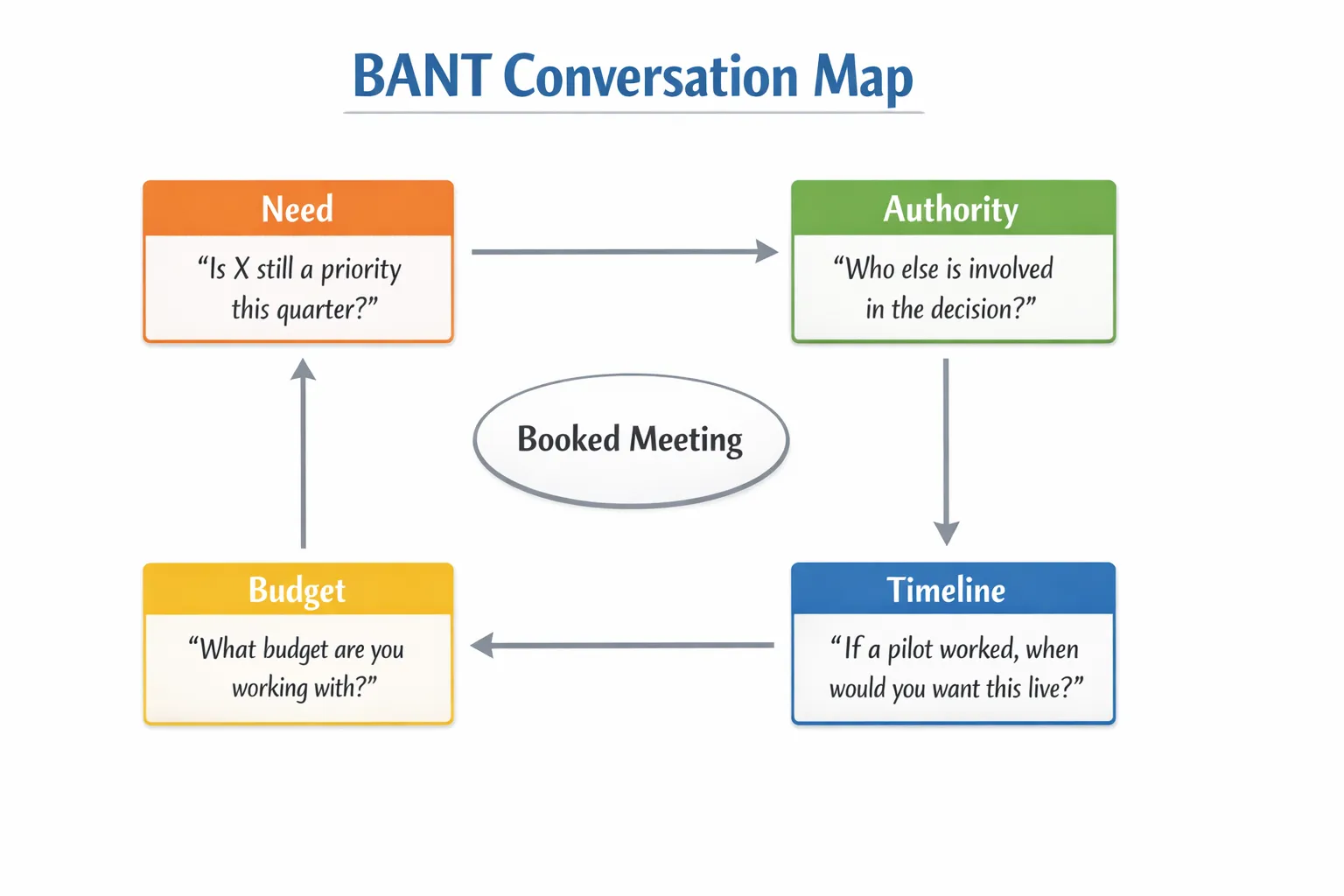
BANT is not a script to ask in order. It is a set of signals to uncover naturally as you guide a conversation. Modern buying often involves multiple stakeholders and fluid budgets, so treat BANT as a conversation map, not a checklist.
Why BANT still works on LinkedIn messages
Short messages, limited attention, and asynchronous replies reward clarity. BANT gives you just enough structure to:
- Focus on problems instead of pitching features
- Identify buying dynamics early, for example other stakeholders
- Agree on next steps and timing without pressure
The secret is sequencing. Lead with Need, confirm Authority, test Budget without pushing for a number, then align on Timeline and offer a low‑friction next step.
Conversational BANT: message prompts that earn replies
Use one‑line prompts that feel like a natural next question. Keep each message under 80 words, ask one thing at a time, and earn micro yeses.
Need, start here
- “You mentioned manual handoffs. What breaks most often and how does it show up day to day?”
- “Are you prioritizing more meetings from LinkedIn this quarter or is email your main channel?”
- “If you could fix one step in your prospecting flow this month, what would it be?”
What good looks like: a concrete problem with impact or urgency. If you get vague answers, tighten with a clarifier, for example “Is it a volume issue or conversion at first reply?”
Authority, de‑risk without asking “are you the decision maker”
- “Who usually weighs in when you add a new prospecting workflow, sales ops or the AE manager?”
- “If we set up a quick pilot, who else should see it so we do not repeat the demo later?”
- “Do you prefer to loop in RevOps now or after we validate fit?”
What good looks like: names, roles, or a clear path to multi‑thread. Capture this in CRM immediately.
Budget, explore approach before numbers
- “Do you already have a line item for this type of tool, or is it coming from an enablement or SDR budget?”
- “If a pilot proves a lift in qualified meetings, is there a path to secure funds this quarter?”
- “Are you optimizing for cost per meeting or rep time saved right now?”
What good looks like: a funded category, a sponsor who can move budget, or a plan tied to a concrete outcome. If the answer is “no budget,” ask “What would need to be true to unlock funds?”
Timeline, anchor on the business trigger
- “If the pilot works, when would you want this live with your SDRs?”
- “Do you have a campaign or event date we should align to?”
- “Is this a Q1 priority or is the timing more opportunistic?”
What good looks like: a date window with a reason, for example headcount change, board target, event, new territory.
Do and do not
- Do stack small questions in separate messages and reflect back what you heard.
- Do book the meeting as soon as Need and one of Authority or Timeline are strong.
- Do not demand numbers or titles upfront, earn them through value.
- Do not pitch long product monologues in DMs. Keep the thread buyer‑first.
A practical BANT signals matrix for LinkedIn
| Dimension | Early signals you can see | Strong signals to capture | Risk flags | Helpful follow up | CRM field to update |
|---|---|---|---|---|---|
| Need | Mentions manual tasks, low reply rates, hiring constraints | Quantified pain or goal, for example increase qualified meetings | Vague interest, no owner | “Is it a volume problem or conversion?” | Problem statement, primary use case |
| Authority | References to RevOps, SDR lead, AE manager | Names of stakeholders and their roles in evaluation | Single gatekeeper, cannot add others | “Who else should see this to avoid redoing the demo?” | Buying roles, champion, influencers |
| Budget | Existing vendor category, budget source, cost focus | Path to funds if pilot succeeds, funded initiative | “No budget until next fiscal,” unclear owner | “What would need to be true to unlock budget this quarter?” | Budget source, budget status |
| Timeline | Quarter target, event or campaign date | Live date with a reason and constraints | “Sometime later,” no urgency | “What happens if this waits a quarter?” | Target go live, critical dates |
Treat two strong signals plus clear next step as meeting‑worthy. If you have one strong and two early signals, nurture with one value drop and a soft next step.
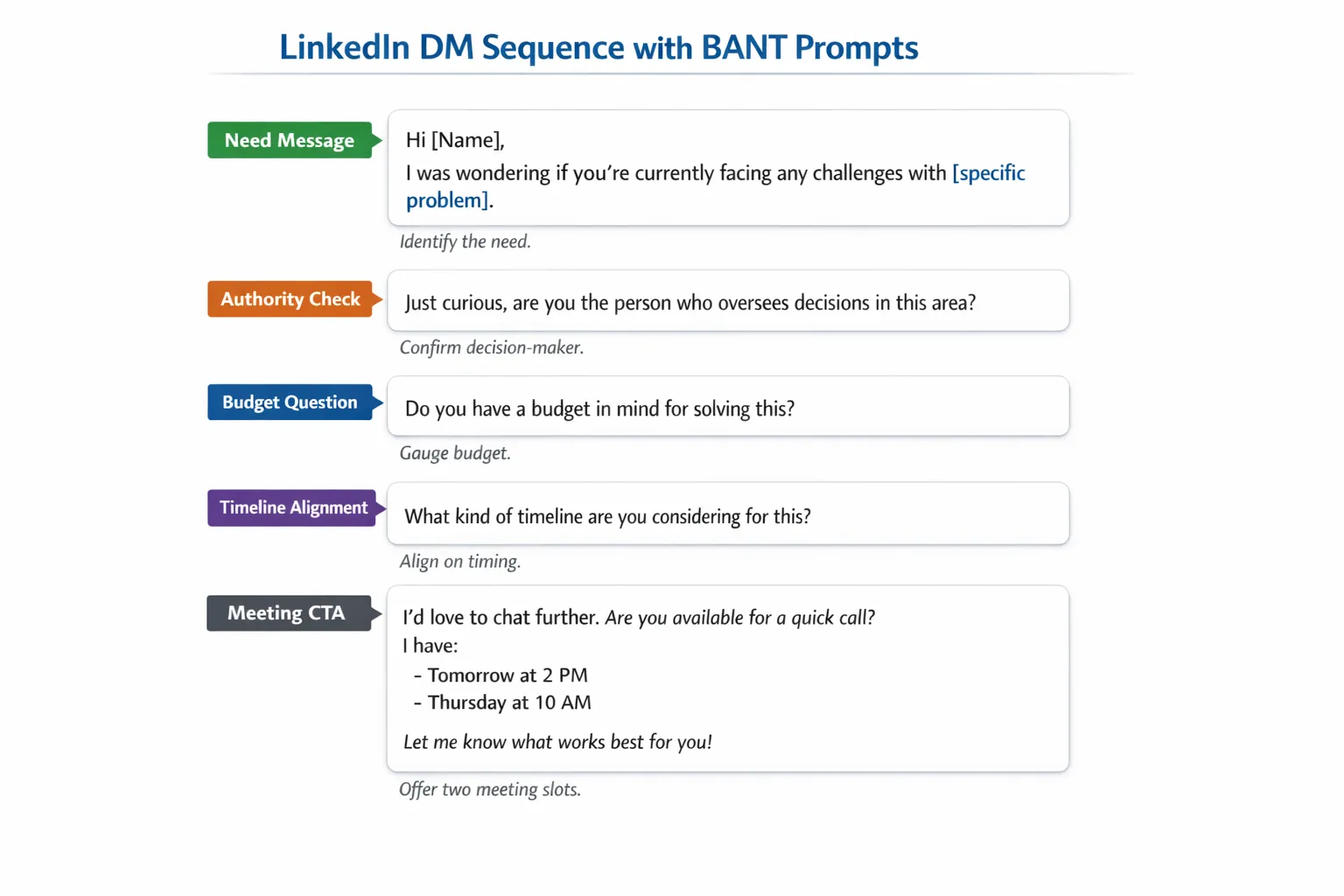
Example LinkedIn DM flow using BANT prompts
- Connection note: “Noticed you scaled the SDR team recently. We help teams move discovery into the DM so AEs get cleaner meetings. Open to connect?”
- After acceptance: “Quick one, are you focusing on more meetings from LinkedIn this quarter or tuning reply quality?”
- If Need confirmed: “Makes sense. When you add a new workflow, who usually weighs in so we can shortcut the process?”
- Authority reply: “Great, happy to include RevOps. If a pilot showed a lift in qualified conversations, is there a reasonable path to secure funds this quarter?”
- Budget reply: “Got it. If we validated fit, when would you want it live with the team?”
- CTA: “Sounds aligned. I can show a 10 minute walkthrough tailored to your sequence. Does Tuesday 10:30 or Wednesday 2:00 work?”
Once the buyer provides two or more strong signals, move to calendar quickly. Offer two time options, then provide a link if they prefer to self‑schedule.
From signals to action: simple scoring you can run tomorrow
Use a lightweight, explainable score so SDRs and AI agents agree on next steps.
- Score each BANT dimension as 0, 1, or 2, based on the matrix above.
- Route and act on the total:
- 6 to 8, book now and multi‑thread.
- 4 to 5, send a tailored value drop and attempt to lock a time.
- 0 to 3, recycle with a nurture asset or set a timed follow up.
If you want a more holistic model that blends Fit and Intent with conversational signals, see our guide on a practical scoring system in Lead Qualification Process: Steps, Scoring, and Automation.
Measure what matters, not just reply rate
Define the micro conversions BANT should influence and review them weekly.
- Connection acceptance rate, are you targeting the right ICP
- First reply rate, are your openers buyer‑first and relevant
- Qualified conversation rate, threads with at least two strong BANT signals
- Meeting booked rate, percent of qualified threads that schedule
- Speed to meeting, median days from first reply to booked time
- Meeting show rate, confirms you are not forcing bad meetings
For broader funnel alignment, use the SQL rubric in What Is a Sales Qualified Lead? Examples and Benchmarks so qualification criteria match sales handoff.
A 14‑day pilot to prove BANT without slowing your team
- Days 1 to 2, baseline. Export last 30 days of LinkedIn threads. Manually tag BANT signals, compute qualified conversation rate and meeting rate.
- Days 3 to 4, instrument. Add BANT fields to your CRM or tracking sheet. Load two versions of micro prompts per dimension.
- Days 5 to 10, run. Use the conversational flow above across one ICP. Keep messages under 80 words. Do not change more than one variable at a time.
- Day 11, review. Compare A and B prompt sets on qualified conversation rate and speed to meeting. Read 20 full threads to judge tone and buyer experience.
- Days 12 to 13, refine. Keep the winning Need and Authority prompts, refresh Budget and Timeline if underperforming. Add a multi‑thread step where needed.
- Day 14, decide. Roll the winning set to a second ICP or scale volume, and set a weekly review cadence.
If you rely heavily on LinkedIn for pipeline, pair this with the plays in LinkedIn Prospecting Playbook: From First Touch to Demo so you have message, cadence, and measurement aligned.
Common mistakes that waste time
- Treating BANT as an interrogation, ask one relevant question at a time and reflect back what you hear
- Asking for budget numbers before confirming the problem, anchor on impact first
- Ignoring buying groups, invite the right stakeholders without asking for permission aggressively
- Skipping CRM hygiene, log BANT signals as you go so AEs trust the handoff
- Optimizing for replies instead of qualified meetings, use qualified conversation rate as your North Star
Operationalizing BANT with AI, without losing control
Running BANT consistently across hundreds of DMs is hard. This is where automation helps, as long as you keep governance and visibility.
With Kakiyo you can:
- Run autonomous LinkedIn conversations that use your BANT prompts and stay on tone
- Qualify in thread with AI‑driven scoring so good opportunities rise to the top
- A/B test prompt variants for each BANT element to continuously improve
- Use industry‑specific templates to start fast and then customize by ICP
- Manage many conversations at once while keeping conversation override control for your team
- See everything in a centralized real‑time dashboard with advanced analytics and reporting
If you want to see how this looks in practice, our post on Automated Lead Qualification: Playbooks, Tools, and Metrics shows how to combine qualification prompts, routing, and analytics into a repeatable motion.
The bottom line
BANT is still one of the fastest ways to separate real opportunities from polite conversations. When you make it conversational, sequence Need before numbers, and capture signals as you go, you will book more meetings in less time and protect your pipeline quality.
If you are ready to qualify leads without wasting time, see how Kakiyo’s AI can manage personalized LinkedIn conversations from first touch to booked meeting while keeping humans in the loop. Start with a focused ICP, load your prompts, and let the system handle the busywork so your team can focus on high‑value opportunities.
FAQ
What is the difference between a lead and a qualified prospect?
A lead is simply a potential contact or account. A qualified prospect has enough verified fit, intent, and context to justify a next sales step.
What makes qualification trustworthy?
Qualification is trustworthy when it relies on auditable signals, not labels alone. The more evidence a team can verify, the easier it is to align sales, marketing, and RevOps.
Should qualification be based on one score?
Not by itself. Scores are useful summaries, but teams still need explicit criteria around fit, buying signals, and next-step readiness.
How do I implement proof-based qualification in my team?
Start by defining what evidence is required at each stage, then make those signals visible in your workflows. The goal is consistency across inbound, outbound, and partner-sourced leads.