
 Ilan Asseo
Builder.ai vs ZoomInfo: Data, Workflows, and Fit
Compare Builder.ai and ZoomInfo for GTM teams—when to build custom workflow apps vs buy data, and how Kakiyo complements them by converting contacts into.

Gartner reports B2B buyers spend only 17% of their buying journey meeting potential suppliers, the rest happens in self-serve research and internal consensus-building. That is why “Builder.ai vs ZoomInfo” is usually not a head-to-head tool fight, it is a build vs buy decision about where your team should spend time, and where software should do the work.
Industry evidence: “Our research suggests that a fifth of current sales-team functions could be automated.” — McKinsey & Company.
Source: McKinsey
What is a go-to-market data and workflow tool?
A go-to-market (GTM) data and workflow tool helps revenue teams find the right accounts, get accurate contact data, route it into their systems, and run repeatable outbound processes. Some products primarily sell data (contacts, companies, intent), others help you build or automate workflows, and a third category executes multi-turn conversations that qualify and book meetings.
Quick comparison table
| Tool Name | Best For | Key Feature | Starting Price |
|---|---|---|---|
| Kakiyo | Autonomous LinkedIn conversations that qualify and book meetings | Full conversation management plus intelligent scoring and meeting booking | Pricing on request (demo) |
| ZoomInfo | B2B contact and company data for outbound, enrichment, and routing | Large GTM database plus enrichment and GTM workflows | Pricing on request |
| Builder.ai | Building custom internal apps and workflow front-ends | Productized app building with an AI-assisted development workflow | Pricing on request |
Two grounding facts before we get tactical:
- LinkedIn says it has 1+ billion members, which is why it remains a primary channel for B2B identity and conversations, even when email deliverability gets harder (LinkedIn Pressroom).
- Gartner’s “17%” stat is the reason you should optimize for speed-to-relevance and speed-to-qualification, not just list size (Gartner research referenced widely in GTM buying-journey coverage).
Kakiyo
What it does (2 sentences). Kakiyo autonomously manages personalized LinkedIn conversations from first touch through qualification to meeting booking. It is built for teams that want pipeline from LinkedIn without turning SDRs into inbox clerks.
Standout feature (1 sentence). Kakiyo’s edge is that competitors automate sending, Kakiyo runs the full multi-turn conversation, qualifies leads with an intelligent scoring system, and books the meeting, SDRs step in only to close.
Who it’s for (1 sentence). SDR leaders, RevOps, and founders who want a governed, measurable way to scale AI LinkedIn prospecting and produce sales-accepted meetings.
Pricing. Pricing is not publicly listed, request a demo via Kakiyo.
Pros (2-3 bullets).
- Converts replies into qualified conversations with scoring, templates, and consistent in-thread discovery.
- Handles many simultaneous threads, reducing “thread debt” and missed follow-ups.
- Built for iteration with prompt customization, A/B prompt testing, and analytics.
Cons (1-2 bullets).
- If you only need bulk connection requests or basic sequences, it may be more capability than you need.
- You still need a clear ICP slice and qualification rules, otherwise you will automate noise.
ZoomInfo
What it does (2 sentences). ZoomInfo is a GTM intelligence platform best known for B2B contact and company data used for outbound list building, enrichment, and routing into CRMs and sales engagement tools. It is typically the “data layer” that fuels prospecting, territory planning, and enrichment workflows.
Standout feature (1 sentence). ZoomInfo’s value is centralized GTM data plus workflow distribution, meaning you can source and operationalize data in one system rather than stitching many vendors together.
Who it’s for (1 sentence). Teams that need reliable B2B data at scale for outbound, enrichment, and segmentation, especially when building lists manually is a bottleneck.
Pricing. ZoomInfo pricing is typically custom, see ZoomInfo for current packaging.
Pros (2-3 bullets).
- Strong fit when your limiting factor is coverage and contactability, not messaging.
- Useful when RevOps needs governed enrichment and standardized fields across teams.
- Commonly integrated into modern revenue stacks, reducing manual CSV work.
Cons (1-2 bullets).
- Great data does not equal pipeline if your team cannot convert replies into qualified meetings.
- Total cost is not just the contract, you also pay in ops time for governance, field mapping, and adoption.
Builder.ai
What it does (2 sentences). Builder.ai is an app-building platform designed to help teams build custom software faster than traditional custom development. In a GTM context, it is relevant when you want to build a custom workflow layer, for example an internal “prospecting request” app, lead routing interface, or a bespoke enrichment QA tool.
Standout feature (1 sentence). Builder.ai’s advantage is custom workflow creation, you can build a purpose-fit app instead of forcing a generic tool to match your process.
Who it’s for (1 sentence). RevOps and operators who have a well-defined process, existing data sources, and a clear reason to build a custom system rather than adopt an off-the-shelf GTM product.
Pricing. Builder.ai pricing is generally project and scope dependent, see Builder.ai for current details.
Pros (2-3 bullets).
- Lets you build exactly what your process requires, which can improve adoption when generic tools fail.
- Can unify fragmented workflows behind one internal interface.
- Helpful when you need a lightweight tool for a unique compliance, QA, or routing rule.
Cons (1-2 bullets).
- It does not replace a GTM database, you still need data sources like ZoomInfo or first-party systems.
- Building adds maintenance and roadmap burden, especially if requirements shift every quarter.
Builder.ai vs ZoomInfo: what you are actually deciding
Most teams comparing these two are deciding between:
- Buying GTM data and workflows (ZoomInfo) so reps can immediately build lists and start outreach.
- Building a custom workflow layer (Builder.ai) to orchestrate data from multiple sources, enforce internal rules, or create a tailored user experience.
Here is the operator-grade way to choose, based on the bottleneck that is slowing pipeline.
1) If you need data, buy data
If your SDRs cannot answer “who should I contact at this account, and how do I reach them,” you do not have a workflow problem, you have a coverage problem.
ZoomInfo is purpose-built for this, Builder.ai is not. Builder.ai can help you build an interface around data you already have, but it will not magically source and maintain a B2B identity graph.
2) If you need a custom process, build the thin layer, not the universe
Builder.ai makes sense when:
- You already have data sources (ZoomInfo, CRM, product signals, intent) but they are scattered.
- Your internal rules matter (routing, approval, logging, QA).
- Your team needs a “single pane” UI to execute a specialized motion.
The trap is trying to build a full ZoomInfo replacement. Even if you could, you would be signing up to continuously solve coverage, verification, compliance, deduplication, and refresh cycles.
3) If you need qualified conversations and booked meetings, neither solves it alone
This is where most outbound stacks fail in 2026. Teams buy data, run sequences, get replies, then lose the thread with slow follow-up, inconsistent qualification, and calendar friction.
That is why an execution layer like Kakiyo matters. ZoomInfo can tell you who to contact. Kakiyo turns those contacts into qualified LinkedIn conversations and booked meetings, with scoring, templates, A/B prompt tests, and override controls so you can scale without brand drift.
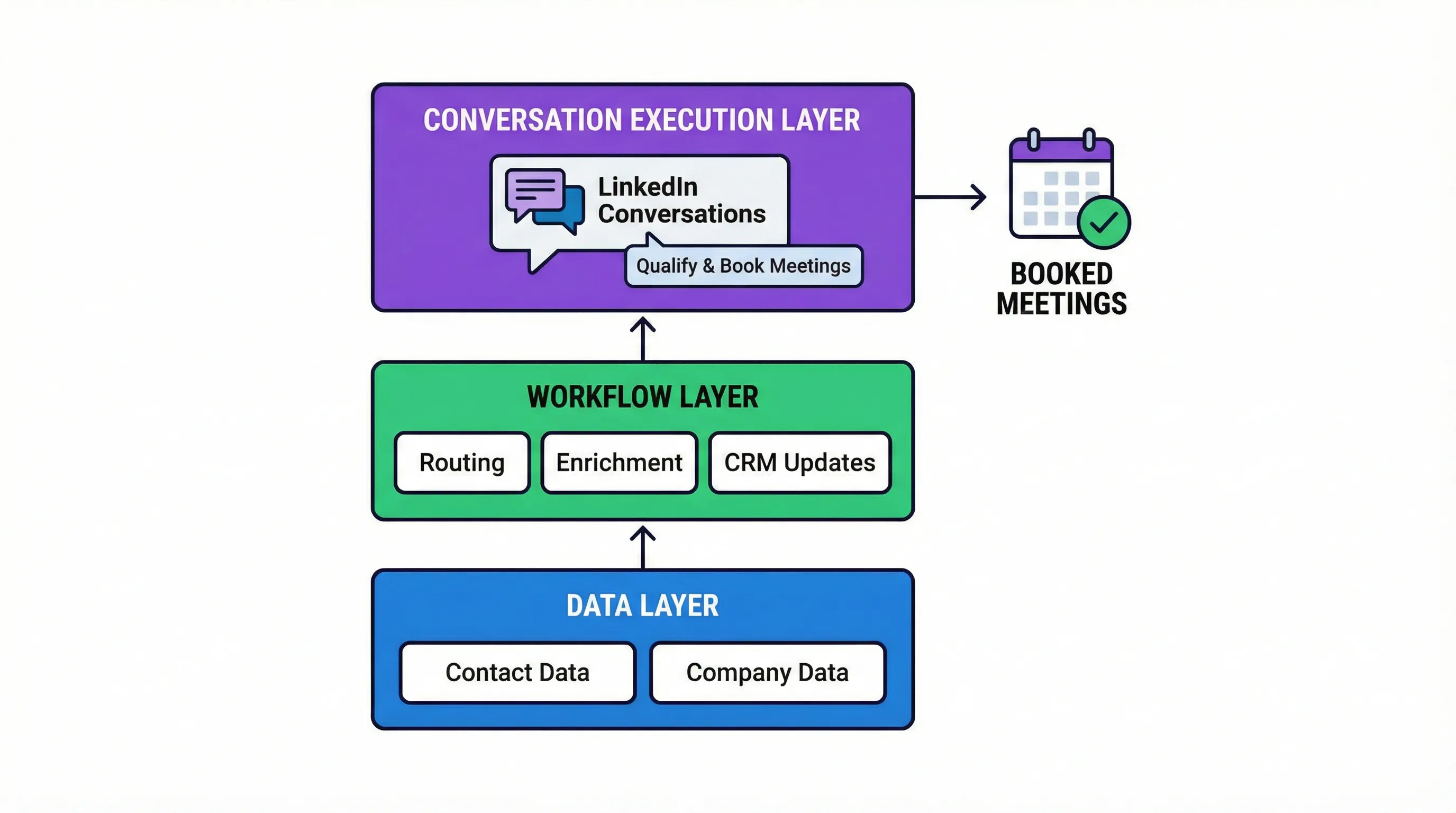
Workflow fit: a practical “data to meeting” mapping
If you want a clean mental model you can share with RevOps and Finance, map each tool to one job and one measurable output.
| Layer | Primary job | What “good” looks like | Tool that best fits |
|---|---|---|---|
| Data | Identify accounts and contacts | High contactability, low bounce/return rates, consistent fields | ZoomInfo |
| Workflow | Enforce routing, QA, enrichment rules | Fewer manual steps, clear ownership, clean CRM records | Builder.ai (custom), or your CRM ops |
| Conversation | Convert replies into qualified meetings | Faster response, consistent qualification, higher sales acceptance | Kakiyo |
This avoids the common mistake of judging ZoomInfo by meeting rate, or judging Builder.ai by database coverage. They are not designed for those outcomes.
Governance and risk, what to validate in the first 30 minutes
If you are evaluating Builder.ai vs ZoomInfo for a revenue workflow, ask these questions early, they determine whether the tool becomes leverage or shelfware.
Data provenance and compliance
With any contact data provider, validate how the vendor approaches privacy and compliance for your regions and use cases. ZoomInfo maintains trust and compliance resources you can review, then align with your legal team’s requirements (ZoomInfo Trust Center).
Operational ownership
If you build with Builder.ai, decide who owns:
- Field definitions and mapping
- Permissions and auditing
- Ongoing change requests
If nobody owns it, a custom workflow becomes a brittle internal product.
Outcome instrumentation
No matter what you choose, do not measure success as “more leads.” Measure down-funnel outcomes, especially the ones that align with Gartner’s reality that buyers are mostly not in meetings.
For outbound, the most defensible chain is:
- Contactability and ICP match
- Reply rate and positive reply rate
- Qualified conversation rate
- Meetings booked, held
- Sales acceptance
ZoomInfo can lift the first step. Kakiyo is built to lift the middle steps where most teams leak.
Which tool should you choose?
- If you want B2B contact and company data for outbound and enrichment, use ZoomInfo.
- If you want to build a custom internal workflow app on top of your existing data sources, use Builder.ai.
- If you want autonomous AI conversation management on LinkedIn that qualifies leads and books meetings, use Kakiyo.
- If you want a practical stack, use ZoomInfo for data plus Kakiyo for LinkedIn execution, then keep Builder.ai for the few workflows that must be bespoke.
- If you want to reduce SDR time spent on inbox follow-ups and re-asking basic questions, use Kakiyo.
FAQs
Builder.ai vs ZoomInfo: which is better for sales teams?
They solve different problems. ZoomInfo is built to provide GTM data and distribute it into sales workflows, Builder.ai is built to create custom applications and internal tooling. If your sales team’s bottleneck is list quality and contactability, ZoomInfo is usually the better starting point.
Can Builder.ai replace ZoomInfo?
Not directly. Builder.ai can help you build an interface or workflow around data you already have, but it is not a GTM data provider. To replace ZoomInfo you would still need equivalent data sources, refresh cycles, and compliance processes.
Is ZoomInfo worth it for outbound prospecting?
ZoomInfo can be worth it when inaccurate or incomplete contact data is your main constraint and your team can operationalize the data into consistent outbound motions. It is less worth it if your bigger issue is slow reply handling, inconsistent qualification, or low meeting conversion.
What are the best ZoomInfo alternatives?
The best alternative depends on what you mean by “ZoomInfo.” If you mean data coverage, look at other data providers. If you mean converting targets into meetings, pair a data source with an execution layer like Kakiyo for LinkedIn conversations and qualification.
What is the best LinkedIn lead qualification software?
If you need software that does more than automate sending, choose a tool that can manage multi-turn conversations, score intent, and book meetings. Kakiyo is purpose-built for autonomous LinkedIn lead qualification with prompt control, A/B testing, scoring, and human override.
Book a Kakiyo demo to see autonomous LinkedIn conversations qualify prospects and book meetings end-to-end.