
 Ilan Asseo
Cold Prospecting on LinkedIn: A Safe, High-Reply Cadence
A practical 10–14 day LinkedIn cold prospecting cadence that prioritizes permission, relevance, and stop rules to maximize replies while protecting.

Cold prospecting on LinkedIn works best when it feels like a normal, respectful conversation, not a sequence. The fastest way to kill reply rates (and risk account restrictions) is to optimize for volume and “steps” instead of permission, relevance, and stop rules.
A safe, high-reply cadence is simply a plan that:
- Uses a few purposeful touches over 10 to 14 days
- Changes behavior based on what the buyer does (accepts, replies, ignores, declines)
- Stops quickly when there is no permission or no fit
- Tracks micro-conversions so you can improve without spamming
Below is a practical cadence you can run manually or with controlled automation, plus the safety guardrails that keep you out of trouble and keep your brand trusted.
Industry evidence: “As customers increasingly learn and buy digitally, sales reps become just one of many possible sales channels.” — Cristina Gomez, Managing Vice President, Gartner.
Source: Gartner
What “safe” means for cold prospecting on LinkedIn
“Safe” is not just “don’t get banned.” In 2026, buyers filter aggressively, and LinkedIn enforces trust and authenticity standards. A safe cadence protects three things at the same time:
1) Platform safety
LinkedIn’s rules and enforcement are not optimized for your pipeline, they are optimized for member experience. If your outreach resembles spam patterns (high volume, repetitive copy, no personalization, aggressive CTAs), you increase the chance of warnings or restrictions.
At minimum, align your motion to LinkedIn’s published policies and expectations, including the LinkedIn User Agreement and LinkedIn Professional Community Policies.
2) Buyer safety (permission and relevance)
Cold prospecting is always an interruption. A safe cadence earns the right to ask questions by being:
- Specific about why you reached out
- Brief enough to read on mobile
- Low pressure (a “yes/no” or “worth exploring?” question, not “book a demo”)
3) Brand safety (voice, claims, and proof)
Your brand takes damage when reps (or AI) over-claim, fabricate urgency, or sound automated. High-reply cadences treat your LinkedIn threads like a public artifact even though they are private.
If you use AI, the bar is higher: you need repeatability and control (prompt governance, A/B tests, and clear escalation rules) so the AI does not drift into risky behavior.
The anatomy of a high-reply cadence (what you are really optimizing)
Most teams try to “get more replies” by writing new templates. The better lever is to optimize the micro-conversions that happen before the reply:
- Profile click (you earned curiosity)
- Connection acceptance (you earned permission to message)
- First message read (you earned attention)
- First reply (you earned engagement)
- Qualified conversation (you earned the right to book)
When those steps are measured, you can fix the real bottleneck. For example, low acceptance is often a targeting and positioning issue, not a copy issue.
Prerequisites (don’t run any cadence until these are true)
Before you schedule touches, lock the inputs. This is where “safe” and “high reply” converge.
Tight ICP slice
Not “VP Sales at SaaS,” but something narrow enough to be meaningfully relevant. Examples:
- VP Sales at Series A-B devtool companies hiring their first 2-4 SDRs
- RevOps leaders at B2B SaaS with Salesforce who mention pipeline hygiene or forecasting
- Founders selling a high ACV service who post weekly about outbound or demand gen
Narrow slices let you send messages that sound like you actually meant them.
A single value hypothesis
A value hypothesis is a one-sentence claim you can support.
Bad: “We help teams grow pipeline.”
Good: “We help SDR teams turn LinkedIn replies into qualified conversations and booked meetings without increasing spam risk.”
A clear “qualified” definition
Your cadence must know what it is trying to produce. If your goal is “meeting booked at all costs,” you will eventually pressure people into calls that no-show or go nowhere.
Use a lightweight rubric (fit + intent + evidence) so reps and AI can stop early when it is not a match.
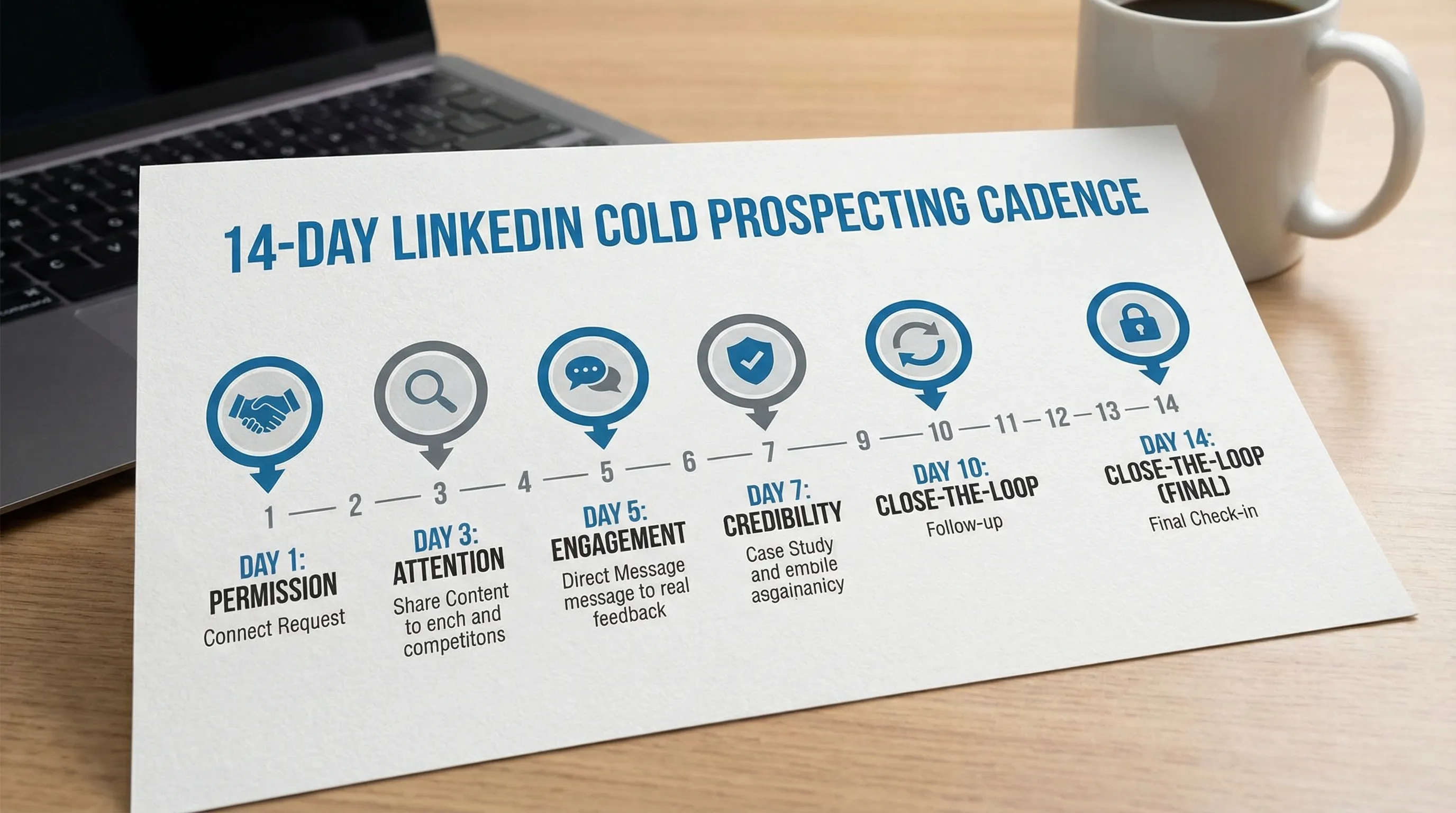
A safe, high-reply LinkedIn cadence (10 to 14 days)
This cadence is built around permission and behavior. It is not “touch them 6 times no matter what.”
The cadence at a glance
| Day | Touch | Primary goal | Safety rule | Example direction (not a script) |
|---|---|---|---|---|
| 0 | Profile view + optional light engage | Warm recognition | Do not force fake engagement | View profile, if relevant react/comment once on a real point |
| 0 | Connection request (no pitch) | Earn permission | No link, no meeting ask | 1 line of relevance + 1 line of context |
| 2-3 | Post-accept message (value-first) | Earn attention | Keep it under 300 characters if possible | Share a specific observation + offer a small useful artifact |
| 5-6 | Follow-up (choice-based) | Trigger a low-effort reply | One question only | “Worth sharing the 3-step version, or not a priority?” |
| 8-10 | Proof snippet + soft CTA | Build credibility | Proof must be true and modest | 1 proof point + ask permission to ask 1 question |
| 12-14 | Breakup (polite, leaves door open) | Protect brand and time | Never guilt | “Seems not a priority, want me to close the loop?” |
Two notes:
- If they do not accept your connection request, you do not “follow up” in DMs. You wait, or you move on.
- If they reply at any point, the cadence becomes a conversation, not additional steps.
What to say at each step (principles that keep it safe and get replies)
You do not need longer messages. You need fewer reasons to ignore you.
Touch 1: The connection request (permission-first)
Connection requests win when they answer “why you, why now” without asking for anything.
Good patterns:
- A relevant trigger: a recent post, job change, hiring signal, product launch
- A narrow reason: “noticed you’re building X motion,” not “I love what you do”
- No CTA beyond connecting
Safety check: if the request would sound weird coming from a peer, rewrite it.
Touch 2: The post-accept message (value-first, no meeting)
Most teams blow it here by pitching immediately. You just earned permission to message, not permission to sell.
High-reply openers usually include:
- One specific observation (shows it is not sprayed)
- One small, concrete “value drop” (a checklist, benchmark, teardown, playbook summary)
- A low-friction question that can be answered in a few words
Examples of “value drops” that are safe:
- “If helpful, I can share the exact LinkedIn reply triage rubric we use (3 categories, 30 seconds).”
- “I wrote a 6-line checklist for turning ‘maybe later’ into a clean next step, want it?”
Touch 3: The follow-up (choice-based)
Your follow-up is not “bumping this.” It is a decision assist.
A safe, effective follow-up does one of these:
- Offers two relevant paths: “want the short version or should I close the loop?”
- Confirms priority: “Is this even on your radar this quarter?”
- Asks a binary question: “Do you handle SDR quality metrics, or someone else?”
Avoid multiple questions. Multiple questions feel like work.
Touch 4: Proof snippet + permission to qualify
Proof increases replies when it is modest and specific. It decreases replies when it is vague (“we drive 10x ROI”) or unverifiable.
Safer proof formats:
- “We’ve seen teams improve qualified conversation rate by tightening ICP slices and adding stop rules.”
- “Common pattern: acceptance goes up after removing the pitch from the connection note.”
Then ask permission for one qualification question, not a meeting.
Touch 5: Breakup (brand-protecting)
A breakup message should reduce pressure, not apply it.
Good breakup behaviors:
- Assume non-priority, not rejection
- Offer a clean opt-out
- Keep the door open for later
This touch protects your reputation and improves list hygiene.
The stop rules that make a cadence “safe”
Stop rules are the difference between a cadence and spam. Define them in writing and enforce them.
Use these as defaults:
- Stop immediately on any negative reply, including “not interested,” “remove me,” or irritation.
- Stop if the person is not your ICP and you realize it mid-thread. Apologize briefly and exit.
- Stop after the breakup. Do not restart the same sequence next month unless you have a new trigger.
- Slow down when engagement is low. If acceptance and replies dip, reduce new starts and fix targeting and messaging before adding volume.
If you run LinkedIn at scale, stop rules should be system-enforced, not “best effort.”
How to measure “high reply” without fooling yourself
Reply rate alone is easy to game (by asking questions that invite low-quality responses). Track paired metrics so you optimize for outcomes.
Here is a practical scorecard for this cadence:
| Metric | What it tells you | Common failure if low |
|---|---|---|
| Connection acceptance rate | Targeting + positioning | ICP too broad, connection note too generic |
| Reply rate (any reply) | Message relevance | You pitched too early, message too long |
| Positive reply rate | Value hypothesis strength | You are not specific, no credible proof |
| Qualified conversation rate | Qualification design | You are not asking the right single question |
| Meetings booked per 100 starts | End-to-end effectiveness | Weak CTA mechanics, no clear next step |
| AE acceptance (if applicable) | Quality control | SDRs booking unqualified meetings |
A healthy cadence improves upstream conversion first (acceptance, first replies), then downstream (qualified conversations, booked meetings). If you only see “more replies” but not “more qualified conversations,” your ask is likely attracting the wrong kind of engagement.
The safest way to A/B test a LinkedIn cadence
Most outreach testing fails because teams change five things at once, then declare victory on a tiny sample.
Keep it simple:
- Test one variable at a time (opener, proof line, question, CTA)
- Hold the ICP slice constant
- Use the same stop rules
- Decide the success metric before you launch (usually qualified conversation rate, not raw replies)
If you need to move fast, rotate tests weekly, not daily. Daily changes create noise and increase the risk of inconsistent brand voice.
Where AI helps, and where it creates risk
AI can improve both safety and reply rates when it is used to increase relevance, enforce rules, and handle repetitive thread work.
AI is risky when it is used to increase volume without governance.
A practical way to think about it:
- Good AI use: summarize profile signals, draft a short message in your voice, handle routine follow-ups, capture qualification evidence, route to a human when uncertainty is high.
- Risky AI use: blasting near-identical openers, pushing for meetings immediately, ignoring negative sentiment, continuing after opt-outs.
Kakiyo is built specifically around this LinkedIn conversation problem: autonomous, personalized conversations from first touch to qualification to meeting booking, with controls that matter in the real world (custom prompts, A/B testing, intelligent scoring, override control, and analytics). If your team is already doing LinkedIn-first outbound and the bottleneck is “too many threads, not enough qualified outcomes,” a governed AI layer can help you scale without turning your network into a spam channel.
You can explore how Kakiyo approaches safe scaling here: Kakiyo.

Implementation checklist (so you can run this next week)
If you want this cadence to be both safe and effective, implement it as an operating system, not a script.
- Write your ICP slice in one sentence and add 3 disqualifiers.
- Write one value hypothesis and one proof point you can defend.
- Define “qualified conversation” in plain language (what evidence must be present).
- Publish stop rules and enforce them.
- Instrument the micro-conversions (acceptance, replies, qualified conversations, meetings booked, meetings held).
- Review results weekly and change one thing at a time.
Cold prospecting on LinkedIn is still one of the highest-signal outbound channels in 2026, but only for teams who treat it like relationships at scale, not steps at scale. A safe, high-reply cadence earns permission first, adapts to behavior, and optimizes for qualified conversations, not activity.
FAQ
What makes a LinkedIn or cold outreach sequence effective?
An effective outbound sequence matches the buyer's context, uses short messages, and measures reply quality rather than raw volume. Cadence, targeting, and stop rules matter as much as copy.
How many touches should I use before stopping?
Most teams should stop once intent is clearly absent or once the sequence becomes repetitive. The right stop rule protects deliverability, reply quality, and brand perception.
Should I automate all outreach?
No. Automation should remove repetitive work, not replace judgment. The best systems automate targeting, timing, and admin while keeping messaging and qualification grounded in context.
How do I know whether outreach is working?
Track positive reply rate, meeting quality, and downstream conversion instead of open rates alone. If meetings do not progress, the issue is usually targeting or qualification, not activity volume.