
 Ilan Asseo
HubSpot Marketing Qualified Lead: Definition and Handoff
In-depth operational guide to defining HubSpot MQLs, the minimum handoff packet sales needs, and automating MQL→SAL with HubSpot and conversational tools.

Forrester famously found that lead nurturing can produce 50% more sales-ready leads at 33% lower cost than non-nurtured programs, but only when marketing and sales agree on what “qualified” means. In HubSpot, a Marketing Qualified Lead is not a score, it is an operational contract that must trigger a fast follow-up, a clear accept or reject decision, and an audit trail.
Industry evidence: Gartner’s research on the B2B buying journey shows that consensus creation is now a core buying job, which is why qualification needs buying-group evidence rather than single-contact activity.
Source: Gartner
What is a HubSpot marketing qualified lead?
A HubSpot marketing qualified lead (MQL) is a contact (or lead record) that meets your team’s agreed criteria for fit + intent + recency, and is therefore ready for a sales development follow-up. In HubSpot, this is typically represented by updating the Lifecycle stage to Marketing Qualified Lead, storing the qualifying evidence in properties, and launching an automated handoff workflow to sales.
Tools that make HubSpot MQL definition and handoff actually work
| Tool Name | Best For | Key Feature | Starting Price |
|---|---|---|---|
| Kakiyo | Autonomous LinkedIn conversations that qualify and book meetings | AI-managed multi-turn LinkedIn qualification with intelligent scoring | Contact sales |
| HubSpot Marketing Hub | Defining MQL triggers and scoring from marketing signals | Lead scoring + workflows tied to lifecycle stages | Free plan available |
| HubSpot Sales Hub | Enforcing MQL follow-up SLAs and acceptance hygiene | Tasks, sequences, pipelines, and sales reporting | Free plan available |
| 6sense | Adding account-level intent to improve MQL quality | Account intent + buying stage signals | Contact sales |
| Zapier | Connecting tools when you need lightweight automation | No-code workflows between apps | Free plan available |
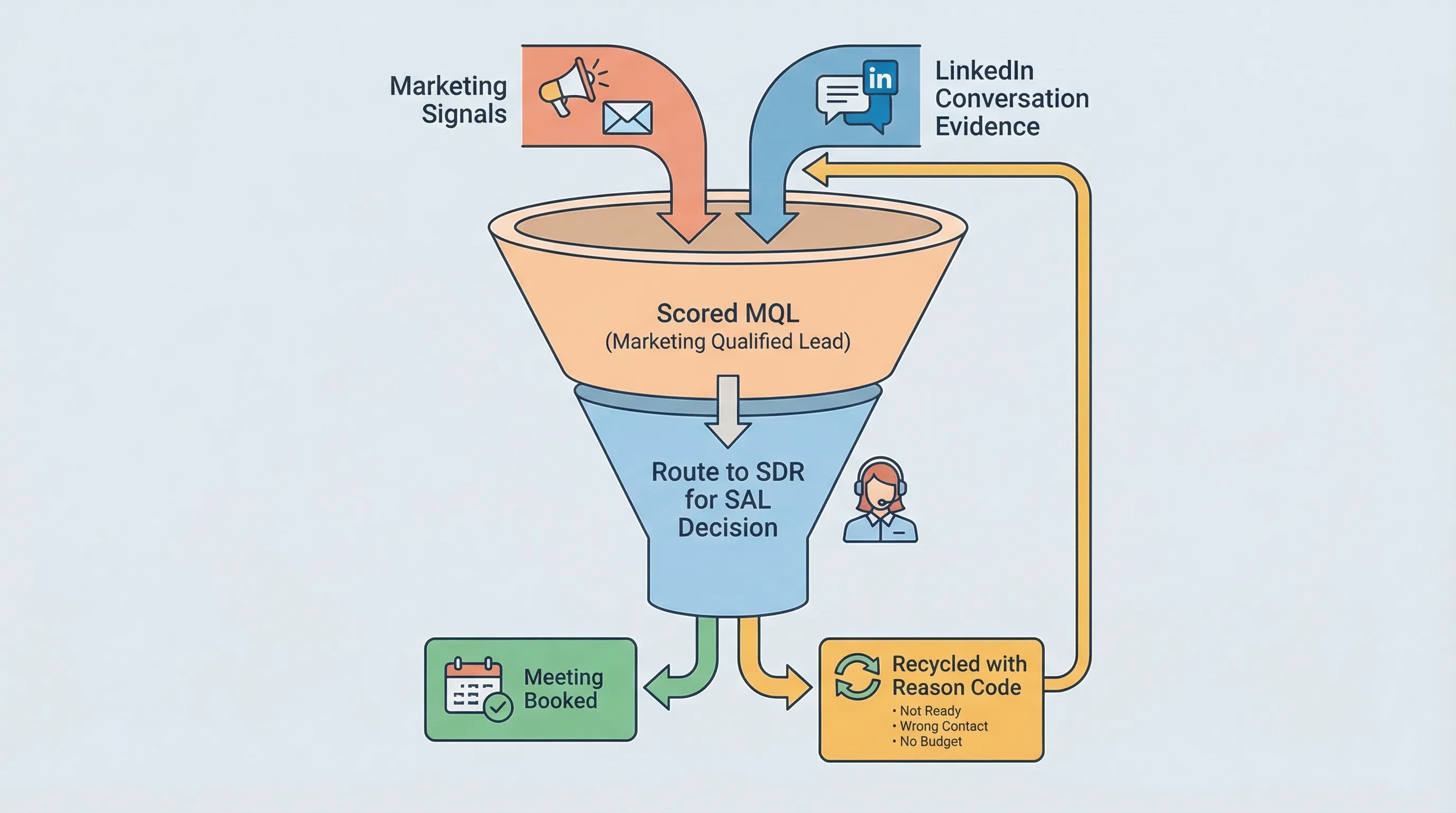
HubSpot MQL: the only definition sales will respect
If you want your HubSpot MQLs to convert (instead of getting ignored), the definition has to be explainable and enforceable. The easiest way to keep it clean is to treat MQL entry as three gates.
1) Fit (can we win here?)
Fit is mostly static. It should come from firmographics (industry, employee size), persona (job function/seniority), and basic disqualifiers (student, agency, competitor, geography you do not serve).
In HubSpot, fit belongs in properties that can be filtered and reported, not buried in free-text notes.
2) Intent (did they signal a real problem?)
Intent is behavioral. Examples: pricing page views, demo requests, high-intent content, webinar attendance, and conversation signals (reply quality, stated pain, “why now”).
This is where most teams break MQL. They count activity (downloads) instead of capturing evidence (problem, impact, next step).
3) Recency (is it happening now?)
Intent expires. Your MQL definition needs a recency window (for example, “high-intent action in the last X days”) so old leads do not keep recycling as “hot.”
HubSpot supports this by tracking Last activity date and by storing timestamps for your specific triggers (for example, “Last high-intent event date”).
The minimum viable HubSpot MQL handoff packet (what sales needs in the record)
An MQL without context forces SDRs to re-discover what marketing already knows. That slows follow-up and drops conversion.
Store a small, consistent “handoff packet” on every MQL so sales can act immediately.
| HubSpot field (property) | What to store | Why it matters to sales |
|---|---|---|
| MQL reason | The single trigger that caused MQL (pricing visit, demo form, event, LinkedIn reply) | Prevents “why are they MQL?” debates |
| Primary persona | Buyer role (finance, IT, ops, RevOps, founder) | Drives the first message and discovery angle |
| ICP fit tier | A simple tier (A/B/C) or fit score band | Sets follow-up priority |
| Intent evidence | 1 to 2 sentences of proof (problem stated, initiative named, competitor mentioned) | Avoids restarting the conversation |
| Recency timestamp | Date/time of the last qualifying signal | Enables SLA and aging reports |
| Routing owner + SLA clock | Who owns it and by when the first touch must happen | Makes follow-up measurable |
| Disqualify or recycle reason codes | Standard picklist values | Enables learning loops, not arguments |
How to implement HubSpot MQL criteria without creating scoring chaos
This is the practical pattern that holds up in real ops reviews.
Use Lifecycle stage for the label, and properties for the proof
HubSpot’s Lifecycle stage is a shared language across marketing and sales. Use it as the official “this is now an MQL” flag.
Then use properties for the evidence sales will ask for. If your MQL definition cannot be expressed as properties and timestamps, it cannot be governed.
HubSpot’s default lifecycle stages (and the fact they are shared across tools) are documented in HubSpot’s knowledge base under lifecycle stage management.
Keep lead scoring explainable
If your model has 60 scoring rules, nobody trusts it.
A practical scoring setup usually looks like this:
- Fit score: small number of firmographic and persona rules.
- Intent score: a short list of behaviors that actually correlate with meetings.
- Negative scoring: students, job seekers, competitors, unsubscribes.
- Decay: points fall off after a defined window so old activity stops inflating.
The outcome you want is simple: any rep should be able to answer, in 10 seconds, “Why is this an MQL?”
The HubSpot MQL handoff: MQL to SAL in one enforceable workflow
A HubSpot MQL handoff fails for one of two reasons.
- Sales never sees it, or sees it too late.
- Sales sees it but cannot decide what to do, so it sits.
The fix is to treat MQL to Sales Accepted Lead (SAL) as a binary decision with reason codes, and to automate everything around that decision.
What the workflow must do
When a contact becomes an MQL, your HubSpot automation should:
- Assign an owner (or route by territory/segment).
- Create a task with a due date that reflects your SLA.
- Notify the right channel (email, Slack, or in-app), so it is visible.
- Stamp the MQL timestamp so aging is measurable.
- Require an accept or reject outcome using a controlled property (not a note).
What sales must do
Sales (often SDRs) should have only a few allowed outcomes:
- Accept: proceed to qualification and meeting booking.
- Recycle: not ready, nurture required.
- Reject: not ICP, bad data, competitor, student, etc.
This is how you stop MQLs from becoming a political KPI.
Where HubSpot MQLs are weakest in 2026: conversation-led signals
Most of the best intent is now conversational.
- A prospect replies on LinkedIn with a specific initiative.
- They confirm a tool they are replacing.
- They mention timing (“Q2,” “after budget reset,” “this month”).
Those signals are higher quality than most form fills, but they often live outside HubSpot in message threads.
If you cannot standardize and store conversation evidence, your HubSpot MQL program will bias toward low-signal activities that are easy to track.
This is exactly where an autonomous conversation layer can increase MQL quality, not by sending more messages, but by capturing better evidence before the handoff.
Kakiyo
What it does (2 sentences): Kakiyo autonomously manages personalized LinkedIn conversations from first touch through qualification and meeting booking. Instead of only automating outreach steps, it runs the multi-turn thread and escalates when a human should step in.
Standout feature (1 sentence): Competitors automate sending, Kakiyo autonomously manages the full conversation, qualifies the lead with an intelligent scoring system, and books the meeting, with override control for SDRs.
Who it’s for (1 sentence): Teams running LinkedIn-first outbound that want higher-quality qualification evidence and booked meetings without SDRs living in inbox triage.
Pricing: Contact sales.
Pros:
- Handles simultaneous LinkedIn conversations while keeping qualification consistent.
- Built for prompt iteration with A/B prompt testing and industry templates.
- Designed to produce a cleaner handoff by standardizing qualification and next steps.
Cons:
- Not a marketing automation platform, it is a conversation and qualification execution layer.
- Requires you to be clear on ICP and qualification rules to get maximum lift.
HubSpot Marketing Hub
What it does (2 sentences): HubSpot Marketing Hub is where most teams capture inbound intent, run campaigns, and automate lifecycle progression. It can score leads, trigger workflows, and stamp lifecycle stages when contacts meet criteria.
Standout feature (1 sentence): Native lead scoring and automation tied directly to HubSpot contact properties and lifecycle stages.
Who it’s for (1 sentence): Marketing ops teams that need a single system to define MQL triggers, manage campaigns, and operationalize scoring.
Pricing: Free plan available (paid tiers vary by edition).
Pros:
- Centralizes marketing signals that often define MQL intent.
- Strong workflow automation for routing and lifecycle updates.
- Reporting is straightforward when your properties are clean.
Cons:
- Scoring can become untrusted if you overfit the model with too many rules.
- Marketing signals alone often miss the best conversation-level intent.
HubSpot Sales Hub
What it does (2 sentences): HubSpot Sales Hub helps SDRs and AEs follow up on MQLs with tasks, sequences, and pipeline workflows. It is where you enforce the “sales acceptance” decision and measure speed-to-lead.
Standout feature (1 sentence): Sales execution tooling that sits on the same contact record as marketing data.
Who it’s for (1 sentence): Revenue teams that want MQL follow-up to be measurable, enforceable, and reportable without stitching systems together.
Pricing: Free plan available (paid tiers vary by edition).
Pros:
- Makes MQL follow-up operational with tasks and sequences.
- Enables tight reporting on acceptance and conversion.
- Keeps handoff activity attached to the same record.
Cons:
- Does not create intent, it only operationalizes it.
- Still depends on marketing definitions being clean.
6sense
What it does (2 sentences): 6sense is an account-based platform that helps teams identify in-market accounts and prioritize outreach. It is often used to improve MQL quality by adding account-level intent to lead-level signals.
Standout feature (1 sentence): Account intent and buying stage signals that help marketing and sales focus on the right accounts.
Who it’s for (1 sentence): ABM teams that need account prioritization to prevent MQL volume from drowning SDRs.
Pricing: Contact sales.
Pros:
- Helps prevent “random lead” routing by anchoring work to accounts.
- Improves prioritization when inbound is noisy.
- Useful for segmenting plays by account buying stage.
Cons:
- Intent signals still need execution and qualification to become meetings.
- Can be over-trusted if teams treat intent spikes as guaranteed pipeline.
Zapier
What it does (2 sentences): Zapier is a no-code automation tool that connects apps and moves data between them. It is commonly used to patch gaps when teams need to push MQL evidence from one system into HubSpot.
Standout feature (1 sentence): Fast, lightweight automations without engineering work.
Who it’s for (1 sentence): Ops teams that need quick integrations and “glue workflows” during a rollout.
Pricing: Free plan available (paid tiers vary by usage).
Pros:
- Speeds up prototyping and pilots.
- Reduces manual copying of evidence between tools.
- Flexible triggers and actions across many apps.
Cons:
- Can become brittle if you build too many one-off zaps.
- Not a substitute for a real lifecycle and SLA design.
Which tool should you choose?
- If you want autonomous AI conversation management and LinkedIn lead qualification, use Kakiyo.
- If you want to define MQL triggers and scoring from marketing signals, use HubSpot Marketing Hub.
- If you want to enforce SDR follow-up SLAs and measure acceptance, use HubSpot Sales Hub.
- If you want to prioritize by account intent before you call something an MQL, use 6sense.
- If you want quick integration glue during a rollout, use Zapier.
FAQ
What is a HubSpot marketing qualified lead?
A HubSpot marketing qualified lead is a contact that meets your team’s agreed thresholds for fit, intent, and recency, and is ready for sales follow-up. In practice, it is a lifecycle stage update plus stored evidence and an automated handoff to sales.
How do you set MQL in HubSpot lifecycle stage?
Most teams set MQL by updating the Lifecycle stage property to Marketing Qualified Lead through workflows triggered by lead score thresholds or specific high-intent actions (like demo requests). The important part is storing the reason and timestamp so sales can verify why the lead is qualified.
What is the MQL handoff process in HubSpot?
A clean HubSpot MQL handoff assigns an owner, creates an SLA-bound task, notifies the rep, and requires an accept or reject decision with reason codes. Without those steps, MQLs become a label that does not reliably turn into conversations or meetings.
How should sales accept or reject MQLs in HubSpot?
Sales should accept or reject MQLs using a controlled property (often a lead status plus a reason code), not by leaving ambiguous notes. This makes acceptance rate, rejection reasons, and recycling performance reportable, and it prevents definition drift.
Can LinkedIn conversations create MQLs in HubSpot?
Yes, but only if you capture the conversation evidence in a structured way, such as the problem, timing, and next step. Tools like Kakiyo are designed to run and standardize LinkedIn qualification so the eventual HubSpot MQL includes real proof instead of just activity.