
 Ilan Asseo
Salesforce Einstein Lead Scoring: Setup, Tips, Pitfalls
Practical guide to configure, adopt, and measure Einstein Lead Scoring with setup steps, adoption tips, common pitfalls, and a 30-day rollout

Salesforce Einstein Lead Scoring helps revenue teams separate signal from noise. When it is set up well, SDRs see which leads are most likely to convert, routing becomes smarter, and outreach on channels like LinkedIn gets focused on people who are actually ready to talk. When it is set up poorly, you get black-box scores, rep distrust, and no measurable lift. This guide walks you through a clean setup, practical tips that drive adoption, and the common pitfalls that stall impact.
Industry evidence: Gartner’s research on the B2B buying journey shows that consensus creation is now a core buying job, which is why qualification needs buying-group evidence rather than single-contact activity.
Source: Gartner
What Einstein Lead Scoring does, in plain English
Einstein Lead Scoring analyzes your historical lead outcomes and the fields on those records to predict the likelihood that a new or existing lead will convert. It then surfaces:
- A numeric score that represents relative conversion likelihood
- Top positive and negative factors that influenced the score
- Model diagnostics so admins can evaluate and tune the setup
If your org has enough history, Einstein trains a model on your data. If not, Salesforce may apply a global model until you accumulate sufficient volume. See Salesforce’s overview and Trailhead module for a concise feature walkthrough: Predict Leads with Einstein Lead Scoring.
Readiness checklist before you enable scoring
Do these items first. They determine whether the model learns the right patterns.
- A clear win condition: Define conversion consistently. If reps convert leads for non-opportunity reasons, codify those in Lead Status and exclude them from training.
- Enough recent history: You want a meaningful sample of leads and conversions from the last few quarters so the model reflects current campaigns and ICP.
- Field hygiene: Standardize key fields like Job Title, Industry, Country, Company Size, and Lead Source. Normalize free-text with picklists where feasible.
- Deduplication: Merge obvious duplicates and decide how you want personal email leads or event lists handled. Duplicates create label noise.
- Compliance and governance: Review which fields are eligible for modeling. Exclude sensitive attributes that could introduce bias or policy risk.
- Rep workflow alignment: Decide where reps will see scores, how thresholds map to SLAs, and what gets routed or sequenced automatically.
Step-by-step: Enable and configure Einstein Lead Scoring
The exact screens can vary slightly by edition and release, but this flow is consistent.
-
Confirm licensing and permissions: Ensure you have the appropriate Sales Cloud Einstein permissions and that the admin configuring scoring has access to the Lead object and relevant fields. See Salesforce Help for your edition’s prerequisites.
-
Enable Einstein Lead Scoring in Setup: In Setup, search for Einstein Lead Scoring, open the setup wizard, and click Get Started. Salesforce will assess data readiness and begin training or apply a global model.
-
Select or exclude fields: Use the configuration panel to exclude fields you do not want in the model. Common exclusions include PII, rapidly changing operational fields, and fields that are outcomes rather than inputs.
-
Expose score and insights to users: Add the score, the score icon, and the top reasons components to your Lead page layout. Include the score in key list views and search layouts so SDRs can sort and filter quickly.
-
Field-level security and profiles: Confirm the score and explanation fields are visible to the right profiles. Hiding explanations erodes trust.
-
Set routing and SLA rules: Use Flow or Assignment Rules to route high-scoring leads to your top queues or owners, and attach SLAs for first-touch time.
-
Pilot with a subset: Roll out to a subset of reps or a region first, gather feedback, then scale. Keep your legacy routing in parallel for an A/B comparison.
-
Monitor model performance: Use the Einstein model metrics panel to view lift, coverage, and top predictors. Revisit exclusions and field hygiene quarterly.
For a step-by-step training path and screenshots, Salesforce’s Trailhead content remains the most accessible resource: Trailhead, Einstein for Sales.
Proven tips that increase lift and adoption
- Standardize Lead Status and conversion rules: Teach the model what a true win looks like. Create a dedicated Lead Status for administrative conversions and exclude them from training.
- Segment where behavior differs: If you sell to different ICPs or regions, consider separate models or at least filter logic in your processes. A single blended model can hide important signal.
- Normalize messy fields before scoring: Clean titles like VP, V.P., Vice President, and Global VP into one canonical value. Do the same for industries and company sizes.
- Use tiers, not just a number: Create three to five operational tiers so reps sprint the right plays. Example below.
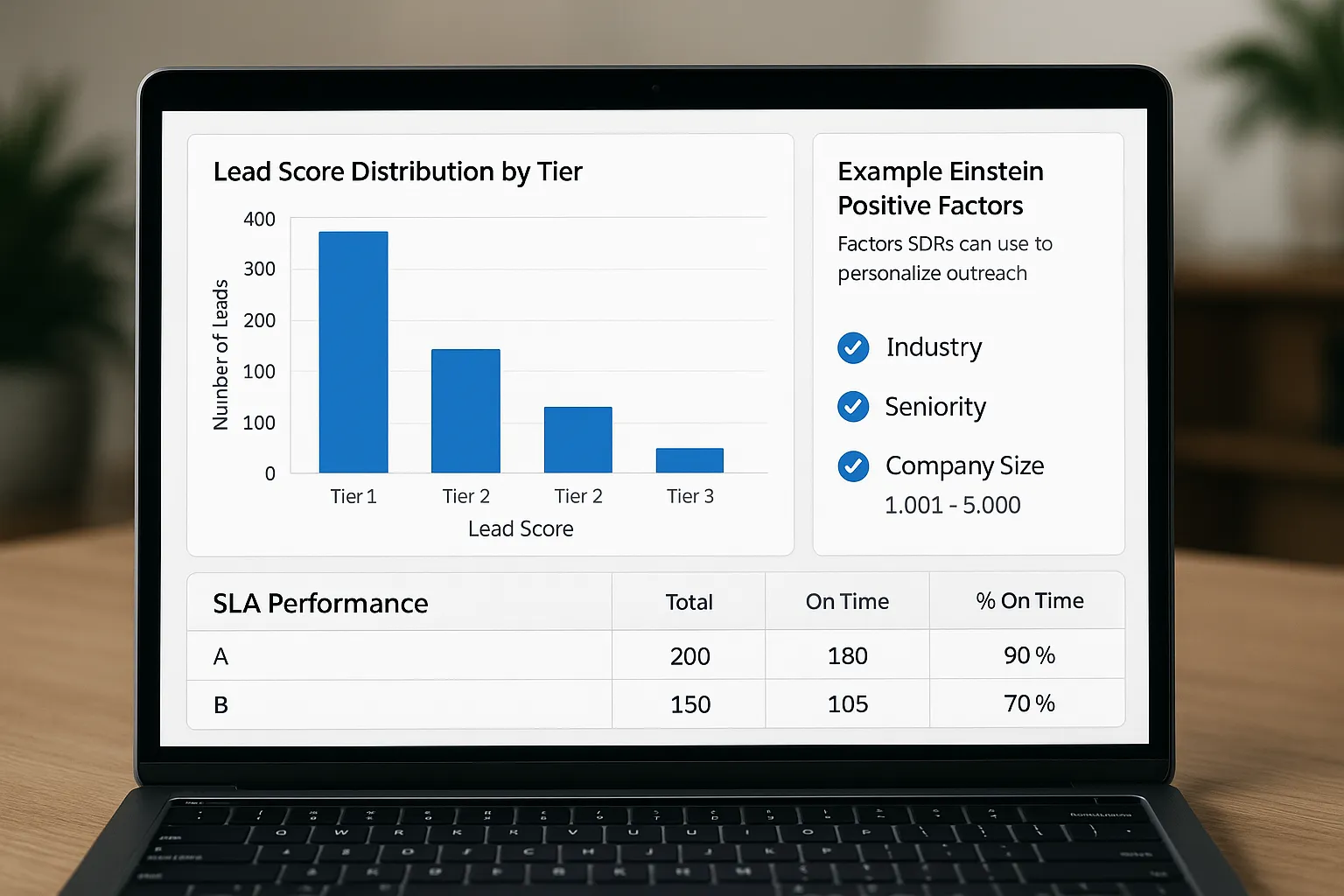
- Surface explanations everywhere: Put top positive and negative factors directly on the Lead page and in list views. It teaches reps how to personalize outreach quickly.
- Establish alerting: Send instant notifications for very high scores to Slack or email with owner mention and a link to the record.
- Review quarterly for drift: New campaigns, seasons, or product launches change patterns. Refresh your exclusions, feature hygiene, and thresholds each quarter.
Example tiers and actions
| Tier | Score band | SLA and action | Notes |
|---|---|---|---|
| A, Priority | 90 to 100 | Respond in 10 minutes, immediate personalized outreach, route to senior SDR | Small volume, treat like hot inbound |
| B, High | 70 to 89 | Respond in 2 hours, sequence Day 0 to Day 3 touch pattern | Most of your short-term pipeline |
| C, Nurture | 40 to 69 | Add to nurture or lower-intensity sequence, recycle after 30 to 45 days | Monitor for behavior changes |
| D, Research | 0 to 39 | Enrich, verify ICP fit, hold until more intent appears | Do not burn domain reputation here |
Adjust the bands based on your distribution. The goal is clear SLAs and plays, not a perfect number.
Operationalizing lead scores for SDRs and LinkedIn outreach
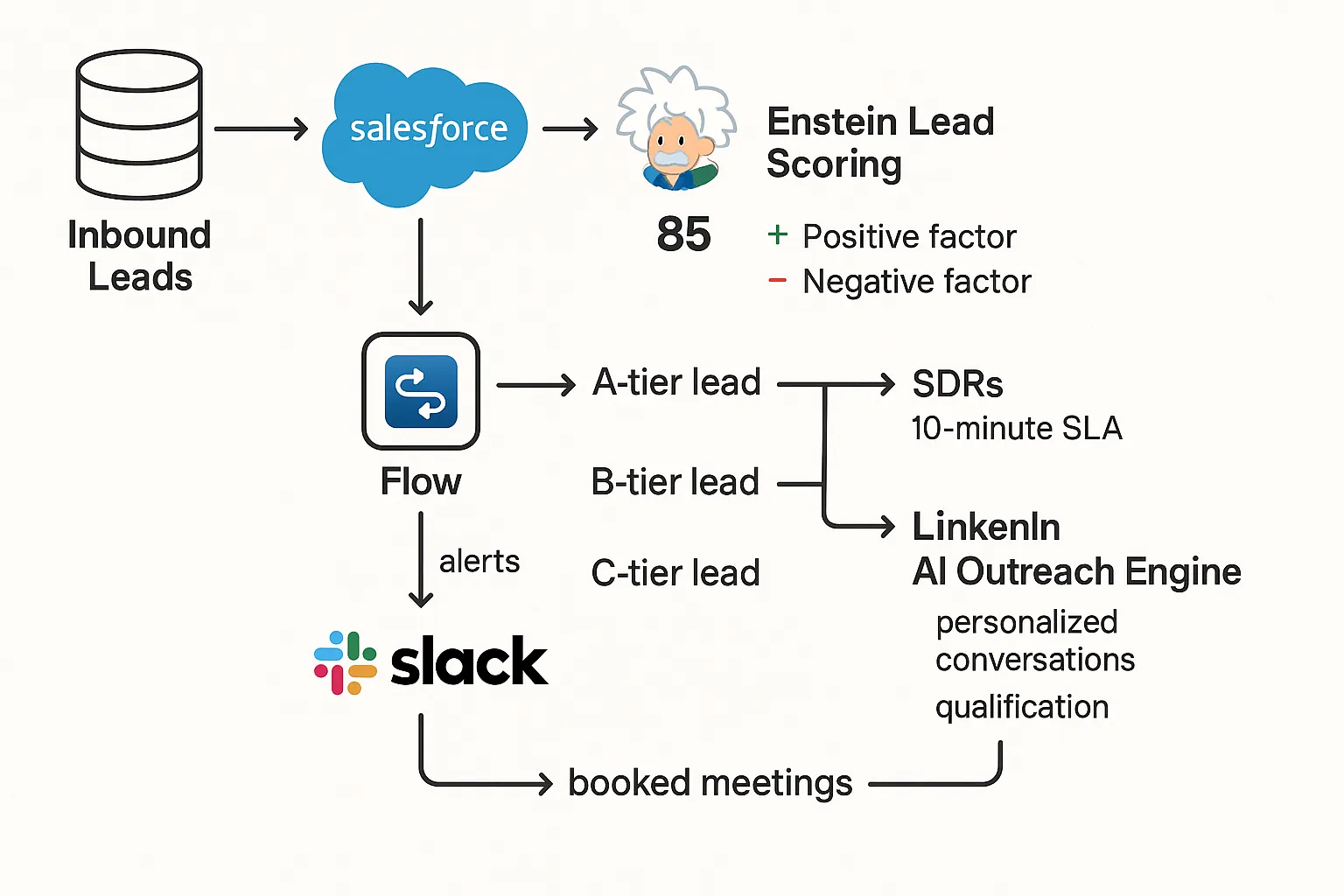
A score only changes behavior if it rewires the daily queue. Here is a lightweight blueprint that connects the model to action.
-
Queue design: Create views for A and B tiers with columns for Score, Score Reasons, Last Activity, and Key Firmographics. Sort by score then last activity.
-
Routing and enrichment: High-score leads auto-route to the right rep or queue, then trigger enrichment if you use a provider. Consider appending LinkedIn profile URLs if your enrichment supports it.
-
Personalize with explanations: Train SDRs to turn reason codes into talking points. If the model highlights Retail industry and Director seniority as positives, the icebreaker references retail outcomes and director-level impact.
-
Sequencing and channels: Start with email and phone for inbound. Use LinkedIn for multi-threading and to reach people who do not engage on email. For outbound-first orgs, use top scores to prioritize who you approach on LinkedIn this week.
-
Autonomous conversations at scale: If you operate on LinkedIn at volume, prioritize A and B tier prospects in your outreach engine. With a platform like Kakiyo, you can run personalized conversations, qualify interest inside the thread, A/B test prompts, and book meetings while SDRs focus on replies that matter. Learn more about autonomous LinkedIn conversations on our guide, AI SDR: Automate Conversations, Qualify Faster, Book More.
Common pitfalls and how to avoid them
- Training on dirty outcomes: If reps convert leads for housekeeping, the model learns junk. Fix Lead Status definitions and exclude non-opportunity conversions.
- Field leakage and proxy bias: Some fields act as thin proxies for sensitive attributes. Exclude questionable predictors and document your rationale for governance.
- Overfitting to a single channel: If 80 percent of wins came from one campaign last quarter, the model can overweight that source. Rebalance training windows and monitor predictor importance.
- Ignoring Person Accounts or custom flows: Complex lead-to-account models can break routing assumptions. Map all conversion pathways before you set SLAs.
- Launching without rep training: Reps need to see examples where a high score predicted a win and why. Show the explanations and celebrate early wins to create pull.
- No A/B or holdout: Without a control group, you will never know whether lift came from scoring or seasonality. Hold out a percentage of leads from score-based routing for a few weeks.
- Set-and-forget: New segments, pricing, or territories require quarterly checks. Watch for drift in conversion rate by score band.
Measurement: prove lift in weeks, not months
Pick a few outcome metrics and track them by tier and by treatment versus control.
- Speed to first touch: A-tier should be minutes, not hours. Measure before and after.
- Connect rate and reply rate: If explanations improve personalization, reply rates on the first touch should jump 15 to 30 percent for A and B tiers.
- MQL to SAL to SQL conversion: Track progression by tier. Expect a monotonic relationship where A > B > C.
- Pipeline per 100 leads: Compare score-based routing to business-rules-only routing over the same period.
- Booked meetings and revenue: Tie meetings and won revenue back to the tier of the originating lead.
Create a weekly review that shows distribution, conversion by band, and SLA adherence. If A-tier is too small, widen bands. If B-tier conversion is flat with C-tier, your threshold is too generous or the model needs new features.
Advanced configuration ideas when you are ready
- Multiple models by segment: If enterprise and SMB behave differently, train separate models or at least apply segment-specific thresholds and routing.
- Time-based retraining window: Prefer a rolling window that reflects the last two to three quarters of performance to capture current ICP and offer.
- Feature engineering upstream: Create clean categorical fields from messy text like Job Title Seniority or Department. Simpler inputs often outperform unstructured data.
- Blend behavioral signals: If you use Marketing Cloud Account Engagement or another marketing automation tool, pair Einstein Lead Scoring with behavioral scores for a compound ranking.
- Human-in-the-loop overrides: Allow managers to up-rank or down-rank specific campaigns temporarily, for example a webinar series, but log overrides for later analysis.
How Kakiyo fits into a scoring-led SDR workflow
Einstein tells you who is likely to convert. The next leverage point is how quickly and personally you engage those people on the channels they prefer.
Kakiyo helps teams execute the next step on LinkedIn at scale, while preserving control and analytics:
- Autonomous LinkedIn conversations that feel one-to-one from first touch to qualification to booking
- AI-driven lead qualification in-thread so SDRs focus on high-value replies
- Customizable prompt creation and A/B testing to continually improve acceptance and reply rates
- Intelligent scoring and simultaneous conversation management to prioritize and handle volume
- Conversation override, dashboard, and analytics so managers keep governance and see what is working
Many teams use lead scores to build prioritized LinkedIn lists, then let Kakiyo start and manage personalized conversations while SDRs jump in on qualified replies. When combined with Einstein tiers, this creates a fast lane from model score to meeting booked. Explore our practical playbooks for LinkedIn outreach and AI tactics:
- LinkedIn Prospecting Playbook: From First Touch to Demo
- Business Development Rep: AI Tactics for LinkedIn Outreach
A 30-day rollout plan you can copy
Week 1
- Finalize Lead Status definitions and exclusions
- Enable Einstein Lead Scoring in a sandbox or pilot subset
- Add score and explanations to layouts and list views
- Define A, B, C, D tiers and SLAs
Week 2
- Route A and B tiers with Flow to the right queues and owners
- Create Slack or email alerts for A-tier
- Train SDRs on how to use explanations to personalize outreach
- Build prioritized LinkedIn lists for A and B tiers; set up Kakiyo prompts and guardrails if you use it
Week 3
- Launch controlled A/B test: 80 percent score-based routing, 20 percent legacy routing as holdout
- Review speed-to-first-touch, reply rates, and early conversion by tier
- Iterate thresholds and field exclusions as needed
Week 4
- Expand rollout to all regions, keep the holdout running for two more weeks
- Share wins with examples of explanations that turned into strong replies
- Document your maintenance cadence, owners, and quarterly drift checks
References and further learning
- Salesforce Trailhead, Predict Leads with Einstein Lead Scoring: https://trailhead.salesforce.com/
- Salesforce Help, Sales Cloud Einstein overview and setup guidance: search for “Set Up Einstein Lead Scoring” on Salesforce Help
Bring scoring to life on LinkedIn
If you already have Einstein Lead Scoring, the fastest way to compound its impact is to operationalize A and B tiers on the channel where your buyers engage. Kakiyo runs personalized LinkedIn conversations at scale, qualifies in-thread, and books meetings so your team spends time only where it moves pipeline.
See how it works at kakiyo.com.
FAQ
What is the difference between a lead and a qualified prospect?
A lead is simply a potential contact or account. A qualified prospect has enough verified fit, intent, and context to justify a next sales step.
What makes qualification trustworthy?
Qualification is trustworthy when it relies on auditable signals, not labels alone. The more evidence a team can verify, the easier it is to align sales, marketing, and RevOps.
Should qualification be based on one score?
Not by itself. Scores are useful summaries, but teams still need explicit criteria around fit, buying signals, and next-step readiness.
How do I implement proof-based qualification in my team?
Start by defining what evidence is required at each stage, then make those signals visible in your workflows. The goal is consistency across inbound, outbound, and partner-sourced leads.