
 Ilan Asseo
Salesforce Einstein Sales Cloud: What It Does and Pitfalls
Operator's guide to Salesforce Einstein Sales Cloud, covering what it does, rollout pitfalls, and when to pair it with conversation AI.

Salesforce Einstein promises AI-powered sales prioritization, but many teams hit predictable failure modes after deployment. This guide covers what Einstein actually does, where it falls short, and how to get real value from it.
Sales reps spend just 28% of their week selling, the rest is admin, research, and tool-hopping. If your “AI” only creates insights inside the CRM (but doesn’t change what happens in the buyer’s inbox), pipeline won’t move.
Salesforce Einstein Sales Cloud is powerful at prioritization and assistance, but it has predictable failure modes. This guide breaks down what it actually does, the pitfalls you should expect, and what to pair it with when your motion is LinkedIn-led outbound.
Industry evidence: “Our research suggests that a fifth of current sales-team functions could be automated.” — McKinsey & Company.
Source: McKinsey
What is Salesforce Einstein Sales Cloud?
Salesforce Einstein Sales Cloud is Salesforce’s AI layer for Sales Cloud. It uses your CRM data (plus connected activity and signals, depending on setup) to help sellers prioritize leads and opportunities, forecast outcomes, and get AI assistance for tasks like writing, summarizing, and recommended actions. It is strongest when you have clean historical data and consistent process definitions.
Quick comparison: Einstein vs tools that fill the gaps
| Tool Name | Best For | Key Feature | Starting Price |
|---|---|---|---|
| Kakiyo | Autonomous LinkedIn conversation management that qualifies and books meetings | AI runs multi-turn LinkedIn conversations with scoring and booking | Contact sales |
| Salesforce Einstein Sales Cloud | CRM-native prioritization, scoring, forecasting, and seller assistance | AI insights inside Salesforce (scores, recommendations, generative assistance) | Contact sales |
| HubSpot Sales Hub | SMB-to-midmarket teams that want an easier all-in-one CRM + sales engagement | CRM + sequences + AI assistance in one place | Free plan available (paid tiers vary) |
| Outreach | Enterprise sequencing, task management, and governance across channels | Sales engagement workflows and enterprise controls | Contact sales |
| Apollo | Lower-cost prospecting + outbound sequencing for lean teams | Database + enrichment + outbound sequences | Free plan available (paid tiers vary) |
| Gong | Call + deal intelligence for coaching and pipeline inspection | Conversation intelligence tied to opportunities | Contact sales |
Two context stats worth keeping in mind while you evaluate:
- Salesforce reports sellers spend 28% of their week selling (State of Sales). Source: Salesforce State of Sales
- Gartner’s classic B2B buying research found buyers spend only 17% of the buying journey meeting with potential suppliers. Source: Gartner: The New B2B Buying Journey
Kakiyo
What it does (2 sentences). Kakiyo autonomously manages personalized LinkedIn conversations at scale, from first touch to qualification to meeting booking. Instead of automating sends, it runs the actual multi-turn chat so SDRs stop living in the inbox.
Standout feature (1 sentence). Kakiyo’s edge is autonomous conversation management with an intelligent scoring system that qualifies prospects and drives to a booked meeting.
Who it’s for (1 sentence). SDR teams and revenue leaders running LinkedIn-first outbound who want more qualified meetings without adding headcount.
Pricing. Contact sales.
Pros.
- Handles many simultaneous LinkedIn threads while keeping qualification consistent.
- Built for measurable outcomes (qualification, booked meetings), not just activity.
- Custom prompts, templates, A/B testing, analytics, and override control for governance.
Cons.
- Not a replacement for your CRM, you still need a system of record.
- Requires clear qualification definitions to get the most value from autonomy.
Salesforce Einstein Sales Cloud
What it does (2 sentences). Salesforce Einstein Sales Cloud adds AI capabilities inside Sales Cloud, such as scoring and prioritization, recommendations, forecasting support, and generative assistance (depending on your edition and packaging). The goal is to help reps focus on the right records, do less manual work, and make better next-step decisions.
Standout feature (1 sentence). It is strongest when it can leverage your existing Salesforce history to drive CRM-native prioritization and recommendations.
Who it’s for (1 sentence). Teams already operating heavily in Salesforce that want AI directly embedded in their opportunity and lead workflows.
Pricing. Contact sales (packaging varies by Salesforce edition and add-ons).
Pros.
- Native to the CRM where pipeline, stages, and forecasting already live.
- Can improve prioritization when your data, labels, and stages are consistent.
- Reduces swivel-chair work when reps live in Salesforce all day.
Cons.
- Garbage in, garbage out: inconsistent stages and weak labels will produce weak AI.
- It does not run outbound conversations for you, especially not on LinkedIn.
HubSpot Sales Hub
What it does (2 sentences). HubSpot Sales Hub combines CRM, sequences, and sales tooling in a product that is typically easier to deploy than Salesforce for smaller teams. It also offers AI assistance features that help with writing, summarizing, and basic workflow efficiency.
Standout feature (1 sentence). Fast time-to-value for teams that want an all-in-one sales system without heavy RevOps overhead.
Who it’s for (1 sentence). SMB and midmarket teams that want a simpler stack and are willing to trade off deep enterprise customization.
Pricing. Free plan available (paid tiers vary).
Pros.
- Lower operational complexity than many enterprise CRM stacks.
- Good for teams that need CRM + outbound basics in one place.
Cons.
- Can be limiting for complex enterprise workflows and strict governance.
- Not purpose-built for autonomous LinkedIn conversation qualification.
Outreach
What it does (2 sentences). Outreach is a sales engagement platform designed to orchestrate rep-driven outbound and follow-up workflows across channels. It helps teams standardize touches, tasks, and sequences, and provides enterprise management and reporting.
Standout feature (1 sentence). Strong enterprise sequencing and process control for rep-executed engagement.
Who it’s for (1 sentence). Larger SDR orgs that need governance, routing, and standardized engagement motions at scale.
Pricing. Contact sales.
Pros.
- Mature workflow tooling for managing high volumes of touches.
- Enterprise controls and reporting for managers and RevOps.
Cons.
- Still requires humans to manage replies and run multi-turn qualification.
- Great at sequencing, not at autonomous conversation management.
Apollo
What it does (2 sentences). Apollo combines prospecting data, enrichment, and outbound sequencing in one platform. It is often used to stand up outbound quickly with a lean budget.
Standout feature (1 sentence). A broad prospecting database tied directly to outbound execution.
Who it’s for (1 sentence). Lean SDR teams and founders who want an affordable prospecting + outreach tool in one.
Pricing. Free plan available (paid tiers vary).
Pros.
- Good value for getting started with outbound.
- Useful for list building, enrichment, and basic sequencing.
Cons.
- Data quality and deliverability outcomes depend heavily on your governance.
- Not designed to autonomously qualify buyers in LinkedIn DMs.
Gong
What it does (2 sentences). Gong records and analyzes sales calls and meetings to surface coaching insights, deal risks, and pipeline visibility. It is most valuable after you have conversations happening, because it improves what happens during and after meetings.
Standout feature (1 sentence). Deep conversation intelligence that ties call behavior to outcomes.
Who it’s for (1 sentence). Teams with meaningful meeting volume that want better coaching, forecasting inspection, and deal execution.
Pricing. Contact sales.
Pros.
- Strong for coaching, onboarding, and identifying deal risks.
- Useful for standardizing discovery and improving win rates over time.
Cons.
- Does not generate new conversations by itself.
- Not a LinkedIn outreach or qualification engine.
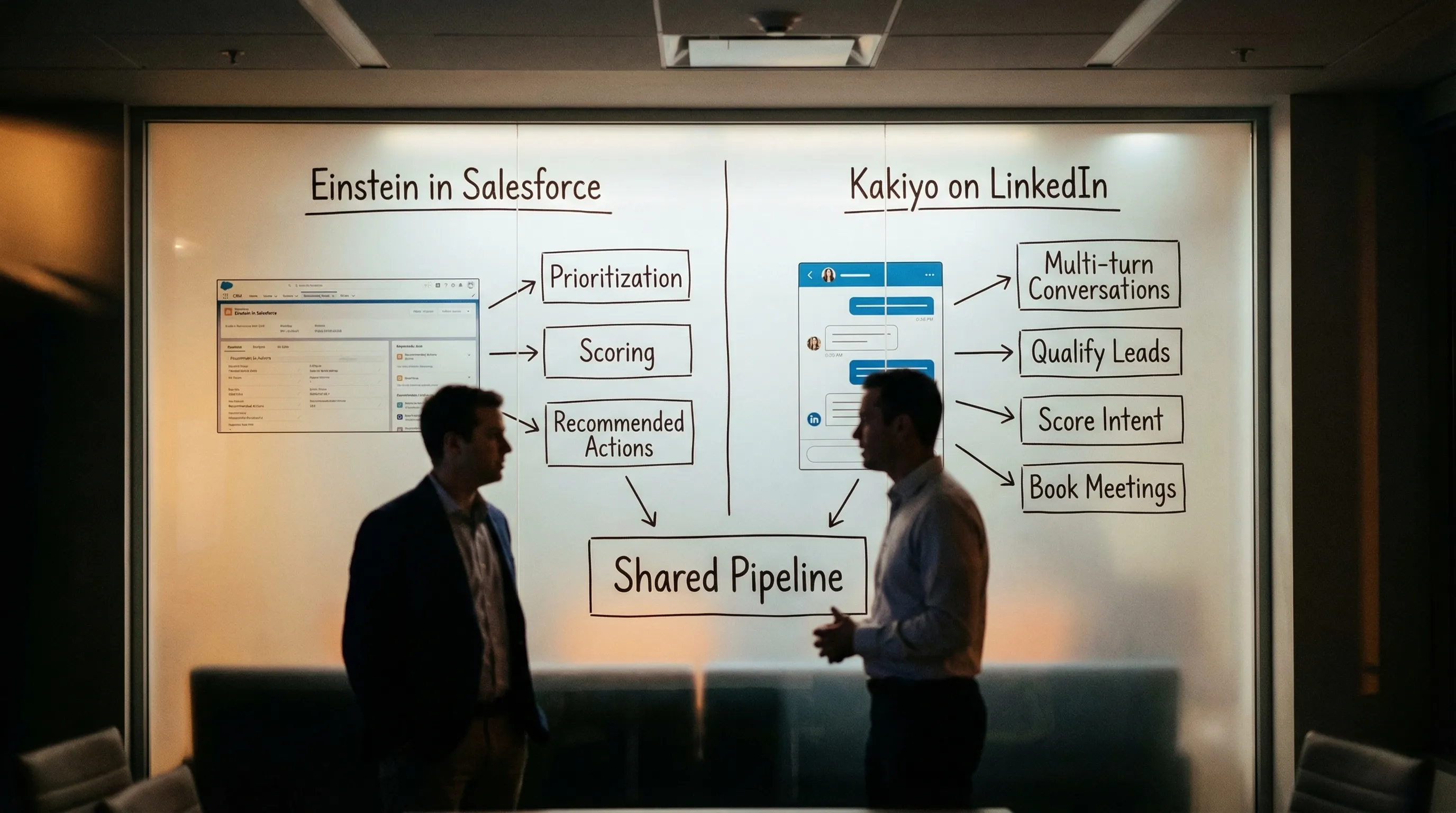
What Salesforce Einstein Sales Cloud actually does well
Einstein is at its best when you want decision support inside Salesforce. Think: which leads should be worked first, which opportunities look risky, what follow-up should happen next, how to summarize a record fast, or how to standardize forecasting inputs.
In operator terms, Einstein is a “make CRM data more usable” layer. If your biggest bottleneck is reps missing follow-ups, prioritizing the wrong accounts, or spending too long preparing internal updates, Einstein can help.
The most common pitfalls (and how to spot them early)
These show up in the first 2 to 6 weeks of a rollout, not six months later.
Pitfall 1: You don’t have a clean outcome label
Einstein can score anything, but you need a label that matters. If you train or optimize around proxy metrics (like email opens, task completion, or “lead status updated”) you can get impressive dashboards and zero pipeline.
Early warning sign: Your “hot” leads are not converting to AE-accepted meetings at a meaningfully higher rate.
Pitfall 2: Stage definitions drift across teams
Salesforce data is only as consistent as your exit criteria. If one SDR marks a lead as SQL because they got a polite reply and another requires confirmed pain + next step, your AI is learning noise.
Early warning sign: Rep trust collapses because scores contradict what they see in real conversations.
Pitfall 3: Sparse or biased history
Many teams want Einstein to fix the exact problem that prevents it from working: not enough clean history, not enough volume, or inconsistent process over time.
Early warning sign: Scores cluster in a narrow band and don’t change decisions.
Pitfall 4: Insight with no execution layer
Even if Einstein correctly identifies “work these 200 accounts,” you still need a system that can actually run the touches, manage replies, and qualify in-thread. This is where Salesforce Einstein Sales Cloud often disappoints LinkedIn-first teams: it does not execute the conversation.
Early warning sign: You can point to prioritized lists, but reps still cannot keep up with inbox volume and follow-up quality.
Pitfall 5: Adoption dies because the workflow is heavier
If Einstein adds fields, clicks, and new dashboards without removing work, reps will ignore it. This is especially true in outbound, where the buyer’s response speed matters more than internal reporting perfection.
Early warning sign: Managers reference Einstein, reps do not.
Here is a practical operator table you can use in a rollout review:
| Pitfall | What it looks like in-week | What to do instead |
|---|---|---|
| Weak label | “High score” does not correlate with meetings | Re-label around AE-accepted meeting or qualified conversation |
| Stage drift | Different teams define SQL differently | Enforce exit criteria with required evidence fields |
| Sparse history | Scores don’t separate winners from losers | Start with a narrower segment, longer time window, or simpler rules |
| No execution | Prioritized lists sit untouched | Pair with a channel-native execution tool (LinkedIn, email, calls) |
| Adoption collapse | Reps ignore scores | Bake actions into rep workflows, not dashboards |
The “CRM AI” vs “Conversation AI” split (why it matters)
A clean way to think about your stack in 2026:
- CRM AI (Einstein): prioritizes, summarizes, forecasts, recommends.
- Conversation AI (Kakiyo): runs multi-turn outreach conversations, captures qualification evidence, drives to booked meetings.
If your outbound motion is LinkedIn-led, most of the value (and most of the failure risk) sits in the conversation layer. Einstein can tell you where to look, but it cannot do the looking for you.
Which tool should you choose?
- If you want CRM-native AI for prioritization and forecasting, use Salesforce Einstein Sales Cloud.
- If you want autonomous AI conversation management on LinkedIn with lead qualification and meeting booking, use Kakiyo.
- If you want an all-in-one CRM + outbound basics for a smaller team, use HubSpot Sales Hub.
- If you want enterprise sequencing and rep workflow orchestration, use Outreach.
- If you want budget-friendly prospecting plus sequencing, use Apollo.
Frequently Asked Questions
What does Salesforce Einstein Sales Cloud do?
Salesforce Einstein Sales Cloud adds AI features inside Salesforce to help sales teams prioritize work, score leads or opportunities, improve forecasting inputs, and speed up tasks like summarizing and drafting. It primarily turns CRM history into recommendations and productivity gains. It does not replace outbound execution tools that run conversations on channels like LinkedIn.
What are the biggest Salesforce Einstein Sales Cloud pitfalls?
The most common pitfalls are weak outcome labels (optimizing for proxies), inconsistent stage definitions, sparse or biased historical data, low rep adoption, and “insight without execution.” Teams often get scores and dashboards but fail to translate them into qualified conversations and booked meetings.
Is Salesforce Einstein Sales Cloud enough for LinkedIn outbound?
Usually not. Einstein can help you prioritize who to contact, but it does not autonomously manage multi-turn LinkedIn conversations, qualify in-thread, or book meetings. LinkedIn-first teams typically pair Einstein with a conversation engine that can execute and qualify at scale.
Kakiyo vs Salesforce Einstein Sales Cloud: what’s the difference?
Einstein is CRM-native AI that improves prioritization and productivity inside Salesforce. Kakiyo is built to run the actual LinkedIn conversation end-to-end, qualify the prospect with an intelligent scoring system, and book the meeting while SDRs only step in to close.
Do you need perfect Salesforce data before using Einstein?
You do not need perfect data, but you do need consistent definitions and a defensible outcome label. Start with one segment, one motion, and one measurable target (for example, AE-accepted meetings), then expand once you can prove correlation and adoption.
Request a demo of Kakiyo to automate LinkedIn conversations, qualify prospects, and book more meetings without adding SDR headcount.