
 Ilan Asseo
SDR Responsibilities: What Top Teams Expect in 2026
Guide to SDR responsibilities in 2026 covering evidence-based qualification, multi-stakeholder engagement, and outcome-driven performance metrics.

SDR responsibilities have evolved beyond raw activity metrics, but most teams still define the role around volume rather than outcomes. This guide covers what top-performing teams expect from SDRs in 2026 and how responsibilities map to real pipeline.
Gartner research repeatedly shows B2B purchases involve 6 to 10 stakeholders in a typical buying group. If your SDR responsibilities still stop at “send X touches,” you are optimizing the wrong unit and losing deals to competitors who manage conversations, evidence, and next steps.
Industry evidence: Salesforce Research reports that sales reps spend only 28% of their week actually selling, with the rest consumed by deal management, data entry, and other non-selling work.
Source: Salesforce State of Sales
What are SDR responsibilities?
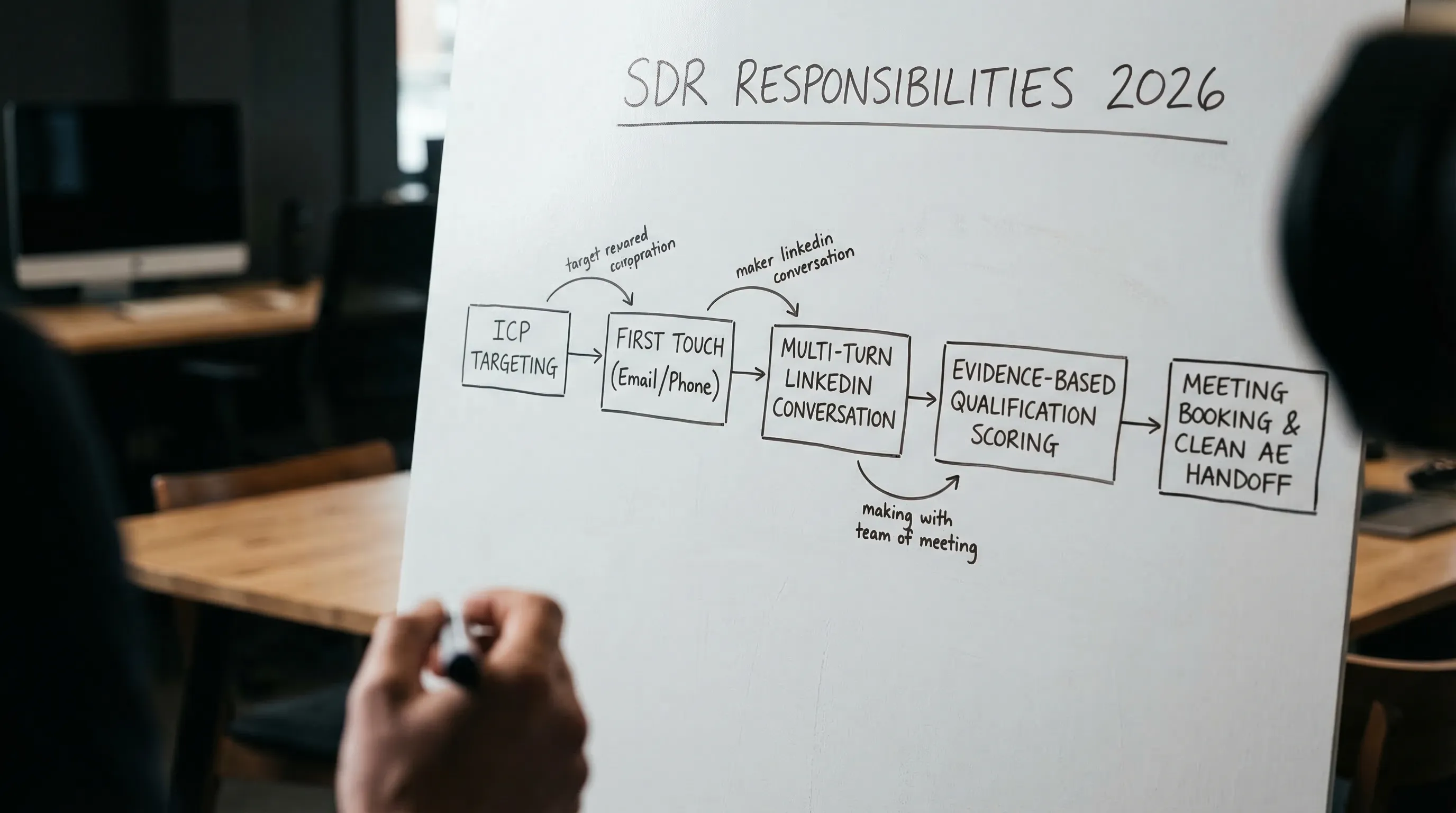
SDR responsibilities are the repeatable outcomes an SDR owns from first touch to a qualified meeting and clean handoff. In 2026, top teams define responsibilities as measurable outputs (qualified conversations, booked meetings, evidence captured, buying-group coverage), not raw activity (messages sent). The SDR’s job is to create pipeline by turning the right accounts into verified, sales-ready next steps.
Tool comparison table (to execute SDR responsibilities in 2026)
| Tool Name | Best For | Key Feature | Starting Price |
|---|---|---|---|
| Kakiyo | Autonomous LinkedIn conversations that qualify and book meetings | AI manages multi-turn LinkedIn threads, scores qualification, books meetings | Request demo |
| LinkedIn Sales Navigator | Building ICP lists and buying-group maps | Advanced search, saved searches, org charts, alerts | From $99.99/user/month (see pricing) |
| Apollo | All-in-one prospecting plus outbound basics | Data + email sequencing + dialer (varies by plan) | Free plan (paid plans available) |
| Clay | Enrichment and list workflows | Flexible enrichment “recipes” across providers | See pricing |
| Salesloft | Sales engagement at scale | Sequencing + governance + team workflows | Contact sales |
| Gong | Conversation intelligence and coaching | Call recording, deal signals, coaching libraries | Contact sales |
| Calendly | Low-friction scheduling | Routing + scheduling links + automated reminders | Free plan (paid plans available) |
SDR responsibilities top teams expect in 2026 (and how they measure them)
Top orgs do not want “more activity.” They want more qualified pipeline per hour, with evidence that the meeting should exist.
Here is what that looks like operationally.
| Responsibility (owned outcome) | What “good” looks like | What gets measured | Where AI helps (safely) |
|---|---|---|---|
| ICP execution and account selection | Tight segments with clear disqualifiers | Coverage by ICP slice, connect rate, reply rate by segment | Research summaries, enrichment, trigger detection |
| Buying-group mapping and multi-threading | 2 to 5 relevant stakeholders engaged per account | Stakeholders touched per account, stakeholder reply mix | Suggest roles to add, draft persona-specific openers |
| First-touch conversion | Gets acceptance and a real reply without sounding automated | Acceptance rate, reply rate, positive reply rate | Personalization at scale, A/B prompt testing |
| Conversation management | Replies handled fast, relevantly, and consistently | Speed-to-first-meaningful-response, thread resolution rate | Auto-triage, draft responses, run multi-turn threads |
| Qualification (evidence-based) | Fit + intent + proof captured before booking | Qualified conversation rate, AE acceptance rate | Scoring, evidence capture, consistent question flows |
| Meeting booking and attendance hygiene | Meetings booked with the right people and held | Meeting show rate, reschedule rate, no-show reason codes | Scheduling automation, reminders, routing |
| Handoff quality to AE | AE gets context, proof, and next step in one place | Handoff completeness score, time-to-AE-follow-up | Auto-summarization, structured fields, checklists |
| Experimentation and feedback loops | Weekly tests that improve conversion, not volume | Lift by prompt/version, segment learning velocity | Variant generation, analytics slicing, insights drafting |
Two 2026 shifts to internalize:
- The SDR is now a conversation operator, not a task doer. Sequencing is table stakes. Winning teams manage multi-turn threads like a funnel stage.
- Evidence beats vibes. “Seemed interested” is not qualification. Top teams require explicit, time-bound next steps and minimal proof captured in the thread and CRM.
For context on channel reality: LinkedIn now reports over 1 billion members globally, which is why it remains a core channel for B2B SDR motions even as inboxes get noisier (LinkedIn About).
And speed still matters. A classic Harvard Business Review analysis found that companies responding to inbound leads within an hour were far more likely to qualify them than slower responders (HBR: The Short Life of Online Sales Leads). The exact multiplier varies by dataset, but the operational point holds: fast, relevant responses win.
Kakiyo
What it does (2 sentences). Kakiyo autonomously runs personalized LinkedIn conversations at scale, from first touch through qualification to meeting booking. Instead of only automating sends, it manages the full multi-turn thread so SDRs step in only when a prospect is truly ready.
Standout feature (1 sentence). Kakiyo’s edge is autonomous conversation management plus an intelligent scoring system that qualifies leads and books meetings, with human override controls.
Who it’s for (1 sentence). SDR teams that want LinkedIn to produce more qualified meetings without turning reps into full-time inbox operators.
Pricing. Request demo (pricing not publicly listed).
Pros (2-3 bullets)
- Handles the hardest part of LinkedIn outbound, the multi-turn conversation, not just connection requests and follow-ups.
- Built for qualification and booking, so it optimizes for downstream outcomes, not vanity activity.
- Supports controlled iteration with prompt customization and A/B prompt testing.
Cons (1-2 bullets)
- Best fit when LinkedIn is a real channel for you, not a “nice to have.”
- Requires clear qualification rules to get the most value (which top teams should have anyway).
LinkedIn Sales Navigator
What it does (2 sentences). Sales Navigator is the system for building targeted prospect lists and tracking account and persona signals on LinkedIn. It helps SDRs find the right people, follow job changes, and stay current on account activity.
Standout feature (1 sentence). Advanced search with saved searches and alerts that turn targeting into a repeatable daily workflow.
Who it’s for (1 sentence). Any SDR team running a LinkedIn-first or LinkedIn-supported outbound motion.
Pricing. From $99.99/user/month for the Core plan (LinkedIn publishes pricing in many regions, confirm for yours).
Pros (2-3 bullets)
- Best-in-class prospecting surface area for LinkedIn-first outreach.
- Makes ICP slicing operational with filters, Spotlights, and alerts.
- Supports buying-group mapping by making stakeholder discovery easier.
Cons (1-2 bullets)
- Does not run your conversations or enforce qualification standards.
- Value depends on whether your team is trained to use it daily.
Apollo
What it does (2 sentences). Apollo combines contact data with outbound execution features, commonly email sequencing and dialing (plan-dependent). It is often used as an entry point for teams that need “prospecting plus outreach” in one place.
Standout feature (1 sentence). A single workflow from list building to launching outbound without stitching multiple tools together.
Who it’s for (1 sentence). Lean teams that want a broad outbound baseline, especially for email-first motions.
Pricing. Free plan available, paid plans available (see Apollo pricing for current tiers).
Pros (2-3 bullets)
- Fast time-to-launch for new SDR teams.
- Useful when you need prospecting and sequencing in one tool.
- Can reduce tool sprawl early on.
Cons (1-2 bullets)
- Like most sequencers, it does not autonomously manage multi-turn LinkedIn qualification.
- Data quality and coverage vary by segment, you still need validation.
Clay
What it does (2 sentences). Clay is a workflow tool for enrichment and list building, used to assemble high-quality lead and account records from multiple data sources. It shines when you need repeatable data pipelines for outbound personalization and routing.
Standout feature (1 sentence). Flexible enrichment workflows that let RevOps and outbound teams create “data recipes” per ICP.
Who it’s for (1 sentence). Teams that already know their ICP and want better inputs for personalization, scoring, and routing.
Pricing. See Clay pricing (plans and usage models change frequently).
Pros (2-3 bullets)
- Strong for enrichment, cleaning, and building outbound-ready lists.
- Supports better segmentation, which improves messaging relevance.
- Helps standardize inputs for scoring and qualification.
Cons (1-2 bullets)
- It does not book meetings by itself, it improves inputs.
- Requires operational ownership to avoid “cool workflows” that do not drive pipeline.
Salesloft
What it does (2 sentences). Salesloft is a sales engagement platform that helps SDR teams run sequences, manage tasks, and standardize outbound execution. It is built for team workflows, coaching, and governance in multi-rep environments.
Standout feature (1 sentence). Mature engagement operations, coaching, and governance capabilities for scaled teams.
Who it’s for (1 sentence). SDR orgs that need structured sequencing, QA, and manager visibility across channels.
Pricing. Contact sales.
Pros (2-3 bullets)
- Proven platform for managing outbound execution across a team.
- Strong for coaching and standardizing process.
- Integrates into broader RevOps stacks.
Cons (1-2 bullets)
- Optimizes sequences and tasks, not autonomous LinkedIn conversation qualification.
- Requires careful configuration to avoid activity-based management.
Gong
What it does (2 sentences). Gong records and analyzes sales calls and meetings to surface coaching opportunities and deal risks. For SDRs, it is most valuable for improving talk tracks, objection handling, and handoff quality.
Standout feature (1 sentence). Searchable conversation libraries that make coaching concrete and repeatable.
Who it’s for (1 sentence). Teams that want faster ramp, better messaging, and consistent discovery and handoff quality.
Pricing. Contact sales.
Pros (2-3 bullets)
- Tightens coaching loops with real examples, not opinions.
- Improves handoffs by clarifying what “good” discovery and meeting quality looks like.
- Useful for enabling SDRs to speak the customer’s language.
Cons (1-2 bullets)
- Not an outbound execution tool.
- Value depends on adoption and coaching discipline.
Calendly
What it does (2 sentences). Calendly removes friction from scheduling by letting prospects book time without back-and-forth. It also supports routing rules and reminders that improve show rates.
Standout feature (1 sentence). Low-friction scheduling links with routing and automation that reduce scheduling drag.
Who it’s for (1 sentence). Any SDR team that books meetings and wants fewer drop-offs between “yes” and “held.”
Pricing. Free plan available, paid plans available (see Calendly pricing for current tiers).
Pros (2-3 bullets)
- Cuts time wasted on scheduling logistics.
- Helps standardize booking and reminder workflows.
- Easy to roll out and adopt.
Cons (1-2 bullets)
- Does not solve targeting, messaging, or qualification.
- Routing needs to be configured carefully to avoid bad meetings.
Which tool should you choose?
- If you want autonomous AI conversation management and LinkedIn lead qualification, use Kakiyo.
- If you want better ICP targeting and stakeholder discovery on LinkedIn, use LinkedIn Sales Navigator.
- If you want a single tool for basic prospecting plus outbound execution, use Apollo.
- If you want cleaner lists and richer personalization inputs, use Clay.
- If you want scaled sequencing governance for a larger SDR org, use Salesloft.
Request a Kakiyo demo to see autonomous LinkedIn conversations that qualify prospects and book meetings.
FAQ
What does a strong SDR or BDR actually own?
A strong SDR or BDR owns early-stage pipeline creation: targeting, first conversations, qualification, and clear handoff. The role is not just about booking meetings, but booking the right meetings.
Which skills matter most in modern sales development?
Prospecting judgment, messaging clarity, qualification discipline, and CRM hygiene matter more than raw call volume. In modern teams, AI literacy and channel fluency also matter.
How should teams evaluate SDR performance?
Use a mix of activity, conversion, and pipeline quality metrics. Strong teams look beyond booked meetings to show rates, qualification accuracy, and accepted pipeline.
How long does it take for a new rep to become productive?
Most reps need a ramp period before they consistently generate qualified pipeline. The fastest ramp comes from clear playbooks, tight feedback loops, and strong qualification criteria.