
 Ilan Asseo
Client Outreach Email: Templates That Get Replies
Use client outreach email templates, messaging principles, and playbook tips that improve replies and turn outreach into real conversations.

361.6 billion emails are sent every day, which means your “quick outreach note” is competing with an ocean of noise before your buyer even blinks. The fastest way to lose is to treat a client outreach email like a pitch instead of a permission-based conversation starter.
Industry evidence: “As customers increasingly learn and buy digitally, sales reps become just one of many possible sales channels.” — Cristina Gomez, Managing Vice President, Gartner.
Source: Gartner
What is a client outreach email?
A client outreach email is a short, personalized message sent to start or restart a business conversation with a prospect, customer, partner, or referral source. The goal is not to “close in the inbox”, it’s to earn a reply by giving a clear reason for reaching out, relevant context, and a low-friction next step.
Best tools to send outreach emails (and convert replies into meetings)
| Tool Name | Best For | Key Feature | Starting Price |
|---|---|---|---|
| Kakiyo | Turning LinkedIn responses into qualified meetings | Autonomous multi-turn LinkedIn conversations with qualification and meeting booking | Contact sales |
| Apollo | All-in-one outbound for lean teams | Prospecting + sequences in one place | Free plan available |
| Outreach | Enterprise sequencing and governance | Advanced workflows, rules, and reporting | Contact sales |
| HubSpot Sales Hub | CRM-first outreach and visibility | Sales engagement tied to CRM activity | Free tools available |
| Lavender | Writing emails that get replies | Real-time email coaching in your inbox | Free plan available |
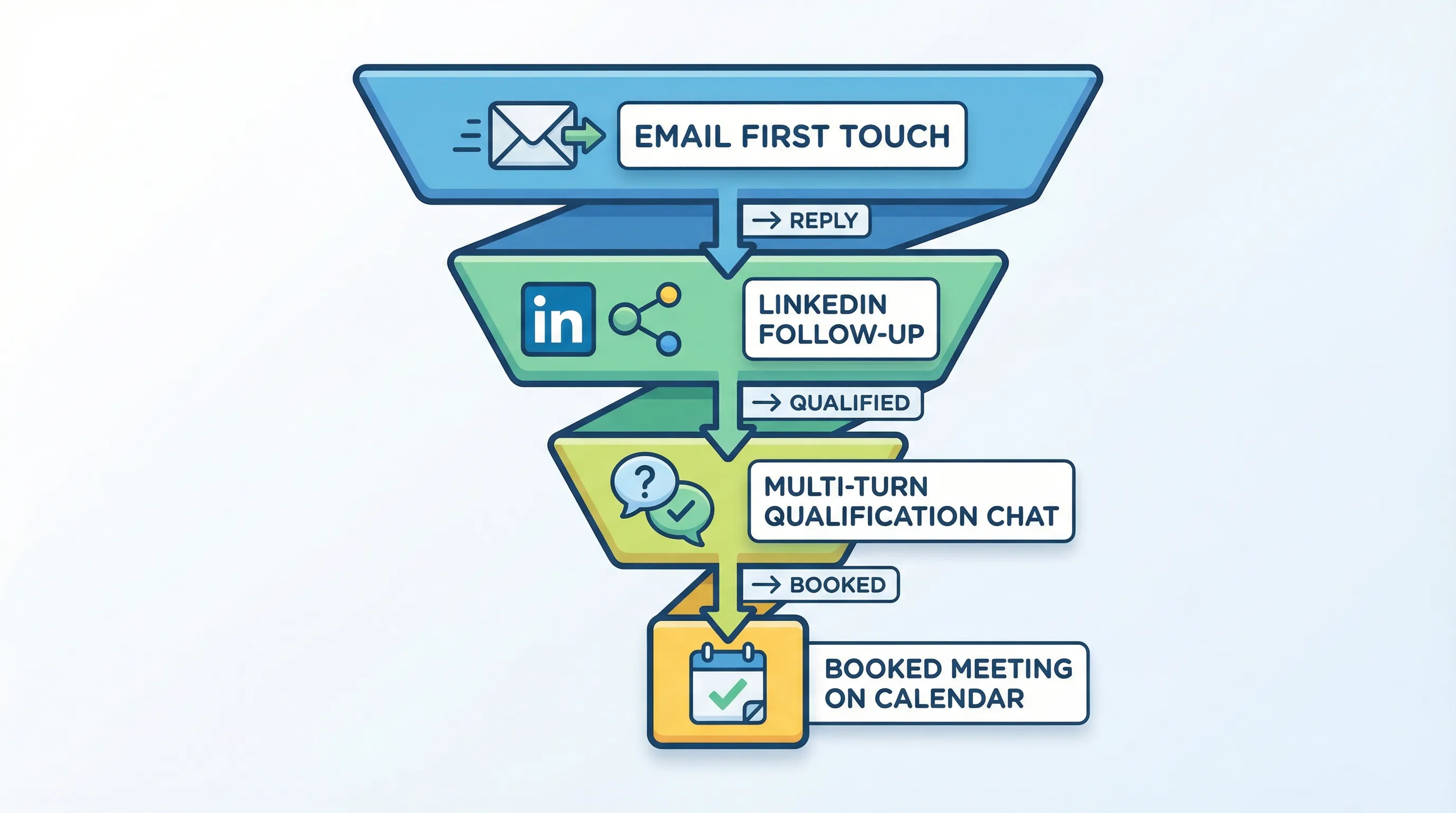
Why this table includes Kakiyo in an “email” post: email is often just the first touch. In 2026, teams that win treat outreach as a conversation system across channels, and LinkedIn is where many replies actually happen.
Two data points to keep you honest
- Email volume is brutal: The Radicati Group estimates 361.6B emails per day in 2024 (and rising), which is why generic outreach collapses fast at scale. Source: Radicati Group Email Statistics Report, 2024-2028.
- Speed matters more than another follow-up: Harvard Business Review reported that leads contacted within one hour were about 7x more likely to qualify than those contacted later. Source: HBR, “The Short Life of Online Sales Leads”.
Kakiyo
What it does (2 sentences). Kakiyo autonomously manages personalized LinkedIn conversations at scale, from first touch to qualification to meeting booking. It is built to handle the messy middle of outbound, the multi-turn thread where most SDR time gets burned.
Standout feature (1 sentence). Kakiyo’s edge is that competitors automate sending, Kakiyo autonomously manages the full conversation, qualifies the lead with an intelligent scoring system, and books the meeting.
Who it’s for (1 sentence). SDR teams and founders who want more qualified meetings without turning reps into inbox clerks.
Pricing. Contact sales via Kakiyo.
Pros
- Runs simultaneous LinkedIn conversations and follow-ups without rep hand-holding.
- Built-in qualification logic, scoring, A/B prompt testing, and conversation override controls.
- Shifts SDR time from “reply management” to closing and high-signal outreach.
Cons
- If you only care about email sending volume, it is not the tool.
- Requires you to define what “qualified” means so the system can enforce it.
Apollo
What it does (2 sentences). Apollo combines lead data, basic enrichment, and outbound sequencing so small teams can go from list to send quickly. It is typically used to run cold or warm email sequences and track replies.
Standout feature (1 sentence). A single workflow for sourcing prospects and putting them into sequences.
Who it’s for (1 sentence). Lean SDR teams that want one tool to build lists and send client outreach emails.
Pricing. Free plan available, see Apollo pricing.
Pros
- Fast setup for list building and outbound sequences.
- Useful when you do not have separate data and engagement tools.
- Good baseline reporting for outbound activity and replies.
Cons
- Conversation quality still depends heavily on copy, targeting, and reply handling.
- Email-first workflows can create “reply debt” if your team cannot keep up.
Outreach
What it does (2 sentences). Outreach is a sales engagement platform designed to run structured outbound sequences with governance, templates, and analytics. It is often used by larger teams to standardize outreach execution and reporting.
Standout feature (1 sentence). Deep workflow control for sequencing, task management, and performance reporting.
Who it’s for (1 sentence). Mid-market and enterprise teams that need standardized outbound execution and oversight.
Pricing. Contact sales, see Outreach.
Pros
- Strong controls for sequence design, templates, and team consistency.
- Useful reporting for managers running weekly performance reviews.
- Mature ecosystem for sales engagement operations.
Cons
- Implementation and change management can be non-trivial.
- Still requires humans to handle multi-turn conversations well.
HubSpot Sales Hub
What it does (2 sentences). HubSpot Sales Hub ties outreach activity directly to CRM objects so reps and managers can see context without stitching tools together. It is commonly used for sequences, meeting links, and pipeline visibility.
Standout feature (1 sentence). CRM-first visibility, outreach activity and pipeline live in the same system.
Who it’s for (1 sentence). Teams that want client outreach email tracking tightly connected to CRM workflows.
Pricing. Free tools available, see HubSpot Sales pricing.
Pros
- Clean handoffs between marketing, SDR, and AE workflows.
- Reporting is easier when activity and outcomes are in one place.
- Great for teams already standardized on HubSpot.
Cons
- Advanced sequencing capabilities can be plan-dependent.
- If your bottleneck is LinkedIn conversation volume, you still need a conversation execution layer.
Lavender
What it does (2 sentences). Lavender is an email assistant that helps reps write clearer, more reply-friendly outreach inside their inbox. It is useful for tightening language, reducing fluff, and improving readability.
Standout feature (1 sentence). Live writing guidance that pushes you toward concise, buyer-relevant emails.
Who it’s for (1 sentence). Reps and teams that want better client outreach email copy without heavy enablement overhead.
Pricing. Free plan available, see Lavender.
Pros
- Helps remove “salesy” filler that kills replies.
- Good for coaching new reps on clarity and structure.
- Works well as a layer on top of your existing email workflow.
Cons
- Does not fix targeting, offer, or follow-up operations.
- Not a sequencing or conversation management platform.
Client outreach email templates that start real conversations
These templates are designed for one thing: a reply. Keep them short, keep the ask small, and stop writing essays.
Template 1: The permission-based opener (best for cold or semi-cold)
Subject: Quick question, {FirstName}

Hi {FirstName},

Should I send over a 2-sentence idea for how {Company} could {outcome} (based on what I saw in {trigger})?

If you’re not the right person for {area}, who is?

Thanks,
{Name}
{Title} | {Company}
Why it works: it asks permission, it is low effort to answer, and it gives an easy “redirect” option.
Template 2: The trigger-based relevance email (best for timed outreach)
Subject: Noticed {trigger} at {Company}

Hi {FirstName},

Saw {trigger} and I’m curious, is the team prioritizing {initiative} this quarter or is it more of a second-half thing?

If helpful, I can share what we’re seeing work for {peer group} when {problem context}.

{Name}
Operator note: your trigger must be real. No fake “noticed you grew 200%” personalization.
Template 3: The “right person?” email (best for avoiding bad routing)
Subject: Who owns {topic} at {Company}?

Hi {FirstName},

Quick one, do you own {topic} at {Company}?

If not, who’s the best person for me to speak with?

Thanks,
{Name}
This is one of the highest-signal emails you can send because it minimizes claims and maximizes clarity.
Template 4: The value-drop follow-up (best after no reply)
Subject: Re: {thread topic}

Hi {FirstName},

No need to respond to the last note.

Here’s a short resource we made on {topic} that might be relevant if you’re working on {initiative}: {link}

Worth a quick chat to see if {outcome} is on the roadmap, or should I close the loop?

{Name}
Keep the resource short and credible. A one-page memo beats a 45-minute webinar.
Template 5: The referral ask (best for agencies, consultants, and partnerships)
Subject: Referral question

Hi {FirstName},

Do you know who typically owns {problem} in {industry/segment} companies?

We’re helping a few teams reduce {pain} and I’m trying to sanity-check whether I’m reaching the right role.

If someone comes to mind, I’d appreciate an intro, and if not, no worries.

{Name}
This works because it is framed as a routing question, not a sales push.
Template 6: The re-engage past client or closed-lost (best for restarts)
Subject: Still relevant to revisit {outcome}?

Hi {FirstName},

We spoke back in {month} about {context}. Has anything changed on your side since then, or is {initiative} still not a priority?

If it’s back on the roadmap, I can share what we’ve learned since then in a 10-minute call.

{Name}
Template 7: The expansion email to an existing customer (best for CS-led growth)
Subject: Idea for {team} at {Company}

Hi {FirstName},

Based on what {Company} is already doing with {current solution/workstream}, I think {adjacent team} could also benefit, specifically for {use case}.

Is it worth looping in {role} for a quick conversation, or should we wait until {timing event}?

{Name}
A simple QA checklist before you hit send
Most “bad outreach” is not aggressive, it’s just unclear.
- Can they understand the reason for the email in 10 seconds?
- Did you include exactly one question?
- Is the CTA a reply, not a meeting?
- Did you remove filler (excited, circling back, just bumping)?
- If they say “no,” did you make that easy?
How to turn client outreach emails into meetings (without more volume)
A good client outreach email creates a reply. A good system converts replies into qualified next steps.
Use the “email to conversation” handoff
Email is great for initial reach. But once someone replies, many teams stall because:
- No one responds fast enough.
- Replies are nuanced and require context.
- The rep is managing too many threads.
This is where LinkedIn can carry the conversation forward in a more natural, lower-friction way, especially when your buyer ignores email but checks DMs.
If you want the full operator playbook for LinkedIn messaging, see LinkedIn outreach messages that get replies.
Stop writing “meeting requests,” start earning micro-yeses
Treat outreach as micro-conversions:
- Reply
- Qualified reply (fit + intent)
- Confirmed next step
- Booked meeting
If you need the governance and safety side of scaling LinkedIn follow-ups, see Automated LinkedIn outreach: do it safely and effectively.
Which tool should you choose?
- If you want autonomous AI conversation management and LinkedIn lead qualification, use Kakiyo.
- If you want an all-in-one prospecting database plus basic sequences, use Apollo.
- If you want enterprise sequencing governance and reporting, use Outreach.
- If you want CRM-first outreach tied to pipeline, use HubSpot Sales Hub.
- If you want better emails that sound human, use Lavender.
Frequently asked questions
What should a client outreach email say?
A client outreach email should state why you are reaching out, reference a real piece of context, and ask one low-friction question that earns a reply. Avoid product dumps and avoid asking for 30 minutes in the first message.
How do you write a client outreach email that gets responses?
Write for a reply, not a meeting: keep it under 90 words, use a permission-based opener, and make the next step a simple yes or no. Then respond quickly, HBR’s research shows speed-to-response has a major impact on qualification.
What is the best subject line for a client outreach email?
The best subject lines are plain and specific, like “Quick question, {Name}” or “Noticed {trigger} at {Company}”. If the subject line looks like marketing, your reply rate drops even if your copy is good.
How many follow-ups should you send for client outreach?
Send follow-ups until you have delivered one new piece of value or clarity each time, usually 2 to 4 touches total for a single outreach angle. Stop when the buyer signals “not now,” when you hit your cadence limit, or when continued follow-up risks brand damage.
Should you use LinkedIn after sending a client outreach email?
Yes, if your prospect is active on LinkedIn, it is often the fastest way to turn a lukewarm email into a real conversation. The key is not to repeat the same pitch, instead reference the email briefly and ask a smaller, context-based question in DMs.
Request a Kakiyo demo to automate LinkedIn conversations, qualify prospects, and book meetings while your team focuses on closing.