
 Ilan Asseo
Einstein for Sales Cloud: Features, Costs, and Use Cases
An operator-focused overview of Salesforce Einstein for Sales Cloud: capabilities, pricing considerations, best use cases, limitations, and how it pairs.

Sales reps spend just 28% of their week actually selling. The rest gets burned on admin work, chasing low-fit leads, and moving data between tools, which is exactly where “Einstein for Sales Cloud” can help, and where it still leaves a gap.
Industry evidence: “Our research suggests that a fifth of current sales-team functions could be automated.” — McKinsey & Company.
Source: McKinsey
What is Einstein for Sales Cloud?
Einstein for Sales Cloud is Salesforce’s AI layer inside Sales Cloud that helps teams prioritize, predict, and act using CRM data. It includes capabilities like lead and opportunity scoring, forecasting support, and AI-assisted recommendations (availability varies by edition and add-ons). It is strongest when your Salesforce data is clean and your sales process is consistent.
Quick comparison: Einstein for Sales Cloud vs alternatives
| Tool Name | Best For | Key Feature | Starting Price |
|---|---|---|---|
| Salesforce Einstein for Sales Cloud | CRM-native scoring, forecasting, and rep guidance in Salesforce | Predictive scoring and AI insights directly on Salesforce records | Varies by Salesforce edition and add-ons (see Salesforce pricing) |
| Kakiyo | Autonomous LinkedIn conversations that qualify and book meetings | AI manages multi-turn LinkedIn conversations with intelligent scoring and meeting booking | Contact sales |
| HubSpot Sales Hub | SMB to mid-market teams wanting an all-in-one CRM + sales workspace | CRM + sales engagement with AI assist features | Free CRM, paid tiers vary |
| Microsoft Dynamics 365 Sales (with Copilot) | Microsoft-native orgs | Copilot-style assistance embedded in Dynamics and Microsoft ecosystem | Varies by licensing |
| Gong | Teams that want pipeline and deal execution insights from calls | Conversation intelligence and deal risk signals | Contact sales |
| Apollo | Prospecting plus outbound basics for lean teams | Large contact database + sequencing | Free plan available, paid tiers vary |
(Pricing changes frequently. Use vendor pricing pages and your contract for the source of truth.)
Salesforce Einstein for Sales Cloud
What it does (2 sentences): Einstein for Sales Cloud adds AI-driven insights to Salesforce to help sellers and leaders prioritize work, improve forecast quality, and standardize next steps. It typically leverages your CRM history (stage movement, outcomes, activity, fields) to surface scores, alerts, and recommendations.
Standout feature (1 sentence): Its biggest advantage is being native to Salesforce, so insights can appear directly where reps already live.
Who it’s for (1 sentence): RevOps and sales teams who have disciplined Salesforce usage and want AI-driven prioritization without leaving the CRM.
Pricing: Varies by Salesforce edition, packaging, and add-ons, reference Salesforce pricing and your Salesforce AE for what is included.
Pros:
- Native workflow fit for Salesforce-first orgs, fewer context switches for reps.
- Strong for prioritization and management visibility when your data and stages are stable.
- Easier governance than stitching together multiple non-native AI widgets.
Cons:
- If your Salesforce data is inconsistent, Einstein can confidently recommend the wrong things.
- It does not run your outbound conversations, especially not multi-turn LinkedIn qualification.
Features that matter in 2026 (the operator view)
Most buyers over-index on “does it have AI?” and under-index on “what job does it do in the funnel?” Here is what Einstein for Sales Cloud is typically best at:
- Prioritization: scoring leads or opportunities so reps know what to work next.
- Forecast support: helping managers spot risk, slippage, or likelihood patterns.
- Rep assistance: drafting, summarizing, and recommending next steps (exact capabilities vary by SKU and rollout).
- CRM hygiene nudges: highlighting missing fields, stale records, or inconsistent process behavior.
Costs: how Einstein actually shows up on your bill
Einstein is rarely a single line item called “Einstein.” In practice, costs depend on:
- Your Sales Cloud edition and contract structure.
- Whether predictive features (like scoring) are included or sold as add-ons.
- Whether you need additional Salesforce products to operationalize the insight (for example, engagement, data, or automation layers).
Procurement tip: ask your Salesforce AE for a one-page breakdown that maps each Einstein capability you want to the exact SKU that unlocks it, and confirm whether it is licensed per user, per org, or by usage.
Best use cases
- Inbound lead triage at scale: prioritize which MQLs deserve fast SDR follow-up.
- Opportunity portfolio management: flag likely-wins vs likely-slips for manager attention.
- Standardizing rep behavior: create consistent “score-to-action” motions (for example, score band A gets same-day call plus LinkedIn follow-up).
Common failure modes (and how to spot them fast)
If you are piloting Einstein, watch for these early warning signs:
- Label rot: your “converted” outcomes do not mean the same thing across teams.
- Proxy success: the model rewards activity (emails logged) instead of actual revenue outcomes.
- Adoption collapse: reps see scores but have no enforced next action, so it becomes dashboard decoration.
If you want a deeper, Salesforce-native implementation lens, see Kakiyo’s guide on Salesforce Einstein Lead Scoring: setup, tips, pitfalls.
Kakiyo
What it does (2 sentences): Kakiyo autonomously manages personalized LinkedIn conversations from first touch to qualification to meeting booking. It is built for the part of the funnel most CRMs do not execute well, the multi-turn thread that turns “interested” into “meeting-worthy.”
Standout feature (1 sentence): Unlike tools that automate sending, Kakiyo autonomously manages the full conversation, qualifies leads with an intelligent scoring system, and books the meeting, SDRs only step in to close.
Who it’s for (1 sentence): Teams running LinkedIn-first outbound who want more qualified meetings without hiring more SDR headcount.
Pricing: Contact sales.
Pros:
- Handles multi-turn LinkedIn conversation management at scale, not just initial touches.
- Built-in qualification workflows and scoring so meetings are earned, not sprayed.
- Control features (templates, prompt creation, A/B prompt testing, overrides) for governance.
Cons:
- If your motion is not LinkedIn-led (or you do not want conversations automated), it can be more than you need.
- You still need a clear ICP and qualification definition to get clean outcomes.
HubSpot Sales Hub
What it does (2 sentences): HubSpot Sales Hub is a sales workspace and CRM layer that helps reps manage pipeline, sequences, tasks, and reporting. It is popular for teams that want faster setup and a unified marketing plus sales system.
Standout feature (1 sentence): The strongest value is a tighter all-in-one experience for SMB and mid-market teams.
Who it’s for (1 sentence): Companies that want a simpler CRM stack and can standardize on HubSpot quickly.
Pricing: Free CRM available, paid tiers vary by seat and package.
Pros:
- Quick to deploy and easier to administer than many enterprise CRMs.
- Strong ecosystem for marketing to sales handoffs and lifecycle tracking.
Cons:
- Advanced AI and enterprise governance varies by tier and may require upgrades.
- Less suited to complex enterprise Salesforce-centric workflows.
Microsoft Dynamics 365 Sales (with Copilot)
What it does (2 sentences): Dynamics 365 Sales is Microsoft’s CRM for managing accounts, opportunities, and forecasting. Copilot-style assistance aims to reduce manual work and help reps act faster inside the Microsoft stack.
Standout feature (1 sentence): Best fit when your company is already deeply standardized on Microsoft tools.
Who it’s for (1 sentence): Teams that want CRM plus AI assistance aligned to the Microsoft ecosystem.
Pricing: Varies by licensing and bundle.
Pros:
- Strong alignment with Microsoft identity, security, and productivity tooling.
- Solid option for Microsoft-first IT and RevOps teams.
Cons:
- Migration and change management can be heavy if you are Salesforce-native today.
- Like Einstein, it still does not solve autonomous LinkedIn conversation execution by itself.
Gong
What it does (2 sentences): Gong records and analyzes sales calls and meetings to surface coaching insights, deal risk, and process adherence. It is a downstream execution tool that helps teams improve win rates and forecast accuracy via conversation intelligence.
Standout feature (1 sentence): Deep call-level insight that turns “gut feel” deal reviews into evidence.
Who it’s for (1 sentence): Mid-market and enterprise sales orgs with meaningful call volume and a coaching culture.
Pricing: Contact sales.
Pros:
- Clear visibility into deal risks and buyer behavior in late-stage pipeline.
- Strong enablement and coaching workflows for managers.
Cons:
- Does not create pipeline, it improves conversion and execution once deals exist.
- Requires adoption and consistent meeting capture to be useful.
Apollo
What it does (2 sentences): Apollo combines prospecting data with outbound sequencing and basic sales engagement workflows. It is designed for teams that want one tool to find leads and run outbound without assembling a complex stack.
Standout feature (1 sentence): The data plus outreach bundle is efficient for lean teams.
Who it’s for (1 sentence): Startups and SMBs that need prospecting plus outbound execution in one place.
Pricing: Free plan available, paid tiers vary.
Pros:
- Fast time-to-value for list building and basic outbound.
- Good coverage for simple outbound motions.
Cons:
- Not a substitute for CRM-native AI when you need Salesforce governance and forecasting.
- Sequencing does not equal qualification, multi-turn conversation management is still a gap.
Where Einstein for Sales Cloud fits (and where it does not)
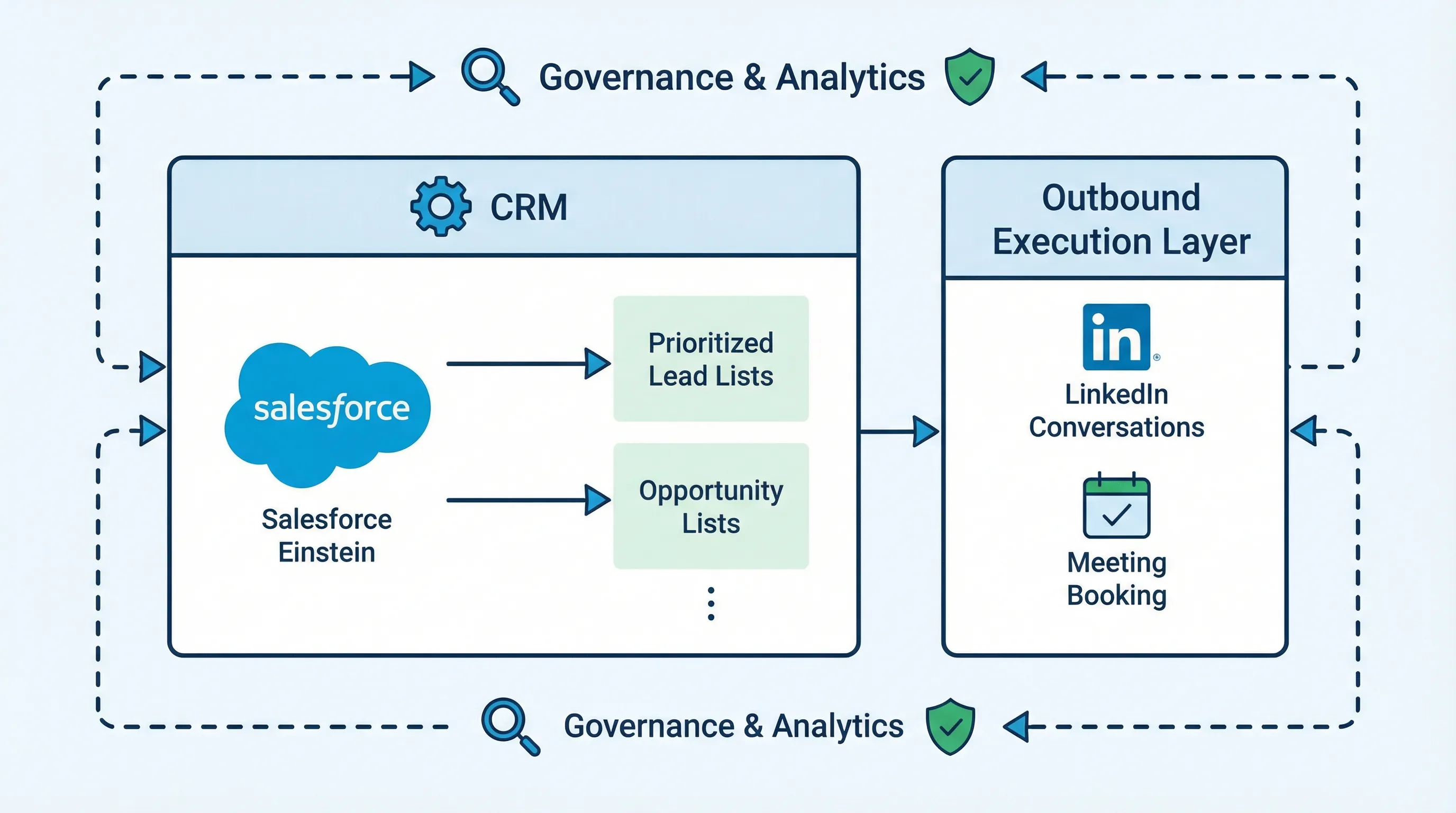
Einstein is strongest as a decision layer inside Salesforce. It can help you answer, “What should my team focus on?” but it often cannot answer, “How do we execute hundreds of high-quality, multi-turn conversations that produce qualified meetings?”
This is why many teams pair:
- CRM AI (Einstein) for prioritization, scoring, and management visibility
- A conversation execution layer (Kakiyo) to actually run LinkedIn threads, qualify in the chat, and book meetings
That pairing matters because speed and follow-through drive outcomes. For example, a well-cited study published via Harvard Business Review reported companies that responded to leads within an hour were nearly 7x more likely to qualify them than those that waited longer. Scoring without fast execution wastes that advantage.
And Salesforce’s own research in its State of Sales has repeatedly highlighted that reps spend a minority of their time selling (commonly cited at 28%), which is the real economic argument for automation and AI assistance.
Which tool should you choose?
- If you want CRM-native AI scoring and forecasting inside Salesforce, use Einstein for Sales Cloud.
- If you want autonomous AI conversation management on LinkedIn plus lead qualification and meeting booking, use Kakiyo.
- If you want a simple all-in-one CRM and sales workspace for SMB, use HubSpot Sales Hub.
- If you want call-based deal inspection and coaching, use Gong.
- If you want prospecting data plus basic outbound sequences in one tool, use Apollo.
FAQs
What is Einstein for Sales Cloud?
Einstein for Sales Cloud is Salesforce’s AI capability set inside Sales Cloud that helps teams prioritize leads and opportunities, improve forecast visibility, and surface recommended actions based on CRM data. The exact features you get depend on your Salesforce edition and add-ons.
How much does Einstein for Sales Cloud cost?
Einstein for Sales Cloud pricing is typically tied to your Salesforce Sales Cloud edition and any AI-related add-ons in your contract. The most reliable approach is to map the exact Einstein capabilities you need to the SKU list provided by Salesforce, then confirm whether pricing is per user, per org, or usage-based.
Is Einstein for Sales Cloud worth it?
It is worth it when your Salesforce data is clean, stage definitions are consistent, and you have clear score-to-action workflows. If your data is messy or reps do not operationalize the insights, you will pay for AI that creates dashboards, not pipeline.
Does Einstein for Sales Cloud work for LinkedIn outreach automation?
Einstein can help prioritize who to reach out to, but it does not autonomously manage LinkedIn conversations end-to-end. If LinkedIn is a core channel, teams often add a conversation execution layer like Kakiyo to run multi-turn threads, qualify prospects, and book meetings.
Einstein for Sales Cloud vs HubSpot: what’s the difference?
Einstein for Sales Cloud is an AI layer for Salesforce users, optimized for Salesforce-native workflows and governance. HubSpot is a simpler all-in-one CRM and sales platform with its own automation and AI capabilities, typically easier to deploy for SMB and mid-market teams.
Book a demo to see how Kakiyo turns Salesforce prioritization into qualified LinkedIn conversations and meetings.