
 Ilan Asseo
LinkedIn Outbound Sales: Cadence, Scripts, and Stop Rules
Operator-grade LinkedIn outbound sales cadence, modular message blocks, and stop rules to protect your brand while scaling outreach.

Many sales teams struggle with effective LinkedIn outreach because fixed sequences create spam, wasted touches, and weak qualification. This guide gives you a practical LinkedIn outbound sales cadence, scripts, and stop rules that improve reply quality without burning your brand.
Gartner predicts 80% of B2B sales interactions will happen in digital channels by 2025, and that reality is already here. If your LinkedIn outbound sales motion is still a fixed “5-step sequence” without stop rules, you are not running outbound, you are running reputation burn.
This guide gives you an operator-grade LinkedIn outbound sales cadence, copy blocks you can actually use, and the stop rules that keep your team from spamming. Then it breaks down the tools that help you execute at scale (including the only option that can run the full conversation autonomously).
Industry evidence: “As customers increasingly learn and buy digitally, sales reps become just one of many possible sales channels.” — Cristina Gomez, Managing Vice President, Gartner.
Source: Gartner
What is LinkedIn outbound sales?
LinkedIn outbound sales is a B2B prospecting motion where you initiate conversations with a defined ICP on LinkedIn, then move qualified prospects to a next step (usually a meeting). It includes targeting (often via Sales Navigator), first-touch messaging, follow-ups, in-thread qualification, and booking logistics. Done well, it is a conversation system with clear micro-conversions and strict stop rules, not just automated sending.
Tool comparison (to run LinkedIn outbound sales end to end)
| Tool Name | Best For | Key Feature | Starting Price |
|---|---|---|---|
| Kakiyo | Autonomous LinkedIn conversations that qualify and book meetings | AI manages multi-turn chats, qualification, and meeting booking | Demo (pricing on request) |
| LinkedIn Sales Navigator | Building targeted lead lists | Advanced search, lead lists, buying signal alerts | Paid (published plans) |
| HeyReach | High-volume outbound across multiple senders | Multi-sender, agency and team scaling workflows | Paid (published plans) |
| Expandi | Rule-based LinkedIn outreach automation | Smart sequences with safety limits | Paid (published plans) |
| Dripify | Lightweight LinkedIn sequences for small teams | Cloud-based drip campaigns | Paid (published plans) |
| Waalaxy | Simple LinkedIn automation + basic sequences | Templates and simple campaign builder | Paid (published plans) |
Note: pricing changes often. Use the table to shortlist by workflow fit, then confirm current pricing on each vendor’s site.
Cadence: a 12-day LinkedIn outbound sales cadence (with branches)
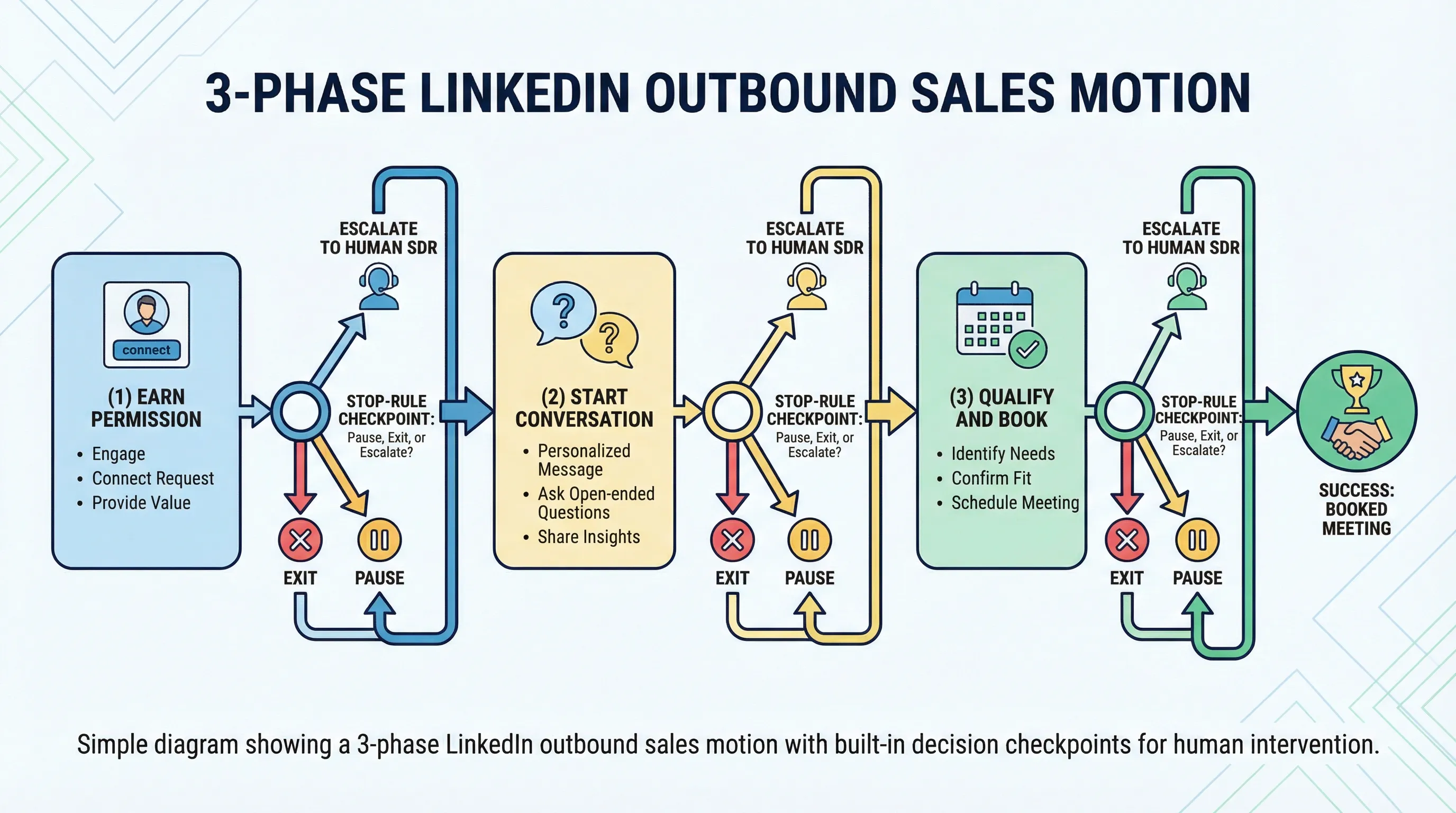
A good cadence is built around behavior, not steps. The goal is to earn permission, convert acceptance into a real conversation, qualify quickly, then book.
Here is a 12-day baseline that works for most B2B offers where the buyer is active on LinkedIn.
| Day | Touch | Goal | If they do nothing | If they engage |
|---|---|---|---|---|
| 0 | Profile view + connect note | Get acceptance with minimal friction | Wait 2 days | If they accept fast, move to Day 2 message sooner |
| 2 | Message 1 (context + question) | Start a conversation | Wait 3 days | If they reply, go straight to qualification lane |
| 5 | Message 2 (proof + micro-CTA) | Create credibility and a small next step | Wait 3 days | If they ask “what is this?”, send the “one-sentence offer” block |
| 8 | Message 3 (value drop) | Give something useful without asking for a meeting | Wait 4 days | If they click/ask a question, ask a single qualification question |
| 12 | Breakup (polite stop) | Close the loop and protect your brand | Stop for 60 to 90 days | If they respond, treat it as a new convo and qualify |
Two implementation details matter more than the timeline:
- Micro-conversions you track: acceptance rate, reply rate, positive reply rate, qualified conversation rate, meetings booked, meetings held.
- Branching logic: acceptance without reply is a different situation than “seen and ignored,” and both are different from “not now.” Your stop rules should reflect that.
Scripts: modular LinkedIn messages you can remix (not a swipe-file dump)
Most teams fail because they try to write “perfect messages.” Operators win by using modular blocks that stay consistent across ICP segments.
Connection note (keep it under the limit)
LinkedIn connection notes are short (commonly limited to 300 characters, which forces clarity). Use a low-ego reason to connect, not a pitch.
Block:
“Hi {FirstName}, saw you lead {Function} at {Company}. I work with {peer group} on {outcome}. Open to connecting?”
Message 1: context + one question
Block:
“{FirstName}, quick question based on {specific trigger}: are you currently responsible for {problem area} at {Company}, or does that sit with someone else?”
Why it works: it gives them an easy reply even if they are not interested.
Message 2: proof without the case-study essay
Block:
“If helpful, we’ve seen {peer group} reduce {pain} by changing {lever}. Is {problem} on your 2026 roadmap, or not a priority right now?”
Message 3: value drop (no meeting ask)
Block:
“Sharing this because it comes up a lot: {1-sentence insight/checklist}. If you want, I can send the full {resource}.”
One-sentence offer (when they ask “what is this?”)
Block:
“We help {ICP} achieve {outcome} by {mechanism}, usually without {common tradeoff}.”
Qualification question (pick one, not five)
Use one thread-safe question that produces evidence.
Block:
“If you did decide to solve {problem}, what would need to be true for it to be worth your time this quarter?”
Meeting ask (only after evidence)
Block:
“Sounds like {their stated goal}. Want to compare notes for 15 minutes and see if there’s a fit? If yes, what does your calendar look like Tue or Wed?”
Stop rules: when to stop, pause, or escalate (the part most teams skip)
Stop rules are what keep LinkedIn outbound sales effective over months, not just a one-week spike.
The three stop-rule categories
- Hard stop (exit immediately): explicit “not interested,” “remove me,” compliance concerns, hostile replies.
- Soft stop (pause and recycle later): “not now,” “revisit in Q3,” “busy this month,” budget freeze.
- Escalate (human takes over): pricing asked, competitor comparison, detailed technical questions, buying-process questions.
Stop-rule matrix you can paste into your playbook
| Scenario | What you do | What you do next | What you track |
|---|---|---|---|
| No acceptance | Stop after 1 connect + 0 to 1 follow-up attempt | Recycle in 60 to 90 days with a new trigger | Acceptance rate by ICP slice |
| Accepted, no replies | Run max 3 follow-ups total | Stop for 60 to 90 days | Reply rate post-accept |
| “Not interested” | Acknowledge, confirm you will stop | Hard stop, do not re-message | Opt-out rate |
| “Not now” with timing | Confirm timing, ask permission to follow up | Set a reminder for their window | Deferrals by segment |
| Wrong person | Ask who owns it | Route to the referred contact | Referral rate |
| Positive reply but vague | Ask one qualification question | If evidence appears, book | Qualified conversation rate |
| Asking for details | Provide concise answer + one question | Escalate if it turns into a sales cycle | Escalation rate |
If you want a deeper governance approach (throttles, QA, and guardrails), this pairs well with Kakiyo’s guide on deploying an AI SDR safely: AI SDR: How to Deploy Without Spamming.
The hidden failure mode: “thread debt” kills outbound
The fastest way to lose money on LinkedIn outbound sales is to create more conversations than your team can properly handle.
When reply volume rises, most SDR orgs fail in predictable ways:
- Replies sit for 12 to 48 hours, killing momentum.
- Reps default to pushing meetings because they cannot qualify properly.
- “Not now” gets ignored, which creates buyer hostility later.
If you care about pipeline quality, treat outbound as a conversation ops problem, not a sending problem. That is why tools that only automate sending plateau quickly.
Kakiyo
What it does (2 sentences): Kakiyo autonomously manages personalized LinkedIn conversations from first touch through qualification to meeting booking. Instead of queuing tasks for SDRs, it runs the multi-turn thread and only escalates when a human should step in to close.
Standout feature (1 sentence): Kakiyo’s edge is end-to-end conversation control plus intelligent scoring so qualification is consistent and auditable.
Who it’s for (1 sentence): SDR leaders and RevOps teams who want LinkedIn pipeline without turning reps into full-time inbox operators.
Pricing: Demo (pricing on request).
Pros
- Manages the full conversation, not just outreach steps.
- Built for qualification and booking, with controls like A/B prompt testing and conversation override.
- Designed to scale simultaneous threads without losing governance.
Cons
- If you only need basic sending automation, it can be more platform than you require.
- You still need clear ICP and qualification definitions to get maximum lift.
LinkedIn Sales Navigator
What it does (2 sentences): Sales Navigator is LinkedIn’s prospecting product for building lead lists, monitoring accounts, and finding buying group members. It does not run outreach for you, but it is often the cleanest source of first-party targeting.
Standout feature (1 sentence): Advanced search and saved lead lists with ongoing alerts.
Who it’s for (1 sentence): Anyone doing LinkedIn outbound sales who needs reliable targeting and list hygiene.
Pricing: Paid (published plans).
Pros
- Strong targeting for titles, seniority, functions, and account attributes.
- Native to LinkedIn, so workflows are straightforward.
Cons
- No automation for multi-turn conversations.
- Still requires a system for qualification evidence and follow-up discipline.
HeyReach
What it does (2 sentences): HeyReach is designed for scaling outbound across multiple LinkedIn senders, commonly used by agencies and teams running many accounts. It focuses on high-throughput outreach operations rather than deep qualification logic.
Standout feature (1 sentence): Multi-sender infrastructure for scaling outbound programs.
Who it’s for (1 sentence): Teams that have a proven message and want more volume across senders.
Pricing: Paid (published plans).
Pros
- Good fit for multi-sender scaling.
- Built around managing outbound operations across accounts.
Cons
- Primarily a sending and sequencing layer, not an autonomous qualification layer.
- Conversation quality still depends heavily on manual SDR effort.
Expandi
What it does (2 sentences): Expandi automates LinkedIn outreach sequences with rule-based steps and safety-oriented limits. It is typically used to systematize follow-ups and reduce manual clicking.
Standout feature (1 sentence): Automation rules designed to mimic human pacing.
Who it’s for (1 sentence): Operators who want classic LinkedIn outreach automation with more controls than basic tools.
Pricing: Paid (published plans).
Pros
- Mature LinkedIn sequencing workflows.
- Useful for structured follow-ups at consistent pace.
Cons
- Automates sending and steps, not end-to-end conversations.
- Qualification and booking are still mostly manual.
Dripify
What it does (2 sentences): Dripify is a cloud-based LinkedIn outreach tool that runs simple drip sequences and follow-ups. It is often chosen by smaller teams that want quick setup.
Standout feature (1 sentence): Lightweight campaign builder for straightforward sequences.
Who it’s for (1 sentence): Small teams or founders who want basic LinkedIn automation without heavy implementation.
Pricing: Paid (published plans).
Pros
- Easy to deploy.
- Covers common sequence needs without much overhead.
Cons
- Limited for nuanced qualification and branching.
- Not built to autonomously manage complex threads.
Waalaxy
What it does (2 sentences): Waalaxy provides simple LinkedIn automation and templates to run outbound campaigns. It is generally positioned as an accessible entry point for LinkedIn sequences.
Standout feature (1 sentence): Simple templates and campaign setup.
Who it’s for (1 sentence): Teams starting with LinkedIn outreach automation who can accept simpler controls.
Pricing: Paid (published plans).
Pros
- Quick to get started.
- Useful for basic outreach workflows.
Cons
- “Automation-first” workflows can drift into spam if your stop rules are weak.
- Not designed for deep qualification and meeting booking autonomy.
Which tool should you choose?
If you want autonomous AI conversation management and LinkedIn lead qualification, use Kakiyo.
If you want the best targeting and lead list workflow inside LinkedIn, use LinkedIn Sales Navigator.
If you want multi-sender volume scaling (and you already have strong messaging and stop rules), use HeyReach.
If you want classic LinkedIn outreach automation with structured sequences, use Expandi.
If you want a lightweight starter sequencer for a small team, use Dripify or Waalaxy.
FAQs
What is the best cadence for LinkedIn outbound sales?
A practical baseline is 10 to 14 days with 4 to 6 total touches, but the real answer is “behavior-based branching.” If they accept but do not reply, you follow up differently than if they never accept. Always include a clear breakup and a recycle window so you do not burn your list.
What are stop rules in LinkedIn outreach automation?
Stop rules are explicit conditions that tell your system or SDR when to end outreach, pause outreach, or escalate to a human. Examples include hard stops for opt-outs, soft stops for “not now,” and escalation when the prospect asks pricing or detailed questions. Without stop rules, LinkedIn outreach automation turns into spam by default.
What are the best automated LinkedIn outreach tools for teams?
It depends on whether you need sending automation or full conversation execution. Tools like Expandi, Dripify, Waalaxy, and HeyReach focus on sequencing and operational scale. Kakiyo is purpose-built for autonomous multi-turn conversations that qualify and book meetings, which is a different category.
What is AI LinkedIn prospecting, and when does it work?
AI LinkedIn prospecting uses AI to personalize outreach, manage replies, and sometimes qualify prospects inside the message thread. It works when your ICP is tight, your qualification rubric is explicit, and governance is real (prompt control, overrides, QA, and stop rules). If you cannot define “qualified,” AI will just help you be wrong faster.
What should I use as LinkedIn lead qualification software?
Use a system that can capture evidence (fit, intent, and a clear next step) inside the conversation, not just label people as “interested.” If you want qualification to happen inside the LinkedIn thread at scale, Kakiyo is designed specifically for that workflow with scoring and meeting booking.
Book a demo of Kakiyo to run autonomous LinkedIn conversations that qualify prospects and book meetings.