
 Ilan Asseo
AI SDR: How to Deploy Without Spamming
Spamming isn’t a volume problem — it’s a relevance and control problem. A practical playbook for deploying an AI SDR on LinkedIn that protects buyer.

Spamming isn’t a volume problem, it’s a relevance and control problem.
An AI SDR can help you run more LinkedIn conversations and book more meetings, but only if it behaves like a disciplined rep: targeted, respectful, context-aware, and willing to stop when the buyer signals “not interested.” The moment automation ignores intent, repeats the same pitch, or escalates too fast, your team doesn’t just lose replies, it risks account restrictions, brand damage, and a pipeline full of low-quality meetings.
This guide is a practical deployment playbook for using an AI SDR on LinkedIn without becoming “that company.”
Industry evidence: Salesforce Research reports that sales reps spend only 28% of their week actually selling, with the rest consumed by deal management, data entry, and other non-selling work.
Source: Salesforce State of Sales
What “spamming” looks like with an AI SDR (and why it happens)
Most teams don’t set out to spam. They set a meeting target, turn up automation, and accidentally create a system that optimizes for output (messages sent) instead of outcomes (qualified conversations and held meetings).
On LinkedIn specifically, spam is often experienced as:
- Generic messages that could have been sent to anyone
- Context-free pitches that ignore the prospect’s role, timing, or priorities
- Aggressive CTAs (calendar links too early, “15 minutes this week?” immediately)
- Bad “reply handling” (AI misses the point, answers awkwardly, or repeats itself)
- No graceful exits (no way to stop, no acknowledgement of “not a fit”)
LinkedIn also actively monitors and limits abusive or suspicious behavior, and the platform’s policies prohibit certain forms of automation and scraping. When evaluating any AI SDR approach, start by reviewing LinkedIn’s Professional Community Policies and related help documentation on abusive behavior and automated activity.
A quick diagnostic: platform spam vs buyer spam vs internal spam
Not all spam is the same. You can “comply” and still annoy buyers, or keep buyers happy while internal teams drown in junk meetings.
| Type of spam | What it looks like | What it breaks | What to fix first |
|---|---|---|---|
| Platform spam | Unnatural sending patterns, repetitive messages, aggressive volumes | Account health and deliverability | Throttling, variability, governance, and compliance checks |
| Buyer spam | Irrelevant outreach, no permission, no proof, no listening | Reply rates and brand trust | Targeting, personalization signals, micro-yes CTAs |
| Internal spam | Meetings booked that AEs reject or prospects no-show | Pipeline predictability | Qualification rubric, scoring, and handoff standards |
If you only solve one of these, you will still feel “spammy” somewhere in the system.
The anti-spam principle: earn permission, then escalate
The safest AI SDR deployments treat LinkedIn outreach like a conversation, not a sequence.
Your job is to earn small permissions in order:
- Permission to connect
- Permission to ask one relevant question
- Permission to explore fit and intent
- Permission to suggest a meeting
That’s why Kakiyo’s blog emphasizes micro-conversions and thread-safe qualification in its broader SDR operating model (see SDR sales from outreach to booked meetings). The anti-spam version of AI SDR is simply: never skip steps.
Build the foundation before you scale (the part most teams skip)
If you want AI to behave well, you need to give it good constraints. Four inputs determine whether your AI SDR feels helpful or spammy.
1) A narrow ICP with clear exclusions
“VP Sales at B2B SaaS” is not an ICP. It’s a category.
A deployable LinkedIn ICP includes:
- Firmographic bounds (industry, size, region)
- Role and team context (who owns the problem)
- Disqualifiers (who you do not want to message)
- A reason you win (one sentence per segment)
If your targeting is loose, AI will “personalize” the wrong pitch to the wrong person, at scale.
For tighter LinkedIn targeting mechanics, reference your Sales Navigator workflows (Kakiyo’s guide: using LinkedIn Sales Navigator for prospecting).
2) One value hypothesis per segment (not one pitch for everyone)
Spam happens when the same message tries to fit five buyers.
Instead, define a simple value hypothesis per segment:
- Problem you believe they have
- Why now (trigger or timing)
- Proof you can offer (credible, minimal)
Keep it short. The point is not to convince, it’s to start a real conversation.
3) A qualification definition your AEs will actually accept
If your AI SDR books meetings without a shared definition of “qualified,” you’ll create internal spam.
At minimum, document what evidence must be captured before proposing time:
- Fit (is this the right kind of account/person?)
- Intent (is there active or emerging interest?)
- Conversation proof (what did they say that shows it?)
If you need a robust reference, align with your org’s SQL criteria (see what is a Sales Qualified Lead).
4) A tone policy and “stop rules”
AI SDRs get spammy when they are not allowed to stop.
Your stop rules should include:
- Explicit opt-out language (e.g., “not interested,” “remove me,” “stop messaging”)
- Soft negatives (e.g., “we already have a vendor,” “maybe later,” “busy right now”)
- Competitor mentions (often better to hand to a human)
- Sensitive situations (layoffs, role changes, personal posts)
The goal is simple: be easy to say no to.
Design a conversation system, not a blasting machine
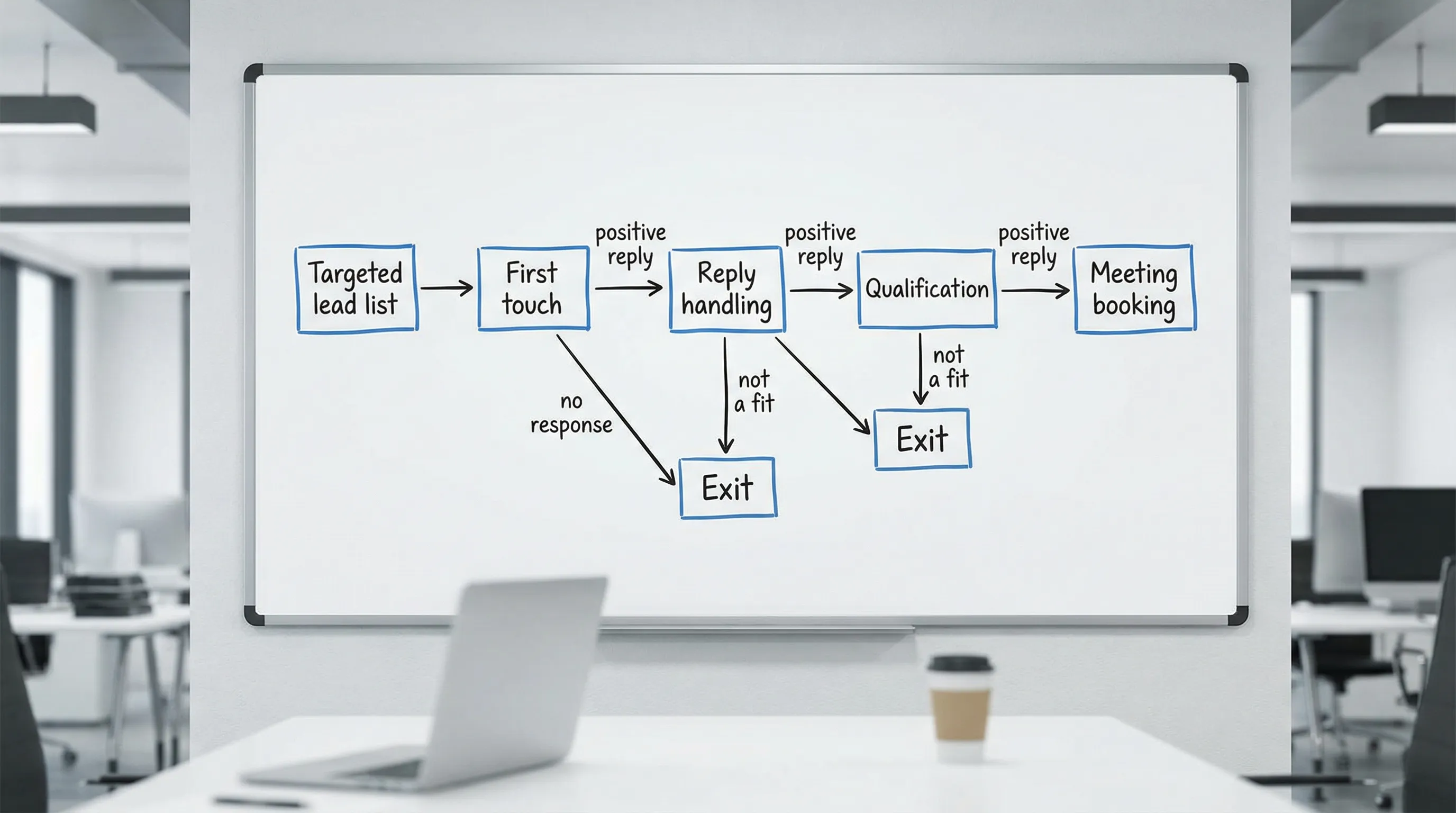
A clean AI SDR deployment looks like a state machine: each prospect is in a conversation state, and the AI chooses the next action based on evidence.
The minimum viable conversation states
You do not need a complex model to avoid spamming. You need consistent state transitions.
Common states to define:
- First touch sent
- Connection accepted (but no reply)
- Replied (positive, neutral, negative)
- Qualifying (asking one question at a time)
- Ready to book (meets evidence threshold)
- Exit (stop or nurture)
This is also where “legacy sequencers” tend to struggle on LinkedIn: they are step-based, not conversation-based. If you are comparing approaches, see Sales AI tools vs legacy sequencers.
Guardrails that prevent spamming (even when you scale)
You avoid spam by building limits into the system, not by hoping the model behaves.
Here are the guardrails that matter most in real deployments.
| Guardrail | What it does | Practical implementation | What to monitor |
|---|---|---|---|
| Volume throttles | Prevents unnatural spikes | Cap new threads/day and total active threads | Account health, acceptance rate, reply rate |
| Behavior-based branching | Stops “follow-up spam” | Only follow up when the prospect’s behavior warrants it | Replies per follow-up, negative replies |
| Qualification gates | Prevents junk meetings | Require minimum evidence before booking | AE acceptance rate, meeting held rate |
| Human override | Prevents brand damage | Allow SDRs to take over any thread instantly | Override rate and reasons |
| A/B prompt testing | Prevents scaling the wrong message | Test one variable at a time across a stable ICP | Lift in qualified conversation rate |
| QA sampling | Catches “weird AI” early | Weekly review of a fixed sample of threads | Policy violations, tone issues |
If you want a weekly operating rhythm for this, Kakiyo’s scorecard approach is a good baseline (see AI sales metrics: what to track weekly).
Messaging patterns that feel human (and don’t trigger spam reflexes)
You do not need longer messages. You need better reasons.
Pattern 1: The “micro-yes” opener
Keep the first message about permission, not pitch.
{Name}, quick question.

Are you the right person for {topic} at {Company}, or does that sit with someone else?
Why it works: it’s easy to answer, and it signals you will respect direction.
Pattern 2: The “signal-based” relevance hook
Use one real signal, then ask a single question.
Saw you’re hiring {role} on the {team} side.

When teams add {role}, is the main driver {A} or {B} right now?
Why it works: it connects to a plausible moment in time without pretending you “know everything.”
Pattern 3: The “no-link, no-pressure” meeting transition
Only after you’ve captured evidence.
Based on what you shared (especially {their_words}), it sounds like this is worth a quick compare.

If it helps, I can suggest 2 times, or I’m happy to keep it async here.
Why it works: it offers a meeting without forcing one, and it references conversation proof.
For more examples, keep your copy short and structured (Kakiyo’s template library approach: LinkedIn outreach messages that get replies).
A phased rollout plan that keeps you out of trouble
Most spam disasters happen because teams scale before they validate. A safer approach is to expand in phases, with explicit “go” criteria.
Phase A: Constrained pilot (prove conversation quality)
Goal: validate that the AI can start and handle real conversations without awkwardness.
What to constrain:
- One ICP segment
- One primary value hypothesis
- Low daily volume
- High QA frequency
Exit criteria (examples): stable reply rates, low negative replies, consistent qualification evidence.
Phase B: Qualification hardening (prove meeting quality)
Goal: ensure booked meetings are accepted and held.
What to add:
- Qualification gates (fit + intent + proof)
- Scoring bands that map to actions
- Clear handoff packet expectations
If you want to pressure test your “qualified” definition, use an explicit rubric similar to Kakiyo’s qualification system design posts (for example, lead qualification process).
Phase C: Controlled scale (expand coverage, not chaos)
Goal: add volume while protecting buyer experience.
How to scale safely:
- Add one new segment at a time
- Keep a stable control prompt while testing variants
- Monitor outcomes weekly and freeze changes if quality drops
The metrics that prove you are not spamming
If you only measure “messages sent” and “meetings booked,” you will eventually spam.
A non-spam AI SDR scorecard includes quality and friction signals, not just throughput.
| Funnel area | Leading indicator | Quality indicator | “Spam smell” indicator |
|---|---|---|---|
| Targeting | ICP coverage, connection acceptance | Reply rate by segment | Sharp acceptance drop after scaling |
| Conversation | Positive reply rate | Qualified conversation rate | Rising negative replies or “stop” requests |
| Booking | Meetings booked | Meetings held, AE acceptance | High no-show or AE rejection |
| Governance | Override rate | QA pass rate | Repeated tone issues, repeated errors |
A key practice is slicing these metrics by segment and prompt version. Otherwise, you will average away the truth.
Where Kakiyo fits (without pretending AI should do everything)
An AI SDR works best when it owns the repeatable parts of LinkedIn prospecting, and humans own strategy and high-stakes judgment.
Kakiyo is designed for exactly that conversation layer: it autonomously manages personalized LinkedIn conversations at scale from first touch through qualification to meeting booking, with controls that matter for non-spam deployment, including:
- Customizable prompts and industry templates
- A/B prompt testing
- Intelligent scoring
- Managing many conversations simultaneously
- Conversation override control (humans can step in)
- Centralized real-time dashboard and analytics
If you want the broader concept and workflow of an AI SDR on LinkedIn, start with AI SDR: automate conversations, qualify faster, book more. Then use the guardrails in this article to deploy it without damaging trust.

The practical takeaway: scale conversations, not noise
If your AI SDR is spamming, it’s usually because one of these is missing:
- A tight ICP and segment-specific value hypothesis
- Micro-yes messaging that earns permission
- A qualification gate that prevents junk meetings
- Guardrails like throttling, QA sampling, and human override
- Metrics that reward held, accepted meetings, not just booked calls
Do those well and AI stops feeling like automation. It starts feeling like a disciplined, always-on SDR that respects buyers and protects your brand while your team focuses on high-value opportunities.
FAQ
Where does AI actually help in sales?
AI helps most when it reduces repetitive work, surfaces better signals, and improves execution speed. It is strongest in research, qualification support, follow-up, and workflow automation.
What are the limits of AI in sales?
AI still depends on clean inputs, good process design, and human oversight. It can accelerate bad workflows just as easily as good ones.
How should teams evaluate AI sales tools?
Evaluate tools by workflow fit, data quality, implementation friction, and measurable business outcomes. A feature-rich tool is not automatically the right tool for your motion.
Does AI replace SDRs or sales reps?
Usually no. In most teams, AI reshapes the role by taking over repetitive execution while humans stay responsible for judgment, positioning, and relationship depth.