
 Ilan Asseo
BDR Responsibilities: Daily Workflow and KPIs That Matter
How BDRs can convert responsibilities into a focused daily production system with micro-conversion KPIs, workflow blocks, and tool comparisons to scale.

Sales reps spend just 28% of their week actually selling (the rest is admin, prep, and tool-wrangling). The fastest way to win as a BDR is to turn “responsibilities” into a tight daily production system with a small set of KPIs you cannot game.
Industry evidence: Salesforce Research reports that sales reps spend only 28% of their week actually selling, with the rest consumed by deal management, data entry, and other non-selling work.
Source: Salesforce State of Sales
What are BDR responsibilities?
Business development representative responsibilities are the repeatable actions that create qualified pipeline: selecting the right accounts, starting conversations, managing replies, qualifying interest with evidence, booking meetings, and handing off clean context to AEs. A good BDR is measured on downstream outcomes (qualified conversations, sales accepted meetings, pipeline) not just activity (messages sent).
If you want BDR output to scale, you need two things: (1) a daily workflow that protects focus, and (2) instrumentation that ties every action to a micro-conversion.
Tool comparison (to run the BDR workflow)
| Tool Name | Best For | Key Feature | Starting Price |
|---|---|---|---|
| Kakiyo | Autonomous LinkedIn conversations, qualification, and meeting booking | AI manages multi-turn chats, scores leads, and books meetings | Contact sales |
| LinkedIn Sales Navigator | Building targeted lead lists and monitoring account signals | Advanced lead/account search + alerts | Varies by plan |
| Apollo | Prospecting data + outbound execution in one place | Database + sequencing + basic scoring | Free plan available |
| Salesloft | Multi-channel sequencing and task execution | Cadences + rep workflows + reporting | Contact sales |
| Gong | Coaching and conversion analysis | Conversation intelligence + deal risk signals | Contact sales |
| Calendly | Fast scheduling without back-and-forth | Scheduling links + routing | Free plan available |
Kakiyo
What it does: Kakiyo autonomously manages personalized LinkedIn conversations at scale, from first touch through qualification to meeting booking. It is built for teams that want the AI to run the thread so SDRs only step in when a deal is real.
Standout feature: Autonomous conversation management plus an intelligent scoring system that qualifies leads and drives to a booked meeting.
Who it’s for: SDR and BDR teams running LinkedIn-first outbound who want to scale conversations without adding headcount.
Pricing: Contact sales.
Pros:
- Handles multi-turn LinkedIn replies (not just sending steps)
- Qualification is built in (scoring, prompts, templates) so meetings are cleaner
- Strong controls (override) plus analytics and A/B prompt testing
Cons:
- Not a fit if you only need a simple connection-request sender
- You still need clear qualification definitions (AI cannot fix vague standards)
LinkedIn Sales Navigator
What it does: Sales Navigator helps BDRs find ICP-matching prospects, build lead lists, and track account changes that create timing. It is the core system for list-building in a LinkedIn-first motion.
Standout feature: Lead and account search with saved searches and alerts.
Who it’s for: Any BDR doing outbound targeting and account research.
Pricing: Varies by plan (LinkedIn publishes plan pricing that can change by region and packaging).
Pros:
- Best-in-class targeting on LinkedIn data
- Alerts support trigger-based outreach (job changes, posts, growth signals)
- Simple workflow for saving leads and accounts
Cons:
- Does not run your conversations or qualification for you
- Reporting is limited if you need a full funnel view
Apollo
What it does: Apollo combines contact data with outbound execution so BDRs can build lists and run sequences. It is often used when teams want “prospecting plus sending” in one tool.
Standout feature: Large contact database paired with outbound sequences.
Who it’s for: Teams that want one place for list building, enrichment, and outbound execution.
Pricing: Free plan available (paid plans vary by package).
Pros:
- Fast list building and enrichment
- Useful for email-led or mixed-channel outbound
- Reduces tool sprawl for early-stage teams
Cons:
- Conversation quality still depends on your messaging and reply handling
- Not designed to autonomously qualify in a LinkedIn thread
Salesloft
What it does: Salesloft is a sales engagement platform for managing multi-channel cadences and rep execution. It is strong when you want standardization, tasks, and manager visibility.
Standout feature: Cadence execution with team workflows and reporting.
Who it’s for: Larger SDR/BDR teams running high-volume outbound across email, phone, and LinkedIn touches.
Pricing: Contact sales.
Pros:
- Good for consistent rep workflows and coaching
- Solid operational reporting for activity and sequences
- Integrates well in typical RevOps stacks
Cons:
- Optimizes “steps,” not multi-turn qualification conversations
- Can push teams into activity metrics if KPIs are not defined well
Gong
What it does: Gong records and analyzes sales calls to surface coaching insights and pipeline risk signals. It helps managers improve conversion, especially post-meeting.
Standout feature: Conversation intelligence tied to outcomes.
Who it’s for: Teams with enough meetings to justify a coaching and QA layer.
Pricing: Contact sales.
Pros:
- Improves coaching quality with objective evidence
- Helps identify why meetings fail to convert
- Useful for onboarding and message QA
Cons:
- Does not generate pipeline by itself
- Limited value if meeting volume is still low
Calendly
What it does: Calendly removes scheduling friction with booking links and routing. It is the simplest lever to increase meetings held because it reduces back-and-forth.
Standout feature: Scheduling links and basic routing.
Who it’s for: Any BDR booking meetings, especially with multiple AEs or territories.
Pricing: Free plan available (paid plans vary by features).
Pros:
- Faster booking, fewer dropped threads
- Easy to standardize handoffs and meeting logistics
- Lightweight and low friction to adopt
Cons:
- Does not qualify leads
- Needs clean calendars and routing rules to avoid mistakes
The BDR daily workflow (what great looks like)
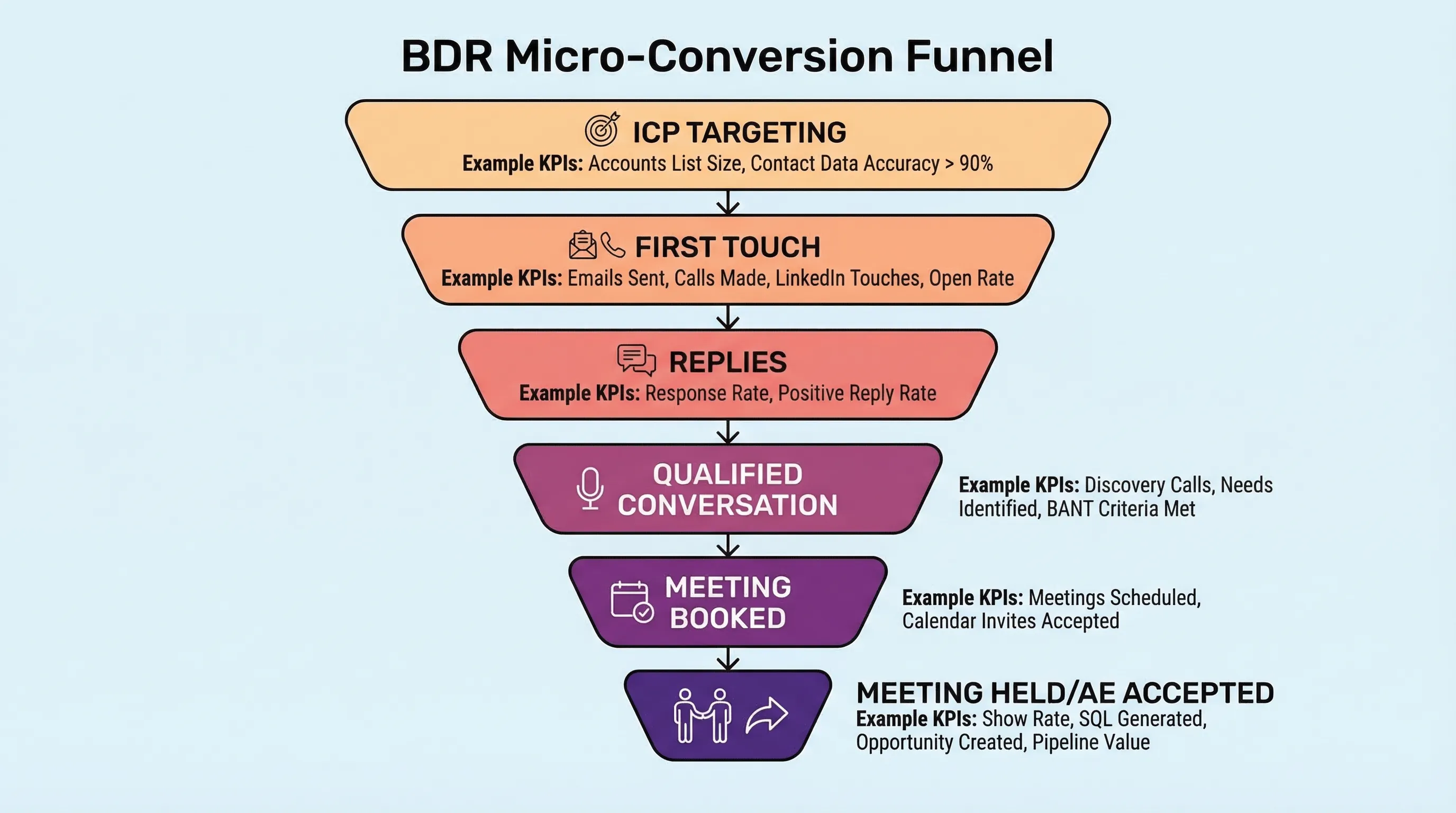
A BDR day should be built around micro-conversions, not tasks. Your job is to move prospects through a small funnel: targeted account selected, first touch sent, reply received, qualified conversation achieved, meeting booked, meeting accepted.
Also, remember the reality of modern buying groups: Gartner research has long shown B2B purchases typically involve 6 to 10 stakeholders, which means your workflow must support multi-threading and clean handoffs, not one-off heroics.
Block 1: Inbox triage (15 to 25 minutes)
Start with responses, not sends. Fast reply handling prevents good threads from going cold and improves your speed KPIs.
What “done” looks like:
- Every new reply is categorized (positive, neutral, objection, wrong person, unsubscribe)
- Next action is set (qualify, value-drop follow-up, book, disqualify)
Block 2: Build today’s hit list (20 to 30 minutes)
Pick a narrow slice of ICP for the day so your message stays consistent and measurable. If your list is broad, your KPIs become noise.
What “done” looks like:
- 20 to 50 net-new prospects selected (based on your volume and motion)
- 1 value hypothesis chosen for the slice
Block 3: First touches (30 to 45 minutes)
Send first touches in a focused block so you can keep quality high and avoid context switching. The goal is not “send a lot,” it is “earn the right to a reply.”
What “done” looks like:
- Connection requests or first messages delivered to the full hit list
- Personalization is based on a consistent signal (role, trigger, initiative)
Block 4: Follow-ups and value drops (20 to 40 minutes)
Most BDRs fail here by either spamming or disappearing. Follow-up is where you prove relevance without escalating too early.
What “done” looks like:
- Follow-ups prioritized by intent and recency
- Value drops are tied to the prospect’s role (not your product brochure)
Block 5: Qualification and meeting booking (20 to 40 minutes)
Qualification is a responsibility, not a vibe. Capture evidence in the thread, then convert to a calendar outcome.
What “done” looks like:
- 1 to 3 qualification questions asked (fit, intent, next step)
- A specific meeting CTA is offered when evidence is sufficient
Block 6: Handoff hygiene (10 to 20 minutes)
Your handoff is part of your job. A “booked meeting” that the AE rejects is not success.
What “done” looks like:
- Meeting context is packaged (why now, what problem, proof, stakeholders)
- CRM notes are complete enough that the AE can run discovery immediately
KPIs that matter (and how to calculate them)
If you only track activity, you will get activity. Track the micro-conversions that predict pipeline.
Two anchor points to keep you honest:
- Time reality: Salesforce reports reps spend about 28% of their week selling, which is why outcome KPIs matter more than raw work logs (Salesforce State of Sales).
- Channel reality: LinkedIn states 4 out of 5 members drive business decisions, which is why LinkedIn-first outbound can work when conversations are managed well (LinkedIn Marketing Solutions).
Here is a KPI scorecard you can implement immediately.
| KPI | What it measures | Simple formula | What it prevents |
|---|---|---|---|
| ICP coverage | Are you aiming at the right people? | ICP prospects touched / total prospects touched | “Spray and pray” targeting |
| Connection acceptance rate (LinkedIn) | First-touch relevance | acceptances / connection requests delivered | Fake personalization and weak targeting |
| Reply rate | Ability to start conversations | replies / delivered first touches | Optimizing for sends instead of responses |
| Positive reply rate | Real interest, not noise | positive replies / total replies | Celebrating “thanks” replies |
| Qualified conversation rate | Quality of your threads | qualified conversations / total replies | Booking meetings without evidence |
| Meetings booked | Throughput to calendars | meetings booked / qualified conversations | Endless chatting without next steps |
| Meetings held | Meeting quality and confirmation | meetings held / meetings booked | Counting no-shows as wins |
| AE acceptance rate | Handoff quality | AE accepted meetings / meetings held | Dumping bad meetings on AEs |
| Meeting to opportunity conversion | Downstream value | opportunities / meetings held | Over-optimizing top-of-funnel metrics |
| Speed to first meaningful response | Operational discipline | median time from reply to BDR response | Slow follow-up killing good intent |
For deeper KPI definitions and a modern scorecard, see Kakiyo’s related guide on SDR KPIs that matter.
Mapping business development representative responsibilities to outputs
This is the simplest way to coach the role: responsibility, observable output, and the KPI it should move.
| Responsibility | Observable output | Primary KPI it should move |
|---|---|---|
| Targeting and list building | Daily hit list with a single ICP slice | ICP coverage |
| First-touch outreach | Connection requests or first messages sent | Acceptance rate, reply rate |
| Reply handling | Categorized replies with next actions | Speed to response, qualified conversation rate |
| Qualification | Evidence captured (fit, intent, next step) | Qualified conversation rate, AE acceptance |
| Booking | Confirmed calendar invites with context | Meetings held |
| Handoff | Clean notes and stakeholders mapped | AE acceptance rate, meeting to opp |
| Experimentation | Message and ICP tests with version control | Lift in reply and qualified rates by segment |
Where teams mess this up (and what to do instead)
Most “BDR responsibility” documents fail because they describe tasks, not outcomes. Fix these three traps:
- Trap: Managing to messages sent. Fix: make reply rate and qualified conversation rate the headline metrics, and treat sends as a capacity input.
- Trap: Booking too early. Fix: define what evidence makes a meeting “sales accepted,” then track AE acceptance rate weekly.
- Trap: No definition of qualified. Fix: write a one-page qualification contract (what counts as fit, intent, proof, and next step) and audit 10 threads per week.
Where Kakiyo fits in the workflow
Most automation tools stop at sending. Kakiyo is different because it is designed to run the conversation, qualify the prospect with an intelligent scoring system, and book the meeting, without the SDR touching the chat.
That changes how you staff and manage the role:
- BDRs spend less time typing and more time supervising quality, exceptions, and strategy
- Managers coach prompts, qualification gates, and segment performance (not just “more activity”)
If you want the practical LinkedIn-first daily routine that pairs well with this model, read Business Development Representative LinkedIn: Daily Prospecting Routine.
Which tool should you choose?
- If you want autonomous AI conversation management and LinkedIn lead qualification, use Kakiyo.
- If you want the best way to build LinkedIn target lists and monitor account signals, use LinkedIn Sales Navigator.
- If you want prospecting data plus outbound execution in one place, use Apollo.
- If you want rep-driven multi-channel cadences with strong workflow management, use Salesloft.
- If you want faster scheduling and fewer dropped threads, use Calendly.
FAQs
What are business development representative responsibilities?
Business development representative responsibilities include targeting the right accounts, initiating outbound conversations, managing replies, qualifying prospects with evidence, booking meetings, and handing off clean context to AEs. The role is accountable for creating sales-ready opportunities, not just generating activity.
What does a BDR do daily?
A strong BDR day is built around inbox triage, building a tight hit list, sending first touches, running follow-ups, qualifying in-thread, booking meetings, and completing handoff hygiene. The order matters: replies first, sends second.
What KPIs should a BDR be measured on?
Measure BDRs on micro-conversions that predict pipeline: reply rate, positive reply rate, qualified conversation rate, meetings held, AE acceptance rate, and meeting-to-opportunity conversion. Keep activity metrics as inputs, not outcomes.
How is a BDR different from an SDR?
In many companies the titles are interchangeable, but when there is a difference, BDR often refers to outbound focused pipeline creation, while SDR can include inbound qualification too. Either way, the measurable outputs should be the same: qualified conversations and sales accepted meetings.
Can AI automate LinkedIn outreach without hurting quality?
Yes, if the AI is governed by clear ICP definitions, qualification gates, stop rules, and human override controls. The risk is using AI to scale sending without managing the multi-turn conversation, which is where relevance and trust are won or lost.
Book a Kakiyo demo to see autonomous LinkedIn conversations that qualify prospects and book meetings while your team focuses on closing.