
 Ilan Asseo
Cold Email Outreach: 6 Templates That Sound Human
Six cold email outreach example templates with a five-part anatomy for human-sounding messages that earn replies instead of eye rolls.

Most cold emails sound robotic for one simple reason: they try to “scale personalization” by copying a formula, not by having a real reason to reach out.
A good cold email is closer to a short, relevant note you would actually send to a peer. It is specific, honest about why you picked them, and easy to respond to.
Below is a cold email outreach example set you can copy and adapt: 6 templates that keep the message human, not hypey.
Industry evidence: “As customers increasingly learn and buy digitally, sales reps become just one of many possible sales channels.” — Cristina Gomez, Managing Vice President, Gartner.
Source: Gartner
What “robotic” cold email looks like (so you can avoid it)
Robotic emails tend to have the same patterns:
- Vague compliments (“Loved your profile”, “Impressed by your growth”) with no proof
- Inflated claims (“guaranteed”, “10x”, “revolutionary”) and too many buzzwords
- Long paragraphs that read like a landing page
- A meeting ask before relevance is established
- Fake personalization (a scraped keyword shoved into the first line)
The fix is not “more personalization tokens.” It is better conversational logic.
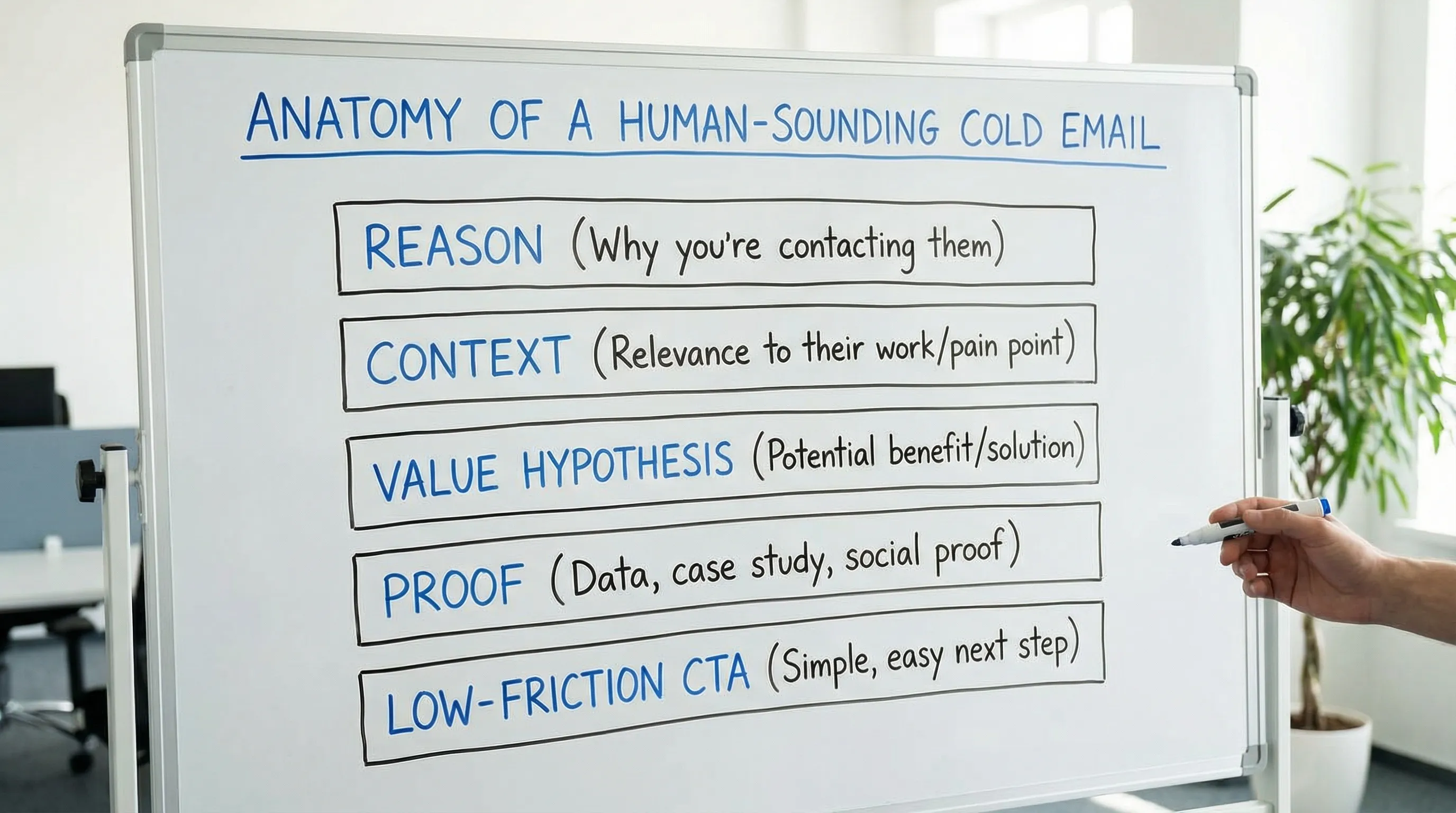
The 5-part anatomy of a human-sounding cold email
Use this structure to make any template feel natural:
- Reason: Why you, why them, why now (one sentence)
- Context: The situation you think they are in (one sentence)
- Value hypothesis: What you can improve and how (one sentence)
- Proof: A believable credibility snippet (one sentence)
- Low-friction CTA: A reply that takes 5 seconds (one line)
When to use each template (quick chooser)
| Template | Best for | Personalization signal to use | CTA style |
|---|---|---|---|
| 1) Permission-based opener | New list, coldest prospects | Clear ICP reason (role, segment) | “Worth a 2-line summary?” |
| 2) Trigger-based outreach | Timely relevance | Funding, hiring, new product, job post | “Does this matter right now?” |
| 3) Problem-first (no pitch) | Crowded categories | A specific, common pain in their role | “Is this on your radar?” |
| 4) “Right person?” forwardable | Unclear ownership | Team structure, org ambiguity | “Who owns this?” |
| 5) Soft CTA to a micro-asset | Skeptical buyers | A 1-page checklist, teardown, benchmark | “Want me to send it?” |
| 6) Close-the-loop breakup | End of sequence | Their non-response (neutral) | “Should I close this out?” |
Template 1: Permission-based opener (simple, respectful, high reply rate)
Use this when you do not have a strong trigger, but you do have a tight ICP and a clear value hypothesis.
Subject options
{company} + a quick questionquick idea for {team/function}worth a 20-sec read?
Cold email outreach example (permission-based)
Hi {first_name} - reaching out because you lead {function} at {company}, and I’m speaking with a few {role}s in {segment} about {problem}.

Usually the issue shows up as {symptom_1} and {symptom_2} once {context_change}.

If it’s useful, I can send a 2-line summary of what’s working for teams like {peer_company} (no deck). Worth it?

Best,
{your_name}
Why it doesn’t sound robotic
- It does not pretend you “love their company.” It states a real selection reason.
- It gives the prospect an easy “yes” or “no” reply.
Personalization that actually helps
Make {context_change} real, for example: “once you add a second SDR pod” or “once AEs start rejecting meetings due to fit.”
Template 2: Trigger-based outreach (relevant beats clever)
Use this when you have a legitimate “why now” signal.
Examples of triggers:
- New funding round
- Hiring for SDRs / RevOps
- New product line or new market
- A job post that reveals the workflow (tools, KPIs, motion)
Subject options
Re: {trigger_event}{trigger_event} and {one_risk}quick question after {trigger_event}
Cold email outreach example (trigger-based)
Hi {first_name} - saw {trigger_event}. Congrats.

When teams in {segment} hit this moment, one challenge is keeping outbound quality high while volume ramps (especially {channel_or_team}).

Curious: are you optimizing for {metric_1} right now, or is the focus more on {metric_2}?

If you tell me which, I’ll share a short play we’ve seen work.

Thanks,
{your_name}
Why it works
- You are not using the trigger as a gimmick, you are connecting it to a plausible operational shift.
- The CTA is a choice question, not “book time.”
Template 3: Problem-first email (no pitch, no screenshots, no hype)
Use this when your category is noisy and buyers are allergic to sales language. Your goal is to start a conversation, not force a demo.
Subject options
question about {process}sanity check on {metric}{role} to {role}: quick check
Cold email outreach example (problem-first)
Hi {first_name} - quick question.

Do you have a clear definition for a “qualified meeting” that sales will actually accept, or does it vary rep to rep?

Asking because we keep seeing teams lose time in the handoff: SDRs optimize for meetings booked, AEs optimize for meetings that convert.

If you already have a tight rubric, I’ll get out of your way. If not, I can share a simple one-page definition that’s been easy to roll out.

Best,
{your_name}
Why it doesn’t feel automated
- It’s written like a real question someone would ask.
- It includes a graceful exit (a surprisingly effective trust signal).
Template 4: “Right person?” email that is easy to forward
Use this when you are not sure who owns the topic. This template avoids forcing the recipient to do work, while still being direct.
Subject options
who owns {topic} at {company}?quick redirect?{topic} ownership
Cold email outreach example (right person?)
Hi {first_name} - I’m trying to figure out who owns {topic} at {company}.

Is it you, or someone on {team_a}/{team_b}?

Context: we help teams {one_sentence_outcome}. If you point me to the right owner, I’ll send a 3-sentence summary and you can decide if it’s relevant.

Thanks,
{your_name}
Why it works
- The CTA is tiny.
- If they are not the owner, they can still reply quickly, and your email can get forwarded with minimal friction.
Template 5: The “micro-asset” offer (value drop without attachment)
Use this when you have something genuinely useful (a checklist, benchmark table, teardown, short script). Do not attach it on first touch. Attachments can hurt deliverability and add friction.
Subject options
want the {asset_name}?{asset_name} for {role}squick share?
Cold email outreach example (micro-asset offer)
Hi {first_name} - I put together a {asset_name} for {role}s running {motion}.

It covers:
- {bullet_1}
- {bullet_2}
- {bullet_3}

Want me to send it over?

Best,
{your_name}
Notes to keep it human
- Keep the bullets concrete (things a buyer can act on).
- Avoid “thought leadership” framing. Make it practical.
If you want a LinkedIn-first version of this same idea (value drop, then conversation), see Kakiyo’s guide on LinkedIn outreach messages that get replies.
Template 6: Close-the-loop breakup (polite, not passive-aggressive)
Use this at the end of a short sequence (for example, after 2 to 4 touches). The goal is to reduce cognitive load and invite an honest “no.”
Subject options
close the loop?should I stop reaching out?putting this on ice
Cold email outreach example (breakup)
Hi {first_name} - I don’t want to keep bumping this if it’s not a priority.

Should I close this out, or is {topic} something you expect to revisit later this quarter?

Either answer is helpful.

Thanks,
{your_name}
Why it gets replies
- It signals respect for attention.
- It gives them two easy paths, including a “later.”
A simple follow-up rule that keeps your emails from sounding like sequences
Most “robotic” follow-ups fail because they add words, not value. A good follow-up adds one of:
- A new piece of relevant context (a trigger you missed)
- A clarified question (narrower and easier to answer)
- A smaller ask (permission, redirect, or a single metric question)
If you want a full operational checklist (deliverability, lists, stop rules, reply triage), Kakiyo has a deeper guide here: Cold Email Outreach: A Modern Checklist for Replies and Meetings.
Quick compliance and deliverability notes (so your “human” email lands)
Even great copy fails if it does not reach the inbox or violates basic rules.
- Include a straightforward opt-out line (for example: “If you’d rather I don’t reach out again, reply ‘no’ and I’ll close the loop.”)
- Make sure your outreach complies with applicable law (in the US, start with the FTC’s CAN-SPAM guidance).
- Avoid heavy formatting, images, and multiple links in first-touch emails.
How to adapt these templates to LinkedIn (without copy-pasting)
Cold email and LinkedIn messages are different, but the logic is the same: relevance, proof, and a low-friction next step.
A practical approach is:
- Use email for the “paper trail” and easy forwarding inside the account.
- Use LinkedIn for conversation, qualification, and nudging the thread forward when email is buried.
If LinkedIn is a core outbound channel for you, Kakiyo is built specifically to manage personalized LinkedIn conversations at scale, from first touch to qualification to meeting booking, so SDRs can focus on high-value opportunities. Learn more about safe scaling in Automated LinkedIn Outreach: Do It Safely and Effectively.

Frequently Asked Questions
What is the best cold email outreach example for getting replies? The permission-based opener is usually the safest starting point: it is short, honest about why you picked them, and asks for a low-effort reply.
How long should a cold email be to avoid sounding robotic? Aim for 60 to 120 words in most B2B outbound situations. One clear idea beats a comprehensive pitch.
Should I ask for a meeting in the first cold email? Often no. If you do, make it low-friction (for example, “open to a quick call?”) and only after you have established a credible reason and proof.
How do I personalize without fake compliments? Personalize the reason for outreach (role, segment, trigger, workflow) and the hypothesis (a problem they likely face). Avoid generic praise unless you can cite something specific.
How many follow-ups should I send? Many teams see better outcomes with fewer, higher-quality touches (for example 3 to 5 total), with stop rules when the prospect says “no” or it’s clearly not relevant.
Can I reuse these templates for LinkedIn messages? Yes, but rewrite them for the channel. LinkedIn messages should be even shorter, more conversational, and should prioritize permission and a single question.
Put conversation quality on autopilot (on LinkedIn)
If your team is already running email outbound, LinkedIn is often the best place to turn a “maybe later” into an actual qualified conversation.
Kakiyo helps teams do that by autonomously managing personalized LinkedIn conversations, qualifying prospects in-thread and booking meetings, with controls like prompt customization, A/B testing, scoring, and override capability.
Explore how it works at Kakiyo.