
 Ilan Asseo
Cold Email Outreach: Checklist for Replies & Meetings
A practical, modern checklist to improve cold email reply rates and meeting conversion without adding spam risk or busywork.

Cold email outreach still works in 2026, but not the way most teams run it. Buyers are flooded, inbox providers are stricter, and “personalization” that is clearly automated gets ignored. The teams that consistently get replies and meetings treat cold email like a production system, with clear inputs, guardrails, and a repeatable checklist.
This post gives you a modern, practical checklist you can use to improve reply rates and meeting conversion without adding fluff, spam risk, or busywork.
Industry evidence: “As customers increasingly learn and buy digitally, sales reps become just one of many possible sales channels.” — Cristina Gomez, Managing Vice President, Gartner.
Source: Gartner
1) Start with the outcome (not the sequence)
Most cold email programs fail because they optimize for sending volume instead of an observable outcome. Your checklist should begin with two definitions you can audit:
- What counts as a “good reply”? (Example: a reply that confirms the problem exists, even if timing is “later.”)
- What counts as a “meeting-worthy” conversation? (Example: the buyer confirms fit + interest + a next step.)
If you skip this, you will “improve reply rate” while booking low-quality meetings that never hold.
Checklist: outcome definition
- Define one primary CTA (most teams should choose either “quick question” or “15-min fit check,” not both).
- Define disqualifiers (industry, size, geography, tech constraints, or “already solved” signals).
- Define meeting acceptance criteria so AEs do not reject meetings later.
- Decide your required evidence fields (persona, problem, urgency, current approach).
If you want a complementary, deeper strategy view, see Kakiyo’s related playbook on cold email outreach strategy.
2) Lock the ICP slice before you touch copy
Copy is rarely the real issue. List quality and ICP clarity drive most of the variance.
A “tight” ICP slice is not a slogan like “B2B SaaS.” It is a specific segment you can describe in one line, where your value hypothesis is plausibly true.
Checklist: ICP slice and value hypothesis
- Pick one segment for the next 2 weeks (industry + size band + key system, if relevant).
- Choose one problem statement you can credibly diagnose in a cold message.
- Choose one proof point that matches the segment (a metric, outcome, or recognizable pattern).
- Define one reason “now” makes sense (trigger, risk, cost, or missed opportunity).
A helpful internal standard is to force yourself to answer: “What would make a reasonable buyer reply ‘yes, that’s us’ in one sentence?” If you cannot, you are not ready to scale sending.
3) Treat data hygiene like deliverability protection
Your deliverability is not only SPF/DKIM. Bad targeting creates negative engagement signals (ignores, spam complaints) that also hurt.
Checklist: list hygiene and targeting
- Verify you have the right persona (role and responsibility) for the outcome.
- Remove obvious “not a fit” accounts before sending (wrong geo, tiny teams, irrelevant vertical).
- De-duplicate across reps and tools to avoid multi-sends.
- Avoid sending to role accounts and generic inboxes where possible.
- Add a light reason-for-reach-out field per prospect (trigger, job change, tech stack, hiring signal, recent initiative).
If you are using enrichment, sample 25 contacts and manually validate that:
- The title matches the persona you think it does.
- The company looks like the segment you intended.
- The email pattern is consistent (a common source of bounce spikes).
4) Pass the “2026 deliverability bar” before you scale
Deliverability is now a product requirement, not an ops afterthought. If you send at scale, you must align with current bulk sender expectations.
Google and Yahoo introduced stricter bulk sender requirements (authentication, spam rate thresholds, and one-click unsubscribe). Even if you are not a “bulk sender” today, your program should be built to that standard.
Recommended references:
Checklist: infrastructure and compliance basics
- Authenticate: SPF + DKIM + DMARC for the sending domain.
- Use a dedicated sending domain or subdomain for outbound if appropriate for your org.
- Ensure a working, visible unsubscribe, ideally one-click.
- Avoid link-heavy, image-heavy, HTML-first layouts for cold outbound.
- Ramp volume gradually, keep daily volume stable instead of spiky.
- Monitor bounce rate and complaint rate, treat any spike as a stop-the-line event.
Practical rule: if you would be uncomfortable explaining your sending practices to your IT/security team, your process is probably too fragile.
5) Write for replies, not for “pitch completeness”
A cold email’s job is not to explain everything. It is to earn a reply. That means your message should be short, specific, and easy to respond to.
High-performing cold emails generally have:
- A relevant reason for the email (what you noticed)
- A credible claim (what you help with, without hype)
- A low-friction question (easy yes/no or short answer)
Checklist: copy quality
- Subject line: plain, specific, non-salesy (avoid gimmicks).
- First line proves it is not a blast (trigger, context, or segment-specific observation).
- One clear value hypothesis, no feature list.
- One CTA, phrased as a question.
- No attachments, minimal links (especially in the first touch).
- Read time under 15 seconds.
Here are three “CTA shapes” that tend to convert well because they are easy to answer:
- “Is X a priority for you this quarter?”
- “Worth a 10-minute fit check, or should I talk to someone else?”
- “If I send a 3-bullet outline of how teams handle X, would you like it?”
If you want a full swipe file, Kakiyo also publishes channel-agnostic templates in cold outreach examples.
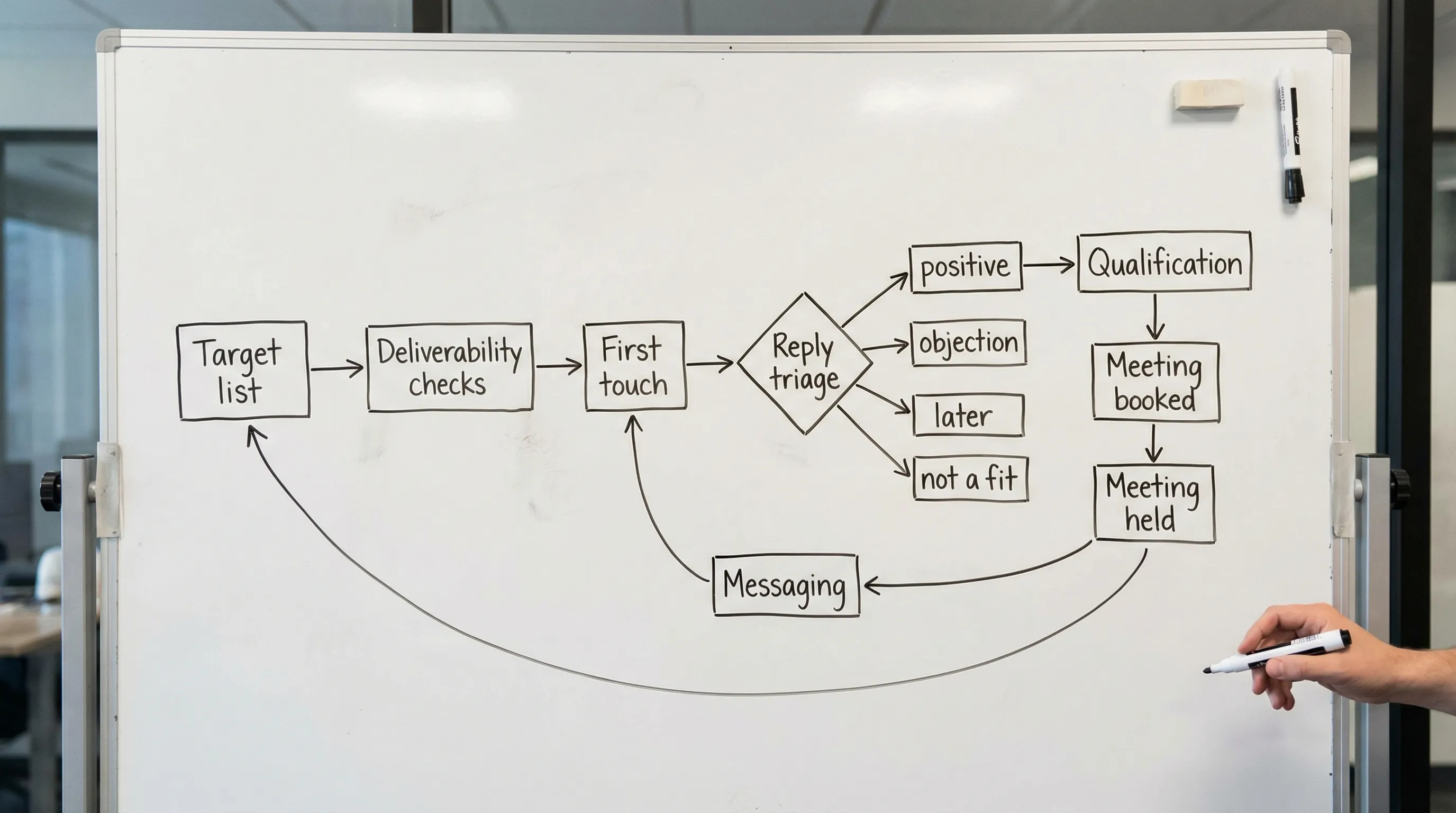
6) Build a sequence that respects behavior (and has stop rules)
Modern outbound sequences work best when they behave more like a conversation queue than a fixed ladder of touches.
Two common mistakes:
- Too many “just checking in” follow-ups with no new information.
- No stop rules, so interested prospects get spammed after they reply.
Checklist: sequencing and pacing
- 3 to 6 total touches over 10 to 18 business days (adjust by segment and deal size).
- Each follow-up adds something new (a sharper hypothesis, a relevant example, or a better question).
- Include at least one permission-based follow-up (“Should I close the loop?”).
- Stop rules are explicit: stop on any reply, stop on unsubscribe, stop on hard negative.
- “Later” replies go into a separate nurture workflow with longer intervals.
If your sequence relies on open tracking to branch logic, be careful. Open data can be unreliable due to privacy protections and email client behavior. Reply-based branching is usually safer.
7) Reply handling is where meetings are won
A lot of teams obsess over copy, then lose the meeting because they respond slowly, over-qualify, or push a calendar link too early.
You need a simple reply triage system, plus a fast SLA.
Checklist: reply triage and SLA
- Define 4 reply categories: positive, objection, later, not a fit.
- Set an SLA for first response (same business day is a strong default).
- Use a consistent qualification micro-flow (1 to 2 questions max before proposing times).
- Always confirm time zone when offering times.
- If you use a scheduling link, offer an alternative (“or I can propose 2 times”).
A practical way to keep this consistent is to standardize “best next message” by reply type:
| Reply type | What it usually means | Best next move | What to avoid |
|---|---|---|---|
| Positive interest | They see relevance | Confirm 1 detail, propose times | Sending a long deck or a full pitch |
| Objection (price, already have, not now) | Not enough context or timing mismatch | Ask 1 clarifying question, offer a smaller next step | Arguing or dumping generic case studies |
| “Later” | Interest without urgency | Confirm when to revisit, set a date | Continuing the same cadence |
| Not a fit | Wrong persona or wrong problem | Ask for the right owner (optional), then stop | Trying to “convince” them |
To improve downstream quality, align your qualification evidence with your broader pipeline definitions. Kakiyo’s posts on MQL vs SQL alignment and SQL criteria are useful for making “qualified” operational.
8) Booking mechanics matter (reduce no-shows before they happen)
Even strong outbound programs leak value after the meeting is booked. A “booked” meeting is not revenue, a held meeting is.
Checklist: meeting booking to held meeting
- Calendar invite includes a clear agenda and expected attendees.
- Send a short confirmation message that reinforces the buyer’s stated problem.
- If the meeting is more than 5 business days out, send a brief reminder 24 hours before.
- Capture context for the AE (what the buyer said, what they care about, what you promised).
This is also where conversation-led systems outperform activity-led systems because the “why now” context stays attached to the meeting.
9) Measure the right things (and know what to do when they drop)
A modern cold email dashboard should separate deliverability, engagement, and conversion. If you only look at reply rate, you will miss root causes.
Checklist: weekly metrics to review
- Bounce rate (hard and soft)
- Spam complaints (if available)
- Reply rate and positive reply rate
- Qualified conversation rate (your definition)
- Meetings booked, meetings held
- AE acceptance rate (if applicable)
Here is a simple diagnostic table you can use in weekly reviews:
| Symptom | Likely cause | Fix to test next |
|---|---|---|
| High bounces | Bad data or wrong email patterns | Tighten verification, adjust sources, reduce new vendor dependence |
| Low replies, stable deliverability | Weak ICP slice or unclear hypothesis | Narrow segment, rewrite the first line and CTA |
| Replies but low positive rate | Message is interesting but not relevant | Rework targeting, add segment-specific proof |
| Meetings booked but low held rate | Weak handoff, weak expectations | Improve agenda, confirm problem and attendees before booking |
For a broader operating rhythm, see AI sales metrics to track weekly. The structure applies even if you are not using AI.
10) Use LinkedIn as the “conversation channel” that supports email
Email is still a strong first touch for many segments, but LinkedIn often closes the loop, especially when:
- The buyer ignores email but is active on LinkedIn.
- You need lightweight context (mutuals, recent posts, job changes).
- You want a lower-friction way to qualify in short messages.
A practical, buyer-respectful approach is:
- Use email to introduce the hypothesis and ask the first question.
- Use LinkedIn to follow up with the same thread of context (not a brand-new pitch).
- Once they engage, qualify and book in the channel that is already working.
Kakiyo is built for this second part: AI-managed LinkedIn conversations that can carry the thread from first touch to qualification to booking, with controls like prompt customization, A/B testing, scoring, analytics, and human override. If you want to modernize your outbound motion without forcing SDRs to live in inboxes all day, start by pairing email with a conversation-led LinkedIn workflow.
To go deeper on the LinkedIn side, see LinkedIn outreach that converts and automated LinkedIn outreach.
The modern cold email outreach checklist (copy/paste)
Use this as your “launch gate” before you increase volume:
- Outcome defined (good reply, qualified conversation, meeting acceptance)
- ICP slice frozen for 2 weeks
- List hygiene validated on a sample
- SPF/DKIM/DMARC correct, unsubscribe working
- Volume ramp plan and stable pacing
- First-touch email under 15 seconds to read, one CTA
- Follow-ups add new value, stop rules implemented
- Reply triage categories and response SLA set
- Booking mechanics in place (agenda, confirmation, handoff evidence)
- Weekly dashboard includes deliverability, replies, qualified rate, meetings held
If you want to scale the part most teams struggle with, consistent qualification and booking inside real conversations, explore Kakiyo at kakiyo.com.
FAQ
What makes a LinkedIn or cold outreach sequence effective?
An effective outbound sequence matches the buyer's context, uses short messages, and measures reply quality rather than raw volume. Cadence, targeting, and stop rules matter as much as copy.
How many touches should I use before stopping?
Most teams should stop once intent is clearly absent or once the sequence becomes repetitive. The right stop rule protects deliverability, reply quality, and brand perception.
Should I automate all outreach?
No. Automation should remove repetitive work, not replace judgment. The best systems automate targeting, timing, and admin while keeping messaging and qualification grounded in context.
How do I know whether outreach is working?
Track positive reply rate, meeting quality, and downstream conversion instead of open rates alone. If meetings do not progress, the issue is usually targeting or qualification, not activity volume.