
 Ilan Asseo
Cost Per Qualified Lead (CPQL): Benchmarks and Levers
How to define, calculate, benchmark, and lower Cost Per Qualified Lead (CPQL) with practical levers, LinkedIn outbound guidance, and a simple measurement.

Gartner has reported that B2B buyers spend only 17% of their buying journey meeting with potential suppliers, so “more leads” rarely fixes pipeline. If you are not managing cost per qualified lead (CPQL), you are paying to create noise, not opportunities.
CPQL is the metric finance actually cares about because it connects spend and effort to a lead your sales team would accept, work, and convert.
Industry evidence: Gartner’s research on the B2B buying journey shows that consensus creation is now a core buying job, which is why qualification needs buying-group evidence rather than single-contact activity.
Source: Gartner
What is Cost Per Qualified Lead (CPQL)?
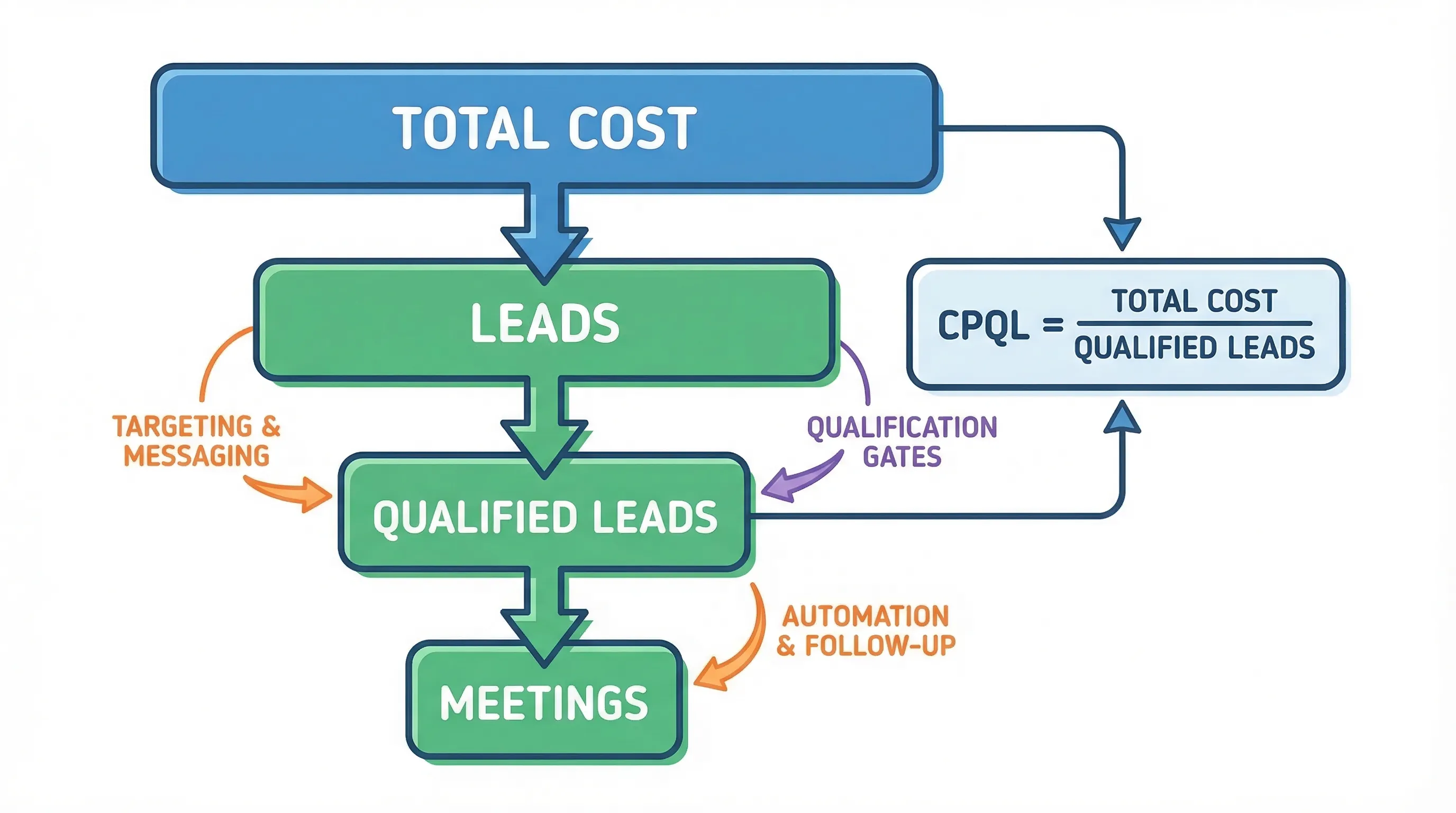
Cost Per Qualified Lead (CPQL) is the total cost to generate leads in a period divided by the number of leads that meet your agreed “qualified” definition in that same period. “Qualified” must be a concrete gate (fit + intent + evidence + recency), not a vibe. CPQL is used to compare channels, campaigns, and outbound motions based on quality, not volume.
How to calculate CPQL (the operator-grade version)
The basic formula is simple:
CPQL = Total acquisition cost / Number of qualified leads
What makes CPQL useful (or useless) is what you include in “total acquisition cost” and how defensible your “qualified” label is.
What costs should be included?
Include every cost you would still incur if you wanted the same volume of qualified leads next month.
| Cost category | Include? | Examples |
|---|---|---|
| Paid media + sponsorships | Yes | Paid search, paid social, newsletters, podcast sponsorships |
| Content production (variable) | Usually | Contractors, freelancers, design for campaign assets |
| Sales development labor | Yes (for outbound) | SDR/BDR fully loaded cost, contractors |
| Tools tied to acquisition | Yes | Sequencers, LinkedIn tooling, enrichment for outbound, landing page tools |
| Fixed overhead | No (most teams exclude) | Office, company-wide G&A |
If you want CPQL to survive a CFO review, document your rules once and keep them stable for at least a quarter.
What counts as “qualified” (so CPQL is not gamed)
Your “qualified” gate needs observable evidence. A practical standard is:
- Fit: matches ICP (firmographics + persona)
- Intent: credible buying signal (not just “thanks”)
- Proof/evidence: something verifiable from the conversation or behavior
- Next step: explicit agreement on what happens next
- Recency: still actionable (decay rules)
If you want a framework for evidence-based gates, align it with the qualification discipline you already run for MQL/SQL to prevent stage drift (related: Qualified Leads: Scoring That Sales Trusts).
CPQL benchmarks (what you can actually benchmark without lying to yourself)
There is no universal “good CPQL” across industries because qualification definitions and sales cycles vary. What you can benchmark reliably are:
- Your internal CPQL trend by channel and ICP slice
- Your economic ceiling (the max CPQL you can afford)
- Your CPQL multiplier vs CPL based on your qualification rate
Benchmark 1: The CPQL multiplier (CPQL vs CPL)
If a channel produces cheap leads but only a small fraction qualify, CPQL explodes. This is the cleanest benchmark because it is just math:
CPQL = CPL / Qualification rate
| Qualification rate (Qualified Leads / Leads) | CPQL vs CPL multiplier |
|---|---|
| 5% | 20.0x |
| 10% | 10.0x |
| 20% | 5.0x |
| 30% | 3.3x |
This table is your first sanity check in any channel review.
Benchmark 2: The economic ceiling (what you can afford)
Tie CPQL to downstream conversion and customer economics:
Allowable CPQL = Target CAC × (Qualified Lead to Customer conversion rate)
Example (replace with your numbers): if your target CAC is $18,000 and 15% of qualified leads become customers, your allowable CPQL is $2,700.
This is how you stop “lead gen” from being an activity contest and turn it into an efficiency constraint.
Benchmark 3: Outbound vs inbound expectations (directionally)
Do not benchmark outbound CPQL against inbound CPQL without adjusting for:
- Sales cycle length (inbound often skews warmer)
- Qualification strictness (outbound teams often promote too early)
- Buying group complexity (enterprise will look “worse” at the lead stage)
If you want a metric closer to sales outcomes, compare CPQL with CPSQL and watch where quality breaks (related: Cost Per Sales Qualified Lead (CPSQL): Benchmarks and How to Lower It).
The levers that actually move CPQL (without tanking quality)
Most teams try to “lower CPQL” by cutting spend or pushing SDRs to do more activity. That usually lowers quality and creates downstream waste.
The levers that work change either (1) your cost base or (2) your qualified rate, while holding the definition steady.
| Lever | What it changes | How to measure | Common failure mode |
|---|---|---|---|
| Tighten ICP slice | Raises qualification rate | Qualified rate, AE acceptance | Going too broad to chase volume |
| Message relevance and proof | Raises reply and qualified conversation rate | Positive reply rate, qualified conversation rate | Personalization theater, no real value hypothesis |
| Faster response and thread handling | Raises qualification rate | Speed-to-first-meaningful-touch, time-to-qualification | Slow inbox triage kills intent |
| Evidence-based qualification gate | Prevents false positives | AE rejection codes, downstream conversion | Promoting “polite replies” as qualified |
| Automation of routine conversation paths | Lowers labor cost per qualified lead | Qualified leads per SDR hour, cost per qualified conversation | Automating sending only, then drowning in replies |
| A/B testing prompts by segment | Improves conversion efficiency | CPQL by prompt version, by persona | Testing too many variables at once |
CPQL in LinkedIn-first outbound: where most teams leak money
LinkedIn can be a high-signal channel because qualification happens in the thread, not in a form fill. It can also become a CPQL disaster if you treat it like email sequencing.
Two realities matter here:
- LinkedIn is now massive, it surpassed 1 billion members in 2023, so your buyers are there, along with your competitors.
- The bottleneck is rarely “sending,” it is managing multi-turn conversations fast enough to capture intent while it is fresh.
The most common CPQL leak on LinkedIn
Teams automate connection requests and first messages, then:
- Replies pile up
- Response times slow down
- Qualification becomes inconsistent
- Meetings get booked without evidence
Your spend did not change, but your qualified rate collapses.
How to compute CPQL for LinkedIn outbound (practical)
For a LinkedIn-first SDR motion, your “total cost” is typically:
- SDR labor (fully loaded)
- LinkedIn seats (Sales Navigator, if used)
- Data/enrichment tied to targeting
- Outreach tooling tied to LinkedIn execution
Then define your denominator as qualified leads produced from LinkedIn conversations, not raw replies.
If you do not have a stable “qualified” definition yet, fix that first. Otherwise CPQL becomes a vanity metric you can improve by lowering the bar.
How Kakiyo helps lower cost per qualified lead
Most LinkedIn automation tools focus on sending at scale. Kakiyo is built for the expensive part: the conversation work that turns replies into qualified leads and booked meetings.
Kakiyo autonomously manages personalized LinkedIn conversations from first touch through qualification to meeting booking, using an intelligent scoring system so your team can enforce what “qualified” means.
Where this impacts CPQL:
- Higher qualified rate: prospects are qualified in-thread with consistent prompts, not ad hoc SDR judgment.
- Lower labor cost per qualified lead: the AI manages many simultaneous conversations, SDRs step in only for high-value moments.
- Cleaner benchmarking: A/B prompt testing and analytics let you measure CPQL by prompt, persona, and ICP slice instead of guessing.
If your current stack can send messages but cannot reliably run the thread, you are paying a hidden tax in SDR time and lost intent.
A simple CPQL measurement cadence (weekly, not quarterly)
CPQL is a control metric. If you only review it monthly, you will miss the leading indicators that cause it to spike.
A lightweight weekly review looks like this:
- CPQL by channel and by ICP slice
- Qualified rate (Qualified Leads / Leads) by channel
- Time-to-first-meaningful-touch (especially for conversational channels)
- AE acceptance rate (to catch “qualified” drift)
- CPQL by experiment (prompt version, offer, segment)
This keeps teams from “optimizing spend” while quality quietly decays.
Which tool should you choose?
If you want autonomous AI conversation management and LinkedIn lead qualification, use Kakiyo.
If you want a database for list building, use a data provider (then measure CPQL downstream).
If you want a sequencer for email-first outbound, use a sequencing tool (but do not expect it to manage LinkedIn threads).
If you want CRM-native reporting and governance, invest in clean lifecycle definitions and dashboards (then feed them better conversation evidence).
If you want to improve prompt-driven outreach performance, use a platform that supports controlled A/B prompt testing and analytics (Kakiyo includes this for LinkedIn conversations).
FAQs
What is a good cost per qualified lead?
A “good” cost per qualified lead depends on your target CAC and your qualified lead to customer conversion rate. The most defensible benchmark is your allowable CPQL, calculated from economics, then compared to your actual CPQL by channel.
How do you calculate cost per qualified lead?
Add all lead acquisition costs for a period (media, labor tied to outbound, and tools directly used to generate leads), then divide by the number of leads that meet your qualified definition in that period. Keep the qualified definition stable, otherwise the metric is easy to game.
What is the difference between CPL and CPQL?
CPL measures cost per lead, regardless of quality. CPQL measures cost per lead that meets your qualification gate, so it penalizes channels and tactics that generate a lot of unworkable leads.
Why is my cost per qualified lead increasing even though CPL is flat?
Usually the qualification rate is dropping due to ICP drift, slower response times, weaker messaging relevance, or inconsistent qualification gates. CPQL increases when fewer leads make it through the qualified gate, even if lead volume and CPL stay the same.
How can I lower cost per qualified lead on LinkedIn?
Stop optimizing for sending volume and optimize for qualified conversations. Tighten your ICP slice, improve message relevance and proof, reduce response time, enforce evidence-based qualification, and automate routine conversation handling so SDRs focus on closing high-value threads.
Book a Kakiyo demo to see how autonomous LinkedIn conversations can lower your CPQL without lowering your bar for “qualified.”