
 Ilan Asseo
Cost Per Sales Qualified Lead: Benchmarks & Tips
A practical guide to calculating cost per sales qualified lead (CPSQL), deriving defensible benchmarks, and the highest-leverage ways to lower CPSQL.

Cost per sales qualified lead is one of those metrics that feels straightforward, until you try to use it to make decisions.
On paper it’s simple: “How much did we spend to generate a Sales Qualified Lead (SQL)?” In practice, teams inflate or deflate the number with inconsistent definitions, missing cost inputs, and attribution that breaks the moment you add LinkedIn conversations, multi-threading, or async booking.
This guide gives you a clean way to calculate cost per sales qualified lead, shows practical “benchmark” ranges you can derive (even when the internet’s benchmarks don’t match your motion), and outlines the highest-leverage ways to lower it without lowering lead quality.
Industry evidence: Gartner’s research on the B2B buying journey shows that consensus creation is now a core buying job, which is why qualification needs buying-group evidence rather than single-contact activity.
Source: Gartner
What “cost per sales qualified lead” actually measures (and what it doesn’t)
Cost per sales qualified lead (CPSQL) measures your spend required to produce one lead that meets your team’s agreed SQL criteria.
The key phrase is “agreed SQL criteria.” If Sales and Marketing (or SDR and AE) disagree about what “qualified” means, you do not have a cost metric, you have a reporting argument.
If you need to tighten your SQL definition before you touch cost, start here:
- What Is a Sales Qualified Lead? Examples and Benchmarks
- Sales SQL: Definition, Criteria, and Examples
CPSQL vs CPL vs CAC (quick clarification)
- CPL (cost per lead) tells you how expensive it is to create a record, not an opportunity.
- CPSQL tells you how expensive it is to create a lead Sales should actually want.
- CAC (customer acquisition cost) tells you what it costs to acquire a customer, after win rates, sales cycle, and expansion.
CPSQL is most useful when you want to improve the part of the funnel where waste accumulates: targeting, first touch, conversation quality, and qualification.
How to calculate cost per sales qualified lead (the version your CFO won’t hate)
The base formula is:
Cost per SQL = Total attributable cost in period / # of SQLs created in period
But “total attributable cost” and “SQL created” are exactly where teams go wrong.
Step 1: Choose the SQL “truth label” you will optimize for
Many teams count an SQL when an SDR checks a box. That makes CPSQL look great, until AEs reject the meetings or nothing converts.
A more defensible approach is to anchor SQL to an outcome Sales can’t easily game, for example:
- AE-accepted meeting
- Meeting held
- Opportunity created
You can still track “SDR-declared SQL,” but treat it as an internal leading indicator, not the number you use for budget decisions.
Step 2: Count SQLs the same way, every week
Pick one:
- Created date (best for weekly ops)
- Qualified date (good when qualification happens outside the CRM)
- Accepted date (best when Sales acceptance is the gate)
Then freeze the definition for at least 30 days so your “improvements” are not just definition drift.
Step 3: Include fully loaded costs, not just tool spend
If you only count ad spend and software, your CPSQL will be fantasy. For most teams, labor is the largest cost driver.
Use a simple cost model like this:
| Cost input | Examples | What to watch |
|---|---|---|
| Labor (SDR/BDR) | Base, variable, benefits, payroll taxes | Use fully loaded cost, not salary |
| Lead/data | List purchases, enrichment, intent data | Split by segment if costs differ |
| Channel spend | LinkedIn Ads, events, sponsorships | Attribute to the motion that created the SQL |
| Tools | Sequencers, schedulers, CRM add-ons | Don’t double-count shared platforms |
| Agencies/contractors | Copywriting, ops support | Tie to the period they worked |
Step 4: Decide attribution rules that match your motion
Attribution is where “benchmarks” often become useless. A LinkedIn conversation can start from:
- A connection request
- A comment thread
- A warm intro
- A retargeting ad
If you are a LinkedIn-first SDR team, you usually want attribution that is conversation-aware, not last-click.
A practical rule: attribute an SQL to the channel where the qualifying conversation evidence occurred.
If your process is conversation-led, this is also where having an auditable qualification packet matters. Kakiyo has a strong point of view on evidence-based qualification and consistent handoffs, see Lead Qualification: A Simple, Repeatable System.
Benchmarks: the three “right” ways to benchmark cost per SQL
External CPSQL benchmarks are hard to trust because they vary by:
- ACV and payback tolerance
- ICP narrowness and list quality
- SDR comp and geo
- Channel mix (inbound vs outbound vs ABM)
- What the company calls an “SQL”
So instead of chasing a single number, use three benchmark layers.
1) The economic benchmark (what you can afford)
This is the benchmark that actually matters.
Max cost per SQL = Target CAC × (SQL-to-customer conversion rate)
Because:
CAC = Cost / Customers and Customers = SQLs × (SQL-to-customer rate)
So:
Cost / (SQLs × rate) = CAC → Cost/SQL = CAC × rate
Example:
- Target CAC: $12,000
- SQL-to-customer conversion: 12% (0.12)
Max cost per SQL you can afford: 12,000 × 0.12 = $1,440
If your CPSQL is $2,200, you either:
- Need higher conversion downstream, or
- Need lower cost upstream, or
- Need to revise your CAC target (usually the hardest lever)
This benchmark is motion-specific. A product-led funnel might have a very different SQL-to-customer rate than enterprise outbound.
2) The internal benchmark (your last 4 to 12 weeks)
Use your own history as the primary benchmark, then segment it.
At minimum, break CPSQL out by:
- Segment (SMB, mid-market, enterprise)
- Channel (inbound, LinkedIn outbound, email outbound, events)
- ICP slice (industry, persona)
This is where many teams discover the real story: one ICP slice is 3x cheaper than another, but nobody scaled it because reporting was aggregated.
3) The “scenario benchmark” (sanity-check ranges you can derive)
Even if you don’t trust external benchmarks, you can build scenario ranges from your funnel math.
Here is a simple CPSQL scenario model you can plug your numbers into:
| Input | Conservative | Typical | Aggressive |
|---|---|---|---|
| Cost per first conversation started | $40 | $25 | $15 |
| Conversation-to-SQL conversion | 6% | 10% | 18% |
| Implied cost per SQL | $667 | $250 | $83 |
This table is not an industry claim, it’s a math mirror. If your implied CPSQL is high, you now know whether the culprit is unit cost (too expensive to start conversations) or conversion (conversations not qualifying).
Why your cost per SQL is high (common root causes)
Most CPSQL problems come from a few predictable failure modes.
Your SQL definition is too loose (so Sales rejects it later)
A loose definition makes CPSQL look low because you “create” lots of SQLs. Then AE acceptance drops, pipeline quality drops, and you end up paying for the same revenue twice.
If you see high SQL volume but low AE acceptance, fix the definition and the evidence packet first. Useful references:
Your ICP is too broad (so most conversations are dead on arrival)
When targeting is generic, you spend labor and tooling on prospects who were never a fit. That inflates cost per SQL even if your messaging is decent.
Broad ICP also encourages spammy scaling, which can create long-term channel damage on LinkedIn.
Your motion is optimized for replies, not qualification
Reply rate is not the same as qualified conversation rate.
If your SDRs ask heavy discovery too early, or pitch too early, you can get polite replies that never turn into evidence and next steps.
A better approach is a micro-conversion ladder, tracked end-to-end. Kakiyo’s view of LinkedIn-first micro-conversions is laid out in SDR Sales: From Outreach to Booked Meetings.
You have a follow-up and triage bottleneck
Many teams lose their cheapest potential SQLs because:
- Replies sit unhandled for hours or days
- SDRs context-switch across too many threads
- “Warm” replies are treated the same as “hot” replies
Speed and consistency matter most in conversational channels.
How to lower cost per sales qualified lead (10 levers that actually move the number)
Lowering CPSQL is not a single hack. It’s usually a combination of:
- Reducing waste (stop paying for low-fit conversations)
- Increasing conversion (more SQLs from the same conversations)
- Lowering unit cost (less manual time per thread)
1) Make the SQL gate evidence-based, not opinion-based
Your SQL criteria should require observable evidence, not vibes.
A lightweight “SQL must include” rule:
- Fit signal (role, company type)
- Intent signal (problem, initiative, evaluation)
- Evidence (quote, detail from thread, screenshot, link, notes)
- Next step (scheduled meeting or explicit agreement)
- Recency (still active)
This reduces downstream rework and raises AE acceptance, which is the fastest way to reduce “hidden CPSQL.”
2) Narrow ICP slices until your message can be specific
Instead of “VP Sales at B2B SaaS,” run slices like:
- VP Sales at SaaS, 50 to 200 employees, hiring SDRs
- RevOps at SaaS using Salesforce, rolling out lead scoring
- Head of Growth at PLG, trying to improve conversion to sales-assisted
Specific targeting reduces wasted conversations and improves conversion without adding spend.
3) Shift from “pitch” to “permission-based qualification”
On LinkedIn especially, your goal is not to dump the deck. It’s to earn permission to ask one qualification question.
If you want frameworks and templates, see:
4) Track cost per qualified conversation, not just cost per SQL
SQL is often too lagging to diagnose quickly.
Add a mid-funnel cost metric:
Cost per qualified conversation = Total cost / # of conversations that hit your qualification evidence threshold
If cost per qualified conversation drops, CPSQL usually follows.
5) Use scoring to prioritize threads that are most likely to qualify
When every reply looks the same in the inbox, SDRs waste time on low-quality threads.
A simple scoring model, even before fancy ML, improves CPSQL by reallocating time toward higher-likelihood conversations. If you want the operational setup details (tiers, routing, adoption pitfalls), Kakiyo’s Salesforce-focused guide is helpful: Salesforce Einstein Lead Scoring: Setup, Tips, Pitfalls.
6) A/B test prompts and conversation flows, not just openers
Most teams A/B test only the first message. But cost per SQL is usually driven by what happens in turns 2 to 6:
- The first qualification question
- How objections are handled
- How you transition to scheduling
Conversation-led A/B testing is one of the highest ROI habits for lowering CPSQL over time.
7) Add stop rules to cut off low-probability threads
If you keep chasing non-buyers, your labor cost per SQL explodes.
Stop rules can be simple:
- Stop after X follow-ups with no response
- Stop immediately on a clear disqualifier
- Nurture instead of pursuing when timing is wrong
The goal is not to be aggressive, it’s to protect SDR time for high-fit opportunities.
8) Reduce manual work per thread with autonomous conversation handling
If LinkedIn is a meaningful channel for you, the biggest cost lever is usually SDR time per conversation, especially when you scale.
Tools that can autonomously manage personalized conversations, while keeping qualification consistent and auditable, reduce unit cost without requiring you to lower standards.
Kakiyo is designed for this job: it manages personalized LinkedIn conversations from first touch through qualification and meeting booking, and supports controlled experimentation (custom prompts, A/B testing, templates), scoring, real-time dashboards, analytics, and human override when needed.
9) Fix booking mechanics (you can lose SQL value at the finish line)
Even when a lead is qualified, CPSQL worsens if meetings don’t get booked or held.
Common mechanical fixes:
- Offer a tight choice of times (not “here’s my calendar, pick anything”)
- Confirm agenda and participants
- Shorten time-to-meeting for high-intent leads
If you track “meeting booked” but not “meeting held,” you will overestimate SQL output.
10) Close the AE feedback loop weekly
If AEs reject leads for the same two reasons every week, your CPSQL will not improve until you feed that back into:
- Targeting rules
- Qualification questions
- Disqualifiers
- Scoring thresholds
A lightweight weekly loop is often enough. If you want a ready-made weekly scorecard approach, use AI Sales Metrics: What to Track Weekly.
A practical 14-day plan to lower CPSQL (without changing budget)
If you want momentum fast, run a two-week sprint focused on one ICP slice.
Days 1 to 2: Freeze your SQL definition and choose your truth label (ideally AE-accepted meeting).
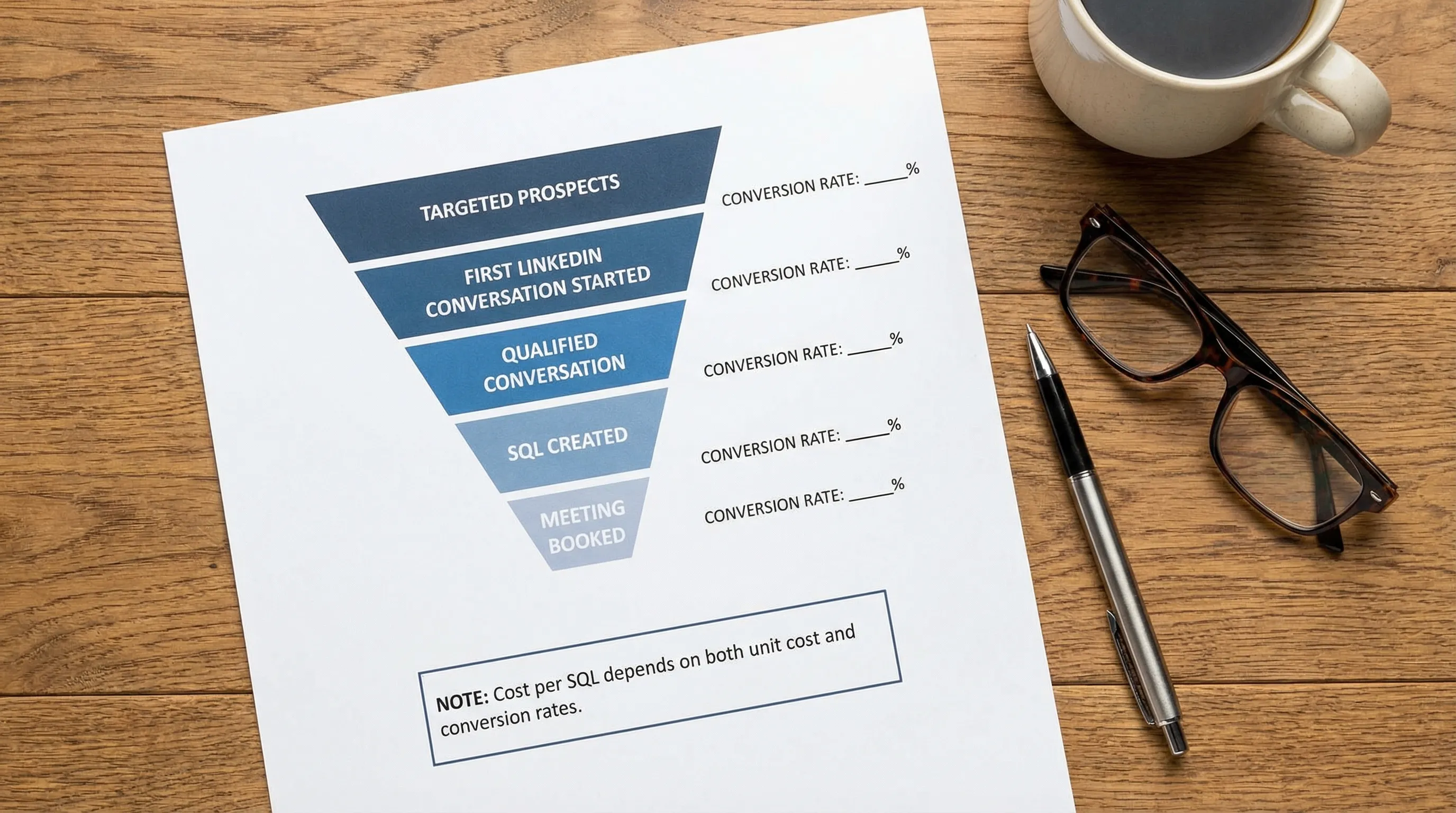
Days 3 to 5: Instrument your micro-conversions (first touch → reply → qualified conversation → SQL → meeting booked).
Days 6 to 10: Run two prompt variants that change the qualification step (not just the opener).
Days 11 to 14: Review results with one AE and one SDR leader, then promote the winner into your standard play.
This approach tends to lower CPSQL because it increases qualified conversation rate, which is the multiplier most teams neglect.
When lowering cost per SQL is the wrong goal
If you lower CPSQL by loosening SQL criteria, you can create a local win and a global loss.
Two guardrails keep you honest:
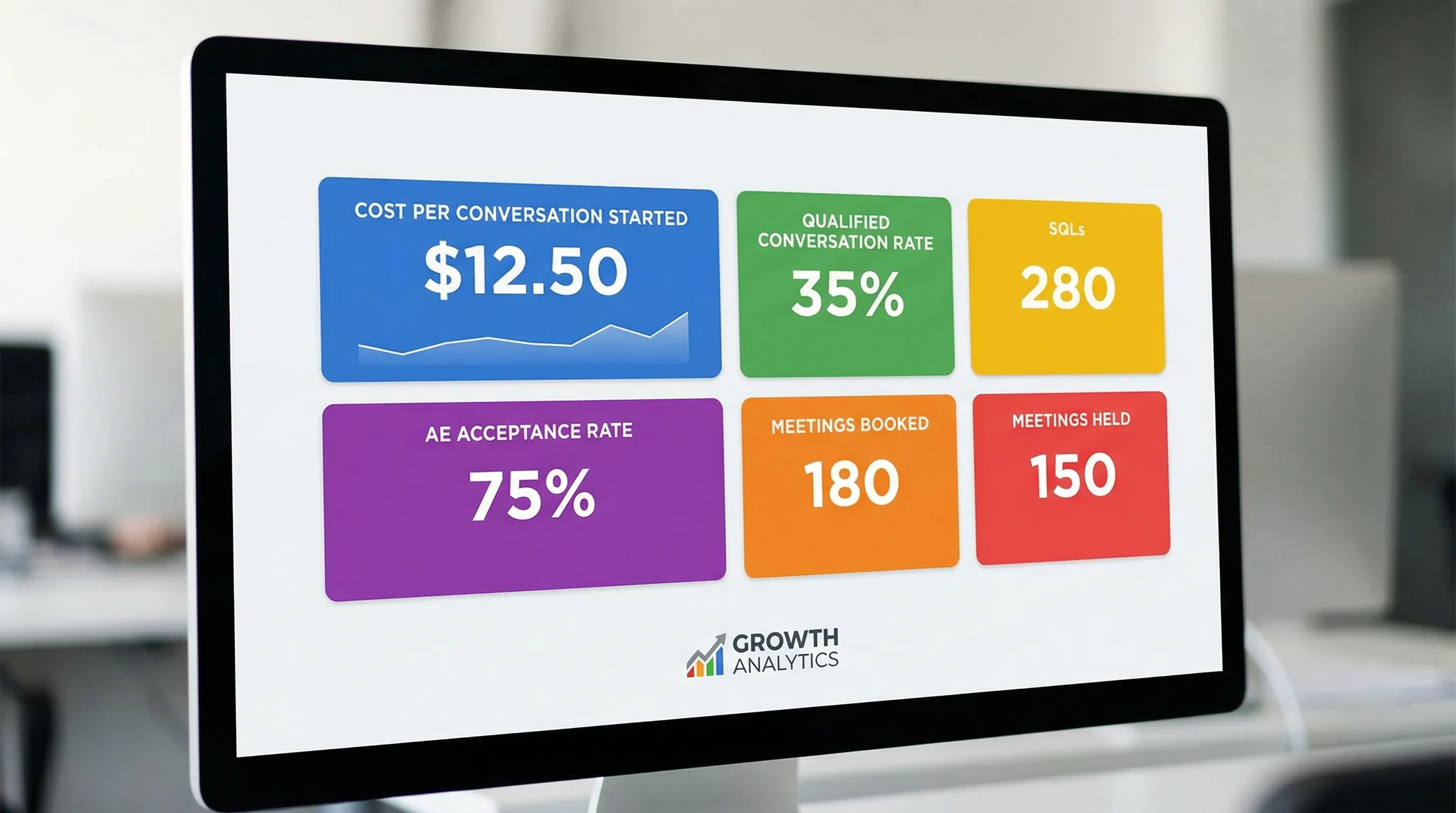
- Track AE acceptance rate (or meeting held rate) alongside CPSQL
- Track SQL-to-opportunity and SQL-to-customer conversion by segment
If CPSQL drops but downstream conversion drops more, you did not improve efficiency, you shifted costs downstream.
Frequently Asked Questions
What is a good cost per sales qualified lead? It depends on your ACV, your sales cycle, and your SQL-to-customer conversion. A “good” CPSQL is one that fits your CAC target and payback model.
Should cost per SQL include SDR salaries and tools? Yes. If you exclude labor and shared tooling, CPSQL will look artificially low and you will make bad channel decisions.
Is cost per SQL the same as cost per opportunity? No. Some teams treat SQL as “opportunity created,” but many do not. If your SQL is earlier than opportunity, track both to avoid optimizing for the wrong gate.
How do I lower cost per SQL in LinkedIn outbound specifically? The biggest levers are narrower ICP slices, permission-based qualification questions, faster reply handling, and reducing manual time per thread through governed automation.
Why does my CPSQL look great but revenue is flat? Usually because the SQL definition is too loose, AEs reject or don’t progress the leads, or meetings don’t hold. Add AE acceptance and meeting held as guardrails.
How do I prevent “lower CPSQL” from turning into spam? Use stop rules, limit volume to what you can handle with quality, and optimize for qualified conversations and evidence, not raw replies.
Lower your cost per sales qualified lead by making LinkedIn qualification scalable
If LinkedIn is a core pipeline channel for your team, CPSQL is often driven by one constraint: how many high-quality conversations your SDRs can run at once.
Kakiyo helps by autonomously managing personalized LinkedIn conversations from first touch through qualification to meeting booking, so your SDRs can focus on high-value opportunities. You also get the controls serious teams need, including customizable prompts, A/B prompt testing, industry templates, intelligent scoring, conversation override control, and analytics.
Explore Kakiyo here: https://www.kakiyo.com