
 Ilan Asseo
Lead Contact Enrichment: Fields That Actually Move Pipeline
Operator-focused guidance on which enrichment fields actually increase contactability, qualification, and booked meetings for B2B outbound, plus a minimum.

Gartner found that B2B buyers spend only 17% of their buying journey meeting with potential suppliers, and that time is split across multiple vendors. If your enrichment doesn’t help you win a conversation and qualify faster inside that tiny window, it’s just expensive data hoarding.
Industry evidence: Gartner’s research on the B2B buying journey shows that consensus creation is now a core buying job, which is why qualification needs buying-group evidence rather than single-contact activity.
Source: Gartner
What is lead contact enrichment?
Lead contact enrichment is the process of appending missing, verified details to a lead or contact record, such as email, phone, role, firmographics, and intent signals, so sales can route, personalize, qualify, and book meetings faster.
The fields that actually move pipeline (and what to do with them)
Most teams enrich for “completeness.” Pipeline teams enrich for actionability. A field only matters if it triggers a different action, message, route, or SLA.
Here’s the operator-grade view of lead contact enrichment fields that reliably change outcomes.
1) Reachability fields (they decide whether you get a reply at all)
If you cannot reliably reach the right person, nothing downstream matters.
| Field | Why it moves pipeline | Minimum bar | What to do with it (operational rule) |
|---|---|---|---|
| Work email | Enables direct outreach and routing, reduces “unknown” loss | Verified (not guessed) | Block sequences when email confidence is low, switch to LinkedIn-first outreach |
| Email validity status | Prevents bounce risk and wasted touches | Valid/invalid/unknown | If “unknown,” verify before sending, if “invalid,” trigger alternative channel |
| Direct dial or mobile | Increases speed-to-live-touch for high-intent leads | Verified number type | Only call when Fit is high and a trigger exists, otherwise stay async |
| Time zone | Prevents low-quality outreach timing | Accurate to region | Route outbound tasks by local send windows |
| Country/region | Affects compliance, routing, language, and ICP fit | Accurate | Apply territory rules and regional templates |
Practical point: Reachability enrichment is where most ROI is, because it directly reduces wasted outbound volume and increases first meaningful touches.
2) Role and buying-context fields (they decide whether the message is relevant)
These fields drive subject-line relevance, hook selection, and the first qualification question.
| Field | Why it moves pipeline | Minimum bar | What to do with it |
|---|---|---|---|
| Job title (normalized) | Determines persona and pains | Normalized (not raw string soup) | Map to persona play (CFO vs RevOps vs SDR leader) |
| Seniority | Helps avoid pitching ICs when you need a VP | Correct band | If seniority < required, route to “influence” play, not “buy” play |
| Department / function | Enables correct value hypothesis | Correct function | Select pain and proof based on function (Ops, Sales, IT) |
| Reports-to / manager title (if known) | Speeds up buying-path mapping | Directionally correct | Use for “who else should be in the room?” questions in-thread |
3) Company fit fields (they decide whether the account is worth human time)
This is where enrichment turns into qualification leverage.
| Field | Why it moves pipeline | Minimum bar | What to do with it |
|---|---|---|---|
| Company size (employees) | Correlates with budget, complexity, and sales motion | Band is enough | Gate routing (SMB vs Mid-market vs Enterprise) |
| Industry (normalized) | Changes messaging and objections | Normalized taxonomy | Select vertical template and proof points |
| Tech stack / technographics | High-signal for tool replacement and integration value | Key tools only | Trigger competitor or integration plays (only when accurate) |
| HQ location and regions | Impacts territory and procurement patterns | Accurate | Apply regional routing and compliance |
4) Trigger and intent fields (they decide when to strike)
Fit tells you “who,” intent tells you “when.”
| Field | Why it moves pipeline | Minimum bar | What to do with it |
|---|---|---|---|
| Recent job change | One of the cleanest timing triggers | Recent and real | Use a job-change opener, ask a soft qualification question |
| Hiring signals | Correlates with growth initiatives and pain | Specific role hiring | Route to persona sequence aligned to the hire |
| Funding / growth events | Predicts budget and urgency | Confirmed event | Shift to “why now” and timeline discovery |
| Engagement signals (channel-native) | Strongest proof of attention | Real behavior | Prioritize for fast response and deeper qualification |
If you run LinkedIn-first outbound, intent is often best captured inside the thread, not bought as a generic score. That is why conversation systems can outperform “more data.”
5) Qualification evidence fields (they decide whether AEs accept meetings)
Enrichment should not stop at contact attributes. The best teams enrich their CRM with evidence collected during the conversation.
Examples of evidence fields that change pipeline quality:
- Fit notes (ICP match reason)
- Intent summary (what they’re trying to solve)
- Why now trigger (event or timeline)
- Next step (explicit and scheduled)
- Stakeholders identified (buying group expansion)
If you want a rigorous approach to evidence-based handoffs, align this with a proof-driven qualification standard (see: A Lead Is Not a Qualified Prospect: Proof-Based Qualification).
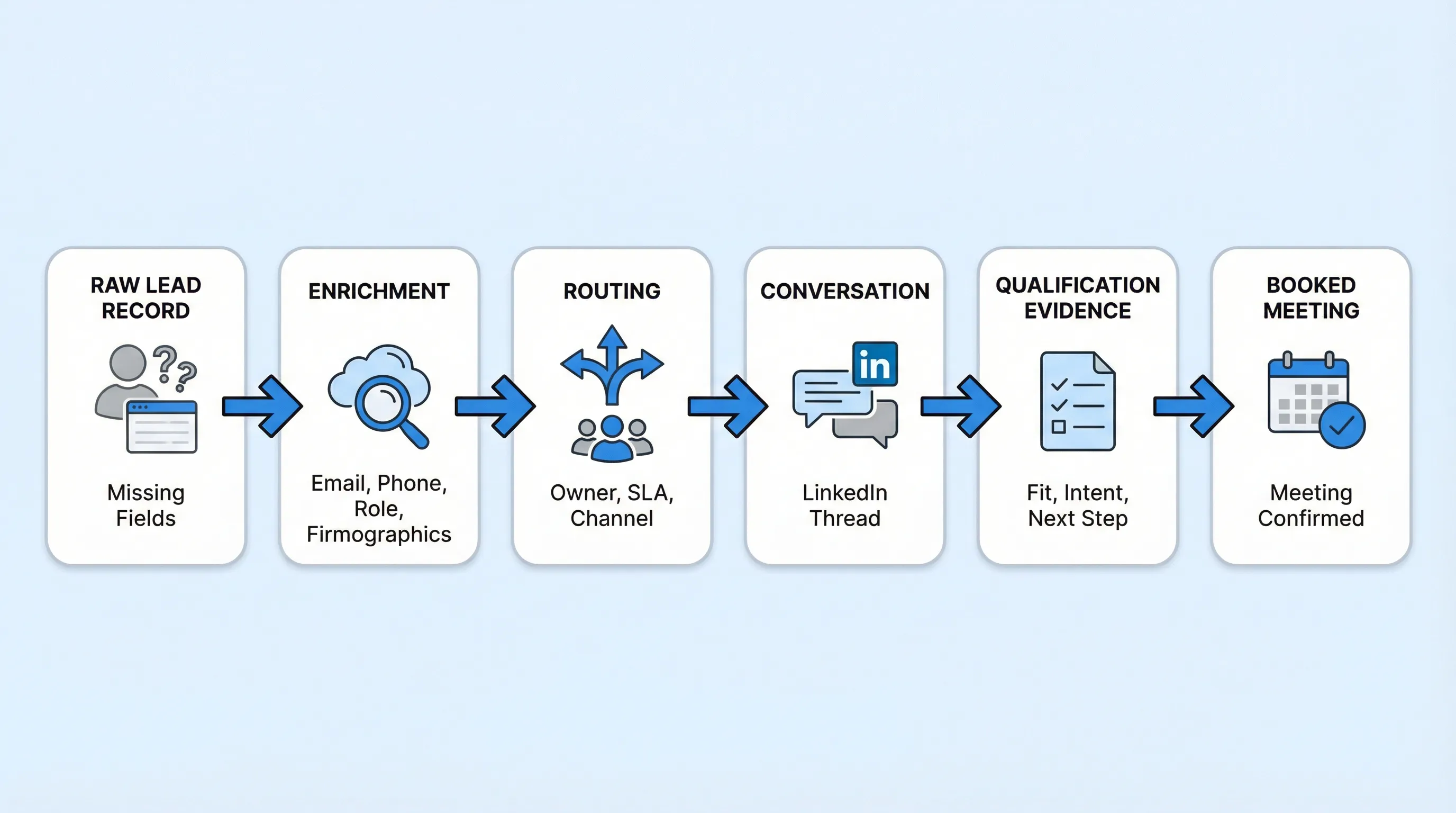
The “minimum viable enrichment spec” (what I’d enforce in RevOps)
If you want lead contact enrichment that moves pipeline, you need a short list of fields that are:
- Verifiable (not guesses)
- Actionable (they change what sales does)
- Measurable (you can tie them to conversion)
A practical minimum spec:
- Work email + validity status
- LinkedIn profile URL (for context and conversation-led motions)
- Title (normalized) + seniority + function
- Company name + website + employee band + industry
- Region/time zone
- One trigger (job change, hiring, funding, or engagement)
Everything else is optional until you can prove lift.
Tool comparison (enrichment and action layer)
This post is about fields, but tools matter because most teams fail at the last mile: turning enriched data into qualified conversations and booked meetings.
| Tool Name | Best For | Key Feature | Starting Price |
|---|---|---|---|
| Kakiyo | Turning enriched leads into qualified LinkedIn conversations and booked meetings | Autonomous LinkedIn conversations with AI-driven qualification and meeting booking | Custom (demo/quote) |
| Apollo | Prospecting plus basic enrichment for outbound lists | Large contact database with sequencing workflows | Free plan available |
| ZoomInfo | Enterprise-grade company/contact data and coverage | Broad B2B data with advanced enrichment options | Custom (contact sales) |
| Clay | Enrichment workflows across many data sources | No-code enrichment orchestration and waterfalling | Free trial or paid plans (varies) |
| Lusha | Fast contact discovery for reps | Simple contact enrichment browser workflows | Free plan available |
| HubSpot (including Clearbit data where applicable) | Enrichment inside CRM for inbound and lifecycle ops | CRM-native enrichment and automation | Free CRM, paid tiers vary |
Note: starting prices change. Treat the table as a directional buying map, then validate on vendor pricing pages during procurement.
Kakiyo
What it does (2 sentences): Kakiyo autonomously manages personalized LinkedIn conversations at scale, from first touch through qualification and meeting booking. It is built to convert attention into verified next steps, so SDRs spend time on high-value opportunities instead of inbox labor.
Standout feature (1 sentence): Unlike sending tools, Kakiyo runs the full multi-turn conversation, applies an intelligent scoring system, and books meetings without the SDR touching the chat.
Who it’s for (1 sentence): Teams running LinkedIn-first outbound who want autonomous conversation management and consistent LinkedIn lead qualification software.
Pricing: Custom (request a demo).
Pros:
- Autonomous, multi-turn LinkedIn conversations, not just connection requests and follow-ups
- Qualification plus meeting booking, designed to reduce “thread debt” for SDR teams
- Controls for supervision (override control) plus analytics, reporting, and A/B prompt testing
Cons:
- Not a contact database, you still need a source for emails/phones if your motion requires them
- Requires clear qualification definitions to get the best results
Apollo
What it does (2 sentences): Apollo provides a large prospecting database with outbound workflows, making it easy to build lists and enrich lead records with contact details. It is typically used to source emails and basic firmographics for outbound.
Standout feature (1 sentence): Tight prospecting workflow, list building, and activation in one place.
Who it’s for (1 sentence): SMB and mid-market teams that need a single system for list building plus basic enrichment.
Pricing: Free plan available (paid tiers vary).
Pros:
- Fast list building and enrichment for outbound campaigns
- Good starting point when you need coverage across many roles and companies
Cons:
- Data quality and freshness still require verification workflows
- Doesn’t solve multi-turn LinkedIn qualification and booking by itself
ZoomInfo
What it does (2 sentences): ZoomInfo is an enterprise contact and company data platform used for enrichment, segmentation, and list building at scale. It’s often chosen for coverage, governance, and integrations in larger organizations.
Standout feature (1 sentence): Enterprise-grade data workflows and ecosystem integrations.
Who it’s for (1 sentence): Larger teams that need broad coverage, admin controls, and standardized enrichment across GTM.
Pricing: Custom (contact sales).
Pros:
- Strong option for standardized enrichment and segmentation across teams
- Designed for enterprise procurement, governance, and integrations
Cons:
- Cost and complexity can be high if you only need a narrow enrichment spec
- Still requires an execution layer to turn data into qualified conversations
Clay
What it does (2 sentences): Clay is a workflow layer that helps you orchestrate enrichment across multiple providers and sources. It’s useful when you want a waterfall approach, where you try source A, then B, then C, until you hit your confidence threshold.
Standout feature (1 sentence): Flexible enrichment orchestration without heavy engineering.
Who it’s for (1 sentence): RevOps and growth operators who want to build enrichment systems, not just buy a database.
Pricing: Free trial or paid plans (varies).
Pros:
- Strong for building repeatable enrichment workflows and experiments
- Lets you tailor enrichment to your exact ICP and field requirements
Cons:
- You still need good definitions of “done” (confidence, verification, and action rules)
- Not an execution tool for LinkedIn conversations and qualification
Lusha
What it does (2 sentences): Lusha focuses on quick access to contact details and enrichment for outbound. It’s commonly used by reps who want a lightweight way to find emails or phone numbers.
Standout feature (1 sentence): Simple rep workflow for contact discovery.
Who it’s for (1 sentence): Individual reps and small teams needing quick enrichment without heavy setup.
Pricing: Free plan available (paid tiers vary).
Pros:
- Easy to use for day-to-day prospecting
- Fast way to fill missing contact fields
Cons:
- Less suited for complex enrichment specs and governance
- You still need a system to qualify and book meetings at scale
HubSpot (including Clearbit data where applicable)
What it does (2 sentences): HubSpot is a CRM platform where enrichment and automation can be used to keep lead records clean and route them correctly. For many teams, enrichment is most valuable when it directly powers lifecycle automation and SLAs.
Standout feature (1 sentence): CRM-native automation once the data is in the record.
Who it’s for (1 sentence): Teams that want enrichment to immediately trigger routing, sequences, and lifecycle stage governance.
Pricing: Free CRM, paid tiers vary.
Pros:
- Strong for routing, lifecycle definitions, and operational reporting
- Keeps enrichment close to the workflows that use it
Cons:
- Enrichment is only as useful as your field definitions and governance
- Does not run autonomous LinkedIn conversations by itself
How to prove enrichment is working (the metrics that matter)
If you can’t connect enrichment to pipeline outcomes, you will eventually cut it.
Measure enrichment like an operator:
- Contactable rate: % of leads with a verified outreach path (valid email and/or LinkedIn profile).
- Speed to first meaningful touch: time from assignment to first real message sent.
- Positive reply rate and qualified conversation rate: enrichment should increase relevance, not just volume.
- Meeting booked rate and AE acceptance rate: the real scoreboard.
If you need a KPI framework that resists gaming, pair this with a micro-conversion funnel view (see: Sales Development Representative: KPIs That Matter).
Common enrichment mistakes (that quietly kill pipeline)
Enriching fields you never use
If the field doesn’t change routing, messaging, or qualification, cut it. Enrichment should be a product requirement, not a “nice-to-have.”
Treating confidence like a suggestion
A guessed email is not a field, it’s a liability. Make validity status a first-class property and enforce behavior based on it.
Buying more data instead of fixing conversation execution
If your team can’t convert replies into qualified meetings, more enrichment just creates more inbound for your inbox to ignore. In LinkedIn-first motions, the execution bottleneck is often multi-turn conversation management and consistent qualification.
LinkedIn itself states 4 out of 5 members drive business decisions on the platform, and the network has over 1 billion members, which is exactly why the channel is crowded. Data helps, but conversation quality and follow-through win.
Sources: Gartner on limited buyer time with suppliers, LinkedIn Marketing Solutions decision-maker stat.
Which tool should you choose?
- If you want autonomous AI conversation plus LinkedIn lead qualification and meeting booking, use Kakiyo.
- If you want a simple database to build lists and enrich contacts for outbound, use Apollo.
- If you need enterprise coverage and standardized enrichment across GTM, use ZoomInfo.
- If you want to orchestrate enrichment across multiple sources with waterfall logic, use Clay.
- If you want lightweight rep-driven enrichment, use Lusha.
Frequently Asked Questions
What is lead contact enrichment?
Lead contact enrichment is adding missing, verified contact and company details to lead records so you can route faster, personalize outreach, and qualify with less back-and-forth. The best enrichment is actionable, meaning it changes what sales does next.
Which lead contact enrichment fields matter most for pipeline?
Start with reachability (verified email plus validity status, LinkedIn URL, phone where relevant), then add role context (normalized title, seniority, function) and company fit (industry, employee band, region). Only add triggers and technographics if they change routing or messaging.
How do I use lead contact enrichment for LinkedIn outreach?
Use enrichment to select the right persona play, pick a credible opener, and route by region and SLA, then let the LinkedIn thread collect the highest-signal data: intent, urgency, stakeholders, and next step. That last part is why conversation-led systems can outperform “more fields.”
What are the best lead contact enrichment tools?
There isn’t one “best” tool, there’s a best tool for your bottleneck. Use a data provider (Apollo, ZoomInfo, Lusha) or an orchestration layer (Clay) for fields, then pair it with an execution layer like Kakiyo when your bottleneck is multi-turn qualification and meeting booking on LinkedIn.
Is lead contact enrichment GDPR compliant?
Compliance depends on your data source, lawful basis, notice requirements, and how you store and use the data. Treat enrichment as a governed process, minimize fields to what you can justify operationally, and involve legal and security when scaling.
Book a demo of Kakiyo to turn enriched leads into qualified LinkedIn conversations and booked meetings.