
 Ilan Asseo
Sales and AI: A Practical Team Playbook
A practical playbook to operationalize sales and AI across your team, turning activity into qualified conversations and booked meetings.

Sales teams do not lose pipeline because they lack tools. They lose pipeline because they lack a repeatable operating system that turns activity into qualified conversations and booked meetings.
AI can help, but only if you treat it like a teammate with a job description, guardrails, and coaching. This playbook is a practical way to operationalize sales and AI across your team, without turning your motion into an experiment that never ends.
Industry evidence: “Our research suggests that a fifth of current sales-team functions could be automated.” — McKinsey & Company.
Source: McKinsey
What “sales and AI” should mean (in practice)
In 2026, the highest-leverage use of AI in sales is not “write me a message.” It is:
- Running more high-quality touches without sacrificing relevance
- Capturing qualification evidence consistently (fit, intent, constraints)
- Prioritizing human time toward the conversations most likely to convert
- Improving week over week through measurable experiments
This aligns with broader research on generative AI’s impact in go-to-market. For example, McKinsey estimates large economic upside from genAI, with sales and marketing among the functions with meaningful potential value (McKinsey research on genAI). The teams that realize this upside treat AI as an operating model, not a feature.
The 5-layer operating model for sales and AI
Most rollouts fail because teams jump to prompts before they define outcomes, ownership, and safety. Use this 5-layer model to keep the rollout grounded.

1) Outcomes (what you are trying to improve)
Choose outcomes that map to pipeline, not vanity activity. In LinkedIn-first outbound, outcomes typically ladder up like this:
- Replies that show intent
- Qualified conversations (clear fit and next step potential)
- Meetings booked
- Meetings held
- Opportunities created
If you are unsure where to start, anchor on “qualified conversations” and “meetings booked.” They are close enough to revenue to matter and fast enough to measure weekly.
2) Data (what the AI is allowed to use)
Your AI will only be as good as the inputs you make consistent. At minimum, standardize:
- ICP rules (industry, size, geography, tech environment, role)
- Offer and positioning claims that are approved
- Disqualifiers (who not to pursue)
- Conversation evidence fields (what you need captured when a lead is “qualified”)
If you cannot explain why a prospect was qualified in one or two sentences with evidence, your system will drift.
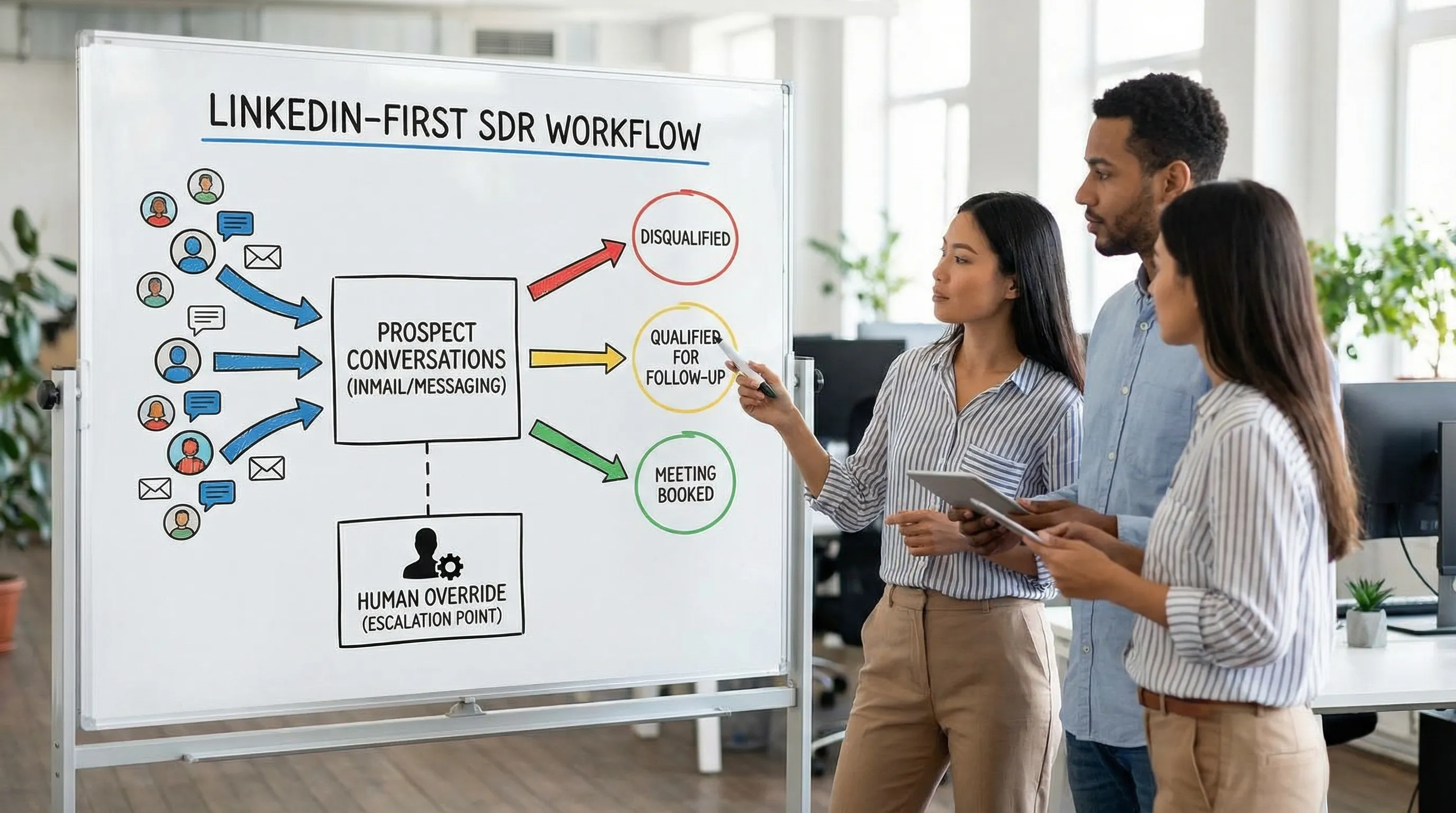
3) Workflow (where AI acts, where humans act)
The best workflow design is explicit about ownership at each step.
Common AI-friendly workflow zones include:
- First-touch personalization at scale
- In-thread follow-ups and clarifying questions
- Lightweight qualification in short messages
- Scheduling mechanics and handoff packaging
Common human-required workflow zones include:
- Segment strategy and offer design
- High-stakes objection handling (pricing, competitors, legal)
- Discovery beyond surface-level qualification
- Exceptions and account-level judgment
(If you want a deeper view of task boundaries, Kakiyo has a related guide on where humans remain essential: AI and Sales: Where Humans Stay Essential.)
4) Governance (how you prevent brand and compliance risk)
Governance is not a “later” step. It is what makes scale possible.
At minimum, define:
- What the AI can say (approved claims and prohibited statements)
- When to escalate to a human
- How overrides work n- How you audit conversations
- What happens if something goes wrong (incident response)
For general AI risk management framing, the NIST AI Risk Management Framework is a useful reference for leaders.
5) Measurement (how you improve, not just report)
A weekly scorecard creates a feedback loop that turns AI from “automation” into “performance improvement.”
If you already track weekly AI-assisted metrics, keep this playbook aligned with your scorecard (see: AI Sales Metrics: What to Track Weekly).
Team roles: who owns what (RACI you can actually use)
AI in sales fails when “everyone” owns it. Assign clear responsibility.
| Area | Sales Leader | SDR Manager | RevOps | Enablement | Legal/Compliance | SDR/BDR |
|---|---|---|---|---|---|---|
| Define ICP and segments | A | R | C | C | C | C |
| Define qualification rules and evidence | A | R | C | C | C | C |
| Prompt library standards | C | A | C | R | C | R |
| Guardrails (claims, prohibited content) | C | C | C | C | A | I |
| Experiment design (A/B prompts, holds) | C | A | R | C | I | R |
| Weekly performance review and changes | A | R | R | C | I | C |
Legend: R = Responsible, A = Accountable, C = Consulted, I = Informed.
Step 1: Define “qualified” before you automate qualification
If your team cannot agree on what “qualified” means, AI will just help you get inconsistent faster.
A practical definition usually includes:
- Fit: Are they in the ICP?
- Intent: Do they have an active or emerging need?
- Constraints: Any blockers (timing, authority, budget, security, tooling)?
- Proof: What did they say that supports the decision?
To operationalize this, require a minimum evidence set before a lead can be marked qualified.
| Evidence field | What “good” looks like | Example (LinkedIn thread evidence) |
|---|---|---|
| Fit | ICP match is explicit | “We are 250 employees, Series B, 8 SDRs.” |
| Problem | Problem exists and is relevant | “Replies are fine, but qualification is inconsistent.” |
| Timing | Time window is stated | “Looking to change process this quarter.” |
| Next step | Clear meeting or referral path | “Yes, send times for next week.” |
This evidence-first approach also reduces disputes between SDRs and AEs because it makes qualification auditable.
Step 2: Set your autonomy level (do not skip this)
A practical sales and AI rollout uses “autonomy levels” so the team knows what is automated, what is assisted, and what is human-only.
| Autonomy level | AI behavior | Human behavior | Best for |
|---|---|---|---|
| Level 0: Draft only | Suggests messages | Human approves and sends | Early pilots, sensitive segments |
| Level 1: Assisted follow-up | Suggests follow-ups based on thread | Human selects and sends | Teams learning what works |
| Level 2: Bounded conversation | Sends within strict rules | Human reviews exceptions | Scaling proven segments |
| Level 3: Qualification and booking | Runs qualification flow and booking | Human handles escalations | Mature outbound motion |
| Level 4: Multi-thread orchestration | Manages multiple stakeholders per account | Human runs strategy and discovery | ABM and enterprise motions |
Set one autonomy level per segment, not “one level for the whole company.” Your risk tolerance is different for SMB founders vs regulated enterprise.
Step 3: Build a prompt system (not “prompts”)
High-performing teams treat prompts like sales assets: versioned, tested, and retired when they underperform.
What belongs in your prompt library
A practical library usually includes:
- Segment briefs (ICP, pain hypotheses, disqualifiers)
- Message frameworks (first touch, follow-up, objection turns, booking)
- Qualification flows (what to ask, what to avoid, how to capture evidence)
- Safety constraints (approved claims, prohibited content, escalation triggers)
The simplest prompt quality checklist
Before a prompt is allowed into production, it should answer:
- Who is this for (persona and segment)?
- What is the job to be done (micro-conversion)?
- What evidence must be captured (fit, intent, constraints)?
- What should the AI never do (claims, tone, sensitive topics)?
- When should it escalate to a human?
If you want to scale this across many LinkedIn threads, a platform approach can help. For example, Kakiyo supports customizable prompts, A/B prompt testing, industry templates, scoring, analytics, and human override controls, all oriented around autonomous LinkedIn conversations.
Step 4: Create escalation rules that your team will follow
Escalation rules are how you keep AI useful without letting it become risky.
Keep rules concrete. Good triggers are observable in a thread.
| Trigger type | Example trigger | Escalation action |
|---|---|---|
| Pricing | “What does this cost?” | Hand to SDR or AE (approved pricing handling only) |
| Competitor comparison | “We are looking at X and Y” | Human response (positioning nuance) |
| Legal/security | “Send your SOC 2” | Human response (security process) |
| Strong negative sentiment | “Stop messaging me” | Stop, apologize if needed, log feedback |
| High intent | “Can you do Tuesday?” | Route to booking workflow quickly |
If you run LinkedIn automation, ensure your process respects LinkedIn rules and user expectations. Link to policy references in your internal docs, such as LinkedIn Professional Community Policies.
Step 5: Add conversation QA (quality assurance) like a real channel
Most teams QA calls. Few teams QA outbound conversations. That is a mistake, because your thread is the work.
A lightweight QA rubric
Use a simple weekly sample: review 20 to 50 threads across reps and segments.
| QA dimension | What you are checking | Pass criteria |
|---|---|---|
| Relevance | Personalization and reason for reaching out | Message is specific and credible |
| Brevity | Cognitive load | Under 400 characters unless necessary |
| Qualification | Evidence captured | Fit and intent are explicit before pitching a meeting |
| Brand safety | Claims and tone | No unapproved claims, respectful tone |
| Next step | CTA quality | Clear micro-yes or scheduling path |
This rubric becomes the shared language for coaching and prompt iteration.
Step 6: Run a weekly operating rhythm (the growth loop)
AI makes it easy to ship changes. Your job is to ship the right changes.
A practical weekly rhythm:
- Review scorecard (outcomes first)
- Pick one bottleneck to fix (for one segment)
- Make one prompt or workflow change
- Tag the change and measure lift the next week
If you want a detailed set of weekly metrics and definitions, use a scorecard like the one described in AI Sales Metrics: What to Track Weekly.
A 30-day rollout plan (designed for busy teams)
This plan assumes you want measurable lift without breaking trust.
| Week | Goal | Deliverables | Success check |
|---|---|---|---|
| Week 1 | Align outcomes and rules | ICP, qualification evidence, approved claims, escalation rules | Everyone can explain “qualified” the same way |
| Week 2 | Stand up prompt library and QA | Segment briefs, prompt versions, QA rubric, baseline metrics | You can review threads and score them consistently |
| Week 3 | Pilot autonomy by segment | Autonomy level per segment, override process, booking handoff | Stable quality, no brand-safety incidents |
| Week 4 | Scale what works | Expand to more reps or segments, tighten scoring and routing | Lift in qualified conversation rate and meetings booked |
Where Kakiyo fits (without changing your whole stack)
If your core problem is managing and scaling LinkedIn conversations, Kakiyo is designed for that specific job: autonomous LinkedIn conversations from first touch through qualification to meeting booking, with prompt customization, A/B testing, scoring, analytics, and human override controls.
Teams typically evaluate platforms like this on:
- Can it manage many simultaneous conversations without losing context?
- Can we standardize qualification and capture evidence consistently?
- Do we get clear reporting on what is working (by prompt and segment)?
- Do we have human control when it matters?
(For a broader buying framework, see AI Sales Tools: What to Buy in 2026.)
Frequently Asked Questions
Will AI replace SDRs in 2026? AI is replacing repetitive parts of the SDR workflow, not the need for SDR judgment. Teams still need humans for strategy, trust-building, and high-stakes discovery.
What is the safest place to start with sales and AI? Start with one segment and one micro-conversion (often first-touch or follow-up), run with strict guardrails, and add QA before increasing autonomy.
How do we prevent AI outreach from hurting our brand on LinkedIn? Use approved claims, clear escalation triggers, a human override process, and weekly QA on real threads. Measure negative signals, not just replies.
What metrics prove AI is improving sales outcomes? Track qualified conversation rate, meetings booked and held, AE acceptance, and conversion by segment. Pair quality metrics with activity metrics to avoid gaming.
How often should we change prompts? Treat prompts like experiments. Make small changes weekly, but only after you have enough volume to measure and you can attribute the change to a specific outcome.
Make AI a measurable teammate, not another tool
If you want AI to run personalized LinkedIn conversations at scale, qualify prospects in-thread, and help book meetings while keeping human control, explore Kakiyo. You can implement the playbook above using Kakiyo’s autonomous conversation engine, prompt A/B testing, intelligent scoring, analytics, and override controls so your SDR team spends more time on high-value opportunities.