
 Ilan Asseo
Sales Automation AI: Where It Helps and Where It Breaks
Why sales automation AI succeeds when it automates conversations and decisions — not just sequences and tasks.

Sales reps spend just 28% of their week actually selling, the rest disappears into admin, research, and follow-ups that never end. Sales automation AI fixes that, but only if you automate the right unit of work: conversations and decisions, not just sequences and tasks.
Industry evidence: “Our research suggests that a fifth of current sales-team functions could be automated.” — McKinsey & Company.
Source: McKinsey
What is sales automation AI?
Sales automation AI is software that uses machine learning and large language models to automate parts of the sales workflow, like prospect research, outreach, reply handling, qualification, scoring, routing, and meeting booking. The best systems do more than generate messages, they preserve context across multi-turn conversations and turn signals into next actions. The worst systems create activity without qualification, hurting brand trust and pipeline quality.
Where sales automation AI helps (and where it breaks)
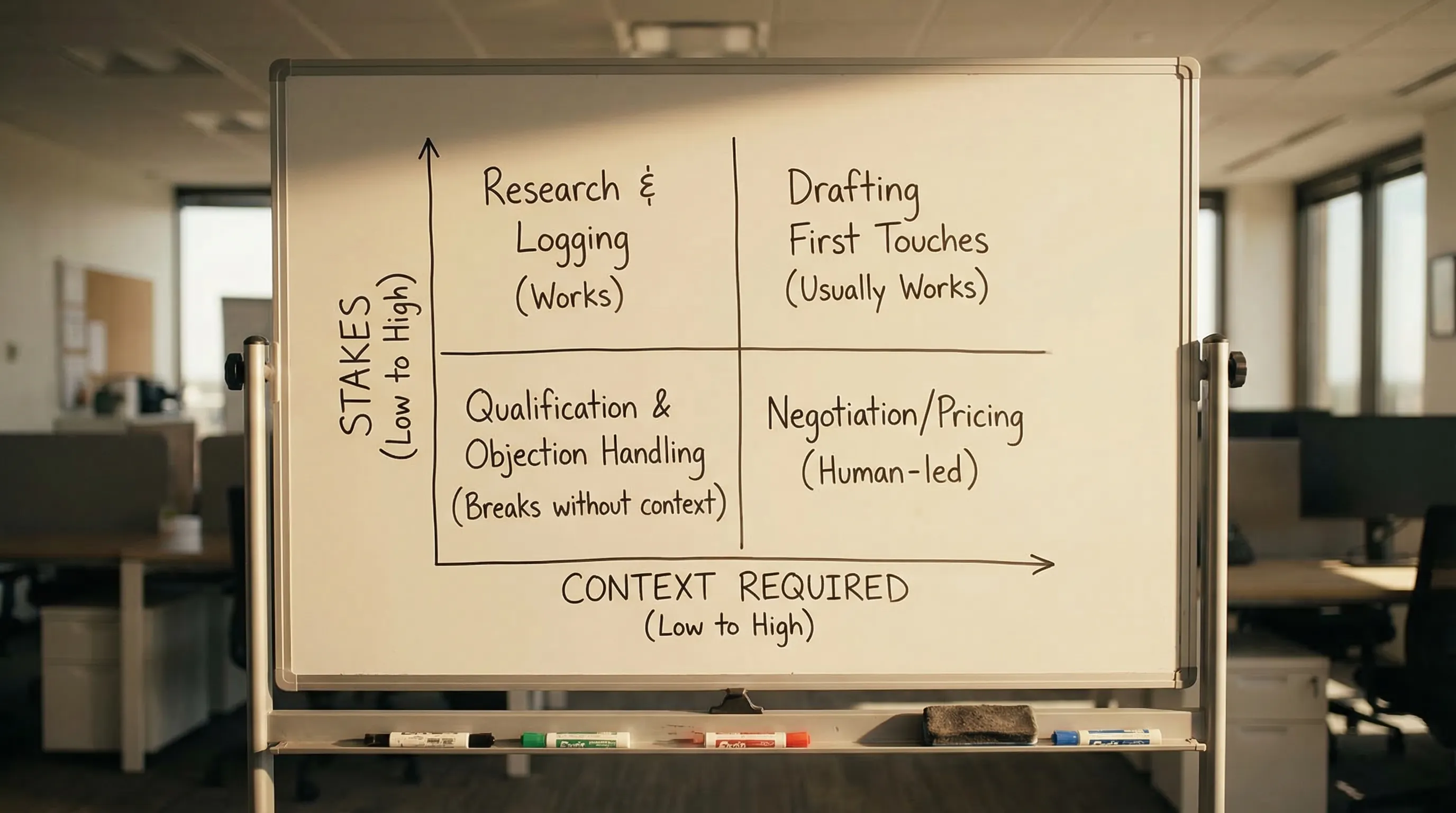
If you want a clean mental model, treat sales automation AI as two different products:
- Automation for throughput: research, list building, drafting, logging, follow-ups, scheduling.
- Automation for judgment: qualification, routing, escalation, deciding when to ask for a meeting.
Throughput automation usually works fast. Judgment automation is where tools either compound your advantage or break your motion.
Here are the predictable breakpoints I see in real teams:
- Context loss across turns: the AI cannot remember what was agreed, what was asked, or what proof has already been shared, so it repeats itself.
- Optimizing for the wrong metric: reply rate goes up, but positive replies, qualified conversations, and AE-accepted meetings go down.
- Bad labels and weak scoring: if “qualified” is vague, AI just scales vagueness.
- Channel mismatch: step-based sequencers behave poorly on conversational channels like LinkedIn where buyers expect a human thread.
- No safety controls: no stop rules, no overrides, no throttles, no audit trail.
A useful benchmark for why this matters: Gartner predicted that 80% of B2B sales interactions between suppliers and buyers would occur in digital channels by 2025. That makes “conversation quality at scale” a core capability, not a nice-to-have (Gartner press release).
Comparison table: sales automation AI tools (quick pick)
| Tool Name | Best For | Key Feature | Starting Price |
|---|---|---|---|
| Kakiyo | Autonomous LinkedIn conversations that qualify and book meetings | AI manages the full multi-turn LinkedIn thread with scoring and booking | Contact sales |
| Outreach | Enterprise sequencing and workflow management | Strong engagement workflows and analytics | Contact sales |
| Salesloft | Sales engagement with coaching and process adherence | Sequencing plus reps-first workflow | Contact sales |
| HubSpot Sales Hub | SMB to mid-market CRM plus automation | CRM-native automation and reporting | Free tools, paid plans vary |
| Apollo | Prospecting plus outbound execution for lean teams | Database + sequences in one place | Free plan, paid plans vary |
| Salesforce Einstein | AI inside Salesforce for prioritization and predictions | CRM-native scoring and recommendations | Salesforce add-on, contact sales |
| Gong | Conversation intelligence and coaching | Call + deal insights to improve execution | Contact sales |
| Clay | Enrichment and AI-assisted outbound ops | Workflow-based enrichment and personalization | Paid plans vary |
Kakiyo
What it does (2 sentences). Kakiyo autonomously manages personalized LinkedIn conversations at scale, from first touch to qualification to meeting booking. Instead of just sending steps, it runs the multi-turn thread and escalates only when the prospect is qualified.
Standout feature (1 sentence). Kakiyo’s edge is autonomous conversation management plus an intelligent scoring system that qualifies leads and moves them to booking without an SDR living in the inbox.
Who it’s for (1 sentence). Teams running LinkedIn-first outbound that want more qualified meetings without hiring more SDR headcount.
Pricing. Contact sales.
Pros
- Automates the hardest part: multi-turn LinkedIn conversations that stay coherent and goal-driven.
- Built for qualification, not just activity, with scoring, templates, A/B prompt testing, and override control.
- Fits conversation-led outbound where “reply handling” is the bottleneck.
Cons
- If your motion is email-only or you do not sell via LinkedIn, you may not capture the full value.
- You still need a clear qualification definition, otherwise any automation will amplify ambiguity.
Outreach
What it does (2 sentences). Outreach is a sales engagement platform built to manage sequences, tasks, and rep workflows across channels. It helps teams standardize execution and measure activity-to-outcome performance.
Standout feature (1 sentence). Strong enterprise-grade sequencing and operational reporting for large outbound teams.
Who it’s for (1 sentence). Teams that already have process maturity and need structured execution, governance, and analytics at scale.
Pricing. Contact sales.
Pros
- Solid workflow engine for sequencing, tasks, and team standardization.
- Good visibility into activity and engagement metrics.
- Works well when your problem is operational consistency.
Cons
- Automates sending and workflow more than true autonomous conversation and qualification.
- Can encourage “more steps” when the real bottleneck is conversation quality.
Salesloft
What it does (2 sentences). Salesloft is a sales engagement platform focused on rep execution, sequencing, and process adherence. It helps teams run consistent outbound and coaching loops.
Standout feature (1 sentence). A mature engagement workflow layer that makes it easy to deploy consistent outbound plays.
Who it’s for (1 sentence). SDR orgs that want to improve rep productivity and consistency across a standardized cadence.
Pricing. Contact sales.
Pros
- Strong for structured cadences, templates, and rep workflow.
- Useful for coaching and standardizing a team’s outbound motion.
- Good fit when humans still own the conversation.
Cons
- Not purpose-built to autonomously manage LinkedIn conversations end-to-end.
- Qualification still depends heavily on rep attention and discipline.
HubSpot Sales Hub
What it does (2 sentences). HubSpot Sales Hub combines CRM, pipeline tracking, and automation so teams can manage leads and deals in one place. It is often the system of record for SMB and mid-market teams that want simple automation without heavy admin.
Standout feature (1 sentence). CRM-native automation and reporting that reduces tool sprawl.
Who it’s for (1 sentence). Teams that want a CRM-first stack with straightforward automations and visibility.
Pricing. Free tools available, paid plans vary (see HubSpot pricing).
Pros
- Easy to implement for most teams, especially when you want fewer systems.
- Strong lifecycle reporting and workflow automation for routing and follow-up.
- Good baseline for operational hygiene.
Cons
- CRM automation does not equal channel-native conversation management.
- If your main bottleneck is reply handling and qualification in LinkedIn threads, you will need a dedicated conversation layer.
Apollo
What it does (2 sentences). Apollo combines a prospect database with outbound execution features like sequences and basic workflows. It is popular with lean teams that need data and sending in one system.
Standout feature (1 sentence). All-in-one prospecting plus outbound execution for fast iteration.
Who it’s for (1 sentence). Startups and small teams optimizing for speed and cost efficiency.
Pricing. Free plan available, paid plans vary.
Pros
- Efficient for sourcing contacts and launching outbound quickly.
- Good for early-stage teams learning ICP and messaging.
- Consolidates tools when budget and ops capacity are limited.
Cons
- Automation is stronger for outbound launching than for multi-turn qualification.
- If you scale volume without tight guardrails, you can create more low-quality conversations to triage.
Salesforce Einstein
What it does (2 sentences). Salesforce Einstein is AI embedded in Salesforce that supports predictions, scoring, and recommendations based on CRM data. It helps prioritize work and surface patterns, assuming your underlying CRM inputs and labels are reliable.
Standout feature (1 sentence). CRM-native prioritization and predictive insights inside the system of record.
Who it’s for (1 sentence). Salesforce-centric orgs that want AI-assisted prioritization and forecasting signals tied to CRM workflow.
Pricing. Typically a Salesforce add-on, contact sales.
Pros
- Useful when you have enough clean history to train on real outcomes.
- Keeps insights close to execution inside Salesforce.
- Strong fit for prioritization and governance in mature orgs.
Cons
- Breaks when labels are weak (for example, “SQL” is inconsistent) or history is sparse.
- Does not execute the work of running LinkedIn conversations, you still need a conversation engine.
Gong
What it does (2 sentences). Gong records and analyzes sales calls and related interactions to improve coaching, deal execution, and forecast confidence. It is less about automating outbound and more about improving what happens after a meeting is booked.
Standout feature (1 sentence). Deal and call insights that surface what top performers do differently.
Who it’s for (1 sentence). Teams that already have meetings and want to improve conversion, messaging, and coaching.
Pricing. Contact sales.
Pros
- Great for improving discovery quality and deal execution.
- Useful for coaching and identifying what messaging actually converts.
- Can reduce “happy ears” by grounding decisions in real conversations.
Cons
- Does not solve first-touch to qualified meeting by itself.
- Value drops if adoption is low or call coverage is incomplete.
Clay
What it does (2 sentences). Clay is a workflow tool for enrichment and outbound operations, letting you combine data sources and AI steps to build better lists and personalization inputs. It is often used by RevOps and growth teams to power segmentation and research at scale.
Standout feature (1 sentence). Flexible enrichment workflows that feed higher-quality targeting and personalization.
Who it’s for (1 sentence). Teams that want to upgrade targeting and enrichment before pushing data into outbound tools.
Pricing. Paid plans vary (see Clay pricing).
Pros
- Strong for enrichment workflows and building better inputs for outbound.
- Helps reduce “spray and pray” by making segmentation practical.
- Useful for experimentation when you want to test ICP slices quickly.
Cons
- Not a conversation manager, you still need execution and qualification tooling.
- Easy to overbuild workflows without tying them to downstream conversion metrics.
The practical rule: automate conversations, not just touches
Most sales automation AI failures look like success in a dashboard:
- More touches sent
- More replies generated
- More “interested?” messages flying around
But Salesforce’s research repeatedly points to the root issue: reps have limited selling time. The fix is not higher activity, it is less manual triage and higher-quality qualification.
If you want a simple standard, measure automation by downstream outcomes:
- Qualified conversation rate
- Meetings booked and held
- AE acceptance rate
- Meeting-to-opportunity conversion
If those are not improving, your “AI” is probably just creating more inbox labor.
For deeper qualification mechanics, align on an auditable definition and scoring approach before you scale anything. Kakiyo’s guides on proof-based qualification and scoring that sales trusts are good operating baselines.
Which tool should you choose?
- If you want autonomous AI conversation and LinkedIn lead qualification, use Kakiyo.
- If you want enterprise sequencing and workflow standardization, use Outreach.
- If you want rep-first engagement and cadence execution, use Salesloft.
- If you want a CRM-first system with basic automation, use HubSpot Sales Hub.
- If you want data plus fast outbound for a lean team, use Apollo.
FAQs
What is sales automation AI?
Sales automation AI is software that automates sales tasks like research, outreach, reply handling, qualification, routing, and scheduling using AI models. It works best when it preserves context across multi-turn conversations and is measured on outcomes like qualified meetings, not just activity.
What are the best AI SDR software options for LinkedIn?
If you need an AI SDR that can run LinkedIn conversations end-to-end, look for autonomous conversation management plus qualification and booking. Kakiyo is designed specifically for that, while many other tools primarily automate sending or rep workflows.
What are the best automated LinkedIn outreach tools in 2026?
The best automated LinkedIn outreach tools do more than send connection requests, they manage replies, qualify, and book meetings with clear guardrails. Tools that only automate sending tend to break once reply volume increases because humans still have to do the hardest part.
Is LinkedIn outreach automation safe?
It can be safe if you enforce pacing, personalization standards, stop rules, and human override controls. It becomes unsafe when teams scale volume without governance, leading to repetitive messages, context errors, and brand damage.
Kakiyo vs Outreach: which is better for sales automation AI?
Outreach is strong for sequencing and workflow standardization across large teams. Kakiyo is purpose-built for autonomous LinkedIn conversations, lead qualification with scoring, and meeting booking, which is where many sequencers leave off and where most inbox labor lives.
Book a demo of Kakiyo to see autonomous LinkedIn conversations that qualify and book meetings in your ICP.