
 Ilan Asseo
Saleswhale Pricing: What You Really Pay and What You Get
Breakdown of Saleswhale pricing beyond the subscription quote, covering five hidden cost drivers, comparison tools, and total ROI evaluation.

McKinsey estimates generative AI can create $0.4 to $0.7 trillion in annual value for sales and marketing, yet most teams still buy “AI SDR” tools without understanding the real bill. With Saleswhale pricing, the number you see on a quote is often the smallest part of what you ultimately pay (and the biggest driver of ROI is what the tool can truly automate end to end).
If you’re evaluating Saleswhale, you should look past the subscription line item and pressure-test five things: volume assumptions, channel coverage, qualification depth, handoff quality, and the operational overhead your team still owns.
Industry evidence: “Our research suggests that a fifth of current sales-team functions could be automated.” — McKinsey & Company.
Source: McKinsey
What is Saleswhale pricing?
Saleswhale pricing is typically a quote-based subscription for an AI SDR style product that engages leads, qualifies them, and routes qualified prospects to meetings or sales follow-up. Your cost usually varies by factors like lead/conversation volume, channels supported, required integrations, and the level of onboarding and support. Because it’s not usually self-serve, the “real price” is the subscription plus implementation time, governance, and any usage-based add-ons.
Quick comparison (pricing and positioning)
| Tool Name | Best For | Key Feature | Starting Price |
|---|---|---|---|
| Kakiyo | Autonomous LinkedIn conversations that qualify and book meetings | Full conversation management plus intelligent scoring and meeting booking | Custom (demo/trial) |
| Saleswhale | AI-assisted lead engagement and qualification | AI-led lead conversations and routing (often quote-based deployments) | Custom (quote-based) |
| Conversica | Enterprise AI assistants for lead follow-up across channels | AI assistants for inbound/outbound follow-up with enterprise workflows | Custom (quote-based) |
| Drift | Website conversational marketing and inbound pipeline capture | Live chat plus routing and playbooks | Custom (quote-based) |
| Qualified | Pipeline generation for high-intent website traffic | Real-time inbound qualification and routing | Custom (quote-based) |
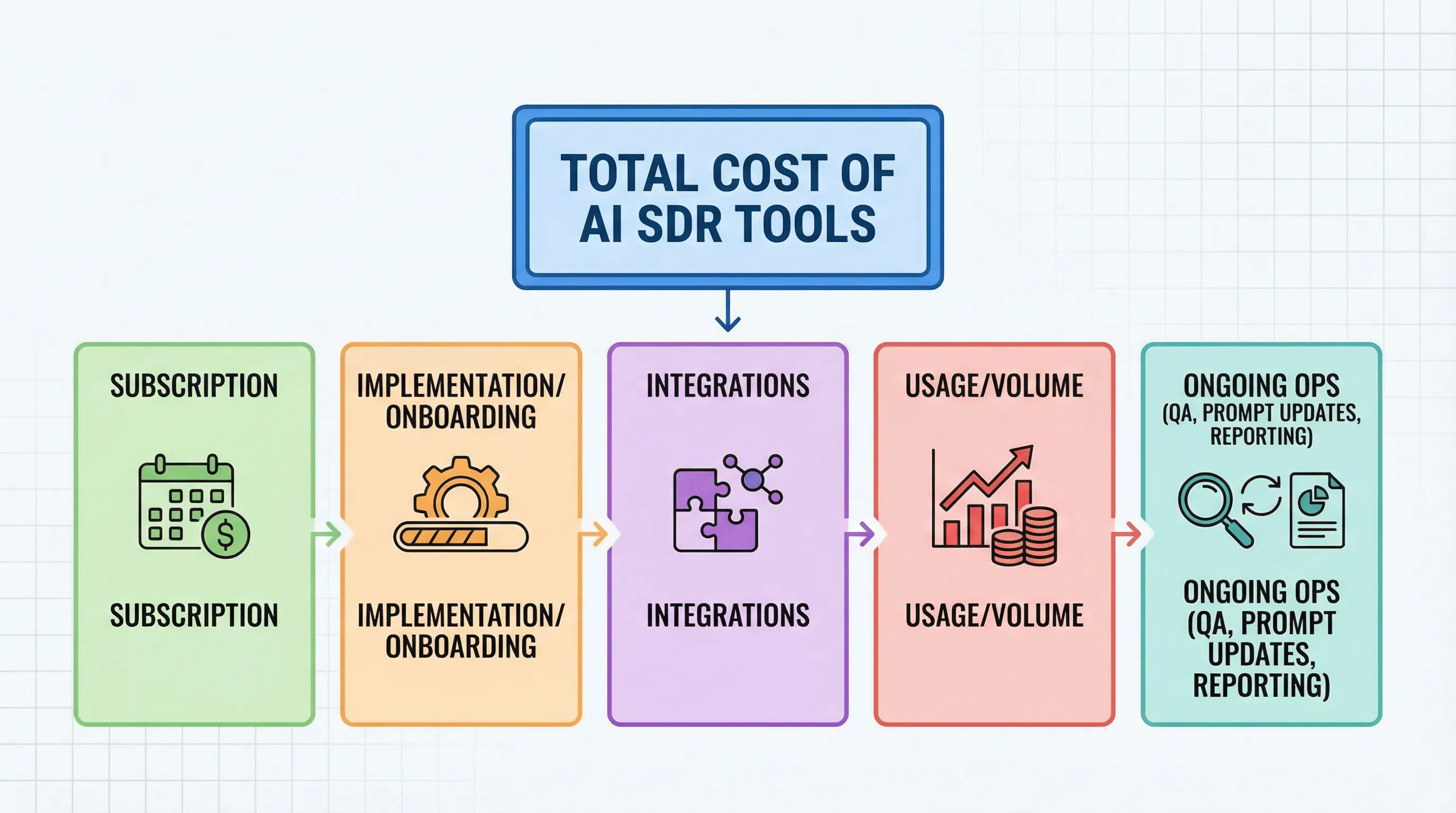
The 5 line items that determine what you really pay
Most teams anchor on “monthly platform cost” and miss the operational math. Here’s where pricing expands in practice.
| Cost driver | What it usually includes | Why it changes your real spend |
|---|---|---|
| Base subscription | Access to the platform, core agent features, reporting | Often sized to company, seats, or a baseline volume tier |
| Implementation and onboarding | Setup, playbook configuration, training, QA process | One-time fees or required services time can be material |
| Integrations | CRM, calendar, routing, enrichment, analytics | “Included” integrations can still require internal RevOps hours |
| Usage and volume | Conversations, contacts, leads touched, channels enabled | Overages or tier upgrades can hit once you scale |
| Ongoing operations | Prompt iteration, QA sampling, compliance review, performance reviews | Tools that do not run full conversations create “human labor debt” |
Two useful procurement truths:
- If the tool doesn’t run multi-turn conversations autonomously, you still pay in headcount time. Your SDRs become inbox clerks.
- If qualification is shallow, you pay downstream. Your AEs burn cycles on low-proof meetings.
(For a deeper look at what “qualified” should mean in a thread, see Kakiyo’s guide on proof-based qualification.)
Saleswhale
What it does (2 sentences) Saleswhale is typically deployed to engage leads and handle early-stage conversations so human reps spend less time on repetitive back-and-forth. In practice, teams evaluate it to reduce response latency, qualify interest, and route the right prospects to meetings or sales follow-up.
Standout feature (1 sentence) It’s built around having an AI handle parts of the qualification and follow-up flow that usually consumes SDR bandwidth.
Who it’s for (1 sentence) Best for teams that want AI support for lead engagement and qualification and are comfortable buying via a quote-based, implementation-led process.
Pricing Saleswhale pricing is generally custom (quote-based), and the total cost depends on conversation volume, channels, and required integrations.
Pros
- Reduces manual back-and-forth for early lead engagement.
- Can standardize first-response handling and basic qualification.
- Typically sold with onboarding, which helps teams get live faster.
Cons
- Quote-based pricing makes it harder to compare true cost without a structured pilot.
- If your motion is LinkedIn-first outbound, you may still need a dedicated LinkedIn conversation layer.
Kakiyo
What it does (2 sentences) Kakiyo autonomously manages personalized LinkedIn conversations at scale, from first touch to qualification to meeting booking. It is designed so SDRs do not touch the chat until it’s time to close the loop on a high-value opportunity.
Standout feature (1 sentence) Unlike tools that automate sending, Kakiyo runs the full multi-turn conversation, qualifies leads with an intelligent scoring system, and books meetings, with conversation override control when a human should step in.
Who it’s for (1 sentence) Best for teams running a LinkedIn-first outbound or hybrid motion that want autonomous conversation management, consistent qualification, and measurable meeting outcomes.
Pricing Kakiyo is custom (demo/trial), with pricing typically scoped to your use case, volume, and rollout requirements.
Pros
- Most advanced option here for autonomous LinkedIn conversation management and LinkedIn lead qualification.
- Built for experimentation (custom prompts, A/B prompt testing) and governance (override controls).
- Centralized real-time dashboard plus analytics helps you manage quality, not just activity.
Cons
- If your primary bottleneck is only website chat, you may prioritize a web-focused tool first.
- Like any high-autonomy system, it needs clear qualification definitions to perform well.
If you want to operationalize safe scaling on LinkedIn, pair this with Kakiyo’s guardrails playbook on automated LinkedIn outreach.
Conversica
What it does (2 sentences) Conversica provides AI assistants that follow up with leads and contacts to drive engagement and route qualified conversations to sales. It’s commonly evaluated by larger orgs that want standardized follow-up and coverage without adding SDR headcount.
Standout feature (1 sentence) Enterprise-grade assistant deployments are often packaged with structured workflows and stakeholder-friendly reporting.
Who it’s for (1 sentence) Best for enterprise teams that need broad coverage, multi-team coordination, and a vendor-led rollout.
Pricing Conversica is typically custom (quote-based).
Pros
- Strong fit for enterprise buying and cross-functional deployments.
- Designed around consistent follow-up, which can reduce lead leakage.
- Often easier to justify when inbound volume is high and response SLAs matter.
Cons
- Less purpose-built for LinkedIn-native conversation execution than a LinkedIn-first platform.
- Enterprise implementations can add process and stakeholder overhead.
Drift
What it does (2 sentences) Drift is primarily an inbound conversational marketing and sales tool focused on website visitors, chat, routing, and playbooks. It’s used to capture demand, qualify in real time, and connect prospects to the right team.
Standout feature (1 sentence) Strong real-time routing and inbound conversion workflows centered on your website.
Who it’s for (1 sentence) Best for teams with meaningful high-intent website traffic and a clear inbound qualification and routing motion.
Pricing Drift is typically custom (quote-based) depending on packages and requirements.
Pros
- Excellent for converting and routing high-intent inbound traffic.
- Clear operational value when speed-to-lead is a known bottleneck.
- Pairs well with existing SDR teams for rapid inbound qualification.
Cons
- Does not replace an outbound conversation engine for LinkedIn or other proactive channels.
- ROI depends heavily on traffic quality and routing discipline.
Qualified
What it does (2 sentences) Qualified focuses on pipeline generation from inbound web traffic through conversational workflows, qualification, and routing. It’s typically adopted by teams that want to capture more meetings from their highest-intent site visitors.
Standout feature (1 sentence) Built for real-time inbound qualification and fast handoff, often aligned to account-based workflows.
Who it’s for (1 sentence) Best for ABM teams and sales orgs that want to monetize existing demand more efficiently.
Pricing Qualified is typically custom (quote-based).
Pros
- Strong fit when your website is a primary demand capture channel.
- Helps teams operationalize routing rules and meeting capture.
- Can improve speed and consistency for inbound qualification.
Cons
- Not a substitute for outbound LinkedIn prospecting or multi-threaded account development.
- If your biggest issue is outbound thread management, value will be limited.
How to evaluate Saleswhale pricing without getting boxed into the wrong contract
If you do one thing before signing a quote, do this: force the pricing conversation to map to your funnel outputs, not the vendor’s units.
Here are the questions I’d ask in procurement, with a RevOps lens:
- What is the billable unit? Contacts, conversations, leads engaged, meetings booked, channels enabled, something else.
- What counts as “usage”? New leads only, re-engagement, replies, follow-ups, multi-threading.
- What is included vs add-on? A/B testing, scoring, analytics, templates, human override, integrations.
- What’s the implementation scope? Who builds playbooks, who owns QA, who monitors performance weekly.
- How do you prove quality? Ask for the vendor’s recommended definition of “qualified” and what evidence is captured.
A pricing quote that looks cheap can be expensive if it pushes work back onto SDRs. If your reps still have to read, classify, and respond to most replies, your “AI SDR” is really a sending tool with a chatbot attached.
Where Kakiyo tends to win vs Saleswhale (and where it may not)
This is the cleanest way to decide.
Kakiyo is the more advanced choice when:
- Your bottleneck is multi-turn LinkedIn conversation management.
- You need lead qualification inside the thread, with an intelligent scoring system and auditable signals.
- You want the system to book meetings and keep SDRs focused on high-value opportunities.
Saleswhale can still be a fit when:
- Your motion is centered on non-LinkedIn channels and you primarily need AI coverage for lead follow-up.
- You want a vendor-led rollout where qualification and routing are handled in a more general engagement model.
If you’re building a LinkedIn-first outbound system, this distinction matters because LinkedIn is a uniquely high-signal channel at scale (and also a uniquely easy channel to ruin with sloppy automation). LinkedIn reports 1+ billion members, which is why the channel is attractive, and why governance matters when you scale outreach (LinkedIn pressroom).
Which tool should you choose?
- If you want autonomous AI conversation and LinkedIn lead qualification, use Kakiyo.
- If you want a quote-based AI-led qualification tool for lead engagement and follow-up, start with Saleswhale.
- If you need enterprise-scale AI assistants across teams and workflows, use Conversica.
- If you want to convert high-intent website traffic into meetings, use Drift.
- If you run ABM and care about real-time inbound routing, use Qualified.
Saleswhale pricing
Saleswhale pricing is usually quote-based, so you should treat it like an enterprise purchase even if your team is small. Ask what the billable unit is, what “usage” means, and what success metrics they expect you to track during a pilot.
Saleswhale pricing per month
Saleswhale pricing per month is not always published publicly, and many teams will receive a monthly or annual quote based on volume and scope. To avoid surprises, confirm whether follow-ups, re-engagement, additional channels, or overages change the monthly cost.
Kakiyo vs Saleswhale
Kakiyo vs Saleswhale is mostly a channel and autonomy decision. If you need autonomous LinkedIn conversations that qualify and book meetings with scoring and human override, Kakiyo is purpose-built for that. If you need broader AI-assisted lead engagement and follow-up under a quote-based model, Saleswhale may fit.
Saleswhale alternatives
Saleswhale alternatives typically fall into two buckets: inbound web conversation platforms (like Drift and Qualified) and enterprise AI assistant vendors (like Conversica). If your real need is outbound LinkedIn prospecting with full conversation management, you’ll want a LinkedIn-native tool like Kakiyo.
Is Saleswhale worth it?
Saleswhale is worth it when it measurably reduces response latency and increases qualified handoffs without creating new QA and routing overhead for your team. The simplest test is a controlled pilot with agreed definitions of “qualified,” plus downstream checks like sales acceptance and meeting-to-opportunity conversion.
Get a Kakiyo demo or free trial at kakiyo.com.
FAQ
Where does AI actually help in sales?
AI helps most when it reduces repetitive work, surfaces better signals, and improves execution speed. It is strongest in research, qualification support, follow-up, and workflow automation.
What are the limits of AI in sales?
AI still depends on clean inputs, good process design, and human oversight. It can accelerate bad workflows just as easily as good ones.
How should teams evaluate AI sales tools?
Evaluate tools by workflow fit, data quality, implementation friction, and measurable business outcomes. A feature-rich tool is not automatically the right tool for your motion.
Does AI replace SDRs or sales reps?
Usually no. In most teams, AI reshapes the role by taking over repetitive execution while humans stay responsible for judgment, positioning, and relationship depth.