
 Ilan Asseo
Artificial Intelligence for Sales: Getting Started
Getting-started guide to artificial intelligence for sales covering prerequisites, pilot setup, measurement, and safe AI deployment.

AI is reshaping sales, but “use AI” is not a strategy. The teams getting results in 2026 are using artificial intelligence for sales to do three things consistently: respond faster, personalize without losing quality, and qualify with clearer evidence so reps spend time on real opportunities.
This getting-started guide is designed for SDR leaders, RevOps, and founders who want a practical first implementation, not a vendor hype tour. You’ll learn where AI actually fits, what to set up first, what to measure, and how to run a safe pilot that proves lift.
Industry evidence: “Our research suggests that a fifth of current sales-team functions could be automated.” — McKinsey & Company.
Source: McKinsey
What “artificial intelligence for sales” actually means
In day-to-day sales work, AI usually shows up in three forms:
- Generative AI: drafts text and summarizes information (messages, call notes, account briefs).
- Predictive AI: estimates likelihood (conversion, meeting hold, opportunity creation) based on inputs.
- Agentic or workflow AI: takes action inside a defined workflow (routing, follow-up, conversation management) with supervision and rules.
The fastest path to ROI is usually not “add a chatbot.” It’s picking a narrow workflow where speed and consistency matter, then instrumenting it so performance is measurable.
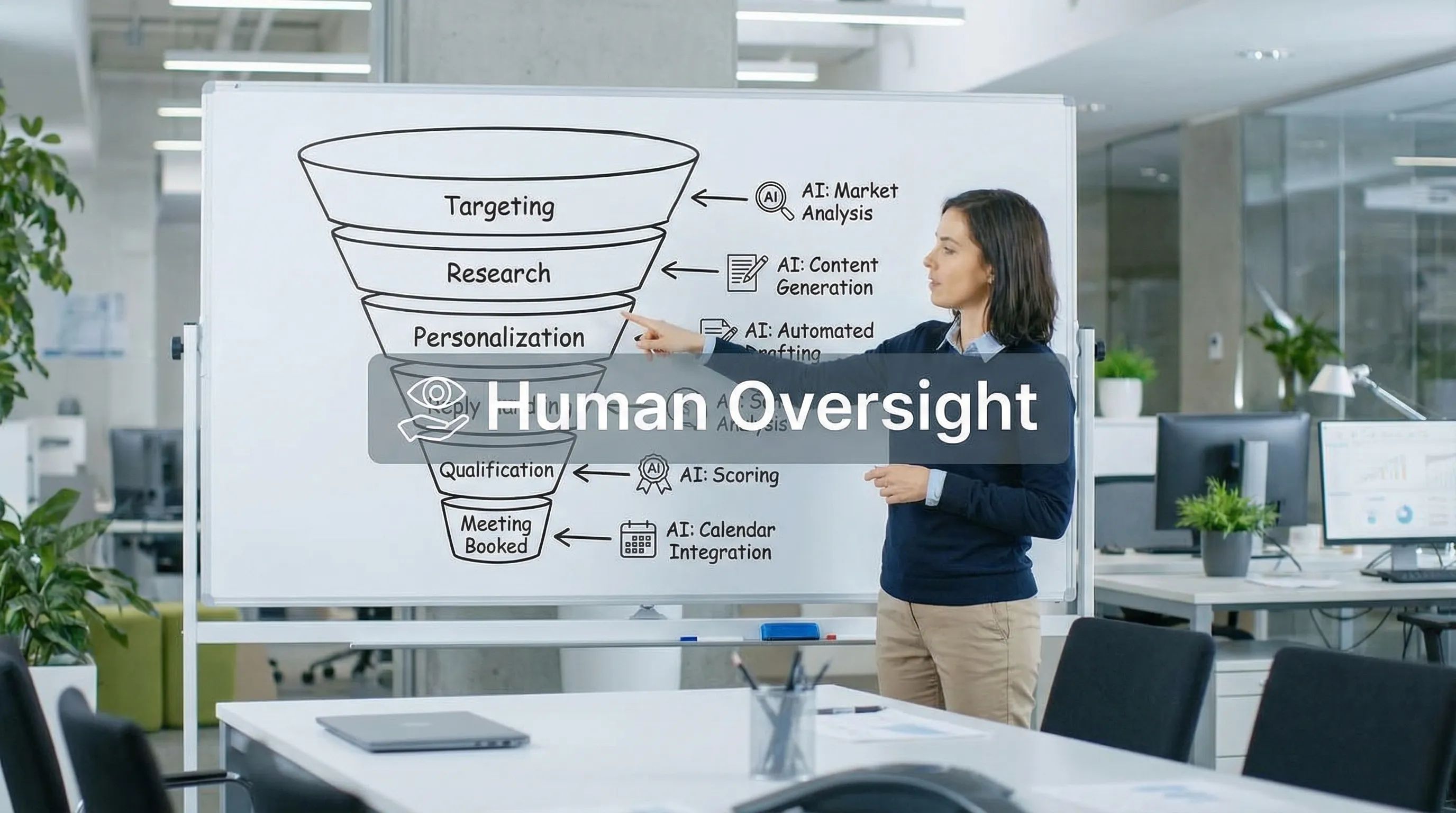
Where AI can help across the sales funnel (and where it should not)
AI creates value when it reduces repetitive effort without degrading trust. Here is a practical map of common use cases.
| Funnel moment | High-ROI AI use cases | What to keep human-led (initially) |
|---|---|---|
| Targeting | ICP research, account/lead enrichment summaries, trigger detection | Segment strategy, ICP decisions, prioritization tradeoffs |
| First touch | Personalized openers at scale, channel-appropriate outreach drafting | Brand voice approvals, sensitive segments (regulated industries) |
| Replies | Rapid response, objection first drafts, context recall | High-stakes objections, executive outreach, nuanced negotiations |
| Qualification | Consistent question sequencing, evidence capture, explainable scoring | Final qualification judgment for edge cases, pricing conversations |
| Meeting booking | Scheduling coordination, agenda confirmation, reminders | Multi-stakeholder deal orchestration |
| Handoff | Auto-generated handoff packets, CRM hygiene, recap summaries | Discovery, deal strategy, relationship building |
If you want a simple rule: automate low-stakes repetition, supervise anything that could create reputational risk.
The three prerequisites before you deploy AI in sales
Most AI rollouts fail for boring reasons: unclear definitions, weak inputs, and no governance. Fix these first.
1) Define the outcome in one sentence
Pick an outcome that a CFO and a sales leader both care about. Good examples:
- Increase qualified conversation rate on LinkedIn.
- Reduce speed-to-first-meaningful-touch for inbound leads.
- Improve SQL precision (fewer bad meetings that AEs reject).
Avoid “increase activity” or “send more messages.” Activity is not the business outcome.
2) Agree on what “qualified” means (and what evidence is required)
AI will faithfully scale whatever definition you give it, including a bad one. Your team needs a shared rule for what qualifies someone to move forward.
A practical starting point is a rubric that includes:
- Fit (ICP match)
- Intent (what they are trying to do now)
- Evidence (what in the conversation or behavior proves it)
If your qualification definition is fuzzy, your AI results will be fuzzy.
3) Set guardrails you can enforce
For conversational channels, guardrails matter as much as prompts.
Examples of guardrails that are enforceable:
- No claims about integrations, pricing, or customer names unless approved.
- Do not ask for sensitive personal data.
- Escalate to a human if the prospect asks policy questions, requests a call, or shows explicit buying signals.
For anything LinkedIn-related, stay aligned with LinkedIn’s rules and safety expectations. Start with LinkedIn’s Professional Community Policies and keep your automation conservative.
A simple autonomy model (start here)
A common mistake is jumping straight to full autonomy. You do not need that to get value.
| Autonomy level | What AI does | Best for | Key control |
|---|---|---|---|
| Assist | Drafts suggestions only | Early teams, tight compliance needs | Human send-only |
| Supervised execution | Sends within rules, escalates frequently | Most teams starting a pilot | Clear escalation triggers + override |
| High autonomy | Manages end-to-end flow with minimal intervention | Mature teams with proven playbooks | Audit logs + QA + monitoring |
If you are “getting started,” supervised execution is often the sweet spot: AI takes the repetitive load, humans keep control.
Getting started in 30 days: a practical pilot plan
You do not need a massive transformation project. You need a controlled pilot with clean measurement.
Week 1: Pick one workflow and instrument it
Choose one channel and one workflow. For many B2B teams, LinkedIn is ideal because replies are fast and signals show up early.
In Week 1, your goal is to set baselines:
- Current connection acceptance rate (if relevant)
- Reply rate
- Positive reply rate
- Qualified conversation rate
- Meetings booked and meetings held
- AE acceptance rate (if SDRs hand off)
If you want a deeper KPI structure, Kakiyo’s weekly scorecard post is a good companion: AI sales metrics to track weekly.
Week 2: Build prompts around a conversation goal, not a “sequence”
Prompts work best when they are designed around micro-conversions, for example:
- Earn permission to ask one question.
- Confirm a relevant context.
- Identify one qualifying signal (team size, tooling, timeline, priority).
- Offer a low-friction next step.
Two practical prompt design tips:
- Write prompts for decision points (“If they say X, do Y”) instead of long scripts.
- Prohibit guessing (no invented case studies, no invented product details).
This is also the week to set your escalation and override rules so humans can step in instantly.
Week 3: Run one A/B test and one quality review loop
Do not test five things at once. Pick a single variable:
- Opener (trigger-based vs role-based)
- CTA (calendar link vs ask for preference)
- Qualification question order
Then run a lightweight QA review:
- Sample threads from each variant
- Check tone, compliance, and whether qualification evidence is being captured
- Identify failure modes (spamminess, premature pitching, unclear questions)
If you want a disciplined way to test messaging, see: Cold outreach: a 7-day testing plan.
Week 4: Decide using leading indicators (not just meetings)
Meetings are a lagging indicator. In early pilots, focus on leading indicators that predict pipeline quality.
Here is a simple pilot scorecard you can copy.
| Metric | Why it matters | What “good” looks like |
|---|---|---|
| Speed to first meaningful reply | Faster response increases conversion in conversational channels | Down week-over-week |
| Qualified conversation rate | Measures whether you are creating real sales conversations | Up without a drop in quality |
| Meetings held rate | Filters out low-quality bookings | Stable or improving |
| AE acceptance rate | Protects the calendar and validates qualification | Stable or improving |
| AI override rate | Early warning for prompt or segment issues | Starts higher, trends down as prompts improve |
At the end of Week 4, make a clear decision: scale, iterate, or stop.
What to look for in an AI sales tool when you’re new
When evaluating tools for artificial intelligence for sales, prioritize operational control over flashy demos.
Must-haves for a first implementation
- Clear human oversight (pause, override, escalation)
- A/B testing or controlled experimentation (so you can learn)
- Explainable qualification and scoring (so sales trusts outcomes)
- Analytics tied to funnel outcomes (not just activity)
- Templates you can adapt (so you are not starting from scratch)
Red flags
- “Set it and forget it” messaging for outbound channels
- No way to audit what was sent and why
- No segmentation controls (everything goes to everyone)
- Success metrics centered on volume instead of quality
If you are comparing categories, Kakiyo’s breakdown of modern tools vs traditional sequencers can help frame the differences: Sales AI tools vs legacy sequencers.
Example: Using AI to scale LinkedIn conversations without losing control
LinkedIn is a conversational channel, not an email blast channel. The AI approach that tends to work is conversation management, not step-based automation.
A purpose-built platform like Kakiyo is designed to autonomously manage personalized LinkedIn conversations at scale, from first touch through qualification to meeting booking, while keeping SDRs in control.
Based on Kakiyo’s stated capabilities, teams typically use it to:
- Run autonomous LinkedIn conversations that stay personalized
- Apply AI-driven lead qualification with an intelligent scoring system
- Use industry-specific templates and customizable prompts
- Improve performance with A/B prompt testing
- Monitor everything in a centralized real-time dashboard with analytics and reporting
- Manage many threads at once with simultaneous conversation management and conversation override control
If your goal is to start safely, look for an approach where humans can review outcomes, intervene in real time, and continuously improve prompts.

Common first-month mistakes (and quick fixes)
Mistake: Automating before tightening your ICP
Fix: Freeze your ICP for the pilot. Narrow beats broad. If you change segments every week, you will not know what caused improvements.
Mistake: Measuring only reply rate
Fix: Track qualified conversation rate and meetings held rate. High replies can be a sign you are attracting the wrong people.
Mistake: Letting AI “wing it” on objections
Fix: Create a short objection policy. If the prospect asks about pricing, security, or integration, escalate. You can later expand autonomy once you have approved responses.
Mistake: No evidence capture
Fix: Require a short, auditable “why this is qualified” note (fit, intent, proof). This is what earns trust from AEs and leadership.
Frequently Asked Questions
What is artificial intelligence for sales? Artificial intelligence for sales refers to using AI systems to improve sales workflows like prospect research, personalization, qualification, meeting booking, and forecasting. The best implementations are outcome-driven and measurable.
Where should a sales team start with AI? Start with one workflow, one channel, and one measurable outcome. Most teams get early wins by improving speed and consistency in conversational channels (for example, LinkedIn replies and qualification).
Will AI replace SDRs? In most organizations, AI replaces repetitive tasks, not the role. SDRs stay essential for judgment, relationship building, edge-case handling, and continuous improvement of messaging and qualification standards.
How do we keep AI-driven outreach safe and compliant? Use conservative guardrails, clear escalation triggers, and human override controls. For LinkedIn, align with platform policies and avoid aggressive automation patterns.
What metrics should we track in an AI sales pilot? Track speed-to-response, qualified conversation rate, meetings booked, meetings held, AE acceptance, and override rate. These indicators show both volume and quality.
Want a safer way to scale LinkedIn conversations?
If your team is experimenting with AI for sales and you want to turn LinkedIn outreach into qualified conversations and booked meetings, Kakiyo is built for that workflow. It autonomously manages personalized LinkedIn conversations, applies AI-driven qualification and scoring, supports A/B prompt testing, and gives you real-time visibility with override control.
Explore Kakiyo here: https://www.kakiyo.com