
 Ilan Asseo
Sales Forecasting Using AI: A Practical Setup Guide
A practical guide for RevOps and sales leaders to set up AI-driven sales forecasting: data snapshotting, feature engineering, model selection, deployment.

Forecasts get political fast when they are built on gut feel, inconsistent stage definitions, and stale CRM fields. The promise of sales forecasting using AI is not magic accuracy, it is a repeatable system: consistent inputs, explicit assumptions, explainable predictions, and a closed loop that turns forecast signals into actions your team actually takes.
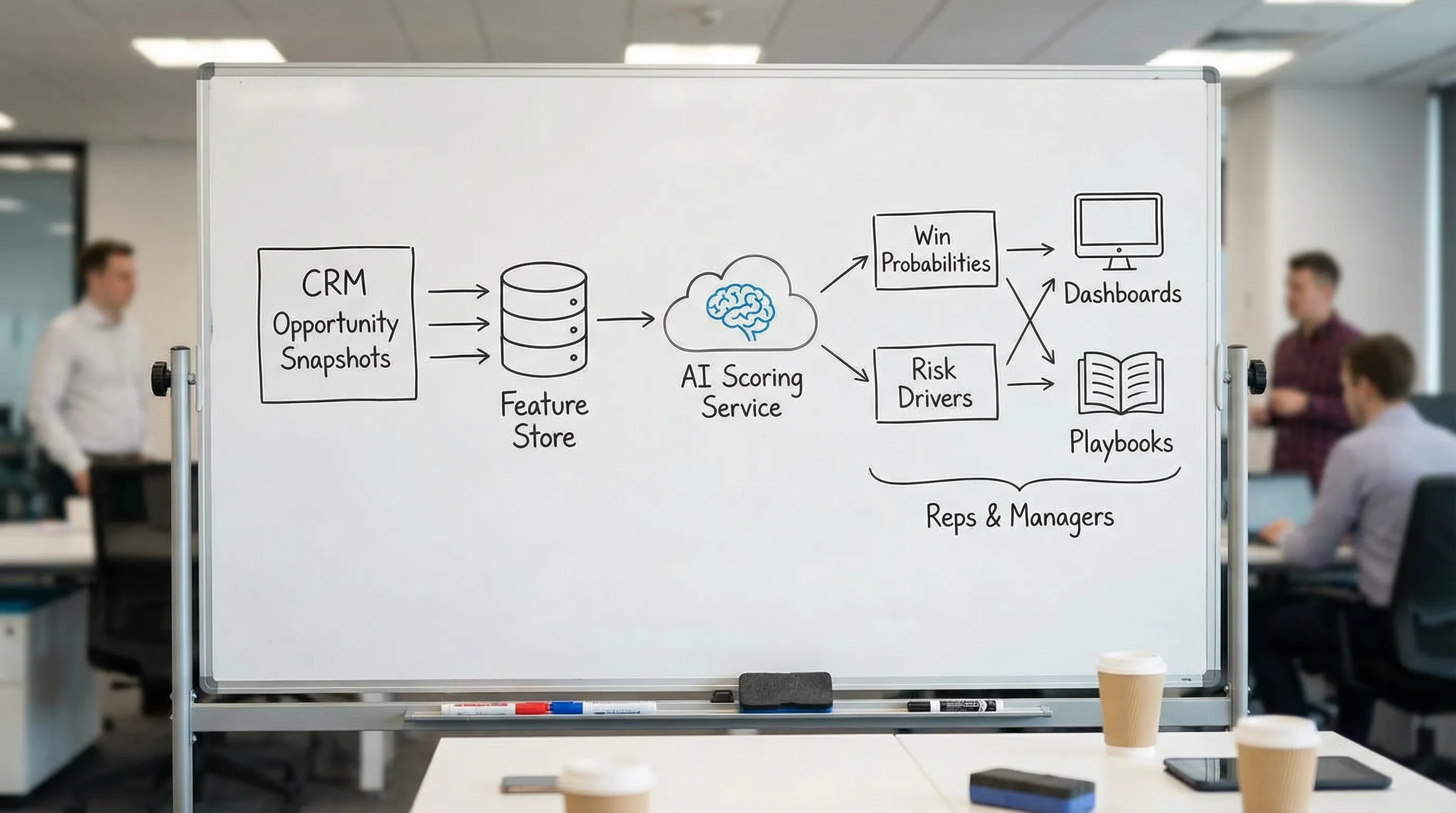
This guide walks you through a practical setup that a RevOps lead and sales leader can implement without boiling the ocean. The emphasis is on what to instrument, how to structure the data, how to pick a first model that is defensible, and how to deploy it so reps trust it.
Industry evidence: McKinsey estimates that generative AI could increase sales productivity by approximately 3 to 5 percent of current global sales expenditures, but only when teams pair models with strong data and operating discipline.
Source: McKinsey
What “good” AI forecasting looks like (so you don’t build the wrong thing)
Before you touch a model, align on the success criteria. In B2B, “accuracy” alone is not enough.
A useful AI forecast is:
- Timely: updates on a cadence that matches how your pipeline changes (often daily or weekly).
- Explainable: you can answer “why did this move?” in plain language.
- Calibrated: when the model says 70% win probability, it wins about 70% of the time in similar situations (calibration matters as much as ranking).
- Actionable: every score band has a defined next step (inspect, advance, multi-thread, close-lost, requalify).
- Comparable to a baseline: it beats your current approach, not a theoretical ideal.
If you want the modeling deep dive (methods, metrics, and accuracy tradeoffs), use this companion guide: AI Sales Forecasting: Methods, Models, and Accuracy.
Step 1: Choose the forecasting question (and one primary consumer)
Most teams fail by trying to forecast everything at once. Pick one question and one decision owner.
Common “first” AI forecasting questions:
| Forecast question | Best for | Output | Primary consumer |
|---|---|---|---|
| “Will this opportunity close-won this quarter?” | Commit accuracy | Win probability by opp | Sales leadership, AEs |
| “How much revenue will close this month/quarter?” | Planning and cash flow | Expected revenue distribution | Finance, RevOps |
| “Which deals are at risk right now?” | Pipeline inspection | Risk score and drivers | Frontline managers |
| “How many qualified meetings will turn into pipeline?” | Top-of-funnel predictability | SQL-to-SQO or meeting-to-pipeline model | SDR leaders, RevOps |
Practical recommendation: start at the opportunity level (win probability by a fixed date), then roll it up to a revenue forecast. Opportunity models are easier to validate and operationalize.
Step 2: Instrument your data like a forecasting product (not a CRM report)
AI forecasting fails more often from data shape than from model choice.
The non-negotiable: opportunity snapshotting
If you train on today’s CRM values (current stage, current amount, current close date), you will accidentally teach the model with information that did not exist at prediction time. You also lose the story of how a deal moved.
You want a time series of deal “states”, typically one row per opportunity per day (or per week).
At minimum, your snapshot should preserve:
| Field family | Examples | Why it matters |
|---|---|---|
| Identity | opportunity_id, account_id, owner_id | Join keys, rollups |
| Timing | snapshot_date, created_date, close_date (as-of snapshot) | Prevent leakage, compute horizon |
| Commercials | amount (as-of snapshot), forecast category | Revenue math, rep intent |
| Stage + history | stage, stage_entered_date, prior_stage | Momentum and stalling |
| Activity | last_activity_date, meetings_scheduled_30d, emails_14d | Recency and effort proxies |
| Outcome label | closed_won, closed_lost (future, not as-of snapshot) | Training truth |
If you are on Salesforce, HubSpot, or another CRM, you can build snapshotting via your data warehouse and ETL, or via a purpose-built reverse ETL setup. The key is not the tool, it is the as-of data discipline.
Add “leading indicators” that CRM stages miss
Stages are a lagging abstraction. Two opportunities in the same stage can be worlds apart.
High-signal leading indicators often include:
- Buyer engagement: replies, meetings booked, meetings held, multi-threading depth.
- Qualification evidence: fit, intent, proof, next step, recency (captured consistently).
- Conversation momentum: time to respond, number of back-and-forth turns, objection themes.
This is where conversation channels matter. If a big part of your pipeline is born on LinkedIn, your forecast will be blind if the only thing that reaches the CRM is “Connected” or “Had a chat.”
Step 3: Define truth labels and guardrails (avoid leakage and politics)
Your “truth” label is the event the model learns to predict. Pick one that is measurable and hard to game.
Typical labels:
- Close-won by end of period (for commit forecasting)
- Close-won within N days (for velocity)
- Advance to next stage within N days (for pipeline progression)
Two setup rules that prevent painful rework:
Use time-based splits for validation
Random train-test splits make models look better than they are because pipeline patterns change over time. Validate on “future” time windows (backtesting).
Freeze the “prediction moment”
Be explicit: “Every night at 2am, score all open opportunities using only fields available as of that timestamp.”
If you want a reference implementation for time-based validation, scikit-learn documents strategies like time series cross-validation.
Step 4: Build a baseline forecast first (so you can prove lift)
An AI forecast is easier to sell internally when you can show incremental improvement over a baseline everyone recognizes.
A solid baseline can be:
- Stage-weighted pipeline (by historical conversion)
- Rep commit adjusted by historical bias
- Simple rules (for example, “in stage X more than Y days equals risk”)
Why this matters:
- You get a benchmark for lift.
- You uncover definition problems (stages, close-date hygiene, missing activities).
- You create a fallback if the model drifts.
Step 5: Create forecasting features that reflect how deals actually close
Great forecasting features are usually not exotic. They are disciplined transforms of basic signals.
Feature patterns that tend to work well
| Feature pattern | Examples | What it captures |
|---|---|---|
| Recency | days_since_last_activity, last_inbound_reply_days | Buyer temperature |
| Momentum | stage_changes_30d, meetings_booked_14d | Direction, not just position |
| Age and stalling | days_in_stage, total_days_open | Stuck deals vs progressing deals |
| Slippage | close_date_push_count_60d | Soft no signals |
| Deal context | segment, ACV band, region, product line | Different conversion regimes |
| Account aggregation | open_opps_at_account, engaged_contacts_count | Buying group strength |
Add conversation-derived signals (especially for LinkedIn-first teams)
If your team qualifies and books meetings inside LinkedIn messages, you can extract structured signals from threads and turn them into model features.
Examples of conversation signals to capture:
| Conversation signal | How to structure it | Why it helps forecasting |
|---|---|---|
| Intent strength | low/medium/high, plus rationale | Predicts conversion better than stage alone |
| Confirmed pain / use case | category label | Improves segment-specific accuracy |
| Next step clarity | none / tentative / scheduled | Strong leading indicator of close likelihood |
| Timeline language | “this quarter”, “Q3”, “no timeline” | Anchors horizon and probability |
| Objection themes | pricing, security, priority, status quo | Explains risk and suggests actions |
Large language models can help convert free-text into structured fields, but you still need governance and QA. The goal is not to automate judgment, it is to make evidence consistent.
Step 6: Pick a first model that is defensible (and easy to explain)
For a first production rollout, prefer models that are:
- Robust on messy enterprise data
- Relatively interpretable
- Fast to retrain
Common starting points:
- Logistic regression for win probability (surprisingly strong with good features)
- Gradient-boosted trees (often strong out of the box, still explainable with care)
You can then compute expected revenue as:
expected_revenue = amount (as-of snapshot) × win_probability
You can also output risk drivers using model explanations, but keep it simple at launch: 3 to 5 drivers max, in plain language.
Step 7: Evaluate like a forecasting team, not a data science demo
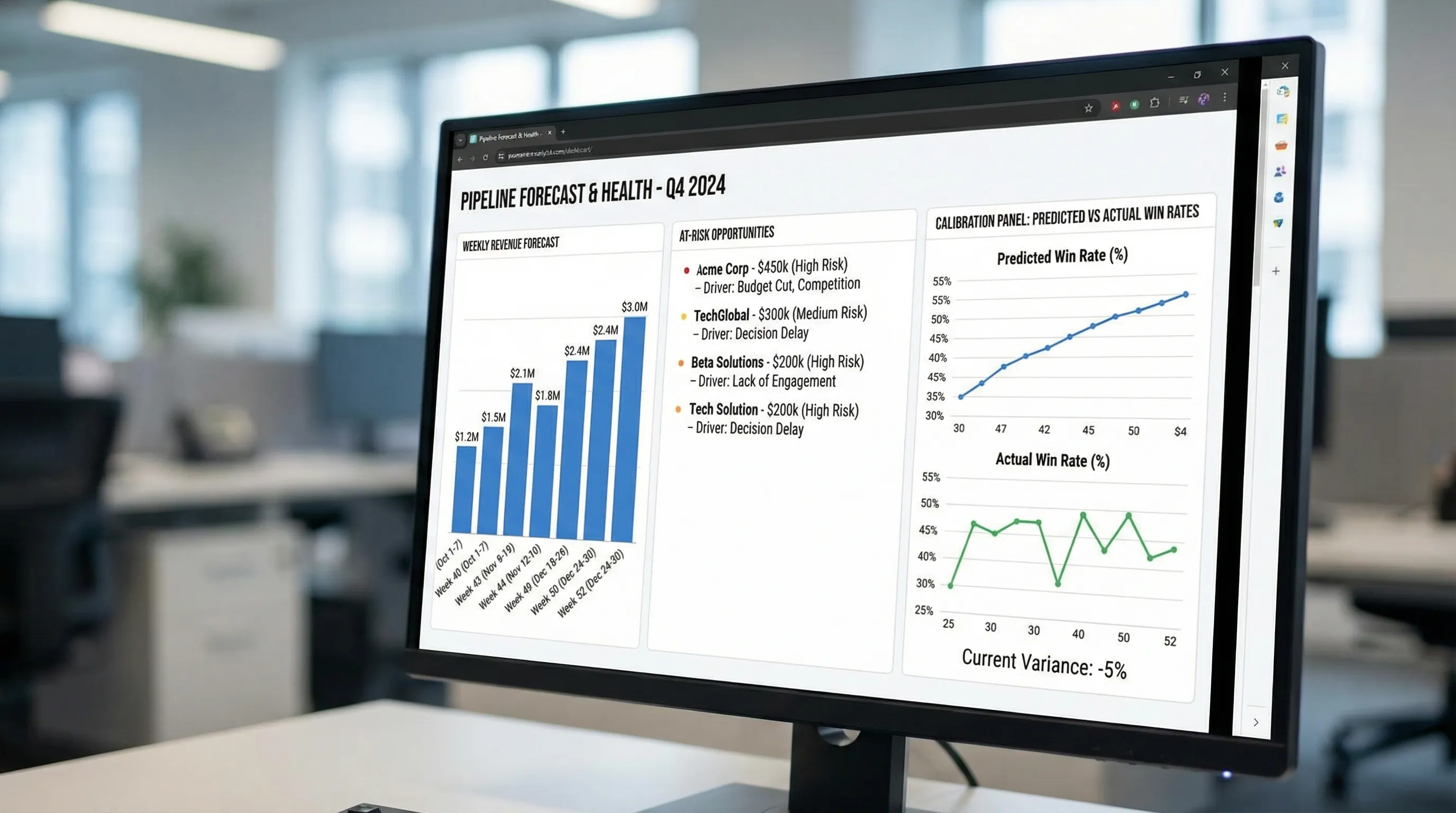
A model that “ranks” deals well can still be a bad forecast if probabilities are miscalibrated.
Use a mix of ranking and probability metrics:
| Metric | What it tells you | When to use |
|---|---|---|
| AUC / ROC-AUC | Ranking quality | Prioritization, risk sorting |
| Precision / recall at a threshold | Operational tradeoffs | Routing, score bands |
| Brier score | Probability accuracy | Forecast credibility (calibration) |
| Calibration curve | Under or over confidence | Executive trust |
If your team is new to probability scoring, the Brier score is a practical starting point because it punishes overconfident wrong calls.
Backtest with the same cadence you will run in production
If you will score nightly, backtest nightly. Compare:
- Baseline vs AI expected revenue by week
- Commit accuracy by segment (SMB vs mid-market vs enterprise)
- Error concentration (is the model wrong in predictable places?)
Step 8: Deploy with an action path (or nobody will use it)
A forecast is only valuable if it changes behavior. Deployment should include:
Score bands with standard plays
Example score bands (tune to your motion):
| Band | What it means | Default action |
|---|---|---|
| High confidence | Likely to close | Protect time, confirm next step, remove friction |
| Medium | Needs manager attention | Inspection, mutual plan, multi-thread, tighten timeline |
| Low | Low probability as-of now | Requalify, nurture, or close-lost with reason |
Write predictions back where sellers live
Most teams fail by putting forecasts in a separate BI dashboard. Put the score in the systems of record your team already uses (CRM views, manager inspection queues, weekly pipeline review packs).
You do not need to over-automate at first. A weekly “Top risks” queue plus a nightly score refresh is enough to prove value.
Step 9: Add governance so AI improves forecasting instead of creating new games
Forecasting is a high-incentive environment. Any scoring system will be gamed if it becomes a target.
A lightweight governance setup:
Define ownership
- RevOps owns definitions, data contracts, and adoption.
- Sales leadership owns the operating cadence and enforcement.
- Analytics or data team owns model training, monitoring, and incident response.
Monitor for drift and gaming
Track:
- Calibration over time
- Feature drift (inputs changing meaning)
- Process drift (stages used differently across teams)
If you want an example of what to track weekly across AI-assisted sales workflows, see: AI Sales Metrics: What to Track Weekly.
A practical 30-day setup plan (minimum viable, production-minded)
Use this as a realistic rollout sequence.
| Week | Deliverable | Definition of done |
|---|---|---|
| Week 1 | Forecast question, label, baseline | One-page spec, baseline report, agreed success metrics |
| Week 2 | Opportunity snapshots + feature set v1 | Daily snapshot table exists, feature list frozen |
| Week 3 | Model v1 + backtest | Time-based backtest, calibration review, segment slices |
| Week 4 | Deployment + operating cadence | Score bands live, inspection queue, weekly review ritual |
If you cannot complete Week 2, pause. That is the foundation.
Common setup mistakes (and quick fixes)
Mistake: Training on “current CRM” fields
Fix: snapshot everything as-of prediction time. If you only do one thing in this guide, do this.
Mistake: Treating stages as ground truth
Fix: incorporate evidence-based signals (next step, meeting held, buying group engagement) and enforce consistent qualification criteria.
Mistake: Shipping a score without a workflow
Fix: map each score band to a default action and a manager inspection habit.
Mistake: Over-optimizing one segment
Fix: evaluate by segment and motion. Enterprise and SMB often behave like different businesses.
Where Kakiyo fits (especially if LinkedIn is a real pipeline channel)
If your SDR motion is LinkedIn-first, forecasting quality depends on whether your system captures what is happening inside threads.
Kakiyo is designed to run and scale personalized LinkedIn conversations from first touch through qualification to meeting booking. That matters for forecasting because it helps you:
- Capture structured qualification evidence from conversations (fit, intent, next step) instead of losing it in free-text.
- Standardize and test prompts (including A/B prompt testing) so your conversational signals become more consistent over time.
- Generate analytics on conversation throughput and quality, which can feed leading indicators for pipeline and forecast models.
You can use those conversation-level signals to reduce the gap between “pipeline on paper” and “pipeline in reality.”
Frequently Asked Questions
What data do I need to start sales forecasting using AI? You can start with CRM opportunity snapshots (stage, amount, close date as-of time), activity recency, and a clean win/loss label. Add conversation and qualification evidence next for lift.
Do I need a complex model to get value? No. A disciplined snapshot dataset plus a baseline model (and then a simple probability model like logistic regression) often beats ad hoc commit forecasts.
How do I make AI forecasts trustworthy to sales leaders? Prioritize calibration, show backtests on future time windows, and ship explanations that map to sales reality (stalling, slippage, missing next step). Tie every score band to a workflow.
Can LinkedIn conversation signals really help forecasting? Yes, when they are structured consistently. Signals like confirmed next step, timeline language, and intent strength are leading indicators that CRMs often miss.
How often should I retrain an AI forecasting model? Start monthly or quarterly, then adjust based on drift. If your ICP, pricing, or motion changes, retrain sooner and revalidate calibration.
Turn conversation signals into a better forecast
If your pipeline starts on LinkedIn, your forecast should not depend on whether a rep remembered to update a field on Friday afternoon. Kakiyo helps teams scale respectful LinkedIn conversations while capturing qualification evidence and booking meetings, so your downstream reporting and forecasting can be based on real buyer signals.
Explore Kakiyo here: Kakiyo | AI LinkedIn Conversations That Qualify & Book Meetings
If you want to tighten the definition of “qualified” before you model anything, start with: MQLs and SQLs: Align Definitions, Boost Pipeline Health.