
 Ilan Asseo
Sales Prospecting LinkedIn: A Repeatable 30-Min Daily Plan
A time-boxed 30-minute daily LinkedIn prospecting plan for SDRs, AEs, and founders to build pipeline consistently without burning out.

Most reps don’t lose on LinkedIn because they “need better copy.” They lose because they don’t run a system, and the system breaks the minute the inbox gets busy.
LinkedIn passed 1 billion members and it still drives disproportionate B2B outcomes, LinkedIn also claims 80% of B2B social leads come from the platform. That makes LinkedIn prospecting worth doing, but only if you can do it daily without it taking over your calendar.
Industry evidence: “As customers increasingly learn and buy digitally, sales reps become just one of many possible sales channels.” — Cristina Gomez, Managing Vice President, Gartner.
Source: Gartner
What is sales prospecting on LinkedIn?
Sales prospecting on LinkedIn is the repeatable process of identifying specific buyers, starting 1:1 conversations, qualifying for fit and intent in-thread, and converting qualified threads into booked meetings. The output is not “messages sent.” The output is qualified conversations and scheduled next steps.
Tool comparison (so the 30-minute plan actually holds)
| Tool Name | Best For | Key Feature | Starting Price |
|---|---|---|---|
| Kakiyo | Autonomous LinkedIn conversations, qualification, and booking | AI runs the full multi-turn thread, scores leads, books meetings | Contact sales |
| LinkedIn Sales Navigator | Building and refreshing high-fit lead lists | Saved searches, alerts, lead/account lists | From $99.99/mo (public pricing, may vary) |
| Apollo | Fast enrichment and contact discovery | Contact data plus outbound workflows | Free plan available |
| Calendly | Removing scheduling friction | Instant scheduling links and routing | Free plan available |
| HubSpot Sales Hub | Lightweight CRM hygiene for small teams | CRM, tasks, activity tracking | Free tools, paid plans |
The repeatable 30-minute daily plan (time-boxed)
This is designed for SDRs with high thread volume, AEs doing their own outbound, and founders who can only afford a small daily block.
Rule #1: your daily plan should create conversations today and protect future time tomorrow.
Rule #2: you only “win” if you produce one of these outcomes:
- A qualified conversation progresses (fit and intent clarified).
- A meeting gets booked.
- A thread gets cleanly disqualified (so it stops consuming attention).
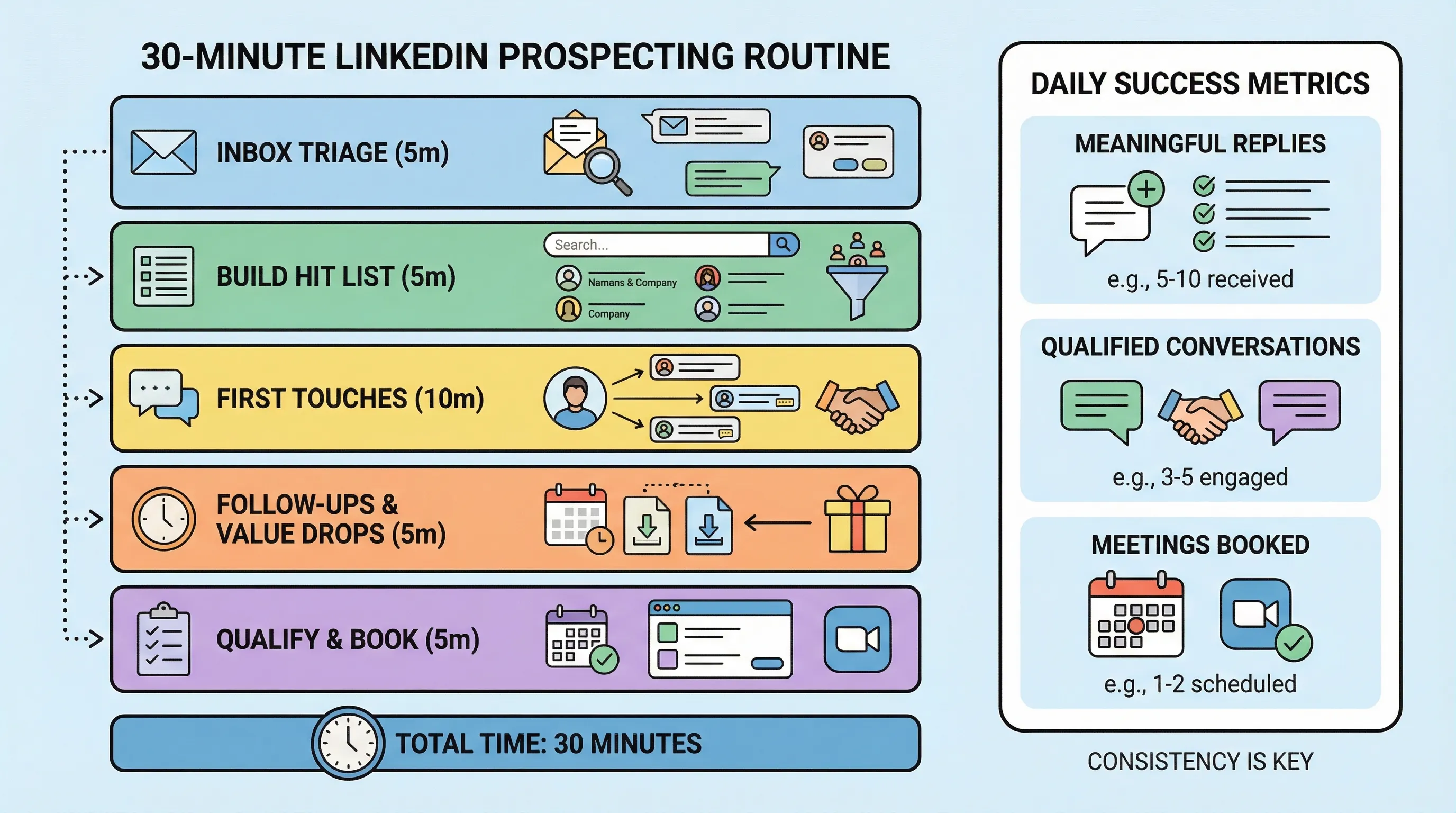
The 5 blocks (with exact minutes)
| Block | Minutes | What you do | What “done” looks like |
|---|---|---|---|
| 1) Inbox triage | 6 | Categorize replies into book, qualify, nurture, disqualify | No “open loops” older than 24 to 48 hours |
| 2) Build today’s hit list | 6 | Pull 10 targets from a saved search, trigger list, or account list | 10 names with a reason each is on the list |
| 3) First touches | 8 | Send 4 to 6 connection requests or DMs | Each message has 1 relevant hook and 1 low-friction question |
| 4) Follow-ups and value drops | 7 | Move existing threads forward without pushing | 6 to 10 threads advanced or closed |
| 5) Qualification and booking | 3 | Ask 1 proof-based question or propose times | 1 booked meeting or 2 threads progressed to meeting-worthy |
Block 1 (6 minutes): Inbox triage that prevents thread debt
The fastest way to “fall behind” on LinkedIn is treating all replies as equal. Triage them into lanes.
Use four lanes:
- Book: they accepted a meeting ask, asked for a link, or proposed times.
- Qualify: they engaged, but you still need fit or intent evidence.
- Nurture: good fit, bad timing, or needs internal alignment.
- Disqualify: wrong persona, wrong segment, no realistic path.
If you want a stricter standard for what counts as evidence, use the “proof-based qualification” framing from Kakiyo’s guide on why a lead is not a qualified prospect.
Operator tip: reply speed matters less than reply quality, but a simple SLA keeps you from bleeding momentum. Pick one, for example “same day for any meaningful reply,” and stick to it.
Block 2 (6 minutes): Build a 10-person hit list with reasons
This block is where most “spray and pray” motions are born. Fix it by requiring a reason.
Your hit list needs exactly two fields:
- Who: name + company.
- Why now: one concrete trigger or ICP signal.
Good “why now” reasons you can find in under 30 seconds:
- Posted about a problem your product solves.
- Job change into a role that owns your problem.
- Hiring for a team that implies the initiative.
- Recent funding, expansion, or new market push.
If you use Sales Navigator, this is where saved searches and alerts pay off. If you do not, create a lightweight list from account news and LinkedIn activity.
Deep-dive reference: Kakiyo’s Sales Navigator prospecting how-to lays out the list-building mechanics.
Block 3 (8 minutes): First touches that earn permission
Your goal is not to pitch. Your goal is to earn a reply that gives you permission to continue.
A first-touch message should be:
- Short: 1 to 3 lines.
- Specific: tied to the “why now.”
- Low friction: a question they can answer in 5 seconds.
Example pattern (connection request note or first DM):
“Saw you’re hiring [role] for [team]. When teams do that, it’s usually because [problem] is getting expensive. Worth sharing what we’re seeing, or not a priority?”
If you need templates, Kakiyo already published a solid swipe file in LinkedIn outreach messages that get replies. Do not copy blindly, keep your triggers and proof honest.
Block 4 (7 minutes): Follow-ups that don’t feel like follow-ups
This is where you win the week, because most teams stop after Touch 1.
Use “value drops” instead of “checking in.” A value drop is a short line that reduces their uncertainty.
Practical value drops that work on LinkedIn:
- A one-sentence benchmark (if you can defend it).
- A quick before/after story (two lines max).
- A decision question (forces clarity without pressure).
If you want a safer cadence model with stop rules, align with Kakiyo’s guide on automated LinkedIn outreach done safely (even if you are not automating, the guardrails still apply).
Block 5 (3 minutes): Qualify and book with one proof question
Stop asking five discovery questions in chat. Pick one that produces evidence.
Two high-signal questions:
- Fit evidence: “Do you already have someone owning [job-to-be-done], or is it split across teams?”
- Intent evidence: “If this was solved, what would you expect to change in the next 90 days?”
When you get a meeting-worthy reply, do not “circle back later.” Convert immediately:
- Propose two windows, or
- Drop a scheduling link (Calendly works fine), plus one sentence on what the meeting will decide.
The hidden constraint: conversation management (why 30 minutes breaks)
The 30-minute plan only holds if your conversation load stays manageable.
Once you have multiple active threads per day, manual LinkedIn prospecting turns into inbox operations, and you start optimizing for “getting through messages” instead of qualification quality.
That’s the gap between classic LinkedIn automation and a conversation engine:
- Sequencers and LinkedIn automation tools typically automate sending and follow-ups.
- Kakiyo is built to autonomously manage the full conversation, qualify with an intelligent scoring system, and book the meeting so SDRs step in only when it is time to close.
If you want the governance side (not spamming, keeping control), Kakiyo’s playbook on deploying an AI SDR without spamming is worth reading before you scale anything.
Tools (what to use, and when)
Kakiyo
What it does: Kakiyo autonomously runs personalized LinkedIn conversations from first touch through qualification to meeting booking. It is designed to manage many simultaneous threads without turning SDRs into inbox clerks.
Standout feature: It goes beyond sending automation by handling multi-turn replies, using an intelligent scoring system to qualify, then booking meetings.
Who it’s for: SDR teams and revenue operators who want more qualified meetings from LinkedIn without adding headcount or spamming.
Pricing: Contact sales.
Pros:
- Automates the work that actually consumes SDR time, multi-turn conversation handling.
- Built for qualification and booking, not just connection requests and drip messages.
- Includes controls (override, testing, analytics) so the team stays in charge.
Cons:
- Overkill if you only send a handful of messages per week.
- Requires you to be clear on ICP and qualification rules to get the best output.
LinkedIn Sales Navigator
What it does: Sales Navigator is LinkedIn’s prospecting layer for finding and organizing leads and accounts. It helps you build repeatable lead sources via saved searches and alerts.
Standout feature: Saved searches and intent-adjacent alerts that refresh your hit list without manual hunting.
Who it’s for: Anyone running sales prospecting LinkedIn seriously, especially outbound SDRs and AEs.
Pricing: From $99.99 per month for the Core plan (public pricing, may vary).
Pros:
- The fastest path to tight targeting and list hygiene.
- Makes a daily hit list possible in minutes.
- Native to LinkedIn, so it fits the workflow.
Cons:
- It does not qualify leads or manage conversations.
- Easy to build huge lists that never turn into meetings if your messaging is weak.
Apollo
What it does: Apollo is primarily a data and outbound platform that helps you find contacts and enrich them with emails and firmographic context. Many teams use it to support LinkedIn with email and calling.
Standout feature: Large contact database paired with workflows that can operationalize list building.
Who it’s for: Teams that want LinkedIn-first prospecting but still need a reliable email and enrichment layer.
Pricing: Free plan available (paid tiers vary).
Pros:
- Useful for filling in the gaps when LinkedIn alone is not enough.
- Can speed up list building and segmenting.
- Helps coordinate multi-channel touches.
Cons:
- Data quality varies by segment, you need a validation loop.
- Does not solve multi-turn LinkedIn conversation management.
Calendly
What it does: Calendly removes scheduling friction by letting prospects pick a time instantly. It is one of the easiest ways to increase meeting conversion once you have intent.
Standout feature: Simple scheduling links and routing that reduce back-and-forth.
Who it’s for: Any rep booking meetings from LinkedIn threads.
Pricing: Free plan available (paid tiers vary).
Pros:
- Converts “sure, send times” into booked meetings faster.
- Reduces admin work and reschedules.
- Easy to standardize across a team.
Cons:
- Booking links can feel abrupt if you have not earned permission.
- Does not enforce meeting quality, you still need qualification rules.
HubSpot Sales Hub
What it does: HubSpot helps you keep prospecting auditable, with CRM records, tasks, and basic reporting. It is a practical default if you do not have a dedicated RevOps stack yet.
Standout feature: Lightweight CRM plus workflows that keep handoffs clean.
Who it’s for: Small teams that need pipeline hygiene and consistent follow-through.
Pricing: Free tools available (paid tiers vary).
Pros:
- Prevents lost context when LinkedIn threads turn into pipeline.
- Gives managers visibility without micromanaging activity.
- Easy to deploy compared to heavier CRM setups.
Cons:
- CRM discipline is still required, tools do not create discipline.
- Not built for LinkedIn-native conversation execution.
Which tool should you choose?
- If you want autonomous AI conversation management and LinkedIn lead qualification, use Kakiyo.
- If you want the fastest way to build daily target lists, use LinkedIn Sales Navigator.
- If you want contact enrichment and a parallel email layer, use Apollo.
- If you want higher booking conversion with less back-and-forth, use Calendly.
- If you want clean tracking and pipeline hygiene with minimal overhead, use HubSpot Sales Hub.
Quick metrics to track (so the plan improves week over week)
Do not track vanity activity. Track micro-conversions that prove the system is working.
A simple weekly snapshot:
- New conversations started: meaningful replies, not emojis.
- Qualified conversations: threads with explicit fit and intent evidence.
- Meetings booked: scheduled next step.
- Meetings held (optional): important if you see no-show problems.
If you want a full operator scorecard, see Kakiyo’s breakdown of SDR KPIs that actually predict pipeline.
Sources and credibility notes (for operators)
- LinkedIn reports it has over 1 billion members (see LinkedIn Pressroom).
- LinkedIn states 80% of B2B social leads come from LinkedIn (see LinkedIn Marketing Solutions).
Those stats do not guarantee you meetings. They justify investing in a daily system that creates qualified conversations.
FAQ
Sales prospecting LinkedIn: what should I do every day?
Run a tight routine: inbox triage, build a 10-person hit list, send a few first touches, advance follow-ups with value drops, then qualify and book. If you cannot do it daily, reduce scope until you can.
Does LinkedIn outreach automation still work?
It works when it improves relevance, speed, and consistency without breaking trust or platform rules. It fails when teams automate sending and measure success by volume instead of qualified conversations and meetings.
What are the best automated LinkedIn outreach tools?
If you only need sending and follow-ups, classic automation tools can help, but they stop where the real work starts. If you need autonomous multi-turn conversation management, lead qualification, and meeting booking, Kakiyo is purpose-built for that layer.
What is AI LinkedIn prospecting?
AI LinkedIn prospecting uses AI to personalize messages, manage replies, and help qualify prospects based on evidence in the thread. The safe version is governed, with clear ICP, stop rules, and human override, so you scale quality, not spam.
What is LinkedIn lead qualification software?
LinkedIn lead qualification software captures fit and intent signals inside LinkedIn conversations, scores them consistently, and routes the right next step (book, nurture, or disqualify). Kakiyo is designed specifically for this, using conversation automation plus an intelligent scoring system.
Request a Kakiyo demo to see autonomous LinkedIn conversations that qualify and book meetings.