
 Ilan Asseo
Salesforce Sales Development Representative: Playbook
Playbook for Salesforce sales development representatives covering funnel design, data model, qualification fields, dashboards, and handoff rules.

Most SDR teams do not have an activity problem. They have a systems problem: great conversations happen in LinkedIn (and other channels), but the CRM does not capture the right evidence, stages, and next actions. The result is predictable: inflated “touches,” messy lead records, inconsistent qualification, and meetings that AEs do not want.
This playbook shows how to run the Salesforce sales development representative motion like an operating system: define outcomes, instrument the funnel, standardize qualification, and build dashboards that make coaching obvious.
Industry evidence: Salesforce Research reports that sales reps spend only 28% of their week actually selling, with the rest consumed by deal management, data entry, and other non-selling work.
Source: Salesforce State of Sales
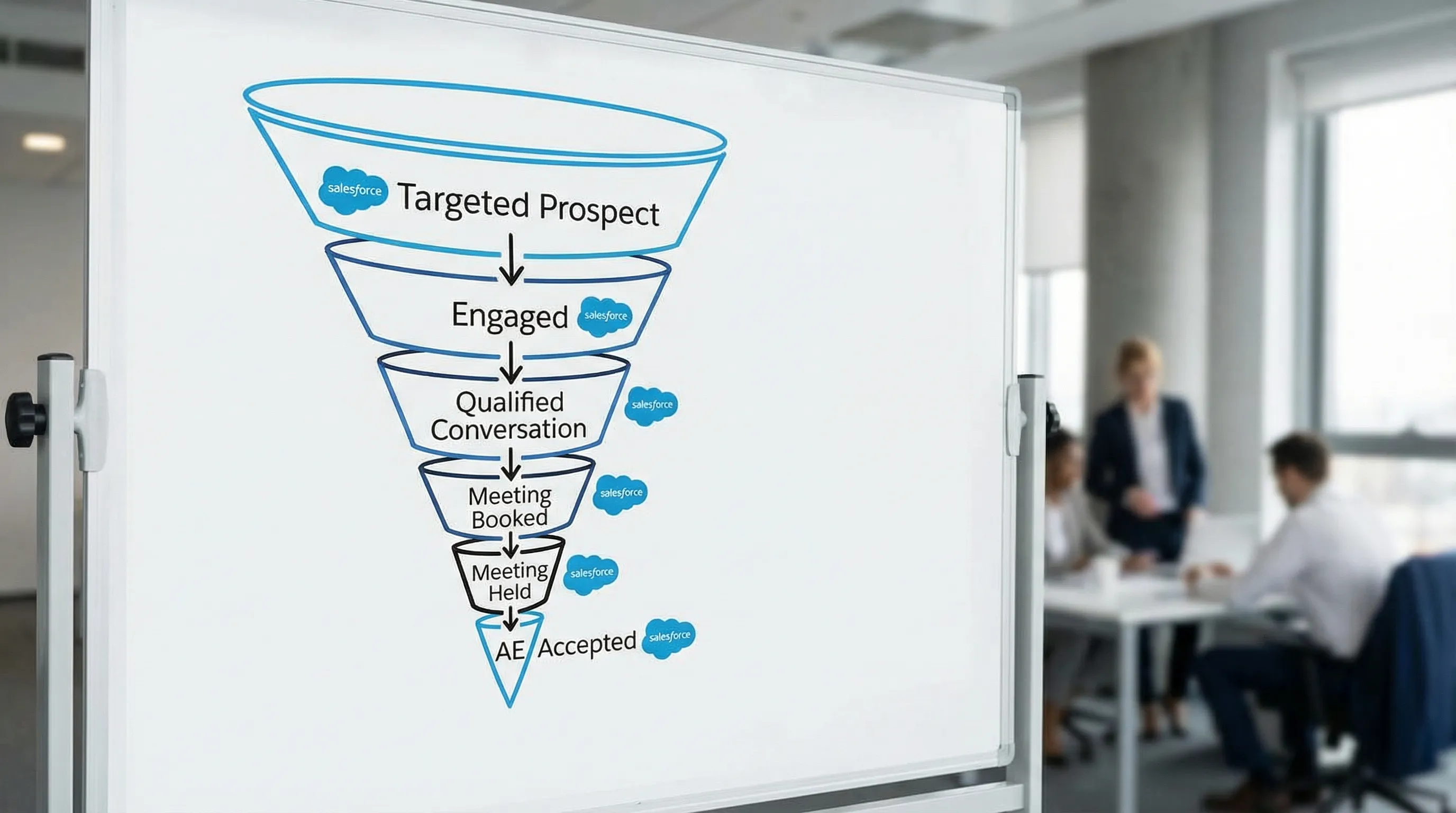
1) Start with a Salesforce-native SDR funnel (not “tasks completed”)
Before you touch fields or automation, lock a simple funnel that matches how SDR work actually converts:
- Targeted prospects
- Engaged (accepted, replied, or meaningfully interacted)
- Qualified conversation (fit + intent + proof captured)
- Meeting booked
- Meeting held
- Accepted by AE (or sourced pipeline)
Why this matters in Salesforce: you want every stage change to be reportable, time-stamped, and tied to a clear owner.
2) Choose the right Salesforce objects for outbound SDR work
Salesforce can support multiple SDR models, but most teams get into trouble when they mix “people records,” “account records,” and “engagement records” without clear rules.
A practical default is:
- Leads for net-new people you are prospecting (not yet converted)
- Accounts + Contacts once you have confirmed the company and person are real and worth tracking long-term
- Activities (Tasks/Events) as the system of record for touches and meeting outcomes
- Campaign Members to track inclusion in a specific outbound initiative (especially if Marketing and Sales share reporting)
If you are unsure which object to use, Salesforce’s standard documentation on Leads and conversion rules is the best starting point.
Recommended “minimum viable” SDR data model
| Salesforce item | What it represents | SDR use | What to keep consistent |
|---|---|---|---|
| Lead | A prospect person not yet converted | Prospecting, early qualification | Lead Status, Lead Source, persona/role, country/region |
| Account | The company | Account-based targeting and routing | ICP segment, territory/region, account owner rules |
| Contact | A person at an Account | Multi-threading buying groups | Role/persona, seniority, function |
| Task | A completed or scheduled touch | Activity reporting | Task Type, outcome, date |
| Event | A meeting | Meeting booked/held reporting | Meeting outcome, meeting type |
| Campaign + Campaign Member | “This person was in this play” | Play-level measurement | Campaign naming, member status |
3) Standardize statuses so qualification is auditable
Your SDR playbook lives or dies on whether stages mean the same thing to every rep, manager, and downstream AE.
A Salesforce-friendly set of SDR stages
You can implement this with standard Lead Status values, a custom “Conversation Stage” field, or both. The key is that each stage has:
- A crisp definition
- Exit criteria
- Required fields
| Stage | Definition | Exit criteria (what must be true) | Required fields |
|---|---|---|---|
| Targeted | In ICP and approved for outreach | First outbound touch sent | Persona, ICP segment, source/play |
| Engaged | Prospect interacted meaningfully | Prospect asks a question, confirms relevance, or replies | Last engagement date, engagement summary |
| Qualified conversation | Fit + intent + proof captured | SDR can justify next step (meeting or nurture) | Fit notes, intent notes, proof/evidence |
| Meeting booked | Time on calendar | Event created, invite accepted (if you track it) | Meeting type, stakeholders |
| Meeting held | Meeting actually happened | Meeting held outcome logged | Held outcome, AE feedback |
| Disqualified | Not a fit or no longer relevant | Clear disqual reason captured | Disqual reason, notes |
Tip: keep disqualification reasons short and reportable (dropdown), not free-text only. Free-text is great for nuance, but dropdowns power coaching.
4) Build a “qualification evidence packet” inside Salesforce
If you want AEs to trust SDR-sourced meetings, you need evidence that survives handoffs.
A simple way to do this is to enforce three evidence elements in Salesforce:
- Fit: are they the right kind of company/person?
- Intent: are they trying to solve something now?
- Proof: what did they say or do that demonstrates fit/intent?
Example field set for evidence-based qualification
This is intentionally lightweight. You can implement with custom fields on Lead/Contact, or with a structured note template.
| Evidence element | Field (example) | Type | Example values |
|---|---|---|---|
| Fit | ICP Segment | Picklist | Mid-market SaaS, Enterprise IT, Agencies |
| Fit | Persona | Picklist | VP Sales, RevOps, SDR Manager |
| Intent | Primary pain | Picklist or text | “Low reply rates,” “Slow speed-to-lead,” “Low meeting quality” |
| Intent | Urgency/timing | Picklist | This month, this quarter, unknown |
| Proof | Proof snippet | Long text | “We are hiring 5 SDRs and need more meetings in Q2” |
| Proof | Source channel | Picklist | LinkedIn, email, event, referral |
| Next step | Recommended action | Picklist | Book meeting, nurture, disqualify |
If your team already uses a framework (BANT, MEDDICC, etc.), you can translate it into this evidence packet, but keep the SDR version short. For LinkedIn-first qualification, a conversational approach tends to work best (see Kakiyo’s guide on BANT for LinkedIn qualification).
5) Run the SDR day from Salesforce views (not from your inbox)
A Salesforce SDR motion works when reps can answer, in under 60 seconds:
- Who needs a touch today?
- Which conversations are active?
- What is my fastest path to a qualified conversation?
- Which meetings need confirmation or cleanup?
The 5 core Salesforce list views to create
Keep it simple and role-based (SDR, SDR manager).
- New targets (uncontacted): ICP-approved leads with no outbound touch yet
- Active conversations: engaged prospects with last activity within X days
- Needs follow-up today: next task due today (or overdue)
- Qualified, not booked: qualified conversation stage, no meeting scheduled
- Booked, not held: meeting booked but not yet held, plus no-show risk flags
To make these views work, you need consistent activity logging. If you are using Salesforce’s sales engagement products, align your process with Salesforce’s guidance on Sales Engagement and keep your definitions stable.
6) Meeting booking and handoff: make it impossible to “throw meetings over the wall”
AEs do not reject meetings because they hate SDRs. They reject meetings because the CRM record does not explain why the meeting exists.
Minimum handoff requirements (Salesforce checklist)
Before converting a record to “Meeting booked” or handing off to an AE, require:
- Confirmed persona and role
- One sentence on pain/problem
- One proof snippet (what they said or did)
- Meeting goal (what the prospect expects to cover)
- Who will attend (if known)
You can enforce this with validation rules, a required “Handoff Notes” field, or a simple “AE Acceptance” stage that cannot be hit without the fields.
If you want a broader KPI framework for this, Kakiyo’s post on SDR KPIs that matter pairs well with the operational setup above.
7) Dashboards that actually improve SDR performance
Most SDR dashboards over-weight volume (calls, emails, touches) and under-weight outcomes (qualified conversations, held meetings, AE acceptance).
A practical SDR dashboard pack in Salesforce
| Dashboard widget | What it tells you | Why it matters |
|---|---|---|
| Targeted to engaged conversion | Are messages earning interaction? | Diagnoses ICP/messaging mismatch early |
| Positive reply rate (or engaged rate) by segment | Which segments are working? | Prevents “average” results hiding winners |
| Qualified conversation rate | Are replies turning into real pipeline potential? | Measures qualification quality |
| Meeting booked rate vs meeting held rate | Are you booking meetings that happen? | Reduces calendar waste |
| AE acceptance rate | Are meetings worth taking? | Forces quality alignment |
| Speed to first meaningful touch | How fast you respond to signals | Speed often wins on conversational channels |
If you are using Salesforce scoring, align it with routing and SLAs rather than treating it as a vanity metric. Kakiyo’s guide to Salesforce Einstein Lead Scoring is a strong reference for setup and adoption pitfalls.
8) Automation in Salesforce: automate routing and hygiene, not trust
Salesforce automation is extremely powerful, but the goal is to reduce delays and inconsistency, not to remove human judgment from high-stakes decisions.
Good SDR automation candidates in Salesforce (often via Flow, assignment rules, and validation rules):
- Lead assignment based on territory, segment, or account ownership
- SLA timers (for example, “respond within 2 hours”)
- Auto-creation of follow-up tasks when a lead becomes Engaged
- Required disqualification reasons when a lead is closed out
- Alerts to managers when high-intent prospects stall
If you build flows, Salesforce’s Flow documentation is the authoritative reference, and it is worth involving RevOps early to avoid unmaintainable automation.
9) LinkedIn-first SDRing: capture conversation signals without breaking process
LinkedIn is increasingly where conversations start, especially for outbound. That creates a Salesforce problem: LinkedIn replies are high-signal, but they can be hard to translate into structured CRM evidence.
A reliable approach is:
- Treat LinkedIn as the conversation layer
- Treat Salesforce as the system of record for stages, evidence, ownership, and reporting
- Standardize how SDRs summarize LinkedIn threads into the “evidence packet” fields
If your team is scaling LinkedIn outreach, make sure you also set guardrails (pace, permission, brand tone, and oversight). Kakiyo’s guide to automated LinkedIn outreach covers the safety-first side.
10) 30-day rollout plan for a Salesforce SDR playbook
Here is a practical implementation plan you can run without a massive Salesforce re-architecture.
| Timeframe | What you implement | Output |
|---|---|---|
| Week 1 | Funnel definitions, stage criteria, disqual reasons | One-page SDR funnel spec signed off by Sales + RevOps |
| Week 2 | Fields for evidence packet, required fields per stage, core list views | SDR workspace that supports daily execution |
| Week 3 | Reports + dashboards, manager coaching rhythm, QA checklist | Team can measure conversion, not just activity |
| Week 4 | Automation light layer (routing, SLAs, follow-up tasks), iteration on message/segment tests | Faster follow-up, fewer stalled conversations |
To keep the rollout stable, change one thing per week after launch (one field, one stage rule, one dashboard cut). This prevents “definition drift,” which is the silent killer of Salesforce SDR reporting.
Frequently Asked Questions
What does a Salesforce Sales Development Representative do? A Salesforce SDR runs prospecting and qualification while using Salesforce to track stages, evidence, activities, and handoffs so meetings and pipeline are measurable and repeatable.
Should SDRs work Leads or Contacts in Salesforce? Many teams prospect on Leads first, then convert to Contacts when the person and account are validated and worth tracking long-term. The best choice depends on routing, reporting, and ownership rules.
What is the most important Salesforce metric for SDR teams? If you can only pick one, prioritize qualified conversation rate or AE acceptance rate. They correlate more closely with pipeline quality than raw activity.
How do you define “qualified” in Salesforce for SDRs? Define it as evidence captured (fit + intent + proof) plus a clear next step. Then enforce it with required fields and a stage exit checklist.
How should SDRs log LinkedIn conversations in Salesforce? Keep it consistent: summarize the thread into a proof snippet, record the primary pain and timing, and move the record to the appropriate stage. The goal is auditable evidence, not a full transcript.
Can AI help SDRs without ruining CRM data quality? Yes, if AI is used to draft, summarize, and score with human oversight, and if your Salesforce fields and definitions are stable. Automate hygiene and routing, keep judgment and escalation human-led.
Scale LinkedIn conversations without losing Salesforce discipline
If your team is LinkedIn-first, the bottleneck is rarely “sending more messages.” It is managing replies, qualifying consistently, and booking meetings while keeping Salesforce clean.
Kakiyo helps by autonomously managing personalized LinkedIn conversations at scale, qualifying prospects and booking meetings, so SDRs can focus on high-value opportunities. If you want to keep Salesforce as your source of truth while increasing qualified conversations, explore Kakiyo and see how an AI-managed conversation layer can support your SDR playbook.