
 Ilan Asseo
Account Development Rep Salesforce: Workflow Guide
Practical ADR workflow, minimal Salesforce data model, and report templates to convert prioritized accounts into AE-accepted meetings and pipeline.

Most teams do not struggle with “not enough activity.” They struggle with unclear account-based workflow, missing qualification evidence, and Salesforce reports that measure volume instead of outcomes.
If you are an Account Development Representative (ADR) working in Salesforce, your goal is simple: consistently turn a prioritized account list into AE-accepted meetings and pipeline. This guide gives you a practical ADR workflow you can run daily, plus the Salesforce reports and dashboards that keep it honest.
Industry evidence: Salesforce Research reports that sales reps spend only 28% of their week actually selling, with the rest consumed by deal management, data entry, and other non-selling work.
Source: Salesforce State of Sales
What an Account Development Representative (ADR) does (and how Salesforce should support it)
An ADR is an outbound, account-based role. Compared to a classic lead-centric SDR motion, ADR work is centered on:
- Building and maintaining named account coverage
- Mapping the buying group (multiple contacts per account)
- Running multi-touch outreach (often LinkedIn-first)
- Capturing conversation evidence (not just tasks)
- Driving a clean handoff to AEs with context that prevents “why are we meeting?”
Salesforce should do two things for an ADR:
- Tell you what to do next (prioritized work queues).
- Prove what is working (reports tied to meetings held, AE acceptance, and pipeline).
If you want a broader Salesforce-native SDR operating model, see Kakiyo’s related playbook: Salesforce Sales Development Representative: Playbook.
The minimal Salesforce data model for ADR teams
You can build a strong ADR motion with mostly standard Salesforce objects. The key is to standardize a few fields so reporting is possible.
Core objects (standard)
- Accounts: your unit of targeting and prioritization.
- Contacts: your unit of outreach and qualification.
- Opportunities: owned by AEs in most orgs, but ADRs influence creation.
- Tasks/Events (Activities): your audit trail.
- Campaigns (optional but powerful): use for outbound waves, segments, and experiments.
The few fields that make ADR reporting work
You do not need 40 fields. You need consistent, auditable evidence.
Common, high-leverage fields (often added as custom fields on Contact, Lead, or Campaign Member depending on your architecture):
- ICP Fit (picklist or numeric tier): e.g., High, Medium, Low
- Intent level (picklist): e.g., None, Mild, Strong
- Qualification status (picklist): e.g., Unreached, In conversation, Qualified, Disqualified
- Last meaningful touch date (date): separate from “last activity,” which can be noise
- Next step type (picklist): e.g., Ask a question, Send proof, Propose time, Nurture
- Next step date (date): keeps work queues real
- Primary channel (picklist): e.g., LinkedIn, Email, Phone, Event
If your team is standardizing qualification across the funnel, align this with an evidence-based definition (fit, intent, proof, next step, recency). Kakiyo has several practical references, including Sales SQL: Definition, Criteria, and Examples and Lead Qualification Process: Steps, Scoring, and Automation.
Account Development Representative Salesforce workflow (day-to-day)
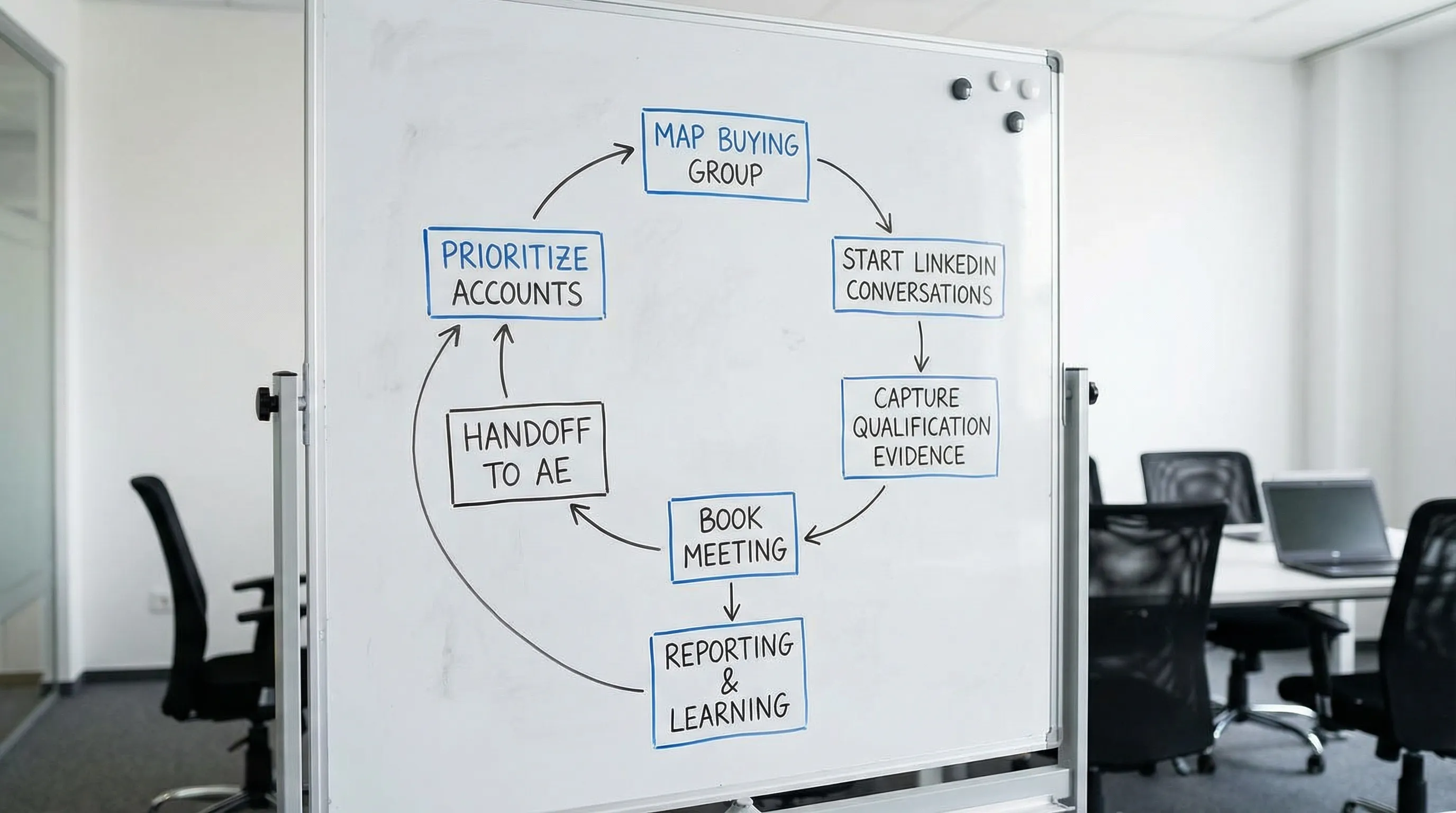
A strong ADR workflow is a loop: prioritize accounts → create conversations → capture evidence → book meetings → package handoffs → learn from reports.
Step 1: Start with an account “hit list” (not an endless queue)
In Salesforce, your morning should begin from an account list view that answers: “What is most likely to convert this week?”
Practical prioritization signals you can operationalize:
- Accounts with recent engagement (replies, meeting requests, inbound site visits if available, event attendance)
- Accounts with open multi-thread paths (1 contact engaged, 2 more roles not reached)
- Accounts with stalled conversations (no meaningful reply in X days)
- Accounts with ICP fit already validated
If you run a LinkedIn-first motion, you can treat LinkedIn conversations as first-class signals, but the key is to write the evidence back into Salesforce (manually, via your process, or via your integration/middleware choices) so it becomes reportable.
Step 2: Map the buying group per account
ADR output is not “contacts messaged.” It is coverage of the buying group.
For each target account, aim to identify a small set of roles (example):
- Economic buyer (budget owner)
- Day-to-day owner (operator)
- Technical evaluator (if relevant)
- Risk/compliance stakeholder (if relevant)
In Salesforce terms, this means:
- Contacts are attached to the correct Account
- Titles/roles are clean enough to segment
- You can track “who is engaged” vs “who is untouched”
Step 3: Run conversations that create qualification evidence
ADR outreach is not just a first touch. It is multi-turn conversation that should reliably gather:
- Fit confirmation (are they the right type of org, team, use case?)
- Intent cues (is a project active, is timing real?)
- Proof relevance (does your evidence map to their situation?)
- Next step commitment (a meeting, or a defined follow-up action)
If you want LinkedIn-specific patterns that earn replies, use: LinkedIn Outreach Messages That Get Replies.
Step 4: Log activities in a way that can be reported (without turning Salesforce into a diary)
Many Salesforce instances fail ADR reporting because activities are inconsistent. The fix is a simple rule:
- Log only meaningful touches and categorize them consistently.
In practice, that means standardizing the “Type” (or equivalent) on Tasks/Events and keeping notes structured:
- Touch type: Connection request, DM reply, Qualification question, Objection, Meeting proposal
- Outcome: No response, Positive reply, Referred, Disqualified, Meeting booked
- Evidence snippet: 1 to 2 lines on what you learned
That evidence snippet is what makes your handoff credible and your reporting explainable.
Step 5: Book meetings with quality gates
A meeting that is not accepted by the AE, or not held, is not a win. In Salesforce, the workflow should explicitly track these states.
Recommended stages for ADR-owned meeting outcomes:
- Meeting booked (calendar scheduled)
- Meeting held (occurred)
- AE accepted (AE confirms it is legitimate)
Whether you represent these as fields, campaign statuses, or a lightweight custom process depends on your org, but the key is that your reporting can separate:
- Meetings booked vs held
- Held vs AE-accepted
This prevents gaming and helps coaching.
Step 6: Package the handoff so the AE can create pipeline
AEs do not want a transcript. They want the minimum evidence needed to run a great first call.
A practical handoff packet should include:
- Why this person, why now (trigger or context)
- Confirmed problem statement (in the prospect’s words)
- Impact (what it costs them)
- Stakeholders mapped (who else matters)
- Next step and meeting goal
This aligns with Kakiyo’s conversation-led approach to qualification and evidence capture. For a full end-to-end SDR motion, see SDR Sales Process: From First Touch to Qualified Meeting.
Workflow-to-Salesforce mapping (a practical table)
Use this table as a checklist for what must be true in Salesforce for an ADR motion to run cleanly.
| ADR workflow step | What it means operationally | Where to reflect it in Salesforce (typical) | What you should be able to report |
|---|---|---|---|
| Prioritize accounts | You have a small set of accounts to work this week | Account fields, Account list views | Accounts in tier 1, accounts touched this week |
| Map buying group | Multiple roles identified, not a single contact | Contacts under Account, contact role tags/fields | Contacts per account, coverage by role |
| Start conversation | First meaningful message sent | Task/Activity, Campaign Member status (optional) | First touch volume by segment |
| Qualify in-thread | Fit and intent signals captured | Contact/Lead fields for fit/intent, Activity notes | Qualified conversation rate |
| Book meeting | Calendar scheduled | Event + meeting status fields, Campaign Member status | Meetings booked, by segment/channel |
| Validate quality | Meeting held and AE accepts | Fields or statuses (process dependent) | Held rate, AE acceptance rate |
| Create pipeline | Opportunity created or influenced | Opportunity + attribution fields | Opps created, pipeline sourced/influenced |
The ADR Salesforce reports that matter (and how to structure them)
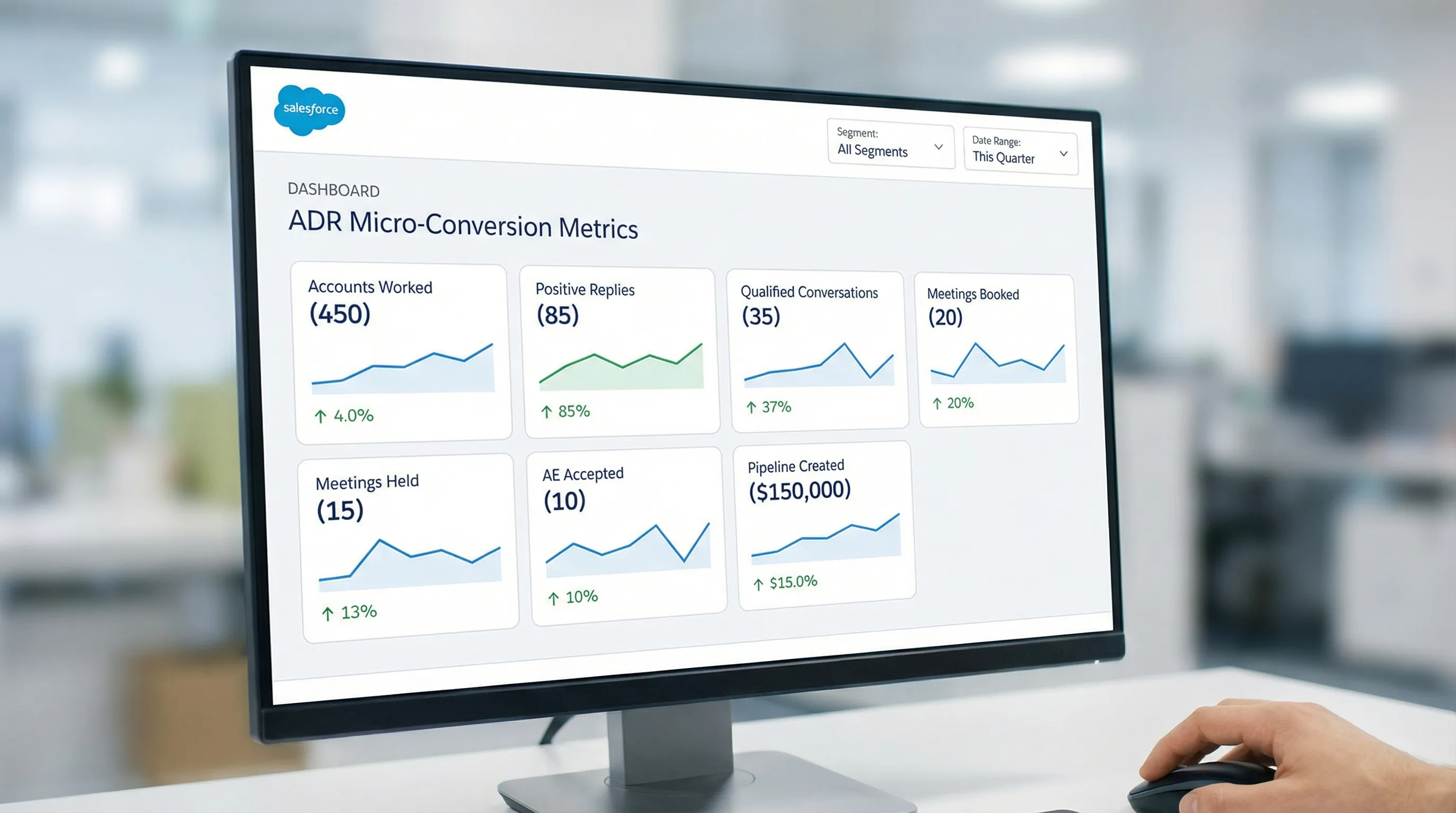
Most ADR dashboards over-index on activity (tasks, dials, messages). In 2026, the winning reporting stack focuses on micro-conversions that predict pipeline.
Below is a practical report suite you can implement as a manager or RevOps partner.
1) ADR funnel report (micro-conversions)
Purpose: See where conversion is breaking, not just how busy the team is.
Include these stages:
- Accounts worked (this week)
- New conversations started
- Positive replies
- Qualified conversations
- Meetings booked
- Meetings held
- AE accepted
- Opportunities created (or pipeline influenced)
Implementation notes:
- Use consistent definitions for “positive reply” and “qualified conversation.”
- If you run LinkedIn-first, treat “reply” as a meaningful inbound message, not a view or a like.
For KPI definitions and measurement discipline, this pairs well with: Sales Development Representative: KPIs That Matter.
2) Account coverage report (ABM reality check)
Purpose: Ensure you are not “single-threaded.”
What to measure by account tier:
- Number of contacts added in buying roles
- Number of contacts touched in last 14 days
- Number of engaged contacts (replied)
This is often the fastest way to diagnose why meetings are not converting into pipeline. If only one person is engaged, AEs often hit a wall after the first call.
3) Aging and SLA report (speed and staleness)
Purpose: Prevent high-intent threads from dying in the inbox.
Track:
- Time to first meaningful touch (from assignment to first real message)
- Days since last meaningful touch
- Conversations with a next step date in the past (overdue)
Aging reports are also a governance tool for AI-assisted motions. If the system is scaling conversations, you want clarity on what is being neglected.
4) Meeting quality dashboard (booked vs held vs accepted)
Purpose: Protect AE calendars and keep ADR coaching objective.
Core metrics:
- Meeting hold rate = meetings held / meetings booked
- AE acceptance rate = AE accepted / meetings held
- Meeting-to-opportunity conversion
If your acceptance rate is low, the fix is rarely “more activity.” It is usually:
- ICP drift
- Weak qualification questions
- Wrong persona
- Too aggressive CTA
5) Segment and experiment report (what messaging and ICP slices win)
Purpose: Make improvements without guessing.
If you use Campaigns to represent outbound segments (recommended), you can compare:
- Segment A vs Segment B conversion
- Prompt or messaging Variant A vs Variant B
- Channel mix (LinkedIn-first vs email-first)
Kakiyo supports A/B prompt testing and templates for LinkedIn conversation work. Even if your execution tooling is outside Salesforce, Salesforce should remain the system of record for outcomes and learning.
A weekly operating rhythm for ADR teams (built on reports)
Reports only matter if they drive decisions. A lightweight weekly cadence:
Monday: pipeline and coverage planning
Review:
- Tier 1 accounts with no touches in 14 days
- Accounts with 1 engaged contact but no second thread started
- Stalled qualified conversations
Output: each ADR commits to a small list of account goals (coverage and next steps), not a raw activity number.
Midweek: conversion coaching
Review:
- Positive reply rate and qualified conversation rate by ADR
- Common objection themes
- Where conversations are getting stuck (no next step, no proof, no timing)
Output: one targeted change per rep (a new qualification question, proof snippet, or CTA).
Friday: quality and learning
Review:
- Meetings held and AE acceptance
- Top 5 wins (why they worked)
- Top 5 losses (why they failed)
Output: update templates, prompts, and segment strategy.
If you want a structured weekly scorecard approach for AI-assisted outbound, see: AI Sales Metrics: What to Track Weekly.
Common Salesforce pitfalls for ADR teams (and quick fixes)
Pitfall 1: Reporting on tasks instead of outcomes
If your dashboard starts with “tasks completed,” you will optimize for logging, not learning.
Fix: Make meetings held, AE acceptance, and qualified conversations your headline metrics. Activity becomes a diagnostic slice, not the KPI.
Pitfall 2: Account-based motion tracked on Lead object only
Lead-first can work, but ADR teams often need durable account context and multi-threading.
Fix: Use Contacts and Accounts for ABM coverage. If Leads are required by your funnel, ensure there is a clean conversion path and that reporting does not break at conversion.
Pitfall 3: No consistent definition of “qualified”
When qualification is subjective, the best reps look average and the loudest reps look best.
Fix: Standardize evidence-based qualification and enforce it in fields and handoff checklists. A practical reference is: Qualified Leads: Scoring That Sales Trusts.
Pitfall 4: LinkedIn conversations live outside the system of record
If LinkedIn threads are not translated into Salesforce evidence, your reports understate what works and you cannot scale responsibly.
Fix: Capture conversation outcomes and key evidence back into Salesforce (manually, through your process, or via integration choices). Keep it lightweight and consistent.
Frequently Asked Questions
What is the difference between an ADR and an SDR in Salesforce? An ADR is typically account-based (named accounts, buying group coverage, multi-threading), while an SDR role is often lead-based or territory-based. In Salesforce, ADR workflows rely more on Accounts and Contacts, plus account coverage and meeting quality reporting.
What should an Account Development Representative track in Salesforce daily? Daily, an ADR should track: prioritized accounts worked, meaningful touches sent, replies and conversation state, next step dates, and meetings booked. The goal is keeping an accurate work queue and clean evidence for qualification and handoffs.
What are the most important reports for ADR managers in Salesforce? The most important reports are: an ADR funnel (micro-conversions), account coverage by tier, aging/SLA for speed and staleness, meeting quality (booked vs held vs AE accepted), and segment/experiment comparisons.
How do you report on LinkedIn outreach in Salesforce? You report on LinkedIn outreach by standardizing activity types and outcomes (touch type, reply outcome, qualification status) and consistently writing key conversation evidence back into Salesforce fields or activity notes. The key is reportable outcomes, not storing full transcripts.
How can AI help ADR teams without ruining reporting discipline? AI can help by managing repetitive conversation work, summarizing threads, and prompting consistent qualification, but Salesforce still needs standardized definitions and fields so outcomes are measurable. Human oversight remains essential for governance and high-stakes decisions.
Scale LinkedIn-first ADR conversations without losing Salesforce clarity
If your ADR team is running LinkedIn outreach at volume, the hardest part is not sending messages, it is managing multi-turn conversations, qualifying consistently, and turning that into booked meetings you can measure in Salesforce.
Kakiyo helps by autonomously managing personalized LinkedIn conversations from first touch through qualification to meeting booking, with controls like prompt customization, A/B prompt testing, scoring, analytics, and human override.
Explore Kakiyo here: https://www.kakiyo.com