
 Ilan Asseo
LinkedIn Prospecting: A Modern Cadence Guide
Build a modern LinkedIn prospecting cadence with behavior-based branching, conversation-led timing, and clearer micro-conversion tracking.

Most LinkedIn prospecting “cadences” were borrowed from email sequencers: fixed steps, fixed timing, and a lot of counting touches.
In 2026, that approach underperforms on a conversational channel.
A modern LinkedIn cadence is not a script, it’s a decision system: a repeatable set of prompts, timing rules, and branching logic that adapts to what the buyer actually does (accepts, ignores, asks a question, shows intent, goes cold). This guide shows how to build that system so your team generates more qualified conversations and more meetings, without spamming.
Industry evidence: “As customers increasingly learn and buy digitally, sales reps become just one of many possible sales channels.” — Cristina Gomez, Managing Vice President, Gartner.
Source: Gartner
What a modern LinkedIn prospecting cadence actually is
A LinkedIn cadence is the planned sequence of actions you take to turn a cold or warm target into a booked meeting, using LinkedIn-native signals.
The “modern” version has three characteristics:
- Conversation-led: you optimize for replies and qualification evidence, not for number of steps.
- Behavior-based: timing and next actions depend on what happened in-thread.
- Measured by micro-conversions: each step has a clear job (accept, reply, qualify, book).
If you want a deeper end-to-end playbook (from first touch to demo), Kakiyo’s longer resource is here: LinkedIn Prospecting Playbook: From First Touch to Demo.
The core mistake: treating LinkedIn like an outbound sequence tool
LinkedIn is a network with memory. Buyers see your face, your title, your mutual connections, and your recent posts, before they decide whether you’re worth responding to.
So when teams run rigid “touch 1, touch 2, touch 3” cadences, three things break:
- Relevance decays fast: the same generic follow-up line works for fewer and fewer people.
- The channel punishes spam: low-quality outreach can damage acceptance and response rates over time.
- Qualification gets postponed: teams push for a meeting too early, then wonder why show rates and AE acceptance are low.
A modern cadence fixes this by designing each step around one micro-commitment and one measurable outcome.
Before you design timing, lock the inputs (or your cadence will look “random”)
Cadence performance is mostly an input problem. Two teams can run the same timing and get wildly different results because their targeting, positioning, and proof are different.
Input 1: a tight ICP slice (not a broad persona)
Pick a slice you can describe in one line, including a pain you can credibly reference.
Example: “Series B cybersecurity teams hiring 3+ SOC analysts this quarter” is a slice.
“IT leaders” is not.
If you need a practical workflow for building lists, filters, and saved searches, this guide is the most relevant companion: Using LinkedIn Sales Navigator for Prospecting: A How-To.
Input 2: one clear value hypothesis
Your first 2 messages should be able to answer: “Why you, why now?” in plain language.
Not a feature dump, not a pitch deck summary.
Input 3: proof that fits the buyer’s risk level
On LinkedIn, proof does not have to be a case study PDF. It can be:
- A specific outcome (reduced time-to-first-response, higher qualified conversation rate)
- A credible pattern (“seeing this a lot with X type of teams”)
- A short artifact (1-minute teardown, checklist, or benchmark)
Input 4: a definition of “qualified” that your team can audit
If your cadence is optimized for “booked meetings” without a qualification standard, your calendar fills and your pipeline suffers.
At minimum, define what evidence you want to capture in-thread before booking. If you want a simple system for this, start here: Lead Qualification: A Simple, Repeatable System.
The cadence framework: 3 phases, 1 goal per phase
Instead of thinking in “touches,” design your cadence in phases.
Phase 1 (Days 0 to 2): Earn the right to talk
Your goal here is not the meeting. It’s the first micro-yes.
On LinkedIn, the cleanest micro-yes is a connection acceptance, but a comment reply or DM response also counts.
Practical guidance:
- Keep the first message short, specific, and low-pressure.
- Avoid asking multiple questions.
- Avoid attaching links in the very first interaction unless you have a strong trigger.
Phase 2 (Days 2 to 10): Convert acceptance into a real conversation
Most teams fail here. They get accepts, then send a pitch.
Instead, your job is to create a useful exchange: one insight, one question, one next step.
This is where your cadence should branch based on behavior:
- Accepted but no reply
- Reply with curiosity
- Reply with objection
- Reply with “not me” or “not now”
Phase 3 (Days 7 to 14): Qualify and book (or gracefully exit)
If you’ve earned attention, you can now move toward a calendar outcome.
A modern CTA is:
- Specific (what the meeting is for)
- Small (timeboxed)
- Conditional (only if relevant)
If there is no signal after multiple high-quality attempts, exit cleanly. Protect your brand and your deliverability on the channel.
A modern 10 to 14-day LinkedIn cadence (with micro-conversions)
Use this as a baseline. Do not treat it as a script. The best teams keep the structure but continuously test the words and proof.
| Day | Action (LinkedIn-first) | Goal | What you measure |
|---|---|---|---|
| 0 | View profile (optional), send connection request with a simple reason | Acceptance | Connection acceptance rate |
| 1 | If accepted quickly, send a short opener that references the reason you reached out | First reply | Reply rate, positive reply rate |
| 3 | Follow-up that adds a small value drop (one line insight, quick pattern, or question) | Engage | Replies per accepted connection |
| 6 | Light qualification prompt (one question that reveals fit or intent) | Evidence | Qualified conversation rate |
| 8 | Objection-friendly nudge (permission-based) | Keep thread alive | Response rate after follow-up |
| 11 | Meeting CTA (timeboxed, conditional) | Book | Meeting booked rate |
| 14 | Close-the-loop message (breakup, future permission, or referral request) | Exit or reroute | Future opt-in, referral rate |
If you want copy examples, use an existing Kakiyo resource instead of reinventing from scratch: LinkedIn Outreach Messages That Get Replies.
The most important upgrade: branch your cadence based on what the buyer does
A fixed cadence assumes every prospect is the same. They are not.
Here’s a simple branching model that works well on LinkedIn and stays manageable for a team.
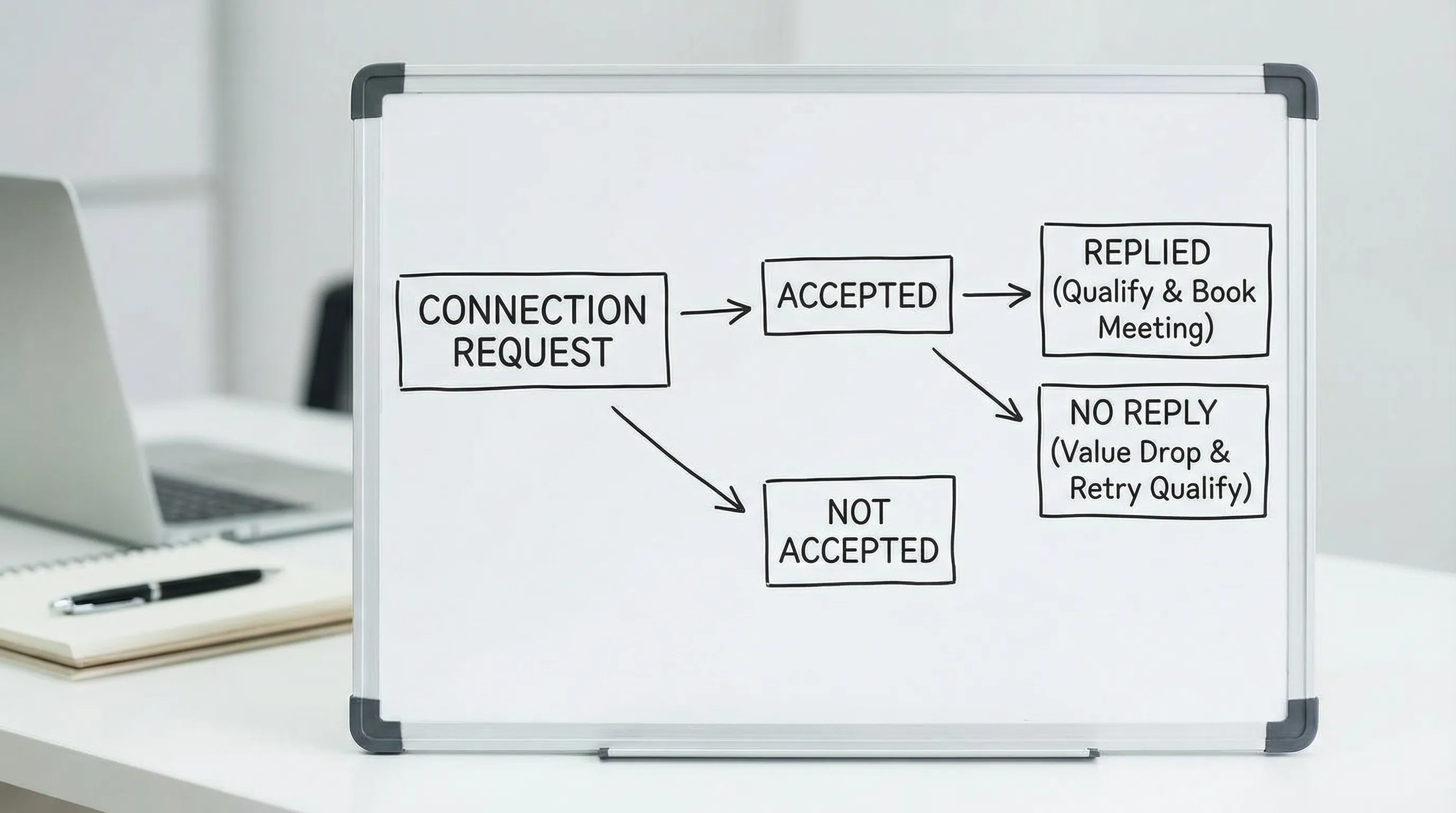
Key rules:
- Accepted + no reply does not mean “not interested.” It often means “not important enough yet.” Use value drops and one-question prompts.
- Objections are data. Treat them as an invitation to clarify, not as a rejection.
- “Not me” is a gift. Ask who owns it, or request the right title to contact.
Timing rules that usually beat “every 2 days”
You do not need a complex system, but you do need consistency.
Rule 1: Respond fast when intent shows up
When someone replies with a real question, the best follow-up is usually the same day. Speed is a competitive advantage in conversational channels.
Rule 2: Space nudges, not value
Repeated “just bumping this” messages train prospects to ignore you.
Instead, space out nudges but keep your value drops meaningful.
Rule 3: Cap your attempts per thread
A common failure mode is endless follow-ups with diminishing quality.
Decide in advance what “done” looks like. For most teams, 5 to 7 total attempts over 10 to 14 days is plenty, assuming each attempt is high-quality.
Rule 4: Use local time, but don’t over-optimize it
If your ICP is in one region, send during business hours. Beyond that, avoid superstition. Your offer clarity and relevance will dominate “perfect send time.”
What to say at each stage (without turning this into a template dump)
Instead of giving you 30 scripts, here are the jobs each message must do.
Connection request: earn permission
Your connection request should answer: “Why are you connecting?”
Strong patterns:
- Same community or context (event, role, shared topic)
- A specific trigger (hiring, fundraising, tool change)
- A relevant observation (not flattery)
First DM: create a low-friction reason to reply
Make it easy to respond with one sentence.
Good first questions are:
- “Curious if you’re seeing X this quarter, or is it more Y?”
- “Is improving A a priority right now, or is B the focus?”
Follow-up: add proof or an insight
If you follow up, you must bring something new:
- A short benchmark you observe in the market
- A quick teardown offer (“happy to share a 3-bullet audit”)
- A simple contrast (“Most teams try X, but Y tends to work better when…”)
Qualification: capture evidence, not interrogation
Keep it lightweight. One question at a time.
If you like structured qualification, you can adapt BANT into short prompts designed for DMs. Kakiyo has a full guide here: BANT Sales Framework: Qualify Leads Without Wasting Time.
Meeting ask: make the meeting about a decision
A meeting CTA works best when it is clearly tied to an outcome.
Examples of outcomes (not scripts):
- Confirming whether the problem exists
- Validating fit for a specific workflow
- Mapping the buying group and next step
Measurement: track the cadence like a funnel, not an activity report
The point of a cadence is predictable conversion, not busywork.
Use a small set of micro-conversion metrics that map to the table above.
| Funnel stage | Metric | Why it matters |
|---|---|---|
| Permission | Connection acceptance rate | Tests targeting and first-touch relevance |
| Engagement | Reply rate and positive reply rate | Tests messaging clarity and value hypothesis |
| Qualification | Qualified conversation rate | Prevents calendar spam, improves AE trust |
| Booking | Meeting booked rate and meeting held rate | Separates “booked” from real pipeline impact |
| Quality | AE acceptance rate (or SQL acceptance) | Ensures meetings are worth taking |
If you want a weekly scorecard built for AI-assisted LinkedIn outbound, use this as your operating rhythm: AI Sales Metrics: What to Track Weekly.
Where AI fits in a modern cadence (and where it should not)
The best use of AI in LinkedIn prospecting is to increase consistency and speed without sacrificing judgment.
AI tends to work well for:
- Managing many simultaneous threads without dropping follow-ups
- Personalizing openers based on profile and company context
- Asking one-question qualification prompts and summarizing evidence
- Routing and scoring conversations so humans focus on the best opportunities
Humans should stay responsible for:
- ICP strategy and segmentation choices
- Messaging positioning and proof decisions
- Edge-case responses (legal, sensitive objections, complex buying dynamics)
- Final meeting quality control and handoff
This philosophy is covered in depth here: AI and Sales: Where Humans Stay Essential.
If you plan to automate any part of your cadence, do it safely. LinkedIn policies and platform limits can change, so keep your approach conservative and governance-driven. A practical safety framework is here: Automated LinkedIn Outreach: Do It Safely and Effectively.
Common cadence mistakes (and quick fixes)
Most “cadence problems” are actually design problems.
- Mistake: The cadence is too meeting-forward. Fix: move the CTA later, and insert one qualification step that captures evidence.
- Mistake: Follow-ups repeat the same idea. Fix: alternate between insight, proof, and a single-question prompt.
- Mistake: You measure replies, not quality. Fix: add qualified conversation rate and AE acceptance rate.
- Mistake: You change too many things at once. Fix: run controlled tests, one variable at a time.
If you want a disciplined way to test cadences and prompts, use this sprint structure: Cold Outreach: A 7-Day Testing Plan.
Frequently Asked Questions
How many touches should a LinkedIn prospecting cadence include? Most teams do well with 5 to 7 high-quality attempts over 10 to 14 days. More touches only help if each one adds new value or new information.
Should I send a message immediately after someone accepts my connection request? Often yes, especially if the acceptance is quick. Keep it short and relevant, and ask one easy question to start a real conversation.
What is the best follow-up message if someone accepts but does not reply? A value drop plus one question usually beats a generic nudge. Share a quick pattern, benchmark, or observation, then ask a simple either-or question.
How do I know when to ask for the meeting? Ask when you have at least one clear signal of interest or fit, for example a relevant reply, a confirmed pain, or a direct question. Make the meeting about a specific outcome, not “a quick chat.”
How do I measure whether my cadence is working? Track micro-conversions: connection acceptance, reply rate, qualified conversation rate, meetings booked and held, plus AE acceptance or SQL acceptance for quality.
Run a modern cadence at scale without losing control
A modern LinkedIn prospecting cadence is hard to execute consistently because it requires fast follow-up, personalized context, and behavior-based branching across dozens of active threads.
Kakiyo helps teams run this motion by autonomously managing personalized LinkedIn conversations from first touch to qualification to meeting booking, with controls that keep humans in the loop. If you want to scale outreach while protecting quality, explore Kakiyo here: https://www.kakiyo.com.